Thank you for your interest in contributing to Supervision!
We are actively improving this library to reduce the amount of work you need to do to solve common computer vision problems.
Please read and adhere to our Code of Conduct. This document outlines the expected behavior for all participants in our project.
- Contribution Guidelines
- How to Contribute Changes
- Installation for Contributors
- Code Style and Quality
- Documentation
- Cookbooks
- Tests
- License
We welcome contributions to:
- Add a new feature to the library (guidance below).
- Improve our documentation and add examples to make it clear how to leverage the supervision library.
- Report bugs and issues in the project.
- Submit a request for a new feature.
- Improve our test coverage.
Supervision is designed to provide generic utilities to solve problems. Thus, we focus on contributions that can have an impact on a wide range of projects.
For example, counting objects that cross a line anywhere on an image is a common problem in computer vision, but counting objects that cross a line 75% of the way through is less useful.
Before you contribute a new feature, consider submitting an Issue to discuss the feature so the community can weigh in and assist.
Supervision APIs should remain generic, composable, and predictable across model families. Before adding a new integration, annotator option, or data conversion method, check the existing sv.Detections, sv.KeyPoints, and annotator patterns and follow these principles:
- Model integrations normalize raw external outputs into existing Supervision containers. Use
sv.Detectionsfor detection, segmentation, and other instance-level predictions that include boxes, masks, class ids, confidence scores, or extra per-instance fields. Usesv.KeyPointsfor standalone keypoint or pose predictions when keypoints exist independently of detection boxes (e.g. pure pose estimation, landmark detection on pre-cropped images). UseDetections.keypointswhen keypoints are always co-incident with boxes from the same model — the field stores an(n, K, 2)or(n, K, 3)array where the optional third channel is per-point confidence in[0, 1]. - Do not add a
from_<model>method when the model already returns a Supervision object.from_*methods are for converting raw outputs from external packages such as Ultralytics, Transformers, Inference, or MediaPipe. If a model'spredict()method already returnssv.Detections, keep that result type and store additional structured payloads indetections.dataordetections.metadatausing documented keys. - Annotators render data; filtering and visibility are container state. Filtering by confidence, class id, tracker id, geometry, or custom data should happen before annotation through the container slicing APIs, for example
detections[detections.confidence > 0.7]orkey_points[key_points.confidence > 0.5]. Per-point presentation state, such as aKeyPoints.visiblemask, may live on the container and be honored consistently by annotators. - Annotator constructor arguments should describe visual presentation, not model-quality gates. Use constructor arguments for color, thickness, opacity, text, position, style, and generic visualization parameters such as sigma levels. Annotators may skip invalid geometry defensively, including missing points, zero-area boxes, non-finite coordinates, or points marked invisible on the container. They should not introduce confidence thresholds or model-specific quality gates as rendering options.
First, fork this repository to your own GitHub account. Click "fork" in the top corner of the supervision repository to get started:
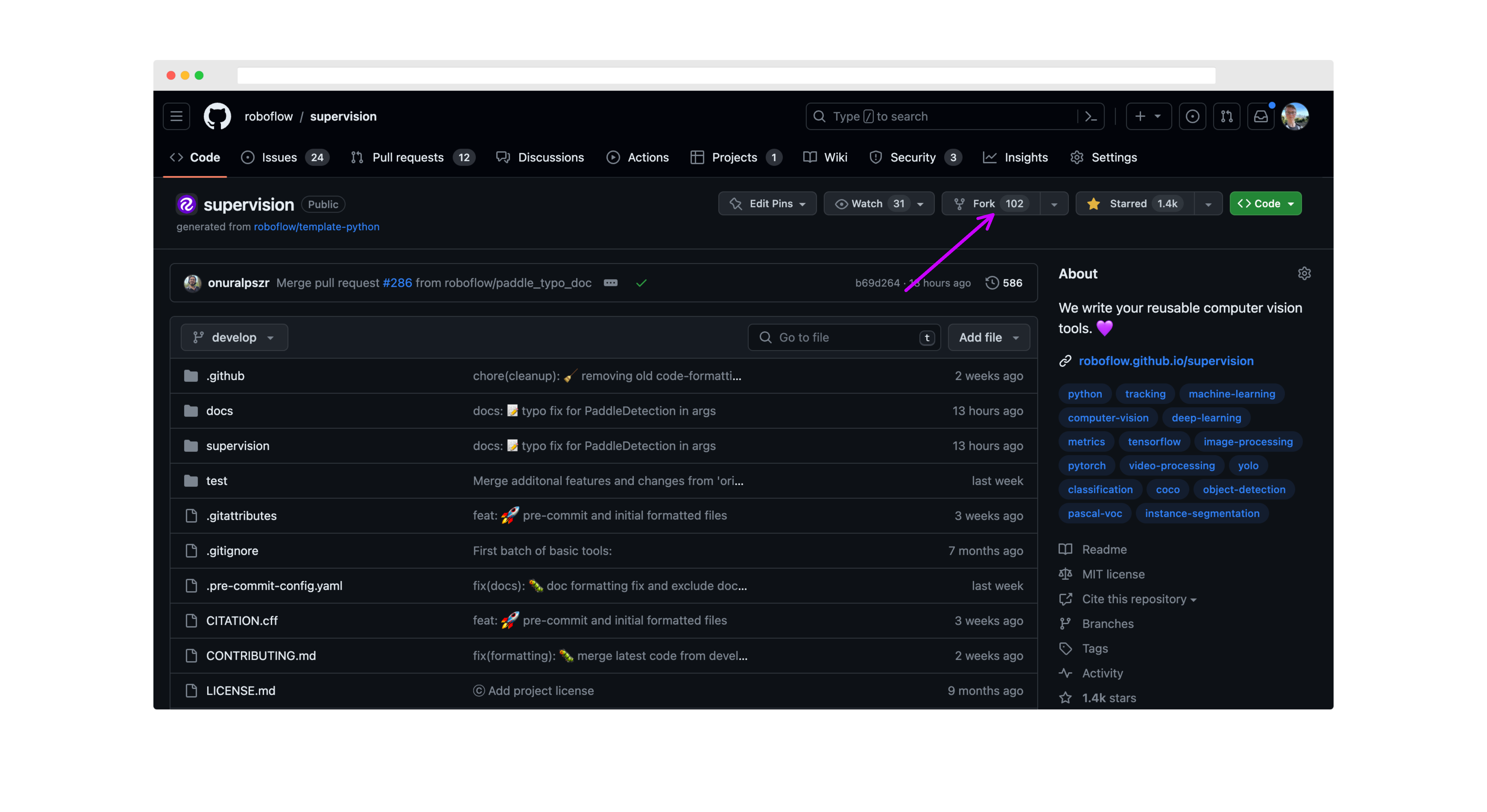
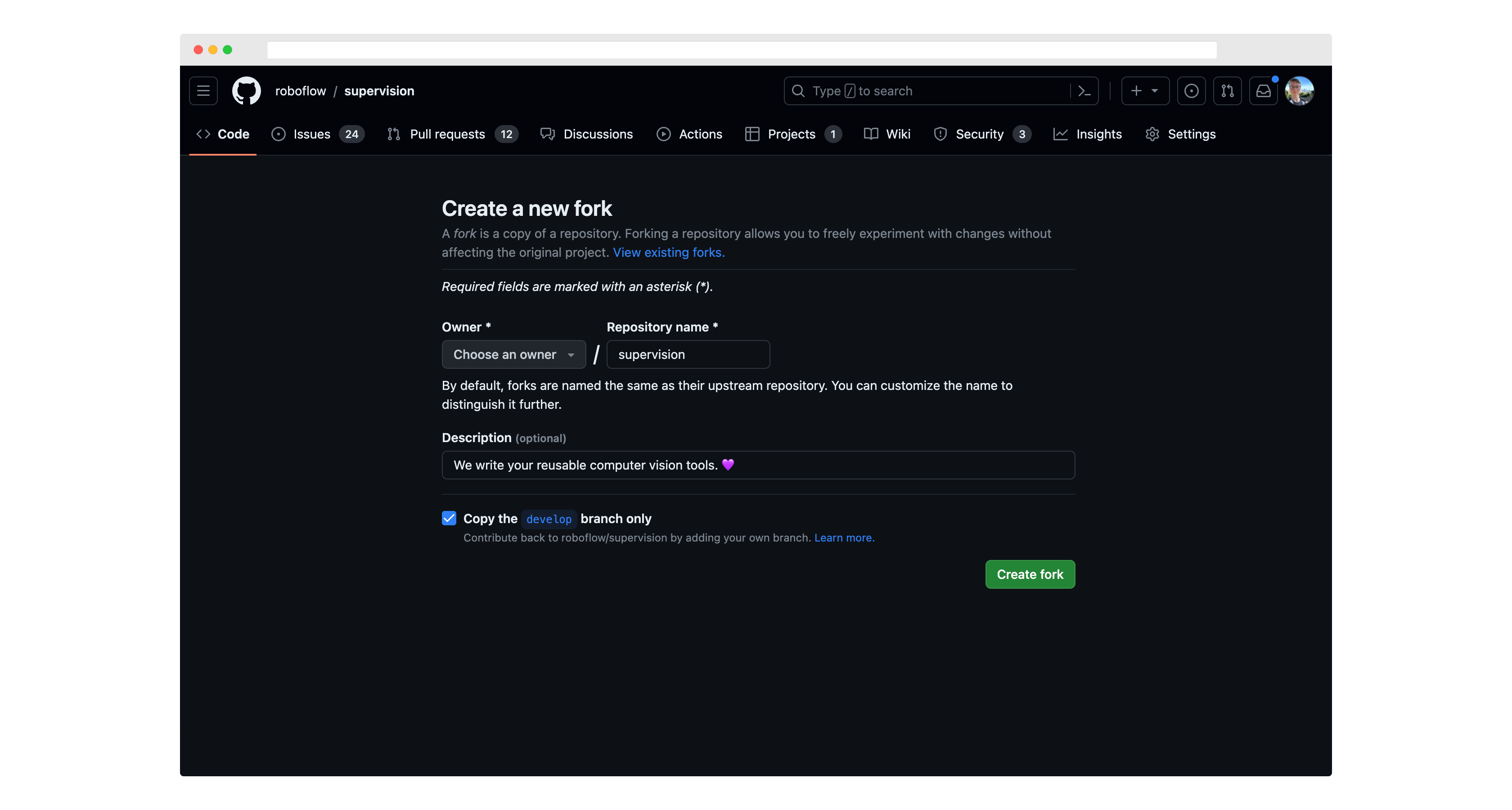
Then, run git clone to download the project code to your computer.
You should also set up roboflow/supervision as an "upstream" remote (that is, tell git that the reference Supervision repository was the source of your fork of it):
git remote add upstream https://github.com/roboflow/supervision.git
git fetch upstream
Move to a new branch using the git checkout command:
git checkout -b <scope>/<your_branch_name> upstream/developThe name you choose for your branch should describe the change you want to make and start with an appropriate prefix:
feat/: for new features (e.g.,feat/line-counter)fix/: for bug fixes (e.g.,fix/memory-leak)docs/: for documentation changes (e.g.,docs/update-readme)chore/: for routine tasks, maintenance, or tooling changes (e.g.,chore/update-dependencies)test/: for adding or modifying tests (e.g.,test/add-unit-tests)refactor/: for code refactoring (e.g.,refactor/simplify-algorithm)
Make any changes you want to the project code, then run the following commands to commit your changes:
git add -A
git commit -m "feat: add line counter functionality"
git push -u origin <your_branch_name>
Use conventional commit messages to clearly describe your changes. The format is:
<type>[optional scope]: <description>
Common types include:
feat: A new featurefix: A bug fixdocs: Documentation only changesstyle: Changes that do not affect the meaning of the code (white-space, formatting, etc)refactor: A code change that neither fixes a bug nor adds a featureperf: A code change that improves performancetest: Adding missing tests or correcting existing testschore: Changes to the build process or auxiliary tools and libraries
Then, go back to your fork of the supervision repository, click "Pull Requests", and click "New Pull Request".
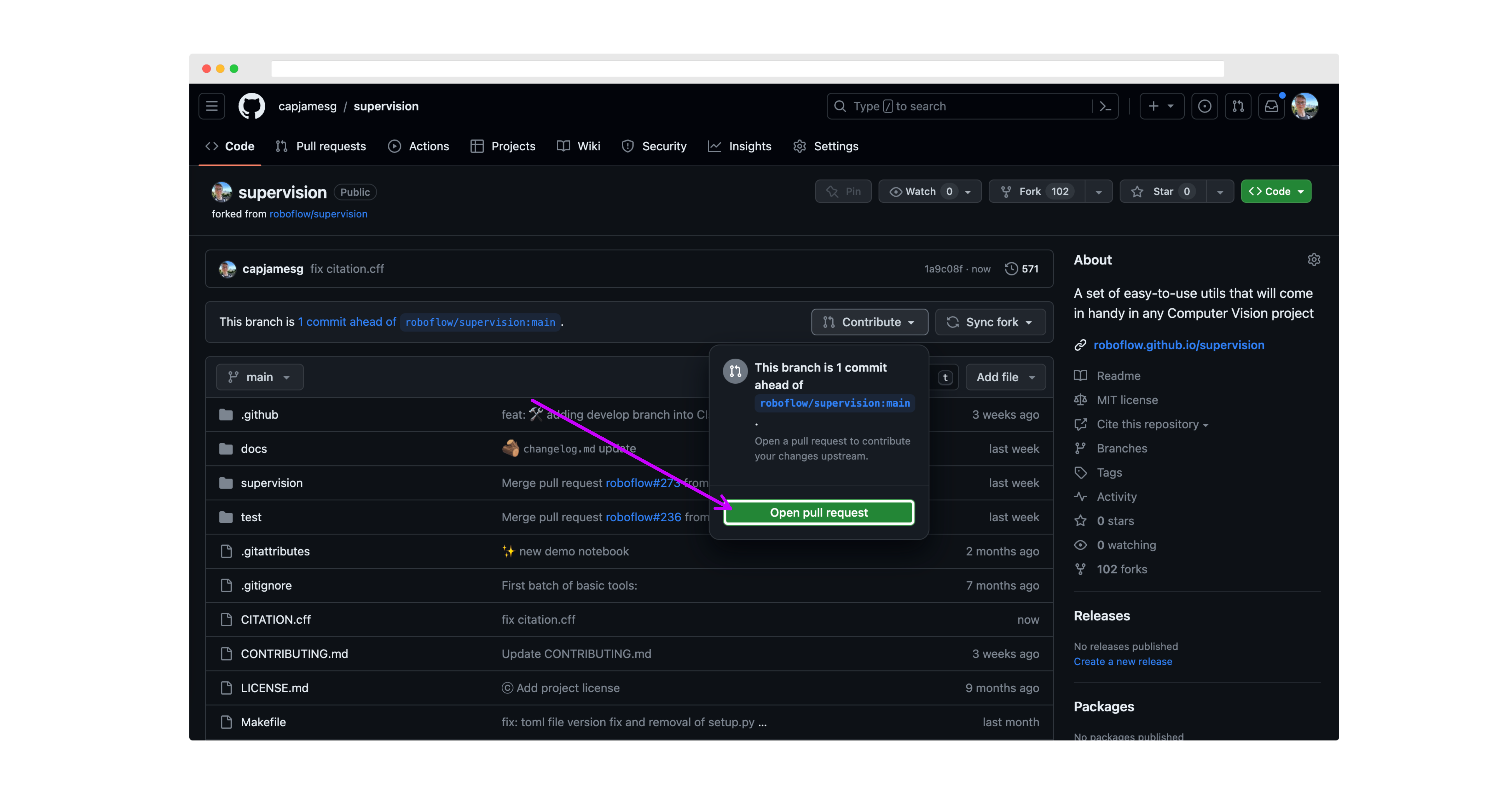
Make sure the base branch is develop before submitting your PR.
On the next page, review your changes then click "Create pull request":
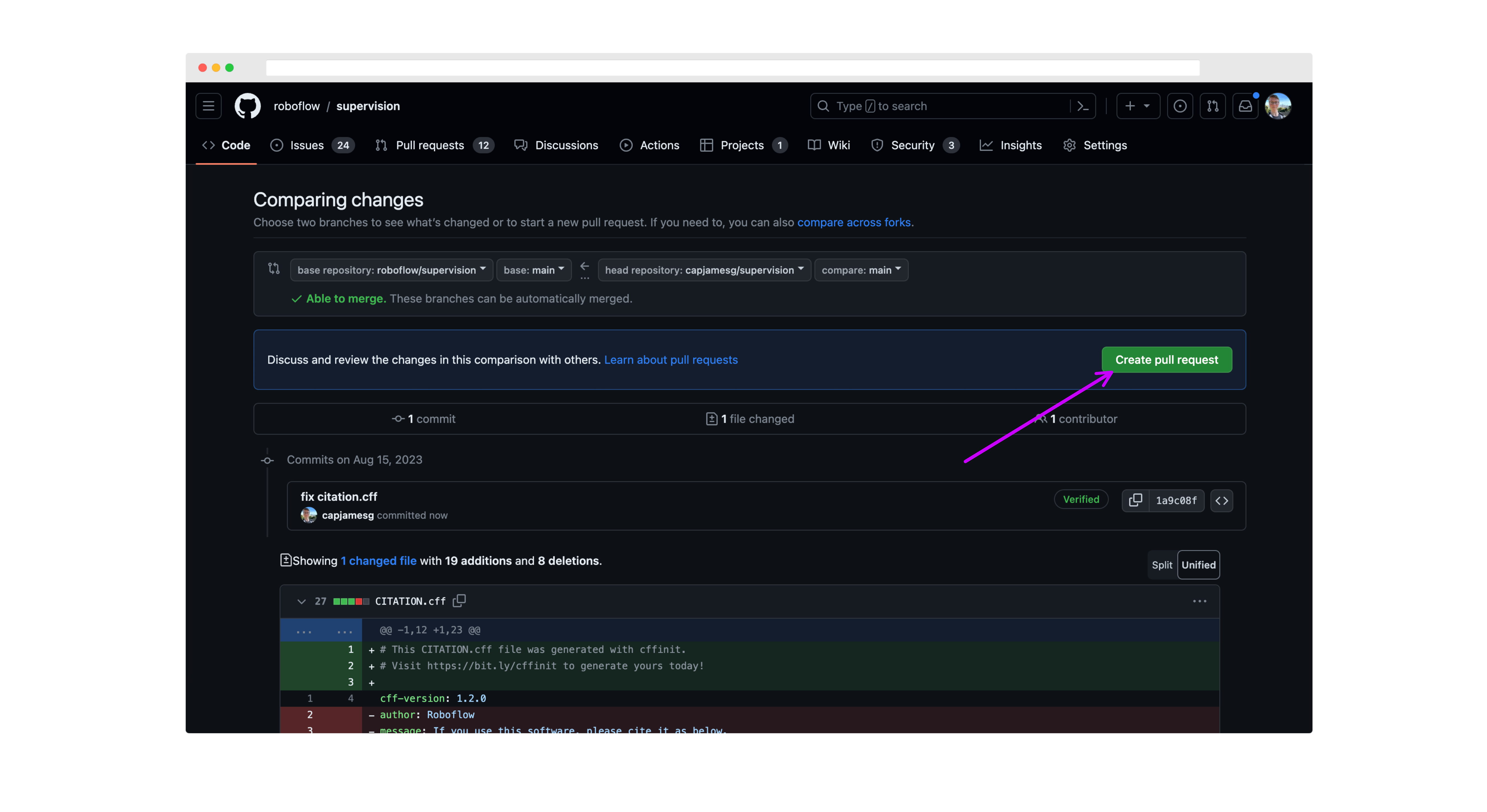
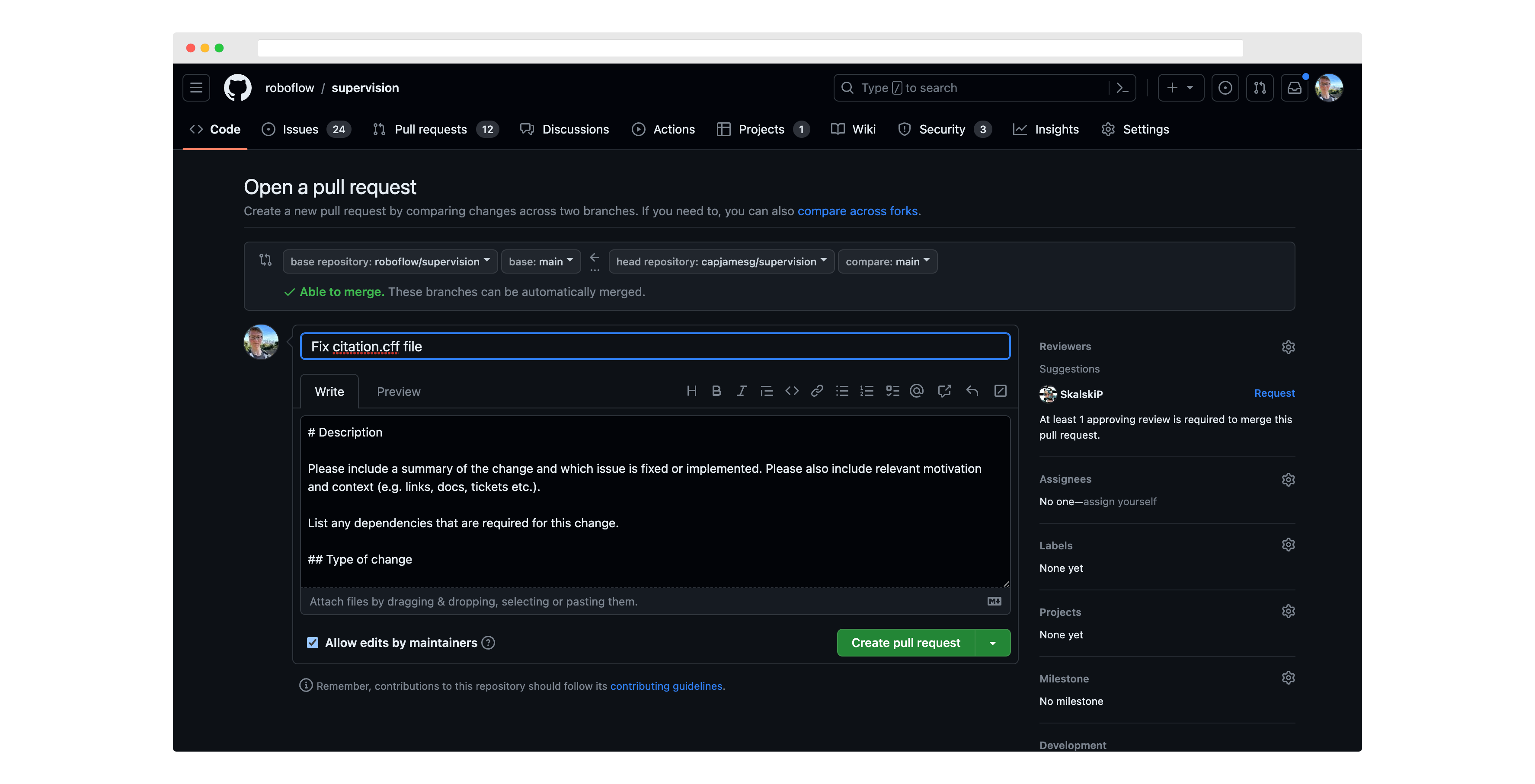
Next, write a description for your pull request, and click "Create pull request" again to submit it for review:
When creating new functions, please ensure you have the following:
- Docstrings for the function and all parameters.
- Unit tests for the function.
- Examples in the documentation for the function.
- Created an entry in our docs to autogenerate the documentation for the function.
- Please share a Google Colab with minimal code to test a new feature or reproduce the issue whenever possible. Please ensure that Google Colab can be accessed without any restrictions.
When you submit your Pull Request, you will be asked to sign a Contributor License Agreement (CLA) by the cla-assistant GitHub bot. We can only respond to PRs from contributors who have signed the project CLA.
All pull requests will be reviewed by the maintainers of the project. We will provide feedback and ask for changes if necessary.
PRs must pass all tests and linting requirements before they can be merged.
Before starting your work on the project, set up your development environment:
-
Clone your fork of the project:
Option A: Recommended for most contributors (shallow clone of develop branch):
git clone --depth 1 -b develop https://github.com/YOUR_USERNAME/supervision.git
cd supervision
Replace
YOUR_USERNAMEwith your GitHub username.Note: Using
--depth 1creates a shallow clone with minimal history and-b developensures you start with the development branch. This significantly reduces download size while providing everything needed to contribute.Option B: Full repository clone (if you need complete history):
git clone https://github.com/YOUR_USERNAME/supervision.git cd supervision git checkout develop -
Set up the upstream remote:
git remote add upstream https://github.com/roboflow/supervision.git
git fetch upstream
-
Create and activate a virtual environment:
On Linux/macOS:
python3 -m venv .venv
source .venv/bin/activate
On Windows:
python -m venv .venv
.venv\Scripts\activate
-
Install
uv:Follow the instructions on the uv installation page.
-
Install project dependencies:
uv pip install -r pyproject.toml --group dev --group docs --extra metrics
-
Verify the setup:
uv run pytest
This project uses the pre-commit tool to maintain code quality and consistency. Before submitting a pull request or making any commits, it is important to run the pre-commit tool to ensure that your changes meet the project's guidelines.
Furthermore, we have integrated a pre-commit GitHub Action into our workflow. This means that with every pull request opened, the pre-commit checks will be automatically enforced, streamlining the code review process and ensuring that all contributions adhere to our quality standards.
To run the pre-commit tool, follow these steps:
-
Install pre-commit (already included if you followed the installation steps above):
uv sync --group dev
-
Navigate to the project's root directory (if not already there).
-
Run pre-commit checks:
uv run pre-commit run --all-files
This will execute the pre-commit hooks configured for this project. If any issues are found, the pre-commit tool will provide feedback on how to resolve them. Make the necessary changes and re-run the command until all issues are resolved.
-
Install pre-commit as a git hook (optional but recommended):
uv run pre-commit install
This will automatically run pre-commit checks every time you make a
git commit.
All new functions and classes in supervision should include docstrings. This is a prerequisite for any new functions and classes to be added to the library.
supervision adheres to the Google Python docstring style. Please refer to the style guide while writing docstrings for your contribution.
Every docstring should include a usage example. When the example only uses supervision, NumPy, and the standard library — no optional extras, no external files or network access — strongly prefer >>> doctest format so it is automatically verified by the test suite. See Doctests below for syntax guidance and for when fenced ```python blocks are appropriate instead.
Type hints are required on all new code. mypy is enforced by the pre-commit hook configured in .pre-commit-config.yaml — your PR will fail CI if mypy reports errors.
- Avoid unnecessary copies of NumPy arrays.
- Prefer vectorized operations over Python loops in hot paths.
- Lazy-import heavy framework dependencies (
torch,transformers,ultralytics) inside the function that needs them — never at module top level.
Minimum window: deprecated APIs must remain for at least 3 minor releases before removal. Example: deprecated in 0.29.0 → removed in 0.32.0.
Use the appropriate mechanism depending on what is being deprecated:
- Module-level alias:
supervision.utils.internal.warn_deprecatedin the deprecated module's__init__.py - Renamed parameter:
supervision.utils.internal.deprecated_parameterdecorator - Public function, method, or class:
@deprecatedfrompydeprecate
Always specify both the deprecation version and the planned removal version in the message or decorator arguments.
supervision.keypoint is deprecated since 0.27.0 and will be removed in 0.30.0. Always import from supervision.key_points:
from supervision.key_points import KeyPoints # correctThe supervision documentation is stored in a folder called docs. The project documentation is built using mkdocs.
To run the documentation locally:
-
Install documentation dependencies (if not already installed):
uv sync --group docs
-
Start the documentation server:
uv run mkdocs serve
-
Access the documentation at
http://127.0.0.1:8000in your browser.
You can learn more about mkdocs on the mkdocs website.
We are always looking for new examples and cookbooks to add to the supervision documentation. If you have a use case that you think would be helpful to others, please submit a PR with your example. Here are some guidelines for submitting a new example:
- Create a new notebook in the
docs/notebooksfolder. - Add a link to the new notebook in
docs/theme/cookbooks.html. Make sure to add the path to the new notebook, as well as a title, labels, author and supervision version. - Use the Count Objects Crossing the Line example as a template for your new example.
- Pin the version of
supervisionyou are using in the notebook. - Place an appropriate "Open in Colab" button at the top of the notebook. You can find an example of such a button in the aforementioned
Count Objects Crossing the Linecookbook. - Notebook should be self-contained. If you rely on external data (videos, images, etc.) or libraries, include download and installation commands in the notebook.
- Annotate the code with appropriate comments, including links to the documentation describing each of the tools you have used.
pytest is used to run our tests.
To run tests:
uv run pytestTo run tests with coverage:
uv run pytest --cov=supervisionFollow Arrange-Act-Assert (AAA): one setup block, one action, one assertion group per test. Never put two independent actions in the same test.
Class grouping: Group related tests into a class. The class name carries the unit under test; method names describe the expected outcome only — not the mechanism.
class TestDetectionsWithNms:
    def test_keeps_highest_confidence_detection(self): ...
    def test_suppresses_lower_score_when_overlap_exceeds_threshold(self): ...
    def test_raises_when_confidence_missing(self): ...
Parametrize aggressively: Three or more structurally identical tests should become a single @pytest.mark.parametrize case. Use pytest.param(..., id="slug") per case — not ids=[...] on the decorator — so the ID stays co-located with its arguments and survives reordering.
@pytest.mark.parametrize(
    ("overlap_metric", "expected_keep"),
    [
        pytest.param(OverlapMetric.IOU, [True, True], id="iou-keeps-both"),
        pytest.param(OverlapMetric.IOS, [True, False], id="ios-suppresses-small"),
    ],
)
def test_overlap_metric_determines_suppression(
    overlap_metric: OverlapMetric, expected_keep: list[bool]
) -> None:
    """Small box inside large: IOU keeps both; IOS suppresses small."""
    ...
Docstrings: Every test function/method requires at minimum a one-line docstring (within the project line length configured in pyproject.toml). Describe the scenario, not the implementation.
Guidance: when an example uses only supervision, NumPy, and the standard library — no optional extras (e.g. no --extra metrics packages), no external files, no network, no devices — prefer >>> doctest format so it is automatically verified by the test suite. Fenced ```python blocks are appropriate when the example cannot reasonably be executed (e.g. loading a third-party model, reading a video file) or when the primary purpose is demonstrating error/exception behaviour rather than return values.
Doctests run automatically as part of the test suite via --doctest-modules in pyproject.toml. The ELLIPSIS and NORMALIZE_WHITESPACE flags are enabled globally, so ... matches any output fragment and minor whitespace differences are ignored.
uv run pytest --doctest-modules src/Writing a doctest
Use the Example: section of a Google-style docstring. Prefix each input line with >>> and each continuation line with .... Place expected output immediately after the last input line with no blank line between them.
def clip_boxes(xyxy: np.ndarray, resolution_wh: tuple) -> np.ndarray:
    """Clip bounding boxes to frame boundaries.

    Args:
        xyxy: Box coordinates as (N, 4) float array.
        resolution_wh: Frame size as (width, height).

    Returns:
        Clipped boxes as (N, 4) float array.

    Example:
        >>> import numpy as np
        >>> import supervision as sv
        >>> boxes = np.array([[-10, -5, 120, 80]], dtype=np.float32)
        >>> sv.clip_boxes(boxes, resolution_wh=(100, 60))
        array([[ 0.,  0., 100.,  60.]], dtype=float32)
"""- Single-line expression — write the repr as expected output:
>>> len(result)→1 - Multi-line statement — use
...continuation:>>> arr = np.array([/... [1, 2],/... ]) - Print output — write the printed string as expected output (no quotes).
Nonereturn — no output line needed (suppress with assignment or_ =).- Large/variable arrays — use
ELLIPSIS:array([...])matches any content. # doctest: +SKIP— use only as a last resort for genuinely non-runnable lines (e.g. a GPU-only call inside an otherwise runnable example). Prefer splitting the example into two blocks instead.
Fenced ```python blocks remain appropriate for:
- Examples that import optional extras (
supervision[metrics],torch,ultralytics). - Examples that read files, capture video, or require a running service.
- Illustrative pseudocode that is intentionally incomplete.
These guidelines help reviewers provide consistent, actionable feedback efficiently. Your goals: validate completeness, identify risks, provide actionable feedback, and highlight quality gaps.
Start with a clear recommendation using these levels:
- 🟢 Approve — Ready to merge
- 🟡 Minor Suggestions — Improvements recommended but not blocking
- 🟠 Request Changes — Must address issues before merge
- 🔴 Block — Critical issues require major rework
Example: 🟠 Request Changes — Missing unit tests for PolygonMerger and no mkdocs entry.
Verify requirements are met (✅ Complete /
- Clear description of what changed and why
- Tests added/updated for new functionality or bug fixes
- Docstrings follow Google-style
- Docs entry added to mkdocs (new functions/classes only)
- Google Colab provided (if demonstrating feature/fix)
- Screenshots/videos included (visual changes only)
Call out missing items explicitly in your review.
Use n/5 scoring with inline code comments for specifics:
Code Quality (n/5):
- 5/5 🟢 Excellent — 4/5 🟢 Good — 3/5 🟡 Acceptable — 2/5 🟠 Needs Work — 1/5 🔴 Poor
- Check: correctness (edge cases, None checks, bounds), Python best practices (idiomatic patterns, error handling, type hints), project conventions (docstrings, linting, import order, PEP 8 naming)
Testing (n/5):
- 5/5 🟢 Comprehensive — 4/5 🟢 Good — 3/5 🟡 Adequate — 2/5 🟠 Insufficient — 1/5 🔴 Missing
- Verify: unit tests for new code, edge cases covered, specific assertions, realistic scenarios, clear test names
Documentation (n/5):
- 5/5 🟢 Excellent — 4/5 🟢 Good — 3/5 🟡 Adequate — 2/5 🟠 Insufficient — 1/5 🔴 Missing
- Confirm: docstrings for public functions/classes, parameters/returns/exceptions documented, usage examples, mkdocs integration, changelog entry for user-facing changes
Flag risks with severity (5/5 🔴 Critical — 4/5 🟠 High — 3/5 🟡 Medium — 2/5 🟢 Low — 1/5 🟢 Negligible):
Common risk categories:
- Breaking changes — API changes, removed features, behavior modifications (must include migration guide)
- Performance — Inefficient algorithms, memory-intensive operations, bottlenecks
- Compatibility — New Python/dependency requirements, platform-specific code
- Security — Unvalidated input, code execution risks, data exposure
## Review Summary

**Recommendation:** [emoji] [Status] — [justification]

**PR Completeness:**
- ✅ Complete: [items]
- ❌ Missing: [gaps]

**Quality Scores:**
- Code: n/5 [emoji] — [reason]
- Testing: n/5 [emoji] — [reason]
- Documentation: n/5 [emoji] — [reason]

**Risk Level:** n/5 [emoji] — [description]

**Critical Issues (Must Fix):**
1. [Issue] — See comment on `file.py`

**Suggestions (Optional):**
1. [Improvement] — See suggestion on `file.py`

**Next Steps:**
1. [Action item]DO: Use inline GitHub comments with suggestions, explain why (not just what), distinguish blocking vs. nice-to-have, acknowledge good work, run linter if needed (uv run pre-commit run --all-files)
DON'T: Mention line numbers in summary (use inline comments), give vague feedback, nitpick style (defer to tools), assume knowledge of conventions, block on minor issues
Tone: Be respectful, specific, pragmatic, and consistent. Focus on actionable feedback that moves PRs toward merge.
By contributing, you agree that your contributions will be licensed under an MIT license.