
Revolutionizing automated defect detection and smart manufacturing through Deep Learning and Edge AI.
Robopipe Studio is an open-source software designed for capturing and processing image data, labeling images, and training and deploying offline machine learning models on Edge-Compute hardware (Luxonis). It provides a user-friendly interface for managing image datasets, annotating images, and building offline computer vision applications.
Operators can label and fine-tune datasets using an intuitive interface, specifically engineered to handle complex, non-rigid products where traditional rule-based vision systems fail. Optimized models are deployed via robopipe API to Edge-Compute hardware (Luxonis) for real-time inference in manufacturing processes.
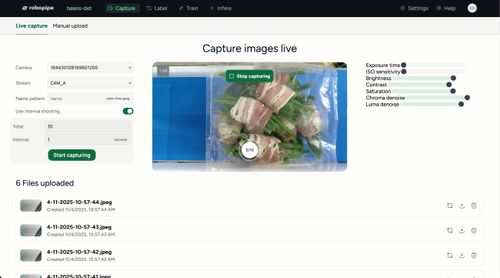 Capture Capture |
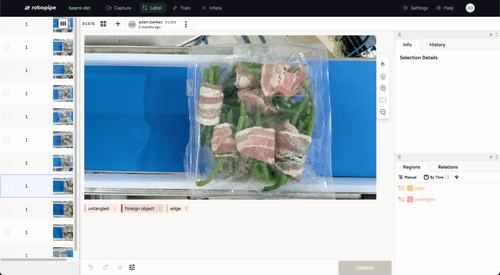 Label Label |
|---|---|
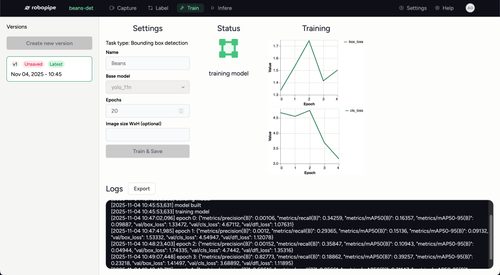 Train Train |
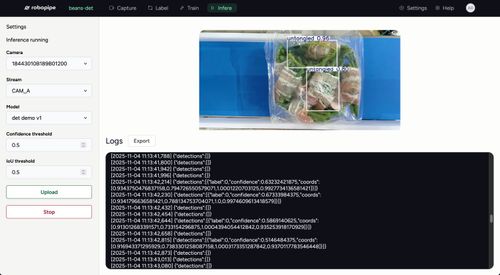 Infer Infer |
To learn more about Robopipe Studio, please visit the Robopipe Documentation.
- Pnpm v10.28.0 (or higher)
- Running PostgreSQL server v16 (or higher), with created database
psql -c "create database robopipe;" - Git
-
Clone the repository:
git clone -b rewrite --single-branch https://github.com/Robopipe/Studio.git
-
Navigate to the project directory:
cd Studio -
Install the required dependencies:
pnpm install
-
Set up environment variables:
cp apps/api/config.local.example.yml apps/api/config.local.yml
cp apps/api/.env.example apps/api/.env
cp apps/web/.env.example apps/web/.env.local
Then configure DATABASE_URL in app/api/.env and apps/api/config.local.yml according to your environment
-
Run the database migrations:
pnpm build && pnpm -F api drizzle:push -
Run the application:
pnpm dev
-
Observe the app
- The web is available at localhost:5173
- API docs are available at localhost:3000/api
- Docker and Docker Compose
-
Clone the repository:
git clone -b rewrite --single-branch https://github.com/Robopipe/Studio.git cd Studio -
Start all services (PostgreSQL, API, Web):
docker compose up --build
-
In a separate terminal, run the database migrations:
docker compose exec api pnpm -F api drizzle:push -
Observe the app
- The web is available at localhost:5173
- API docs are available at localhost:3000/api
Source code is volume-mounted, so changes trigger hot-reload automatically.
Robopipe values all your feedback. If you encounter any problems with the app, please open a GitHub issue for anything related to this app - bugs, improvement suggestions, documentation, developer experience, etc.
Join our Robopipe subreddit to share your apps, ask any questions regarding Robopipe, get help debugging your apps, or simply to read more about Robopipe from our users.