Scenario:
Open an AL project in VS Code.
Download symbols.
Wait for some time, like 15 Minutes or 2-3 hours (the max wait time was not exactly tested, but a waiting time of a few hours was tested).
Download symbols again.
Get the error "Could not download symbols.":

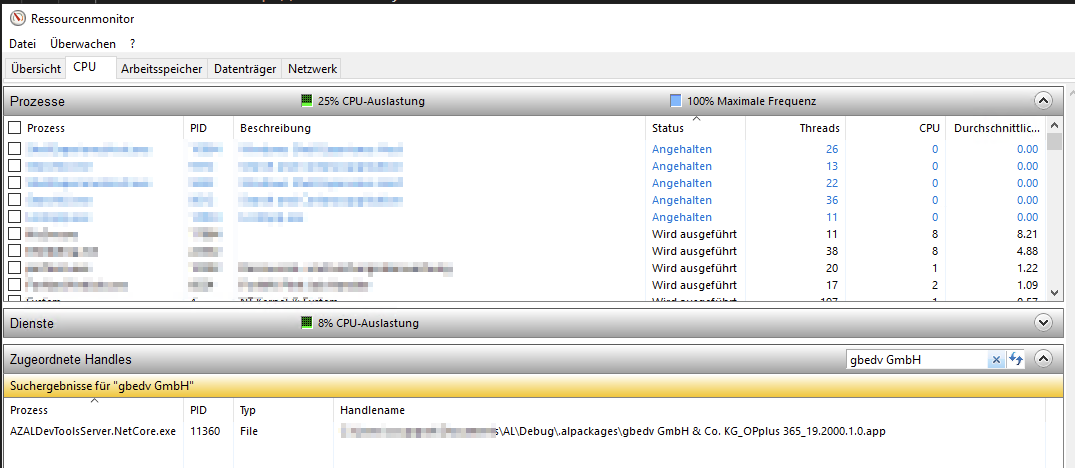
Check who is blocking the app file:
Check the process in VS Code:
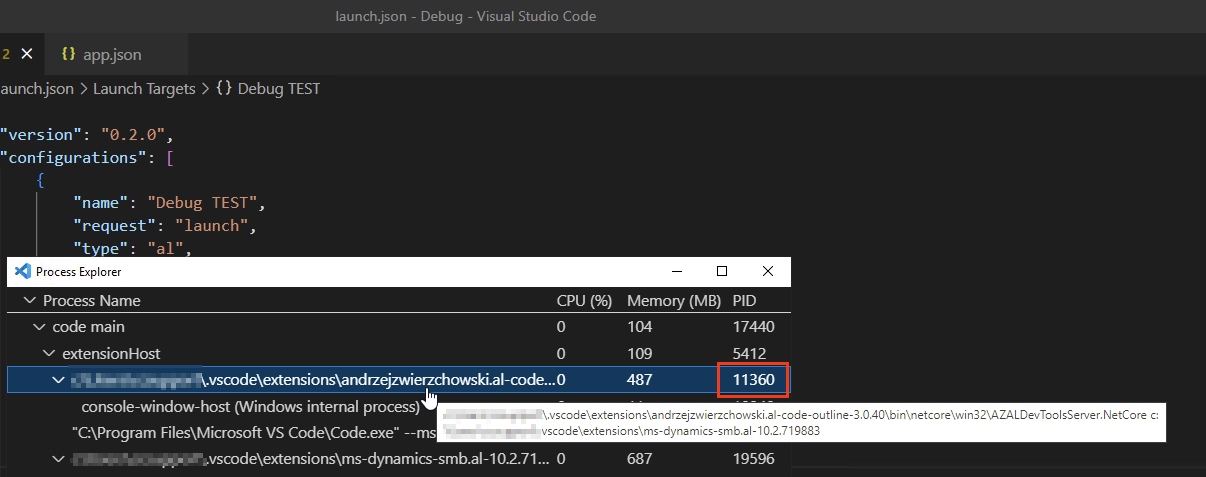
It seems that one specific app file always causes hanging of the az-al-dev-tools-server.
The behaviour can be easily reproduced with that app file.
Other (many) app files are not causing this behaviour.
The app file is a runtime file, it cannot be opened as zip archive. File size is around 30Mb.
Suggestion for a quick workaround: add some timeout setting for the process per file.

Scenario:
Open an AL project in VS Code.
Download symbols.
Wait for some time, like 15 Minutes or 2-3 hours (the max wait time was not exactly tested, but a waiting time of a few hours was tested).
Download symbols again.
Get the error "Could not download symbols.":
Check who is blocking the app file:
Check the process in VS Code:
It seems that one specific app file always causes hanging of the az-al-dev-tools-server.
The behaviour can be easily reproduced with that app file.
Other (many) app files are not causing this behaviour.
The app file is a runtime file, it cannot be opened as zip archive. File size is around 30Mb.
Suggestion for a quick workaround: add some timeout setting for the process per file.