iOS Mail Application Meta-Refresh King Phisher Template
The original iOS-Mail.app-inject-kit was written in PHP and used Apache as the web server. This version have been created specifically for use with the Phishing Tool King Phisher.
Using Jinja, the displayed iOS password prompt will automatically change depending on the target email domain. Currently there are six different password prompts for gmail.com, yahoo.com, hotmail.com/outlook.com, icloud.com, and aol.com. Any other email domain not matching these six domains will be considered a corporate email address connected through Exchange and display the more generic "Enter the password for the Exchange account {{ client.email_address }}".
Once the user has opened the email and submitted their credentials, King Phisher detects the client visit count using the Jinja variable client.visit_count. If this visit count is greater than one, the user will not be shown the password prompt. Instead, they will be immediately shown the email message contents, which is "Important Information: Please Read!". For testing purposes, change the Jinja tag to {% if client.visit_count >= 1 %} in order to view the password prompt multiple times.
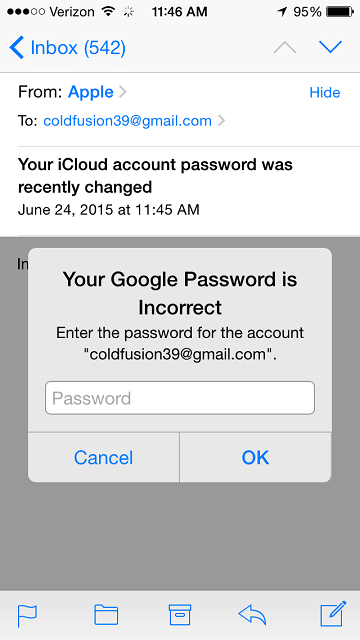
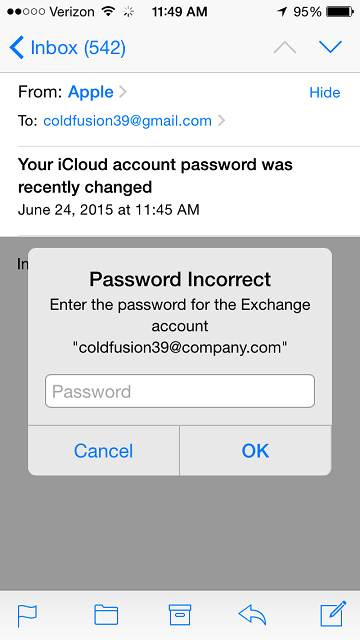
This code is released under the MIT license, for more details see the LICENSE file.
Credit should be given to jansoucek and his original Proof of Concept iOS-Mail.app-inject-kit .
- Import
email.htmlinto King Phisher as the "Message HTML File". - Upload the contents of
wwwto your King Phisher server and set your "Web Server URL" toauth. - Make sure the King Phisher server is configured to require a message ID
require_id: truein order capture submitted credentials.