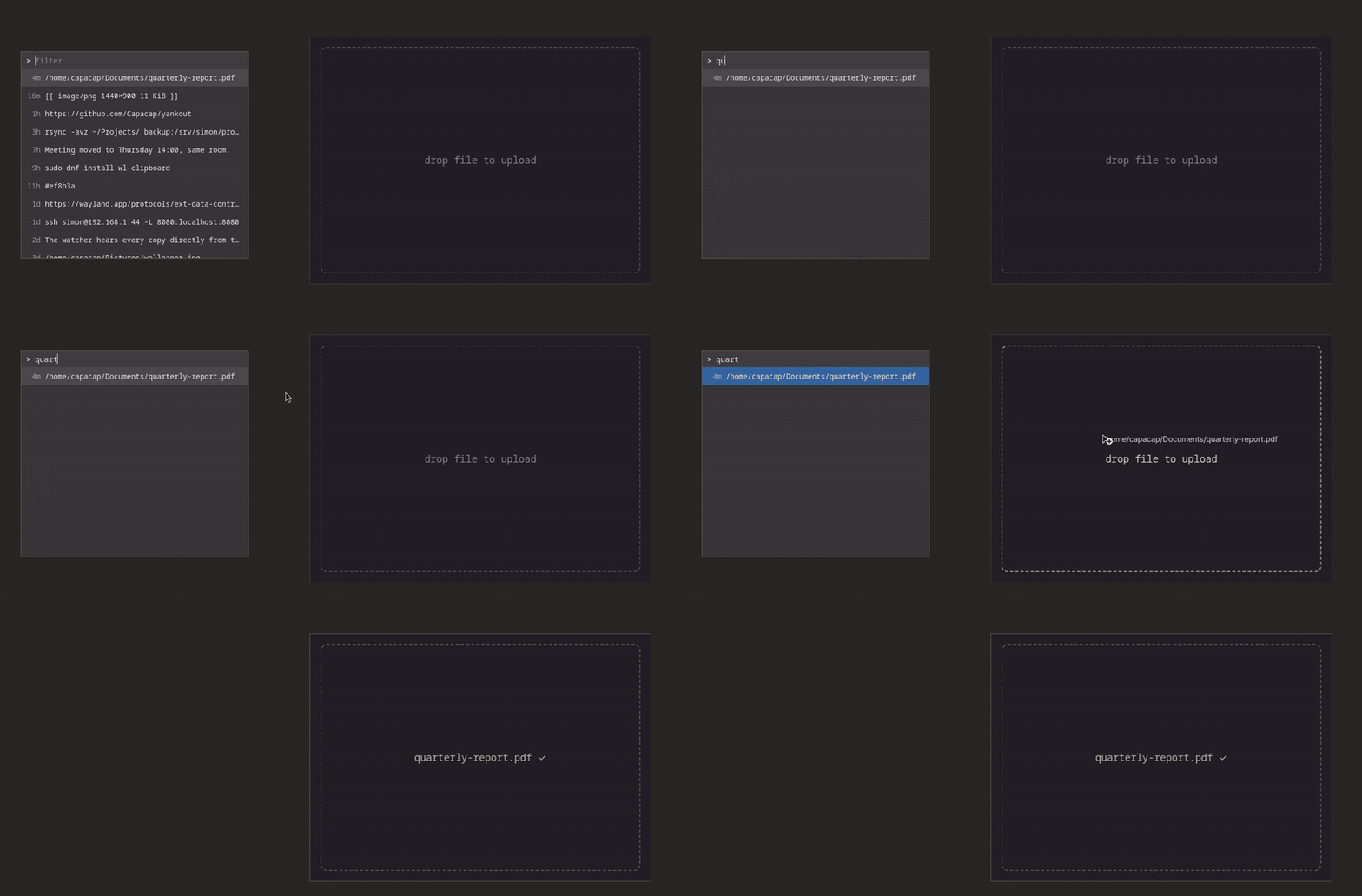
A Wayland clipboard manager built in the dmenu tradition. A minimal GTK window lets you drag entries out to any destination, and a copied file path leaves as a real file drop. It also fills the role of a regular clipboard manager: search your history, recall an entry to the active clipboard.
When working in the terminal or in TUI apps like yazi and fzf, feeding a file into a GUI app such as a browser or editor is tedious. yankout lets the clipboard bridge that gap: copy the file path, open yankout, and drag the entry out of the window into the destination. The other direction works too: an image or text sitting in the clipboard becomes a file in the current directory with one command.
yankout              open the history window
yankout --current    show a puck that drags the live clipboard out
yankout list         print history as <id>TAB<preview> lines, newest first
yankout decode [id]  write one entry's raw content to stdout
yankout save [id]... write entries to files, named by time and type
yankout save --current   write the live clipboard to a file
yankout watch        record clipboard history; run once per session

--to <path>          save into this directory, or to this file (default: cwd)

--css <file>         load CSS on top of the default theme
--backend <name>     force the history backend (native or cliphist)
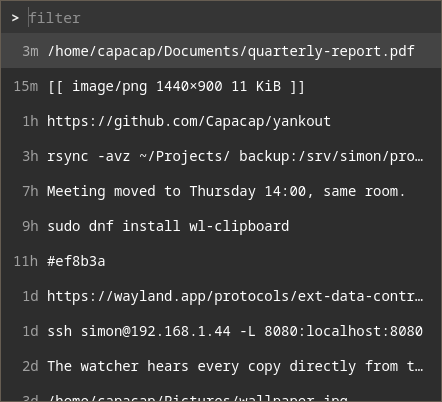
In the history window, type to filter, Enter or double-click to recall, and the whole window drags the selected entry. It closes on Esc, focus loss, or a completed drop. The puck survives focus loss and makes any terminal program a drag source:
echo ~/report.pdf | wl-copy && yankout --currentPaths to existing files are dragged as text/uri-list plus
text/plain, so file managers and browsers take the file while text
fields take the path string. Binary content goes out under its
sniffed type, everything else as plain text.
Requires a GTK4-capable Wayland session and wl-clipboard.
cargo install yankoutSpawn yankout watch, the history recorder, on session startup and
bind yankout to a key. The windows are fixed-size, which niri and sway float on their
own; compositors without that heuristic need a float rule matching
the app-ids dev.yankout.list and dev.yankout.puck. niri examples
are in contrib/niri.kdl.
yankout watch is yankout's own clipboard watcher. It hears every
copy directly from the compositor over the data-control protocol and
records it under $XDG_DATA_HOME/yankout/history: newest first,
deduplicated, capped at 750 entries, and offers marked
x-kde-passwordManagerHint are never stored, keeping password
managers out of history. On compositors without data-control,
cliphist fills in if
installed. The history is also readable from the terminal, in
cliphist's shape so existing pickers switch by renaming the command:
yankout list        # <id>TAB<preview> per line, newest first
yankout decode 42   # raw content of one entry
yankout list | fuzzel --dmenu | yankout decode | wl-copyA GUI file manager turns a pasted image into a file; a terminal file
manager cannot, and neither can a terminal receive a drop. save is
that paste: the live clipboard, or any history entry, written to the
current directory (or --to a directory or file path) and named by
the moment it was copied and its sniffed type, clip_2026-09-18_12-17-25.png.
Text becomes .txt; png, jpeg, gif and webp keep their type. Nothing
is ever overwritten, and every path written is printed. Ids can be
piped in one per line, so a multi-selection saves in one go:
yankout save --current                  # the clipboard, into the cwd
yankout save 42 --to ~/Pictures/shot.png
yankout list | fzf --multi | yankout save
In yazi, a key that runs yankout save --current is Ctrl+V for the
clipboard; contrib/yazi-keymap.toml
has that and an fzf picker over history.
The built-in theme is neutral monospace and follows the GTK light and
dark preference. Everything customizable is GTK CSS in
~/.config/yankout/style.css; --css <file> tries a theme without
installing it.
contrib/warm.css
is a commented
starting point that lists the stylable nodes.
Licensed under either of Apache License, Version 2.0 or MIT license at your option. Unless you explicitly state otherwise, any contribution intentionally submitted for inclusion in the work by you shall be dual licensed as above, without any additional terms or conditions.