🚀 Live Demo: https://image-explorer-web-app.vercel.app/
A modern and interactive image discovery platform powered by Pexels, Pixabay & Unsplash APIs with performance optimization.





Image Explorer is a modern web application designed to make image discovery simple, fast, and enjoyable.
Users can search for high-quality images using keywords, explore results from multiple image APIs, upload their own images, preview images in a beautiful modal, and download images instantly.
The project also includes a simple authentication system using LocalStorage, allowing users to create an account and maintain a personalized session.
🚀 Built with pure HTML, CSS and JavaScript — no frontend framework required.


.jpg)


The Home Page serves as the primary hub for ImageLens, allowing users to discover, search, and explore high-resolution images seamlessly.
- Hero Search Bar: Instant image search with real-time query suggestions.
- Featured Collections: Curated categories and trending visual topics.
- Responsive Grid: Dynamic layout optimized for desktop, tablet, and mobile viewing.
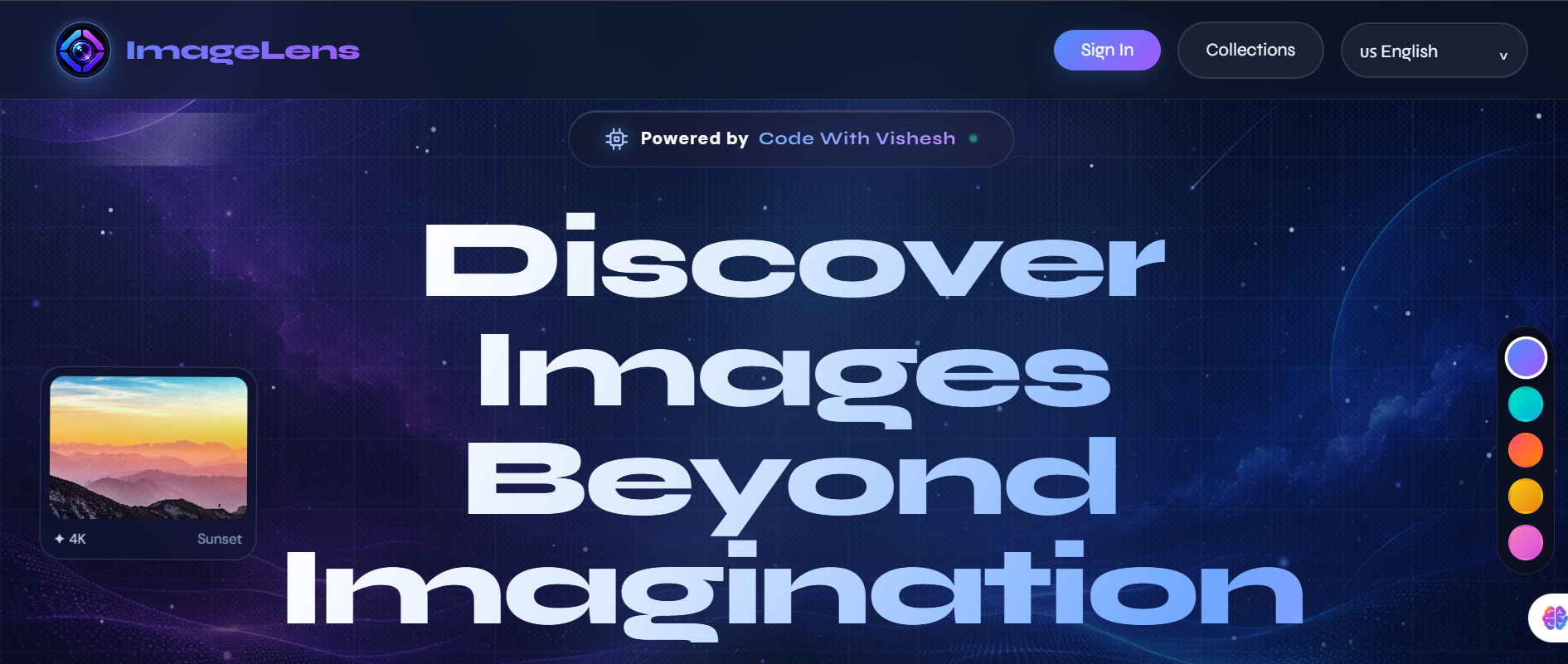
Powered by Code With Vishesh
- ✨ Beautiful gradient UI with particle animations
- 🔍 Instant search across 3 image APIs (Pexels, Pixabay, Unsplash)
- 🎨 Modern dark theme with vibrant accents
- 💫 Smooth animations and transitions
- 📱 Fully responsive design
- ⚡ Lightning-fast image loading
Finding the right image shouldn't feel complicated.
Image Explorer brings multiple useful features together in one clean interface:
🔎 Search Images
      ↓
🌐 Fetch Results
      ↓
🖼️ Explore Gallery
      ↓
👁️ Preview Full Size
      ↓
⬇️ Download Image
Whether you're looking for wallpapers, nature photography, technology images, travel inspiration, or creative assets — Image Explorer gives you a smooth way to discover them.
Search for images using simple keywords.
Image Explorer fetches results dynamically from:
- 📸 Pexels API
- 🌎 Pixabay API
- 🎨 Unsplash API (via secure Express proxy)
Results from all 3 providers are merged and displayed instantly in a responsive gallery.
Explore images through a clean and modern gallery interface.
- Responsive grid layout
- Image hover animations
- Smooth transitions
- Lazy image loading
- Dynamic API results
- Beautiful image cards
- Mobile-friendly layout
Users can upload their own images directly into the application.
Uploaded images are automatically added to the gallery and can be viewed alongside API results.
Click any image to open a larger preview.
The modal provides:
- Full-size image preview
- Photographer information
- Image source
- Download option
- Close interaction
- Smooth opening animation
Download images directly from the image preview modal.
No unnecessary navigation.
One click → Download.
Image Explorer includes a simple authentication system.
- 📝 User Signup
- 🔑 User Login
- 🚪 Logout
- 💾 Session management
- 👤 Personalized user experience
User account and session information is stored using:
LocalStorage
⚠️ This authentication system is designed for learning/demo purposes. Production applications should use secure server-side authentication and password hashing.
The interface focuses on a clean and interactive user experience.
- ✨ Gradient headings
- 🌈 Modern color combinations
- 🪟 Clean cards
- 🎯 Interactive buttons
- 💫 Hover animations
- 🔄 Smooth transitions
- 📱 Responsive design
- 🖼️ Image-focused layout
- ⚡ Fast interactions
| Technology | Purpose |
|---|---|
| 🟧 HTML5 | Structure & semantic markup |
| 🔵 CSS3 | Styling, animations & responsive design |
| 🟨 JavaScript ES6+ | Application logic & DOM manipulation |
| 💾 LocalStorage | Authentication & session data |
| 📸 Pexels API | High-quality image search |
| 🌎 Pixabay API | Image search & discovery |
| 🎨 Unsplash API | Professional photo search |
| 🟩 Node.js + Express | Backend proxy server |
| 🔐 Environment Vars | Secure API key management |
Pexels provides high-quality stock photography and image search capabilities.
Used in this project for:
- Image searching
- Photographer information
- Image previews
- Image URLs
Pixabay provides a large collection of images that can be searched dynamically.
Used for:
- Image discovery
- Search results
- Image previews
- Additional image sources
Unsplash provides beautiful, high-quality professional photography.
Integration Method: Secure Express proxy server (API key kept server-side)
Used for:
- Professional photo search
- Extended image library
- Photographer attribution
- Enhanced search results
A Node.js/Express backend proxy server forwards Unsplash API requests securely:
- 🔐 API key stored on server (never exposed to client)
- 🚀 Endpoint:
http://localhost:3000/api/unsplash/search - ⚡ Handles rate limiting and error handling
- 📡 Merges Unsplash results with Pexels & Pixabay
Why? Protecting sensitive API keys from browser exposure ensures security and prevents abuse.
The application includes multiple performance enhancements:
- 📦 Lazy Loading: Images load only when visible in viewport
- 🎯 Responsive Images: Correct image sizes for different screens (srcset/sizes)
- 🔄 Async Decode: Images decode off main thread using
decoding="async" - 📊 Incremental Rendering: Gallery renders images in adaptive chunks (8-20 per batch)
- ⏱️ Scroll Throttling: Scroll events debounced with requestAnimationFrame (rAF)
- 👁️ IntersectionObserver: Auto-load pagination when reaching end of feed
- 🚫 AbortController: Prevents stale requests from outdated searches overwriting results
- 💾 Search Caching: Repeated searches use cached results (instant display)
Result: Lightning-fast image loading even with large result sets!
The application follows a complete workflow:
              ┌──────────────────┐
              │   User Searches  │
              └────────┬─────────┘
                       │
                       ▼
              ┌──────────────────┐
              │ JavaScript Logic │
              └────────┬─────────┘
                       │
          ┌────────────┼────────────┐
          ▼            ▼            ▼
   ┌──────────────┐   ┌──────────────┐   ┌──────────────┐
   │ Pexels API   │   │ Pixabay API  │   │ Express Proxy│
   │ (Direct)     │   │ (Direct)     │   │→ Unsplash API│
   └──────┬───────┘   └──────┬───────┘   └──────┬───────┘
          │                  │                  │
          └────────┬─────────┴──────────────────┘
                   ▼
          ┌──────────────────┐
          │ Merge Results    │
          │ (Dedup + Sort)   │
          └────────┬─────────┘
                   │
                   ▼
          ┌──────────────────┐
          │ Incremental      │
          │ Chunk Rendering  │
          │ (8-20 at a time) │
          └────────┬─────────┘
                   │
          ┌────────┴────────────┐
          ▼                     ▼
    👁️ Preview            ⬇️ Download
Key Features in the Flow:
- ✅ All 3 APIs queried in parallel
- ✅ Results merged into single feed
- ✅ Incremental rendering for performance
- ✅ IntersectionObserver for auto-load pagination
- ✅ AbortController to prevent stale updates
Image-Explorer/
│
├── index.html
├── style.css
├── script.js
│
├── assets/
│   ├── images/
│   └── icons/
│
└── README.md
If your project uses a different folder structure, update this section according to your actual files.
To run the project locally, you need API keys from:
- 📸 Pexels
- 🌎 Pixabay
- 🎨 Unsplash (optional - for enhanced results)
Add your Pexels and Pixabay API credentials inside the JavaScript:
const PEXELS_KEY = "YOUR_PEXELS_API_KEY";
const PIXABAY_KEY = "YOUR_PIXABAY_API_KEY";The Unsplash API is served via a secure Express proxy server.
Set the environment variable before running the server:
# Windows PowerShell
$env:UNSPLASH_ACCESS_KEY="YOUR_UNSPLASH_ACCESS_KEY"
cd server
npm install
npm start
Or use the provided startup script:
.\start-server.ps1 -UnsplashKey "YOUR_UNSPLASH_ACCESS_KEY"- ✅ Pexels & Pixabay keys: OK to embed in frontend (they're public keys)
- 🔒 Unsplash key: MUST be server-side only (via environment variable)
⚠️ Never commit secrets to GitHub — use.envfiles or environment variables- 🛡️ Production: Use proper secrets management (Heroku Config Vars, AWS Secrets Manager, etc.)
git clone https://github.com/Code-With-Vishesh/Image-Explorer-Web-App-.git
cd Image-Explorer-Web-App-Move into the server directory and install dependencies:
cd server
npm installWindows PowerShell:
$env:UNSPLASH_ACCESS_KEY="your_unsplash_key_here"macOS/Linux (Bash):
export UNSPLASH_ACCESS_KEY="your_unsplash_key_here"npm startExpected output:
Unsplash proxy listening on http://localhost:3000
Open index.html in your browser or use VS Code Live Server:
# Using Live Server extension in VS Code
Right-click index.html → Open with Live ServerOpen DevTools (F12) → Network tab → Search for an image
You should see API calls to:
- ✅
api.pexels.com(Pexels) - ✅
pixabay.com/api(Pixabay) - ✅
localhost:3000/api/unsplash/search(Unsplash via proxy)
cd Image-ExplorerAdd your Pexels and Pixabay API keys according to your JavaScript configuration.
You can simply open:
index.html
in your browser.
For the best development experience, use VS Code + Live Server.
🚀 Live Demo: https://image-explorer-web-app.vercel.app/
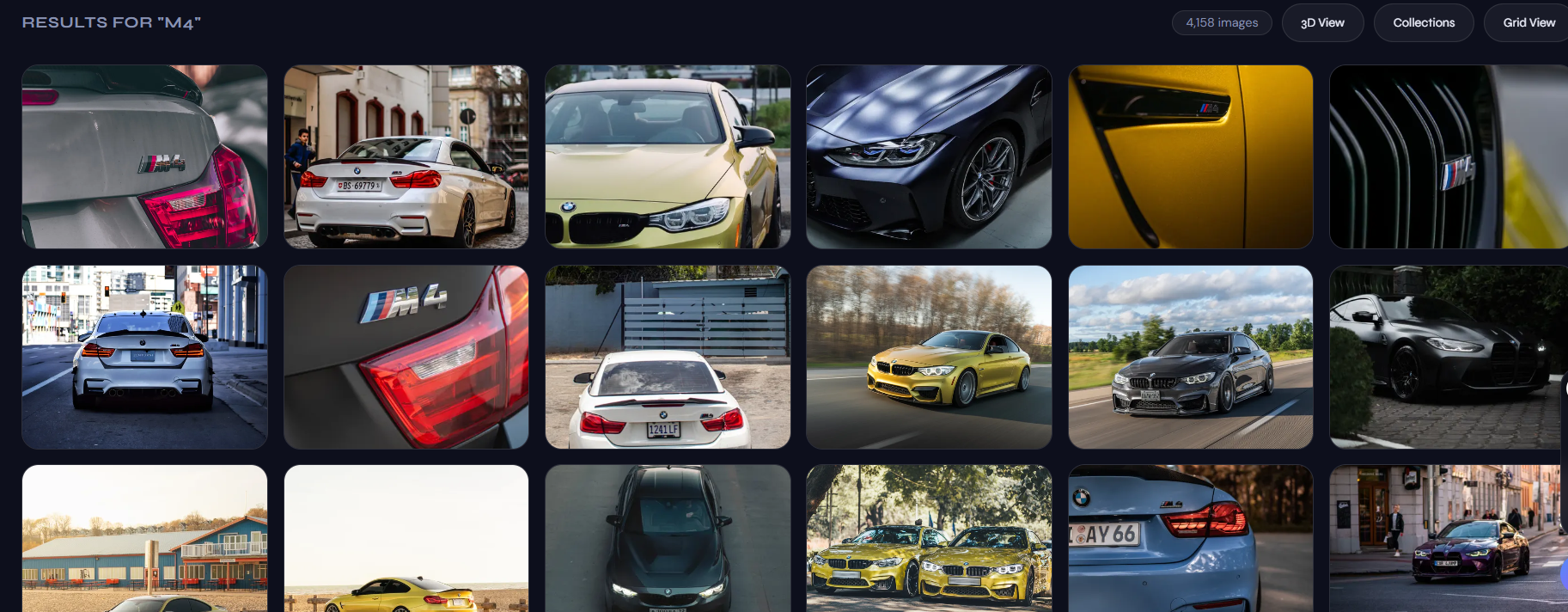


Image Explorer is designed to work across different screen sizes.
🖥️ Desktop
       ↓
💻 Laptop
       ↓
📱 Tablet
       ↓
📱 Mobile
The layout automatically adapts to different screen sizes using responsive CSS.
This project helped implement several important JavaScript concepts:
- DOM Manipulation
- Event Listeners
- Fetch API
- Async/Await
- Promises
- JSON Handling
- API Integration
- LocalStorage
- Dynamic HTML Generation
- Modal Components
- File Upload Handling
- Error Handling
- Responsive UI interactions
Building Image Explorer helped me improve my practical understanding of:
I learned how to create responsive and interactive interfaces using HTML and CSS.
I practiced real-world JavaScript concepts including API requests, asynchronous programming, DOM manipulation, and event handling.
I learned how to work with third-party APIs and dynamically display external data inside a web application.
I learned how browser storage can be used to save user information and maintain sessions.
I improved my understanding of modern layouts, animations, hover effects, responsive design, and user interaction.
The project can be extended with many exciting features.
- ❤️ Like / Favorite Images
- ⭐ Save Favorite Images
- 🗂️ Create Image Collections
- 🌙 Dark / Light Mode
- 🔎 Advanced Filters
- 📐 Image Orientation Filters
- 🎨 Color-based Search
- 📜 Search History
- 🔐 Backend Authentication
- ☁️ Cloud Image Storage
- 👤 User Profiles
- 🧠 AI-powered Image Search
- 📱 Progressive Web App Support
This project uses browser LocalStorage for demonstration purposes.
It should not be considered a secure authentication system for production applications.
For a production-ready application, authentication should be handled using:
Frontend
   ↓
Backend API
   ↓
Authentication System
   ↓
Secure Database
Passwords should never be stored as plain text.
Contributions are welcome!
If you have an idea that can improve Image Explorer:
git forkgit checkout -b feature/your-featureImprove the project or add a new feature.
git commit -m "Add new feature"git push origin feature/your-featureSubmit your Pull Request on GitHub.
If you found this project useful or interesting, consider giving it a ⭐ on GitHub.
It really helps and motivates me to build more projects! ❤️
Passionate about building modern, responsive and interactive web applications.
🖼️ Image Search
⚡ Real-Time API Integration
📤 Image Upload
⬇️ Instant Download
🔐 Authentication
💾 LocalStorage
🎨 Modern UI
📱 Responsive Design
🚀 Pure JavaScript
Built to learn. Built to improve. Built to create.
⭐ If you like this project, don't forget to star the repository!
© 2026 Vishesh Jaiswal — Image Explorer