
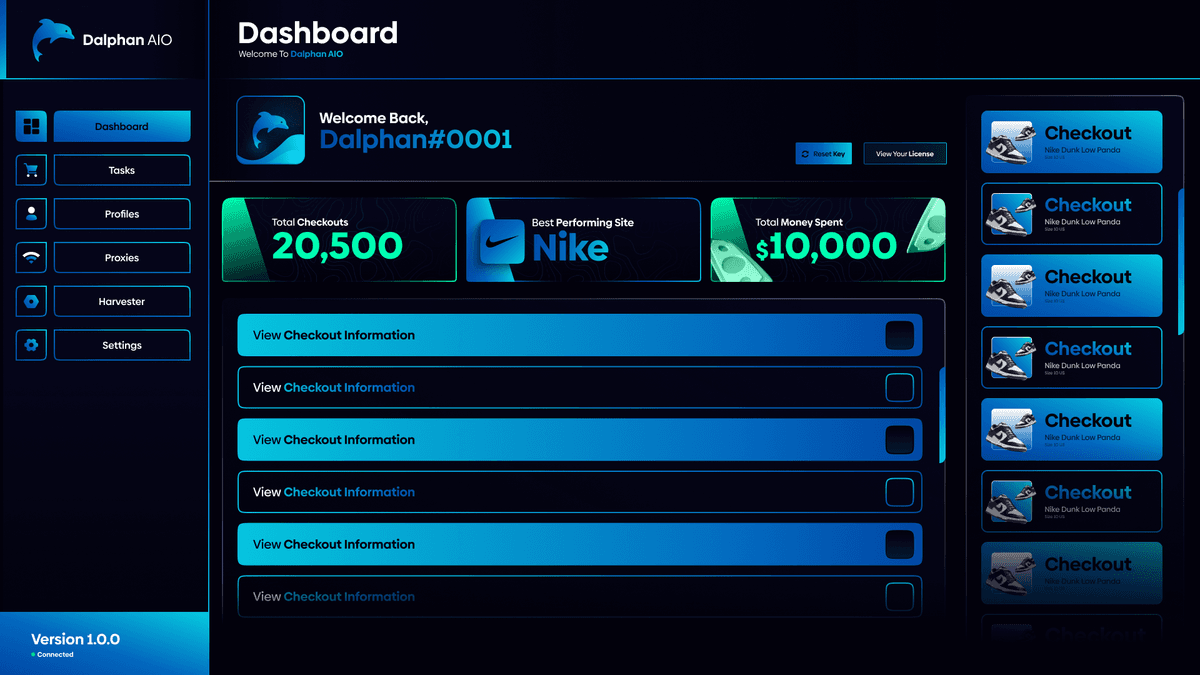
DalphanAIO is a bot software designed to streamline and optimize online purchases by automating the buying process across multiple platforms. Leveraging multiple programming languages, DalphanAIO was created to meet modern industry standards.
- DalphanAIO was able to reduce checkout times by up to 75%.
- Designed and implemented intuitive user interfaces for the bot, utilizing Electron, React, Redux and Figma for frontend design.
- Architected and developed the core functionalities of DalphanAIO, writing robust and efficient code primarily in Typescript and Golang.
- Developed and integrated various APIs to enable seamless interactions between DalphanAIO and online retail platforms, ensuring compatibility and functionality.
Well here it is. After working on DalphanAIO for 2 years, and battling in my head about whether or not to publish the code, I've decided on doing it. I've removed any secrets or urls to the actual fully working version, but everything else is there. I still believe you can pull the modules from the last update I've pushed. I've modified other parts of the bot to allow anyone to just download the code and run it without needing a key anymore.
DalphanAIO is a electron-based desktop application, designed to checkout products online while also sneaking by cybersecurity checks. 2 years ago I started working on DalphanAIO due to being unsatisfied with current products on the market. I figured I could create something better, so I began research and development. The first iteration of DalphanAIO came to fruition about 2 months into research, and was known as IonAIO. This was created without any React, just HTML, CSS, and Node.js. It ran like shit, and at the time, I had no idea how I was going to handle automatic updates, or modules running in the backend. I was just writing code as I went. After about a month of this version, IonAIO was renamed to TalonAIO, where it underwent further development for another month before being scrapped to rebuild from scratch.
At this point, I've heard of React, and decided it was my best bet to solve all the issues I was having developing purely in HTML and CSS. This is when I started developing the 2nd version of DalphanAIO. I developed this version for close to a year, all the way up into the point where we were actually having users test on drops! However, in this testing phase, I noticed the amount of critical bugs and design flaws the software had. Sadly I came to the conclusion, I needed to start from scratch again, this time using TypeScript and Redux.
Now having React, Redux, and TypeScript under my belt, I began development on the final version of DalphanAIO. I worked on this final version for another year before completing what I ultimately set out to do 2 years ago. This time, Redux helped to manage states across the app even when swapping pages and unrendering components. TypeScript helped eliminate majority of my bugs before they ever made it to production. Finally it came down to adding auto-updating and module support for the bot. I decided on using Go and developing my own request libary Turbo to write the task modules for DalphanAIO. Go was perfect as it allowed me to really tweak the fine details and maximize performance. Then using DigitalOcean, I hosted these files on a space/container (forget what its called exactly) and set up Electron's auto-updater to integrate with the space. From there I finalized with GitHub Actions to automatically deploy updates to the servers and DalphanAIO was complete.
I could not be more grateful to my past self for deciding to embark on this journey. It has taught me so much about being a full stack developer that I don't think any internship or entry level job could provide to someone. I am happy and sad at the same time to publicize this code to you today, but I hope it helps someone else out that wants to learn or become a better developer. Thanks to Santiago for helping build DalphanAIO, and thank you to every user I ever had. I figured it was time to step away from DalphanAIO and pursue other goals, but I do not regret a day spent working on this project. Thank you again to everyone involved.
~ Thomas

Start the app in the dev environment:
npm start