HTML Dashboard

The optional dashboard provides operators a live browser view of lobby health, player counts, routing activity, affinity, and the active configuration summary. It uses a dedicated port configured in navigator.toml.
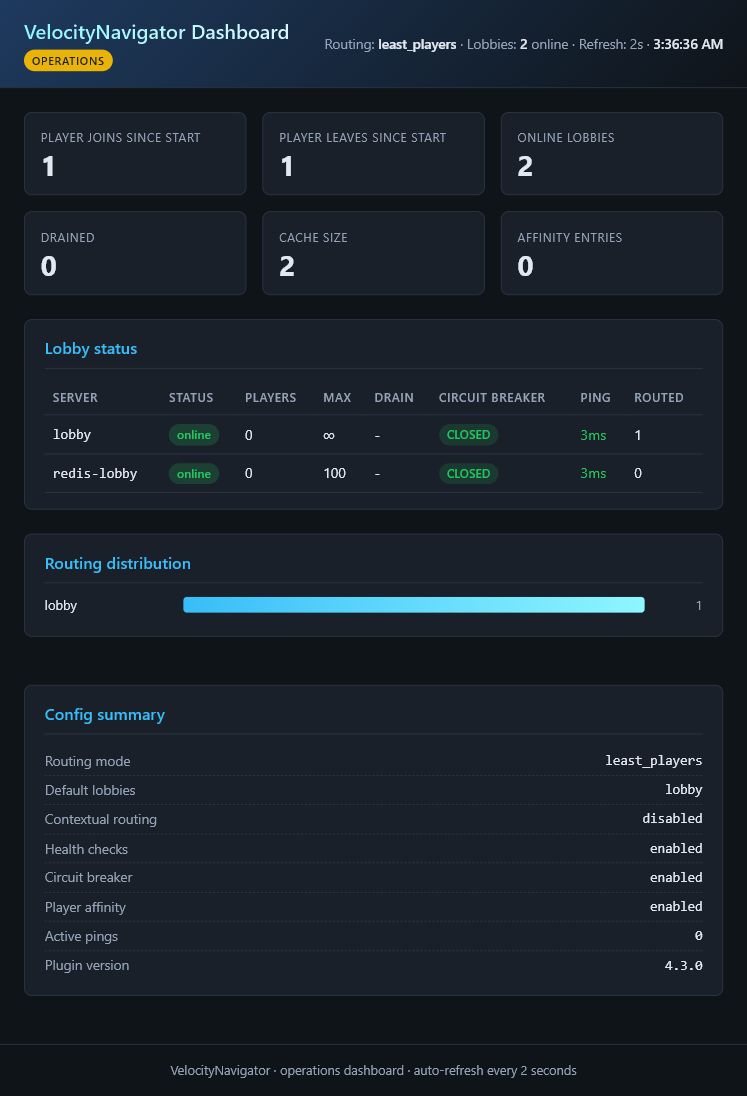
This capture shows a running proxy with one configured lobby and one Redis-discovered lobby. Dynamic servers appear alongside configured servers and show their advertised capacity.
[dashboard]
enabled = true
port = 9226
bind_host = "127.0.0.1"
bearer_token = "choose-a-long-random-token"
refresh_seconds = 5
127.0.0.1 represents the local loopback address, not a public IP. The values above serve as examples. Assign a port provided by your hosting provider and select a bind address valid within your server or container.
| Where Velocity runs | bind_host |
port |
Address you open |
|---|---|---|---|
| Your own machine, local access only | 127.0.0.1 |
Any unused port | http://127.0.0.1:<port>/ |
| Pterodactyl or another container panel | Usually 0.0.0.0
|
A separate port allocated by the provider | Your provider's node address or assigned domain plus that port |
| Behind a reverse proxy |
127.0.0.1 or a private interface |
Any private unused port | Your HTTPS dashboard domain |
Avoid copying a provider's public IP into bind_host unless explicitly documented. bind_host defines the local interface the plugin listens on. It is not the browser address. A configured token prompts for authentication before data loads.
- current lobby health, state, latency, and player count
- routing distribution and live counters since the proxy started
- current number of saved affinity records
- routing mode and important feature settings
The dashboard displays live proxy data. It functions as an operations view, not a historical database. Counters reset on proxy restart.
| Field | Meaning |
|---|---|
| Player joins / leaves | Connections and disconnections observed since the proxy started. They do not equal current online players. |
| Online lobbies | Tracked lobbies holding a current online health sample. |
| Drained | Lobbies intentionally excluded from new routing. |
| Cache size | Health records held by the proxy. |
| Affinity entries | Players assigned to specific lobbies. |
| Active pings | Health-check ping requests currently in flight. |
| Field | Meaning |
|---|---|
| Players | Player count from the latest health sample. |
| Capacity | Configured or dynamically advertised max_players. Uncapped servers lack limits. |
| Latency | Measured backend ping time. An unavailable value indicates a missing sample. |
| Routed | Successful routing decisions assigned to that lobby since the proxy started. |
| Drained | Denotes paused routing. |
| Circuit |
CLOSED permits routing. OPEN blocks routing after failures. HALF_OPEN performs a recovery probe. |
The routing distribution logs decisions made by VelocityNavigator. It is not a billing or long-term traffic report.
The port and bind address are configurable. 127.0.0.1 secures the listener, restricting connections to the proxy machine. Hosting-panel users must secure a separate dashboard port and define it under port. Use 0.0.0.0 for container requirements, securing it with a strong bearer_token and provider firewall rules.
The internal listener handles HTTP. Place a trusted reverse proxy in front for HTTPS access over a private address.
| Problem | Check |
|---|---|
| Page does not open | Verify enabled, port, bind address, and firewall settings. |
| Address already in use | Select another unused or allocated port and reload. |
| Cannot assign requested address | The bind_host is invalid on the machine. Panel users often require 0.0.0.0. |
| Token is rejected | Enter the case-sensitive value precisely. |
| Another computer cannot connect | Avoid 127.0.0.1 for remote access. Bind to a private interface and configure a firewall rule. |
| Values look empty | Join through the proxy and await a health-check cycle. |
After changes, execute /vn reload and verify the dashboard address in the proxy log.

Getting Started
Routing
- Routing Algorithms
- Algorithm Visualizations
- Initial Join Balancing
- Contextual Routing Guide
- Player Affinity
- Health & Circuit Breakers
- Retries & Fallbacks
- Geo Routing
Player Experience
- Java & Bedrock Selectors
- Selector Customization
- Backend NPCs
- Backend YAML Menus
- Language Packs
- Party System
- Capacity Queue
Configuration
- Configuration Guide
- Modular Configuration
- MOTD Configuration
- Authentication & Security
- Backend Bridge Configuration
- Migration Guide v3 → v4
- Migration Guide v4.4 → 4.5
Network & Operations
- Advanced Proxy Systems
- Redis & Multi-Proxy
- Common Core Architecture
- NavigatorAPI
- Storage & Databases
- Server Management
- Backend Lifecycle States
- Maintenance Mode
- HTML Dashboard
- Operations Runbook
- Prometheus & Grafana Setup
- Troubleshooting Guide
- FAQ
VelocityNavigator 4.5.0