
Watch: Benchmarking C# Safe Arrays vs Unsafe Pointers (and why Safe won).



StructForge is a high-performance, zero-allocation data structures library for .NET and Unity.
Designed for performance-critical applications like Game Engines, Real-Time Systems, and High-Frequency Trading, StructForge bridges the gap between standard collections and raw memory manipulation. It focuses on CPU cache locality, hardware intrinsics (SIMD), and minimizing Garbage Collector (GC) pressure.
Benchmarks performed on Intel Core i7-13650HX, .NET 8.0.
| Data Structure | Benchmark Scenario | Comparison (vs .NET) | Speedup | Memory |
|---|---|---|---|---|
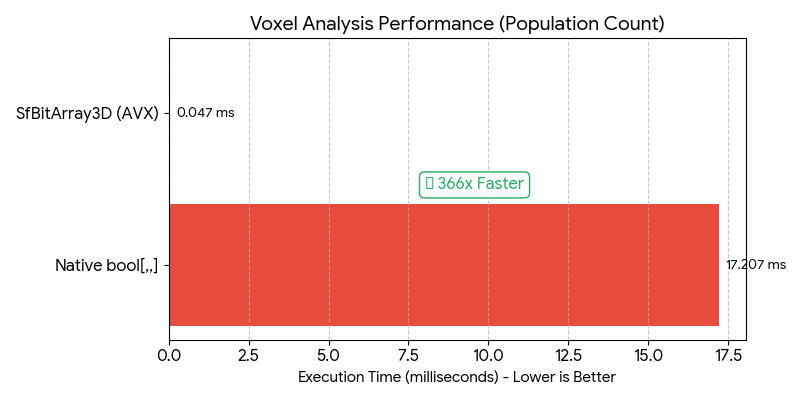
| SfBitArray3D | Voxel Analysis (PopCount) | vs bool[,,] Loop |
🚀 366x Faster | 8x Less RAM |
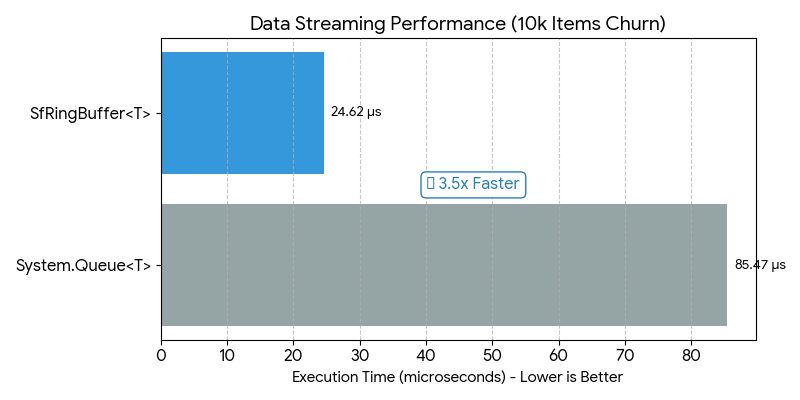
| SfRingBuffer | Data Streaming (Churn) | vs Queue<T> |
🔥 3.5x Faster | Zero Alloc |
| SfBitArray | Logical Masking (AND) | vs bool[] Loop |
⚡ 40x Faster | 8x Less RAM |
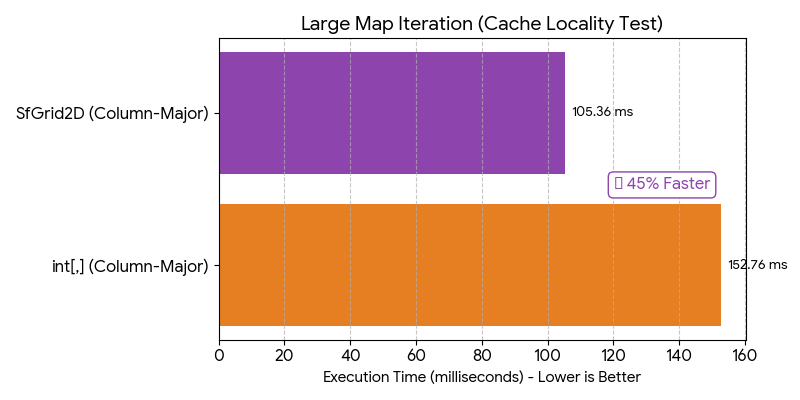
| SfGrid2D | Column-Major Iteration | vs int[,] |
✅ 1.45x Faster | Cache Friendly |
| SfList | Foreach Iteration | vs List<T> |
✅ 1.1x Faster | Zero Alloc |
| Benchmark Scenario | Speedup Analysis |
|---|---|
| 1. 3D Voxel Analysis (Native bool[,,] vs SfBitArray3D)Native arrays struggle with large 3D datasets due to memory overhead. StructForge leverages CPU SIMD instructions (PopCount) to process 64 blocks in parallel. |
 |
| 2. Data Streaming (System Queue<T> vs SfRingBuffer)Standard queues perform array resizing and version checks. SfRingBuffer optimizes throughput by removing modulo arithmetic and utilizing simpler branching logic. |
 |
| 3. Grid Iteration (Native int[,] vs SfGrid2D)Multi-dimensional arrays often cause CPU cache misses during column-major traversal. StructForge's flattened 1D layout ensures linear memory access patterns. |
 |
Detailed benchmark results and methodology can be found in the Benchmarks folder.
All collections in StructForge use custom struct Enumerators.
foreachloops allocate 0 bytes of garbage.- Eliminates GC spikes in hot paths (e.g., Game Loops / Update methods).
- Significantly faster iteration than standard
IEnumerable<T>boxing.
All array-backed structures expose their internal data safely via AsSpan() and AsReadOnlySpan().
- Allows users to perform Zero-Copy operations.
- Enables extremely fast binary serialization using
MemoryMarshal.
SfGrid2D/SfGrid3D: Uses flattened 1D arrays (z*w*h + y*w + x) to maximize CPU cache hits, unlike .NET's multi-dimensional arrays which can cause cache misses during column-major traversal.SfBitArrayFamily: Bit-packed structures (1D,2D,3D) for boolean maps (Fog of War, Collision), using 8x less memory thanbool[].
Install via NuGet Package Manager:
dotnet add package StructForgeStructForge is fully compatible with Unity 2021.3+ and includes .asmdef files.
Method 1: Install via Git URL (Recommended) You can install directly from Unity Package Manager without extra tools.
Open Unity -> Window -> Package Manager.

Click the "+" button (top-left) -> "Add package from git URL...".

Enter the following URL:

[https://github.com/FurkanKirat/StructForge.git?path=/StructForge](https://github.com/FurkanKirat/StructForge.git?path=/StructForge)
Note: The ?path=/StructForge suffix is required because the package source is located in a subdirectory.
Method 2: Install via OpenUPM If you use openupm-cli, run this command in your project folder:
Bash
openupm add com.kankangames.structforge
Method 3: Manual Installation Download the latest Source Code (zip) from Releases.
SfList<T>: High-performance dynamic array. Supports AsSpan(), RemoveAtSwap (O(1) removal), and direct array access.
**SfEnumSet<TEnum>: Bitmask-based set for Enums. Allocates 2x less memory and performs operations up to 1.7x faster than HashSet.
SfGrid2D<T> / SfGrid3D<T>: Cache-friendly spatial grids. Proven to be up to 45% faster than native arrays in complex iterations.
SfBitArray / SfBitArray2D / SfBitArray3D: SIMD-accelerated bit manipulation structures using hardware intrinsics (POPCNT).
SfRingBuffer<T>: Fixed-size circular buffer. Guaranteed Zero-Allocation on enqueue/dequeue. Ideal for input history, logs, and network packets.
SfAvlTree<T>: A strictly balanced Binary Search Tree. Faster insertions than .NET SortedSet in benchmarks.
SfSortedSet<T>: Backed by SfAvlTree. Provides sorted iteration using a pooled stack buffer (avoiding recursion overhead).
SfBinaryHeap<T>: Array-backed Min-Heap. Can be used as a high-performance Priority Queue.
SfPriorityQueue<TItem, TPriority>: A wrapper around SfBinaryHeap for ease of use with separate priority values.
SfHashSet<T>: Open-addressing hash set with struct enumerators. Optimized for iteration speed.
SfStack<T> / SfQueue<T>: Optimized implementations using StructForge's underlying array logic for consistent API and performance.
SfEnumSet uses bitwise operations instead of hashing, making it perfect for RPG stats or inventory flags.
var buffs = new SfEnumSet<Buffs>();
buffs.Add(Buffs.Haste);
buffs.Add(Buffs.Strength);

var debuffs = new SfEnumSet<Buffs>(Buffs.Slow);

// Allocates 272 bytes vs 568 bytes (HashSet)
// Executes ~40% Faster than HashSet.ExceptWith
buffs.ExceptWith(debuffs);Iterating over SfList uses a public struct Enumerator, completely avoiding the boxing overhead of IEnumerable<T>.
var entities = new SfList<Entity>(1000);
// ... populate list ...

// 0 GC Allocation here!
foreach (var entity in entities)
{
    entity.Update();
}Using SfBitArray3D to check 2 million voxels takes microseconds thanks to CPU Intrinsics.
// Stores 128x128x128 world (2M blocks) in ~256 KB RAM (vs 2MB for bool[])
var voxels = new SfBitArray3D(128, 128, 128);

voxels.SetUnchecked(10, 50, 10, true);

// Hardware Accelerated PopCount (~360x Faster than loop)
int activeBlocks = voxels.CountTrue(); Since SfGrid stores data contiguously, you can cast it to bytes and write to disk instantly without intermediate buffers.
public void SaveTerrain(SfGrid2D<int> terrain, Stream stream)
{
    // 1. Get data as Span (No Copy)
    ReadOnlySpan<int> data = terrain.AsReadOnlySpan();

    // 2. Reinterpret as Bytes (User-side optimization)
    var bytes = System.Runtime.InteropServices.MemoryMarshal.AsBytes(data);

    // 3. Write to disk instantly
    stream.Write(bytes);
}Ideal for scenarios where you need to keep the last N items without generating garbage.
var logs = new SfRingBuffer<string>(100); // Fixed capacity

// When full, it automatically overwrites the oldest item.
// No resizing, No memory allocation.
logs.Enqueue("Player joined");
logs.Enqueue("Game started");

foreach (var log in logs)
{
    Console.WriteLine(log);
}Thread Safety: StructForge collections are not thread-safe by default. This is a design choice to ensure maximum single-threaded performance (avoiding locking overhead). Use external synchronization if accessing from multiple threads.
SfDictionary: Temporarily removed in v1.3.0 to re-architect for strict zero-allocation standards. Use SfHashSet for unique collections or standard .NET Dictionary for key-value pairs.
Distributed under the MIT License. See LICENSE for more information.