





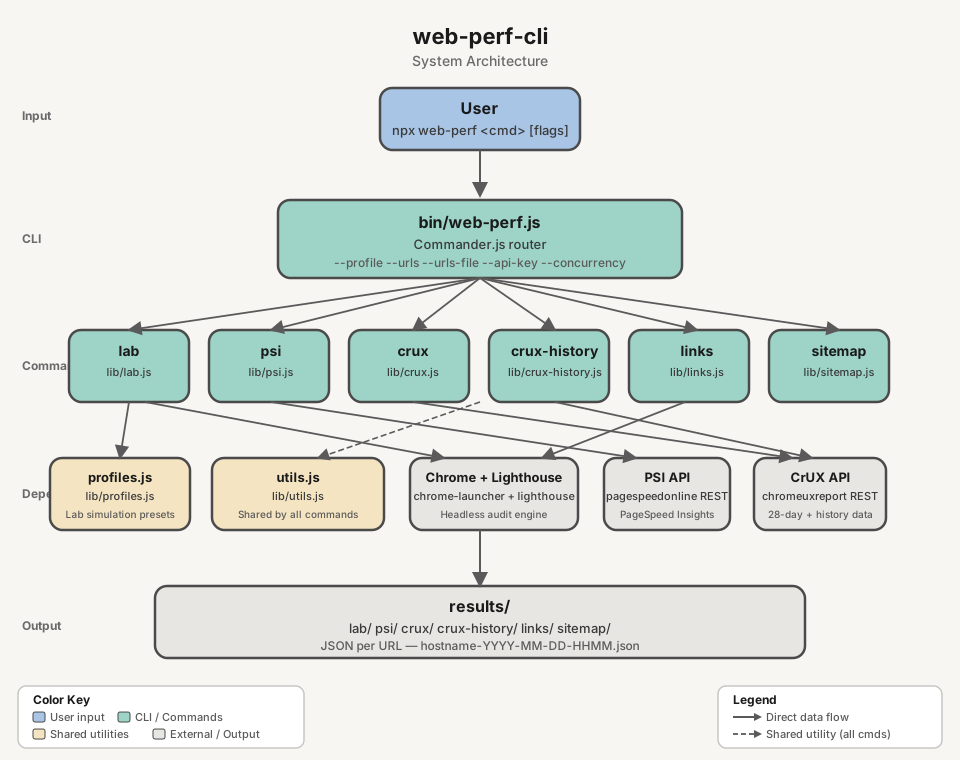
Node.js CLI and library for web performance auditing. Analyze any website using local Lighthouse audits, real-user metrics from PageSpeed Insights, Chrome UX Report data via the CrUX API, or extract URLs from sitemaps and rendered pages.
- Node.js >= 18
- Google Chrome installed locally (required for
labandlinks) - Google Cloud API key with PageSpeed Insights API and/or CrUX API enabled (required for
psi,crux,crux-history) — pass inline with--api-key, via a file with--api-key-path, or setWEB_PERF_PSI_API_KEY(key) orWEB_PERF_PSI_API_KEY_PATH(file path) environment variable
# Local Lighthouse audit
web-perf lab https://example.com

# PageSpeed Insights (real-user data)
web-perf psi --api-key=<YOUR_KEY> https://example.com

# CrUX data (28-day rolling average)
web-perf crux --api-key=<YOUR_KEY> https://example.com

# Historical CrUX trends (~6 months)
web-perf crux-history --api-key=<YOUR_KEY> https://example.comCreate an API key in the Google Cloud Console under APIs & Services > Credentials, with the following APIs enabled:
- PageSpeed Insights API — required for
psi - Chrome UX Report API — required for
cruxandcrux-history
Note: After enabling the Chrome UX Report API, it may take a few minutes for the API key to become effective.
# Inline
web-perf psi --api-key=<YOUR_KEY> <url>
web-perf crux --api-key=<YOUR_KEY> <url>

# From file (plain text, key only)
web-perf psi --api-key-path=<path-to-file> <url>

# Via environment variable (inline key)
export WEB_PERF_PSI_API_KEY=<YOUR_KEY>
web-perf psi <url>

# Via environment variable (file path)
export WEB_PERF_PSI_API_KEY_PATH=<path-to-key-file>
web-perf crux <url>web-perf <command> [options] <url>Available commands: lab, psi, crux, crux-history, links, sitemap, list-profiles, list-networks, list-devices.
| Command | Source | Result | Options |
|---|---|---|---|
lab |
Local Lighthouse audit (headless Chrome) | JSON report with performance scores and Web Vitals | --profile, --network, --device, --urls, --urls-file, --skip-audits, --blocked-url-patterns, --no-strip-json-props |
psi |
PageSpeed Insights API (real-user data + Lighthouse) | JSON with field metrics and lab scores | --api-key, --api-key-path, --urls, --urls-file, --category, --concurrency, --delay |
crux |
CrUX API (origin or page, 28-day rolling average) | JSON with p75 Web Vitals and metric distributions | --scope, --api-key, --api-key-path, --urls, --urls-file, --concurrency, --delay |
crux-history |
CrUX History API (~6 months of weekly data points) | JSON with historical Web Vitals over time | --scope, --api-key, --api-key-path, --urls, --urls-file, --concurrency, --delay |
sitemap |
Domain's sitemap.xml (recursive, auto-detects sitemap URLs) |
JSON list of all URLs found | --depth, --delay, --output-ai |
links |
Rendered DOM via headless Chrome (SPA-compatible) | JSON list of internal links | --output-ai |
list-profiles |
— | Prints available simulation profiles | — |
list-networks |
— | Prints available network presets | — |
list-devices |
— | Prints available device presets | — |
Runs a full Lighthouse audit in headless Chrome and saves the JSON report. Supports simulation profiles to test under different device and network conditions.
# Default (Lighthouse defaults: Moto G Power on Slow 4G)
web-perf lab <url>

# Single profile
web-perf lab --profile=low <url>
web-perf lab --profile=high <url>

# Multiple profiles (comma-separated)
web-perf lab --profile=low,high <url>

# All profiles (low, medium, high)
web-perf lab --profile=all <url>

# Granular control
web-perf lab --network=3g --device=iphone-12 <url>

# Profile with partial override (low device + wifi network)
web-perf lab --profile=low --network=wifi <url>

# Skip specific audits
web-perf lab --skip-audits=full-page-screenshot,screenshot-thumbnails <url>

# Block URL patterns (prevent asset downloads during audit, e.g. analytics, ads)
web-perf lab --blocked-url-patterns='*.google-analytics.com,*.facebook.net' <url>
web-perf lab --profile=low --blocked-url-patterns='*.ads.example.com' <url>

# Strip unneeded properties (i18n, timing) from JSON output (default: enabled)
web-perf lab --profile=low <url>  # JSON excludes i18n, timing
web-perf lab --no-strip-json-props <url>  # JSON includes all properties (raw Lighthouse output)

# Multiple URLs (<url> argument is ignored when --urls or --urls-file is provided)
web-perf lab --urls=<url1>,<url2> --profile=low
web-perf lab --urls-file=<urls.txt> --profile=all| Parameter | Required | Description |
|---|---|---|
<url> |
Yes* | Full URL to audit (e.g. https://example.com). Ignored when --urls or --urls-file is provided |
--profile <preset> |
No | Simulation profile(s): low, medium, high, native, all (comma-separated) |
--network <preset> |
No | Network throttling: 3g-slow, 3g, 4g, 4g-fast, wifi, none |
--device <preset> |
No | Device emulation: moto-g-power, iphone-12, iphone-14, ipad, desktop, desktop-large |
--urls <urls> |
No | Comma-separated list of URLs to audit |
--urls-file <path> |
No | Path to a file with one URL per line |
--skip-audits <audits> |
No | Comma-separated Lighthouse audits to skip. Default: full-page-screenshot,screenshot-thumbnails,final-screenshot,valid-source-maps |
--blocked-url-patterns <patterns> |
No | Comma-separated URL patterns to block during the audit (e.g. *.google-analytics.com,*.facebook.net). Uses Chrome DevTools Protocol to prevent matching assets from being downloaded |
--no-strip-json-props |
No | Disable stripping of unneeded properties (i18n, timing) from JSON output. Omit or leave blank to strip (default). See ADR-001 for rationale |
Run list-profiles, list-networks, or list-devices to see all available presets:
Chrome must be installed on the machine.
| Profile | Device | Network | Description |
|---|---|---|---|
low |
Moto G Power | Regular 3G | Budget phone on 3G |
medium |
Moto G Power | Slow 4G | Lighthouse default |
high |
Desktop 1350x940 | WiFi | Desktop on broadband |
native |
No emulation | No throttling | Actual device (no emulation, no throttling) |
When --network or --device are used together with --profile, the granular flags override the corresponding part of the profile. For example, --profile=low --network=wifi keeps the Moto G Power device but switches the network to WiFi.
web-perf list-profiles
web-perf list-networks
web-perf list-devices
Output: results/lab/lab-<hostname>-YYYY-MM-DD-HHMM.json
Fetches real-user metrics and Lighthouse results from the PageSpeed Insights API.
# Single URL with inline API key
web-perf psi --api-key=<PSI_KEY> <url>

# Single URL with API key from file (plain text, key only)
web-perf psi --api-key-path=<path-to-key-file> <url>

# Multiple URLs (comma-separated) — <url> argument is ignored if present
web-perf psi --urls=<url1>,<url2>,<url3> --api-key=<PSI_KEY>

# Multiple URLs from file (one URL per line) — <url> argument is ignored if present
web-perf psi --urls-file=<urls.txt> --api-key=<PSI_KEY>

# Parallel processing (10 concurrent requests, 100ms delay between each)
web-perf psi --urls-file=<urls.txt> --api-key=<PSI_KEY> --concurrency=10 --delay=100| Parameter | Required | Description |
|---|---|---|
<url> |
Yes* | Full URL to analyze (e.g. https://example.com) |
--api-key <key> |
No** | PageSpeed Insights API key passed inline |
--api-key-path <path> |
No** | Path to a plain text file containing only the API key |
--urls <list> |
No | Comma-separated list of URLs. When provided, <url> argument is ignored |
--urls-file <path> |
No | Path to a file with one URL per line. When provided, <url> argument is ignored |
--category <list> |
No | Comma-separated Lighthouse categories to include. Values: performance, accessibility, best-practices, seo. Default: all four |
--concurrency <n> |
No | Max parallel API requests when processing multiple URLs. Default: 5 |
--delay <ms> |
No | Delay in ms between requests per worker. Default: 0 (no delay) |
Built-in quota protection: PSI request starts are capped at 4 requests/second globally during batch runs, regardless of --concurrency.
* Not required when --urls or --urls-file is provided.
** A PSI API key is required. Provide it via --api-key, --api-key-path, or the WEB_PERF_PSI_API_KEY / WEB_PERF_PSI_API_KEY_PATH environment variables. CLI flags take precedence.
# Only performance
web-perf psi --category=performance --api-key-path=<key-file> <url>

# Performance and SEO only
web-perf psi --category=performance,seo --api-key-path=<key-file> <url>--api-keyflag (inline key)--api-key-pathflag (file path)WEB_PERF_PSI_API_KEYenv var (inline key)WEB_PERF_PSI_API_KEY_PATHenv var (file path)- Interactive prompt
Output: results/psi/psi-<hostname>-YYYY-MM-DD-HHMM.json (one file per URL)
Queries Chrome UX Report data via the CrUX REST API. Returns a 28-day rolling average of Web Vitals metrics. Supports both origin-level and page-level queries via --scope. Pages need ~300+ monthly visits to have data.
# Origin-level (default)
web-perf crux --api-key=<KEY> <url>

# Page-level
web-perf crux --scope=page --api-key=<KEY> <url>

# Multiple URLs (page scope)
web-perf crux --urls=<url1>,<url2> --api-key=<KEY>
web-perf crux --urls-file=<urls.txt> --api-key=<KEY> --concurrency=10 --delay=100| Parameter | Required | Description |
|---|---|---|
<url> |
Yes* | URL or origin to query |
--scope <scope> |
No | Query scope: origin or page. Default is origin for single URL input, and page when using --urls or --urls-file |
--api-key <key> |
No** | CrUX API key |
--api-key-path <path> |
No** | Path to plain text file containing the API key |
--urls <urls> |
No | Comma-separated URLs (page scope) |
--urls-file <path> |
No | Path to file with one URL per line (page scope) |
--concurrency <n> |
No | Max parallel requests. Default: 5 |
--delay <ms> |
No | Delay between requests in ms. Default: 0 |
Built-in quota protection: CrUX request starts are capped at 2.5 requests/second globally during batch runs, regardless of --concurrency.
* Not required when --urls or --urls-file is provided.
** A CrUX API key is required. Provide via --api-key, --api-key-path, or the WEB_PERF_PSI_API_KEY / WEB_PERF_PSI_API_KEY_PATH environment variables.
Output: results/crux/crux-<hostname>-YYYY-MM-DD-HHMM.json
Queries the CrUX History API for ~6 months of weekly data points. Each data point represents a 28-day rolling average. Supports both origin-level and page-level queries.
# Origin-level (default)
web-perf crux-history --api-key=<KEY> <url>

# Page-level
web-perf crux-history --scope=page --api-key=<KEY> <url>

# Multiple URLs (page scope)
web-perf crux-history --urls=<url1>,<url2> --api-key=<KEY>
web-perf crux-history --urls-file=<urls.txt> --api-key=<KEY> --concurrency=10 --delay=100| Parameter | Required | Description |
|---|---|---|
<url> |
Yes* | URL or origin to query (e.g. https://example.com) |
--scope <scope> |
No | Query scope: origin or page. Default is origin for single URL input, and page when using --urls or --urls-file |
--api-key <key> |
No** | CrUX API key |
--api-key-path <path> |
No** | Path to plain text file containing the API key |
--urls <urls> |
No | Comma-separated URLs (page scope) |
--urls-file <path> |
No | Path to file with one URL per line (page scope) |
--concurrency <n> |
No | Max parallel requests. Default: 5 |
--delay <ms> |
No | Delay between requests in ms. Default: 0 |
Built-in quota protection: CrUX History request starts are capped at 2.5 requests/second globally during batch runs, regardless of --concurrency.
* Not required when --urls or --urls-file is provided.
** A CrUX API key is required. Credential resolution is identical to crux (see above).
Output: results/crux-history/crux-history-<hostname>-YYYY-MM-DD-HHMM.json
Parses a domain's sitemap.xml (including sitemap indexes) and extracts all URLs. Auto-detects if the URL points to a sitemap (.xml extension) or uses <url>/sitemap.xml by default.
web-perf sitemap <url>
web-perf sitemap --depth=3 <url>
web-perf sitemap https://example.com/custom-sitemap.xml
web-perf sitemap --output-ai <url>| Parameter | Required | Description |
|---|---|---|
<url> |
Yes | Domain or sitemap URL (e.g. example.com or example.com/sitemap-pages.xml) |
--depth <n> |
No | Max recursion depth for sitemap indexes. Default: 3 |
--delay <ms> |
No | Delay between requests in ms (randomized ±50ms). Default: 0 |
--output-ai |
No | Generate AI-friendly .txt output (one URL per line, normalized) |
Output: results/sitemap/sitemap-<hostname>-YYYY-MM-DD-HHMM.json
Extracts internal links from the rendered DOM using headless Chrome. SPA-compatible (waits for JavaScript rendering).
web-perf links <url>
web-perf links --output-ai <url>| Parameter | Required | Description |
|---|---|---|
<url> |
Yes | URL to extract links from |
--output-ai |
No | Generate AI-friendly .txt output (one URL per line, normalized) |
Output: results/links/links-<hostname>-YYYY-MM-DD-HHMM.json
| Variable | Command | Description |
|---|---|---|
WEB_PERF_PSI_API_KEY |
psi, crux, crux-history |
API key for PageSpeed Insights / CrUX API |
WEB_PERF_PSI_API_KEY_PATH |
psi, crux, crux-history |
Path to file containing the API key |
CLI flags (--api-key, --api-key-path) always take precedence over environment variables.
All results are saved as JSON files under the results/ directory, organized by command:
results/
├── lab/
│   └── lab-example.com-2026-03-29-1430.json
├── psi/
│   └── psi-example.com-2026-03-29-1430.json
├── crux/
│   └── crux-www.example.com-2026-03-29-1430.json
├── crux-history/
│   └── crux-history-www.example.com-2026-03-29-1430.json
├── links/
│   └── links-www.example.com-2026-03-29-1430.json
└── sitemap/
    └── sitemap-www.example.com-2026-03-29-1430.json
web-perf can be used as a Node.js library. The pure audit functions return data directly — no files written, no disk I/O — making them safe for use in servers and backends.
// CommonJS
const { runCruxAudit, runPsiAudit, runLabAudit } = require('@hugoer/web-perf-cli');

// Subpath imports (load only what you need)
const { runCruxAudit, runCruxAuditBatch } = require('@hugoer/web-perf/crux');
const { runPsiAudit, runPsiAuditBatch }   = require('@hugoer/web-perf/psi');
const { runLabAudit } = require('@hugoer/web-perf/lab');| Function | Module | Returns |
|---|---|---|
runLabAudit(url, options?) |
web-perf/lab |
Promise<LabReport> |
runPsiAudit(url, apiKey, categories?) |
web-perf/psi |
Promise<PsiReport> |
runPsiAuditBatch(urls, apiKey, categories, options?) |
web-perf/psi |
Promise<PsiBatchResult[]> |
runCruxAudit(url, apiKey, options?) |
web-perf/crux |
Promise<CruxReport> |
runCruxAuditBatch(urls, apiKey, options?) |
web-perf/crux |
Promise<CruxBatchResult[]> |
runCruxHistoryAudit(url, apiKey, options?) |
web-perf/crux-history |
Promise<CruxHistoryReport> |
runCruxHistoryAuditBatch(urls, apiKey, options?) |
web-perf/crux-history |
Promise<CruxHistoryBatchResult[]> |
// Single URL
const report = await runCruxAudit('https://example.com', apiKey, { scope: 'origin' });
console.log(report.metrics);

// Batch with progress
const results = await runCruxAuditBatch(urls, apiKey, {
  scope: 'page',
  concurrency: 5,
  onProgress: (done, total, url) => console.log(`${done}/${total}: ${url}`),
});
The CLI wrapper functions (runLab, runPsi, runCrux, runCruxHistory, …) are also exported and behave identically to the CLI commands — they write JSON to disk and return the output file path.
TypeScript type declarations are included and resolve automatically when you install the package. No @types/ package needed.
import { runCruxAudit, runPsiAudit } from '@hugoer/web-perf-cli';
import type { CruxReport, PsiReport, LabReport } from '@hugoer/web-perf-cli';

// Subpath imports also carry types
import { runCruxHistoryAudit } from '@hugoer/web-perf/crux-history';
import type { CruxHistoryReport } from '@hugoer/web-perf/crux-history';
Key exported types:
| Type | Description |
|---|---|
LabReport |
Stripped Lighthouse JSON (categories, audits, formFactor, timing) |
PsiReport |
PageSpeed Insights API response (loadingExperience, lighthouseResult) |
CruxReport |
CrUX 28-day snapshot (metrics, collectionPeriod, scope, key) |
CruxHistoryReport |
CrUX historical snapshot (metrics, collectionPeriods array) |
CruxMetric |
Single CrUX metric (histogram bins, p75 percentile) |
PsiBatchResult |
{ url, data: PsiReport | null, error: string | null } |
CruxBatchResult |
{ url, data: CruxReport | null, error: string | null } |
CruxHistoryBatchResult |
{ url, data: CruxHistoryReport | null, error: string | null } |
# Clone and install dependencies
git clone https://github.com/your-org/web-perf-cli.git
cd web-perf-cli
npm install

# Run the CLI locally
node bin/web-perf.js lab https://example.com| Script | Description |
|---|---|
npm test |
Run all tests (vitest) |
npm run lint |
Lint and auto-fix with ESLint |
npm run generate-types |
Regenerate types/lib/*.d.ts from JSDoc annotations |
Type declarations in types/lib/ are generated from JSDoc @typedef annotations in lib/. Run npm run generate-types after changing any return shape in a run*Audit function, then commit the updated types/ alongside the code change.
npm run generate-types
git add types/ lib/
git commit -m "feat: update CruxReport shape"ISC