
Add an AI coding toolbar to any web app. One command. Zero code changes.








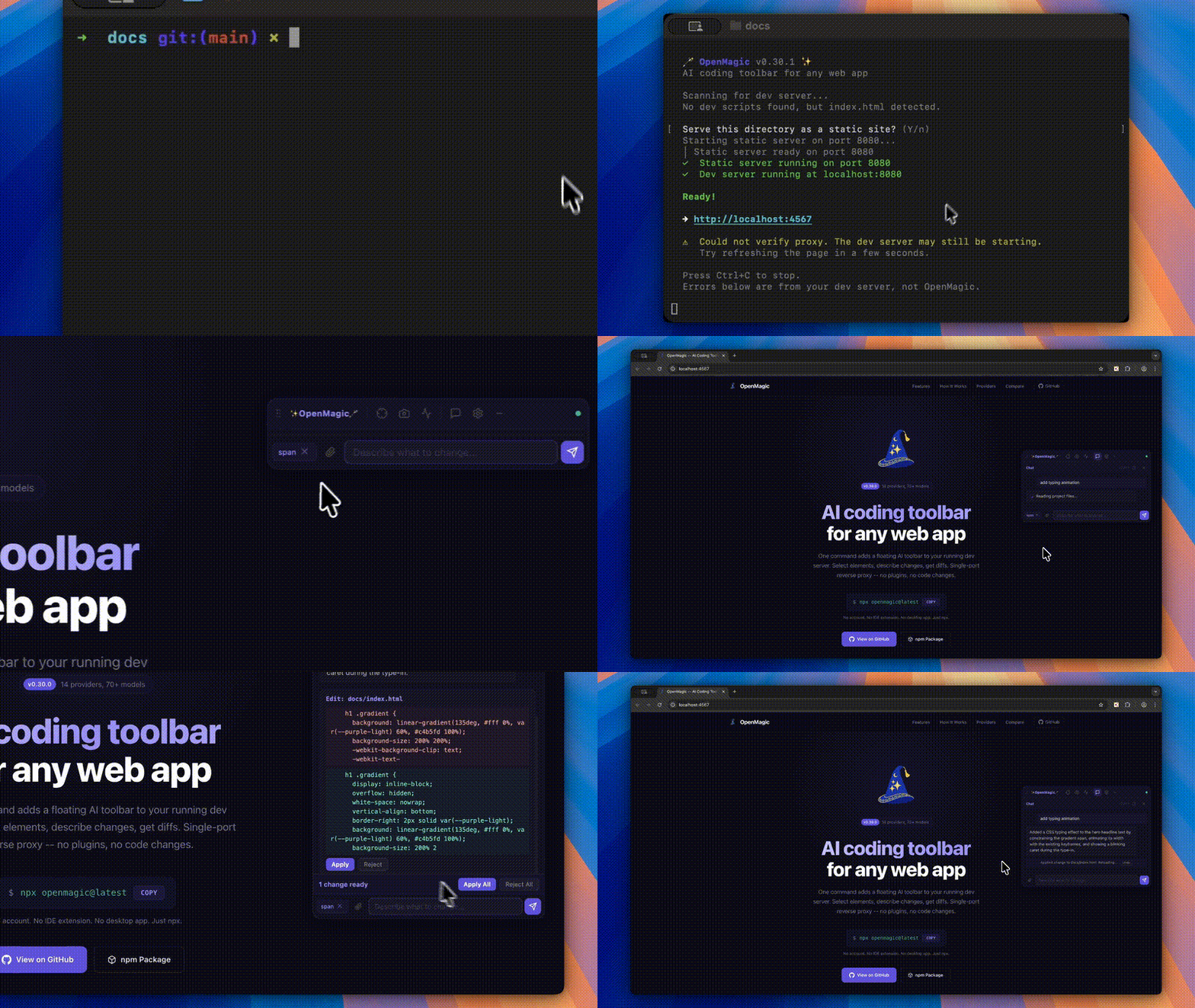
OpenMagic injects a floating AI toolbar into your running web app via reverse proxy. Select any element, describe what you want, review the diff, approve — your code updates and HMR refreshes the page. No framework plugin. No IDE extension. No account. Bring your own API key.
Website · Quick Start · How It Works · Providers · GitHub
# 1. Start your dev server as usual
npm run dev

# 2. In your project folder, run OpenMagic (auto-detects your dev server)
npx openmagic@latest
Run this from your project folder so OpenMagic can find your source files and dev server. A proxied version of your app opens with the toolbar overlaid.
| Feature | Description | |
|---|---|---|
| Select | Element Selection | Click any element to capture its DOM, computed styles, parent layout, siblings, React props, and component name |
| Ground | Smart File Grounding | Reads project files, follows import chains, auto-reads co-located stylesheets and package.json deps |
| Diff | Diff Preview | Approve or reject each change. Undo to revert. Fuzzy line matching handles indentation differences |
| Retry | Auto-Retry | If the LLM requests more files, OpenMagic reads them transparently and retries — no manual intervention |
| Chat | Markdown Chat | Streaming responses, copy buttons, session persistence across HMR reloads |
| Net | Network Profiling | Captures page load timing, TTFB, FCP, and flags slow resources |
| Img | Image Attachments | Drag-drop, paste from clipboard, or use the file picker — vision models analyze screenshots |
| Keys | Per-Provider Keys | Store a key for each provider. Switch models without re-entering credentials |
| KB | Keyboard Shortcuts | Toggle, send, close, minimize — all from the keyboard |
| Min | Minimize to Icon | Collapse the toolbar to a small floating button when you do not need it |
OpenMagic is a single-port reverse proxy. It sits between your browser and your dev server, injecting the toolbar script into HTML responses. Your project is never modified at install time.
                        +-----------------------+
                        |      Your Browser     |
                        |  localhost:4567        |
                        +---+---------------+---+
                            |               |
                      HTTP proxy        WebSocket
                            |               |
  +----------------+    +---+---------------+---+
  | Your Dev Server|    |   OpenMagic Server    |
  | localhost:3000  |<---|                       |
  +----------------+    |  File Read/Write      |
                        |  LLM API Proxy        |
                        |  (your key, localhost) |
                        +-----------------------+
- Proxy -- All requests forward to your dev server. HTML responses get the toolbar
<script>tag appended automatically. - Toolbar -- A Shadow DOM Web Component. Fully isolated from your app's styles.
- Server -- Local Node.js process handling file I/O and proxying LLM calls. API keys never leave your machine.
- HMR -- When the AI modifies source files, your dev server's hot module replacement picks up changes automatically.
Stop with Ctrl+C. Nothing stays behind.
14 providers, 70+ models. All pre-configured — select a provider, pick a model, paste your key.
| Provider | Notable Models | Vision | Thinking / Reasoning |
|---|---|---|---|
| OpenAI | GPT-5.4, GPT-5.4 Pro/Mini/Nano, o3, o4-mini, Codex Mini | Yes | reasoning_effort |
| Anthropic | Claude Opus 4.6, Sonnet 4.6, Haiku 4.5 | Yes | Extended thinking (budget_tokens) |
| Google Gemini | Gemini 3.1 Pro, 3 Flash, 2.5 Pro, 2.5 Flash | Yes | thinking_level |
| xAI (Grok) | Grok 4.20, Grok 4.20 Reasoning, Grok 4.1 Fast | Yes | reasoning_effort |
| DeepSeek | DeepSeek V3.2, DeepSeek R1 | -- | R1: reasoning_effort |
| Mistral | Large 3, Small 4, Codestral, Devstral 2, Magistral | Yes | Magistral: reasoning_effort |
| MiniMax | MiniMax models | Varies | -- |
| Kimi | Kimi models | Varies | -- |
| Qwen | Qwen models | Varies | -- |
| Zhipu | Zhipu (GLM) models | Varies | -- |
| Doubao | Doubao models | Varies | -- |
| Groq | Llama 4 Scout, Llama 3.3 70B, Qwen 3 32B | Llama 4 | -- |
| Ollama | Any local model (free, private) | Varies | -- |
| OpenRouter | 200+ models from all providers | Varies | Varies |
| Shortcut | Action |
|---|---|
Ctrl+Shift+O |
Toggle toolbar open/close |
Ctrl+Enter |
Send message |
Escape |
Close toolbar |
| Minimize button | Collapse to floating icon |
| Option | Description | Default |
|---|---|---|
-p, --port <port> |
Dev server port to proxy | Auto-detect |
-l, --listen <port> |
OpenMagic proxy port | 4567 |
-r, --root <paths...> |
Project root directories | Current directory |
--host <host> |
Dev server host | localhost |
--no-open |
Do not auto-open browser | false |
npx openmagic --port 3000 --root ./frontend --root ./backendSettings persist in ~/.openmagic/config.json (your home directory, never in your project):
{
  "provider": "anthropic",
  "model": "claude-opus-4-6",
  "apiKey": "sk-ant-..."
}ollama pull llama3.3
npx openmagic --port 3000
# Select "Ollama (Local)" as your provider- Localhost only -- The proxy and WebSocket bind to
localhost. Not accessible from the network. - Session tokens -- Each session generates a random token. The toolbar authenticates before accessing any API.
- Path sandboxing -- File operations are restricted to configured root directories. Symlinks that escape the root are rejected.
- API keys stay local -- Keys live in
~/.openmagic/config.json. They are proxied through the local server, never exposed to the browser or any third party. - Zero project modification -- OpenMagic never touches your
package.json, config files, or source code during installation. The toolbar exists only in the proxy layer. - Diff preview -- AI-proposed changes are shown as diffs with Approve/Reject buttons. Nothing is auto-applied without your consent.
- Origin change -- Your app runs on
:3000but you access it via:4567. This can break OAuth redirect URIs,localStorageisolation, and Service Worker scope. Most dev setups work fine, but if your app checkswindow.location.origin, you may need to adjust your dev config. - CSP via meta tags -- OpenMagic strips CSP response headers so the toolbar script can load, but
<meta>tag CSP can't be modified at the proxy level and may still block it. - Not for production -- This is a dev tool. Don't deploy the proxy to production.
| Feature | OpenMagic | Stagewise | Frontman | Agentation |
|---|---|---|---|---|
| Install | npx openmagic |
npm + Electron | Framework middleware | npm package |
| Framework support | Any (reverse proxy) | React, Vue, Angular, Svelte | Next.js, Astro, Vite | React |
| Code modification | Yes (diff + approve) | Yes (via IDE) | Yes | No (clipboard) |
| BYOK | Yes | Paid tiers | Yes | N/A |
| Prompt limits | None | 10 free/day | None | N/A |
| Vision | Yes | Yes | No | No |
| Network profiling | Yes | No | Server-side | No |
| Multi-repo | Yes | No | No | No |
| IDE required | No | VS Code extension | No | No |
| License | MIT | Partial | Apache 2.0 | MIT |
OpenMagic works via reverse proxy, so it supports any framework that serves HTML:
JavaScript/TypeScript -- React, Next.js, Vue, Nuxt, Angular, Svelte, SvelteKit, Astro, Remix, Solid, Qwik, Ember
Server-rendered -- Django, Flask, Rails, PHP (Laravel, WordPress)
Static -- Plain HTML with any HTTP server
PRs are welcome. Bug fixes, new providers, UI improvements, docs.
git clone https://github.com/Kalmuraee/OpenMagic.git
cd OpenMagic
npm install
npm run build
node dist/cli.js --port 3000   # Test with your dev server
See CONTRIBUTING.md for the architecture overview, how to add providers, and PR process.
| Version | Milestone |
|---|---|
| v0.1 - v0.3 | Core reverse proxy, dev server auto-detection, initial toolbar |
| v0.4 - v0.7 | Robustness hardening, Chinese model providers, session auth |
| v0.8 - v0.10 | Complete toolbar rewrite, professional UI, security audit (19 fixes) |
| v0.11 - v0.14 | Single-port architecture, diff preview, per-provider keys, streaming |
| v0.15 - v0.17 | Network profiling, image attachments, HMR WebSocket fixes |
| v0.18 - v0.20 | Full element context (parents, siblings, React props), auto-retry grounding |
| v0.21 - v0.22 | Fuzzy diff matching, import chain following |
| v0.23 - v0.24 | Undo, keyboard shortcuts, minimize, markdown rendering, chat polish |
Khalid Almuraee (@kalmuraee)
MIT -- Copyright (c) 2026 Khalid Almuraee. See LICENSE for details.
BYOK. Any framework. Zero lock-in.
GitHub · Website · npm · Report a Bug · Request a Feature