Credits: This project owes its existence to the foundational work of two developers. The ANSI art scripts were originally created and/or collected by Derek Taylor (DistroTube) in shell-color-scripts, then ported to PowerShell by Scott McKendry as ps-color-scripts.
ColorScripts-Enhancedbuilds on their work with selective output caching for expensive renderers, cross-platform support, an expanded command set, and a formal module structure.













A cross-platform PowerShell module for discovering and displaying ANSI colorscripts, with selective output caching for renderers that are expensive to regenerate.

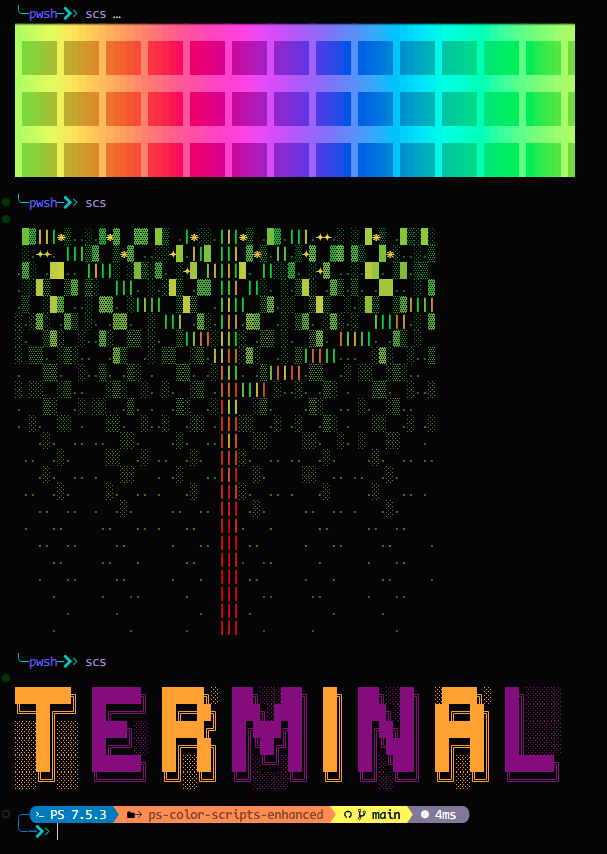
- 🎨 3156+ Colorscripts — Fractals, patterns, characters, nature scenes, and more
- ⚡ Selective Caching — Reuses output for the 15 computational renderers listed in
CachePolicy.psd1; static scripts execute directly - 🌐 Cross-Platform — Works on Windows, macOS, and Linux
- ⚙️ Configurable — Persist cache location, startup behavior, and defaults
- Rich Metadata — Filter the catalog by name, category, and tag or export it as structured data
- 🐾 2500~ Pokémon ColorScripts — Opt-in Pokémon-themed colorscripts
- Note: Pokémon art is filtered by default to keep load times fast. Opt in with
-IncludePokemonon relevant commands.
- Note: Pokémon art is filtered by default to keep load times fast. Opt in with
- 🌍 10 Languages — English, German, Spanish, French, Italian, Japanese, Dutch, Portuguese, Russian, Chinese
- 🧩 Easy to Use — Simple commands with tab completion
- 🗄️ Centralized Cache — OS-wide in
AppData/ColorScripts-Enhanced/cache - 🔄 Auto-Update — Cache invalidates automatically when scripts change
- 📚 Complete Help — Full comment-based help for all commands
# Install from PowerShell Gallery
Install-Module -Name ColorScripts-Enhanced -Scope CurrentUser

# Import and display a random colorscript
Import-Module ColorScripts-Enhanced
Show-ColorScript

# Add to your profile (optional - shows colorscript on every terminal open)
Add-ColorScriptProfile
Requires PowerShell 5.1+. PowerShell 7+ recommended for best performance.
# Show a random colorscript
Show-ColorScript
scs                          # shorthand alias

# Show a specific colorscript
Show-ColorScript -Name "mandelbrot-zoom"
scs pikachu

# List all available colorscripts
Show-ColorScript -List
Get-ColorScriptList

# Filter by category
Get-ColorScriptList -Category Patterns
Get-ColorScriptList -Tag Recommended

# Include Pokémon scripts (opt-in)
Show-ColorScript -IncludePokemon# Build caches only for computationally expensive renderers
New-ColorScriptCache
# Rebuild cache if scripts seem stale
New-ColorScriptCache -Force
# Inspect scripts skipped because caching is unnecessary
New-ColorScriptCache -Name bars -PassThru
# Clear cache if needed
Clear-ColorScriptCache -AllAdd a colorscript to your terminal startup:
# Option 1: Use the built-in helper
Add-ColorScriptProfile

# Option 2: Manually edit your profile
notepad $PROFILE
# Add these lines:
Import-Module ColorScripts-Enhanced
Show-ColorScript

# Option 3: Always include Pokémon art
Add-ColorScriptProfile -IncludePokemon -SkipPokemonPrompt

# Pokémon are opt-in by default
- The module filters Pokémon colorscripts by default to keep startup lean.
- Opt in with `-IncludePokemon` on `Show-ColorScript`, `New-ColorScriptCache`, or `Add-ColorScriptProfile`.
- Direct Pokémon names always work (e.g., `Show-ColorScript -Name Pikachu`) even without `-IncludePokemon`.

# Tip: If Pokémon are filtered by default, specifying a Pokémon script by name still works (e.g., `Show-ColorScript -Name Pikachu`).
Create a custom alias:
Set-Alias -Name cs -Value Show-ColorScript| Command | Alias | Description |
|---|---|---|
Show-ColorScript |
scs |
Display a colorscript (random or by name) |
Get-ColorScriptList |
— | List available colorscripts |
New-ColorScriptCache |
— | Build caches for policy-selected computational scripts |
Clear-ColorScriptCache |
— | Remove cached files |
Add-ColorScriptProfile |
— | Add module to your PowerShell profile |
Get help for any command:
Get-Help Show-ColorScript -ExamplesSome colorscripts use special glyphs that require a Nerd Font. If you see boxes instead of icons:
- Download a Nerd Font (e.g., CascadiaCode, FiraCode, JetBrainsMono)
- Install the font and set it as your terminal font
- Test with:
Show-ColorScript -Name nerd-font-test
Colorscript not displaying correctly?
Show-ColorScript -Name "scriptname" -NoCacheCache seems stale?
New-ColorScriptCache -ForceModule not found?
Get-Module ColorScripts-Enhanced -ListAvailable- PowerShell: 5.1+ (7+ recommended)
- OS: Windows 10/11, macOS 10.13+, or Linux
- Terminal: Any ANSI-capable terminal (Windows Terminal, VS Code, iTerm2, etc.)
📖 User Documentation
🛠️ Developer Documentation
🤝 Contributing & Community

Built upon the work of:
- Derek Taylor (DistroTube) — Original shell-color-scripts
- Scott McKendry — PowerShell port
The collection incorporates art from upstream projects and public archives, including shell-color-scripts, ps-color-scripts, 16colo.rs, ArtScene, and Pokemon-Colorscripts. Those sources may contain work by individual artists whose terms differ from the archive or project that distributes it.
Project-authored code is provided under the Unlicense. Third-party ANSI art and other incorporated works remain subject to their original authors' rights and source terms; the repository license does not relicense those works.
The current catalog predates complete per-file provenance records. New imports should record the source URL, artist or pack attribution, and applicable license or permission so a future THIRD_PARTY_NOTICES inventory can be complete.
Enjoy the colors! 🌈✨

Thanks goes to these wonderful people (emoji key):
 Nick2bad4u 🐛 💻 📖 🤔 🚇 🚧 👀 |
 Scott McKendry 🐛 💻 🎨 📖 💡 🚇 🚧 📦 🔌 👀 ✅ |
 Snyk bot 🛡️ 🚇 🚧 👀 |
 StepSecurity Bot 🛡️ 🚇 🚧 |
![dependabot[bot]](https://avatars.githubusercontent.com/in/29110?v=4?s=80) dependabot[bot] 🚇 🛡️ |
This project follows the all-contributors specification. Contributions of any kind welcome!