Help
- In order to find the root cause of a specific problem, log is written whenever an exception occurs. To Access the log file,
- Open Start Menu
- Search "CompInfoUI"
- Right click on "CompInfoUI" and click on Open File Location. File Explorer will open with this location: "C:\ProgramData\Microsoft\Windows\Start Menu\Programs".
- Right click again on "CompInfoUI.ink", the shortcut file and click on Open file location.
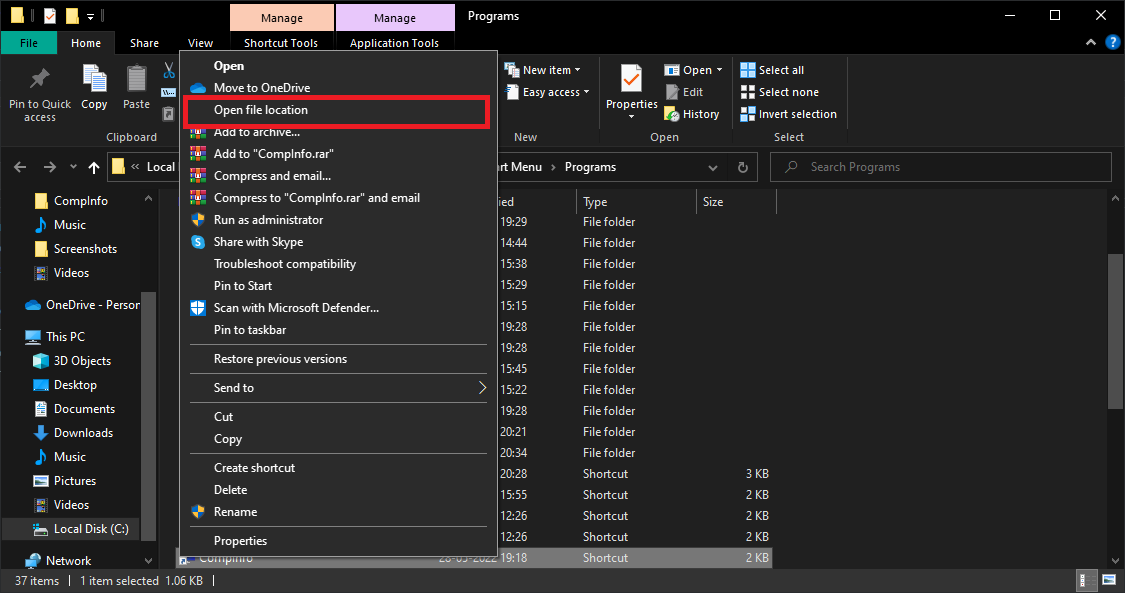
- You will be directed to "C:\Program Files (x86)\CompInfoUI".
- Locate "log_en.txt" in the same folder.
- Open the log file and then according to the date & time, raise an issue here with log text: https://github.com/OceanCyanTech/CompInfo/issues
Hope you find this useful. If not, please raise an issue here: https://github.com/OceanCyanTech/CompInfo/issues