Minimal desktop viewer/editor for Madness-engine EDF/EDFBIN engine files. Quickly inspect, plot, and lightly edit torque curves and common engine parameters using JDougNY’s Project CARS Engine translation mapping (v1.01).
Why: Open an EDF, see what’s inside, export a curve to CSV, tweak values (or scale the whole torque table), and save a copy — no hex editor required.
- Open
*.edf,*.edfx,*.bin - Parse & display
- Torque tables (RPM, compression, torque) with plausibility checks
- Turbo boost tables (RPM vs throttle 0/25/50/75/100%)
- Common parameters (e.g.,
EngineInertia,RevLimit*,EngineFuelMap*,EngineBrakingMap*, cooling, lifetime stats, emissions) - Engine layout hint (best‑effort from known code sequences)
- Unknown regions with hex preview & simple pattern analysis
- Plotting (optional, via
matplotlib)- Torque vs RPM
- Torque vs Compression
- Both side‑by‑side
- Editing
- Double‑click parameters (float/int/byte) to edit safely
- Scale torque globally by a percentage (e.g., 110 for +10%, 90 for −10%)
- Export/Save
- Export torque tables to CSV
- Save a modified EDF to a new file; original remains untouched
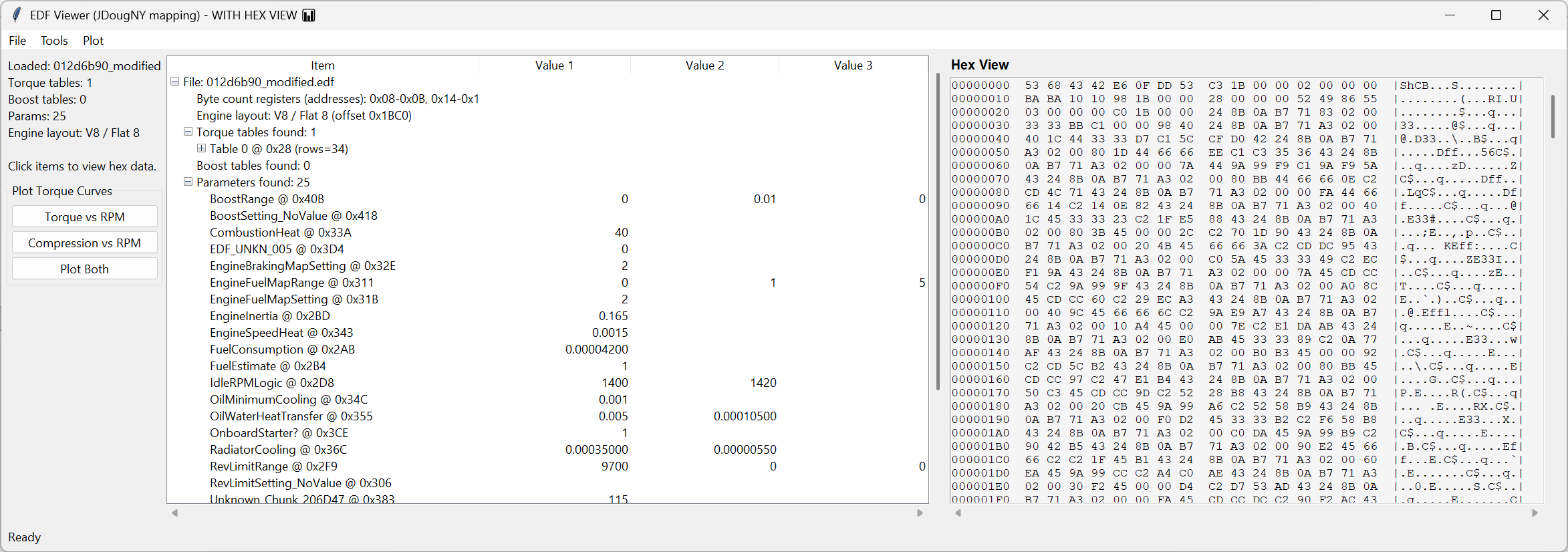
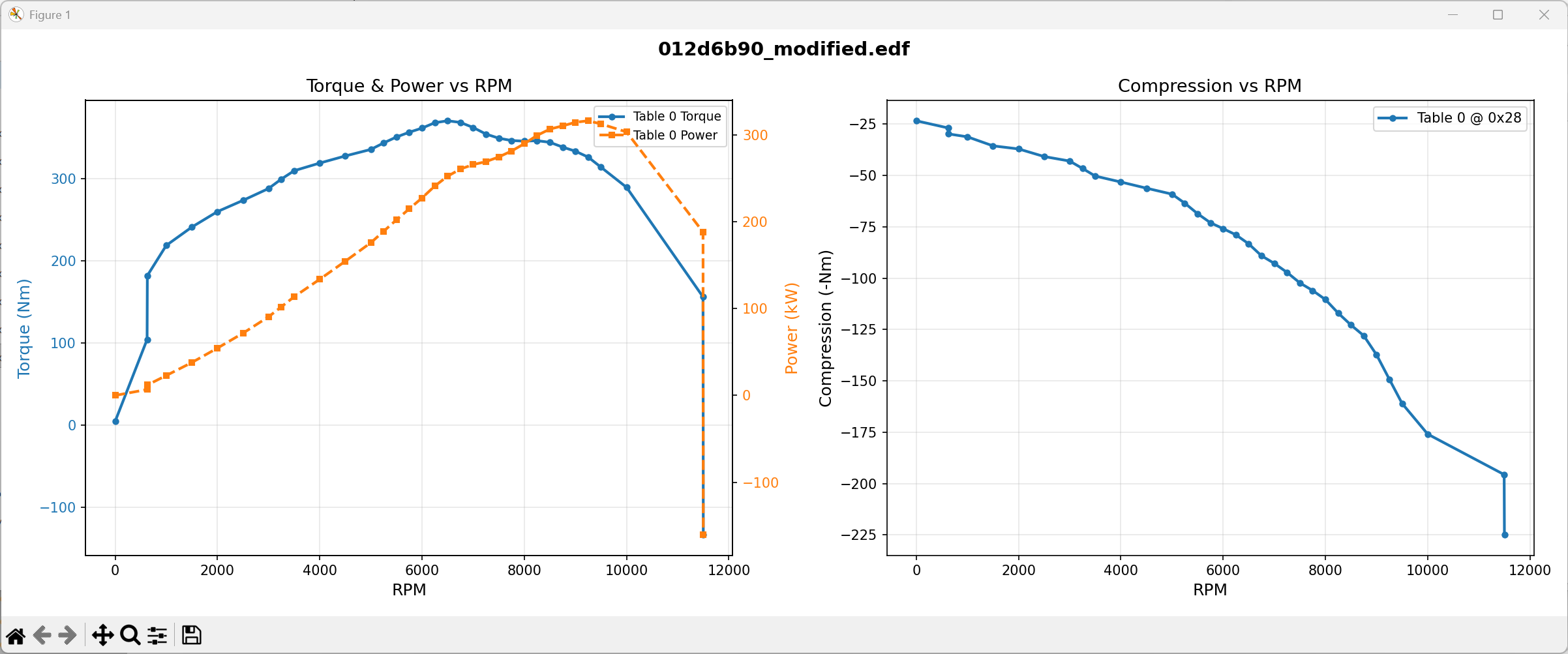


- Python 3.9+
- Standard library:
tkinter,struct,csv,pathlib - Optional for plots:
matplotlib- Install:
pip install matplotlib
- Install:
python edf_tk_viewer.py- File → Open EDF…
- Explore torque/boost tables, parameters, and unknown regions in the tree.
- (Optional) Plot torque curves (requires
matplotlib). - Edit a parameter: double‑click → change → Save in the dialog.
- Tools → Scale Torque Values… to apply a global percentage.
- File → Export torque CSV…
- File → Save Modified EDF… to write a new file.
Changes are applied to an in‑memory copy until you save.
- Detects 0‑RPM rows and subsequent rows (
int32/float/floatorfloat/float/float) - Plausibility checks:
- RPM:
0–25,000 - Torque:
−4,000–10,000 Nm - “Compression” (middle float) displayed/preserved as-is
- RPM:
- Shows hex offsets for traceability
- Throttle columns: 0/25/50/75/100% per RPM
- Typical values expected around 0.5–3.0 bar
- Known signatures → names (from JDougNY mapping), decoded as
float/int/byte - Examples:
EngineInertia,RevLimitSetting/Range/Logic,EngineFuelMap*,EngineBrakingMap*, cooling & lifetime stats, emissions
- Best‑effort match from known sequences near file tail (e.g., Straight‑4/6, V10/V12)
- May report Unknown/Not found for some files
- Computes known byte ranges and lists the gaps
- Hex preview & simple pattern hints (repeats, likely struct size, null blocks, ASCII)
- Open EDF…
- Export torque CSV…
- Save Modified EDF…
- Plot Torque vs RPM / vs Compression / Plot Both (needs
matplotlib) - Exit
- Scale Torque Values… — apply a global percentage to all parsed torque rows (including 0‑RPM rows)
- Double‑click any Parameter row to edit typed values (float/int/byte)
- Offsets displayed as hex for correlation with external tools
Columns:
| table_index | row_index | rpm | compression | torque | row_kind | payload_offset_hex | table_start_hex | source_file |
|---|
Use for comparisons, diffs, and external plotting.
- Sanity checks are conservative to avoid false positives
- Some parameters/regions are game‑specific and may remain unknown
- Engine layout detection is heuristic, not guaranteed
- No plots →
pip install matplotlib - “No torque tables parsed” → file variant may differ, or checks filtered rows; inspect Unknown regions
- Edits didn’t save → use File → Save Modified EDF… to write a new file
- Per‑table/selection scaling
- Side‑by‑side file comparison & delta plots
- Editable boost tables
- Signature discovery helpers
- Dark mode/UI theming
- JDougNY — Project CARS Engine translation mapping (v1.01)
- Single‑file Tk app (
tkinter,struct) - Key internals:
- Signatures (
SIG_*) mark row/table boundaries - Structs (
ROW*,BOOST*) define layouts forstruct.unpack_from/pack_into - Parsers:
parse_torque_tables,parse_boost_tables,parse_params - In‑place editing via
bytearraywith correct endianness - Unknown regions = file length minus merged known ranges
- Signatures (