


Structural-steel estimating skills for the Pi coding agent: validated takeoffs, plate nesting, linear cut-list optimization, guarded DXF output, draft vendor RFQs, and a review-gated estimate pipeline.
Built by StructuPath.
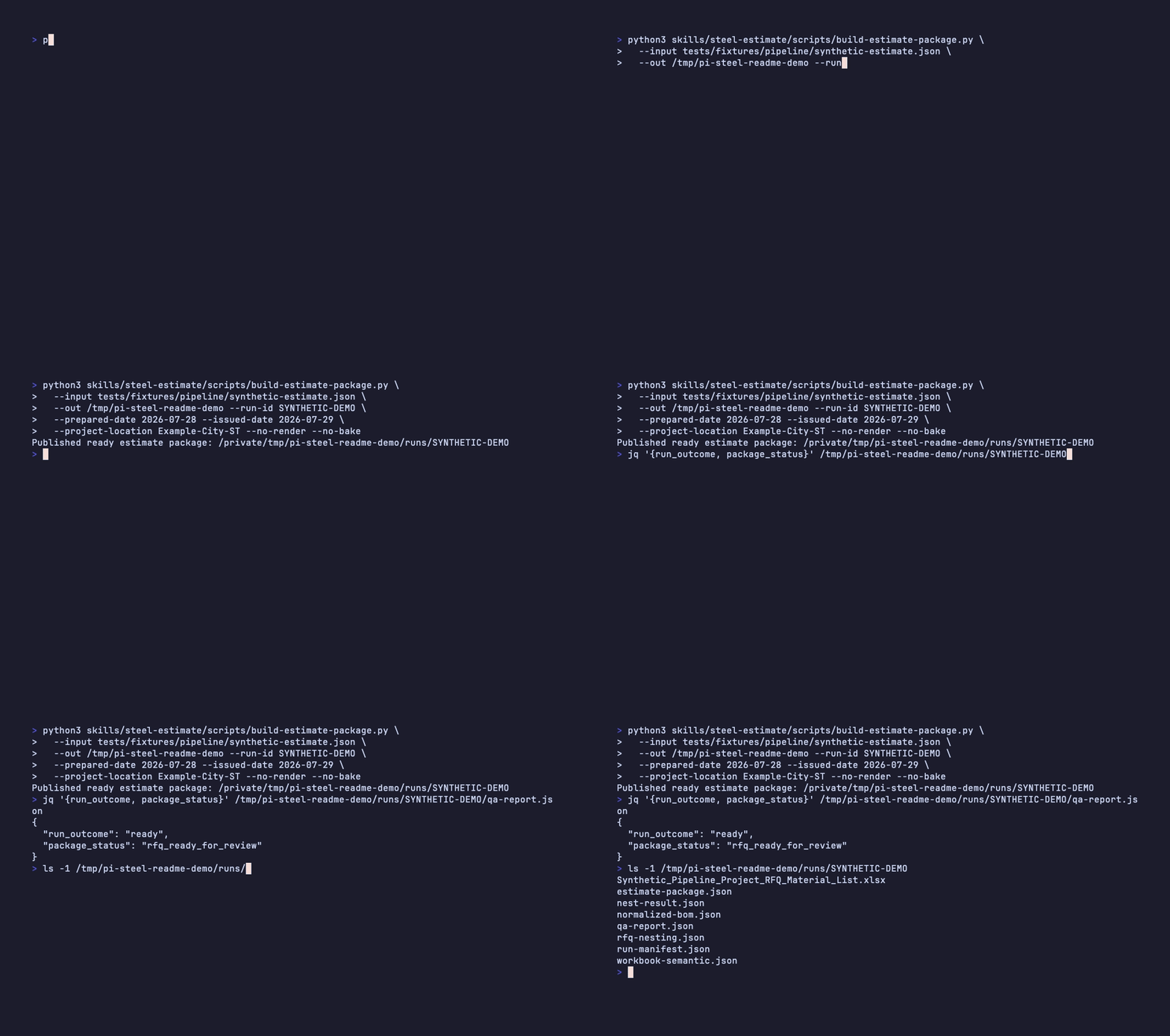
This demo uses only the repository's synthetic fixture. It runs the complete
takeoff → nest → draft RFQ pipeline and publishes an isolated package with a
machine-readable rfq_ready_for_review outcome.
pi install npm:@structupath/pi-steelThen ask Pi:
Do a structural-steel takeoff from these drawings and build a validated BOM.
Nest these rectangular plate parts on 96 × 48 stock.
Optimize these beam lengths onto 40/50/60 ft mill lengths.
Prepare a draft RFQ from this estimate.
Run the local dependency check when using the source repository:
npm run doctor| Skill | Purpose | Primary outputs |
|---|---|---|
steel-takeoff |
Validate member designations and calculate BOM weight and tonnage | Validated BOM and findings |
steel-nest |
Lay out plate parts with kerf, gap, and edge-margin controls | Nest results, reference drawings, and guarded burn DXFs |
steel-cutlist |
Optimize member lengths onto purchasable mill lengths (1D bar nesting) | Verified cutting lists, purchase summaries, drop candidates, and bar diagrams |
steel-rfq |
Compile estimate data into a reviewable vendor request | Draft .xlsx RFQ and semantic workbook record |
steel-estimate |
Orchestrate the complete review-gated workflow | Immutable run directory, QA report, lineage, manifests, nesting, and draft RFQ |
steel-takeoff provides structural-shape lookup, weight calculation, and BOM
validation helpers. It checks member designations, grades, duplicate marks, and
unreasonable weights. It calculates from supplied quantities and allowances; it
does not invent pricing.
steel-nest uses MaxRects bin packing for rectangular parts and reports yield,
scrap, reusable drops, and unplaced material. Irregular parts may carry a true
polygon outline for exact areas, weights, hole checks, and drawn profiles; they
are placed by bounding box, always flagged, and then compacted along their true
profiles in fixed scan-to-first-contact steps — every compacted plate must pass
an independent polygon-clearance verifier or the bounding-box layout is kept.
Per-sheet burn_plate_N.dxf files are emitted only when the full nest is
complete and every supported hole remains inside its part. Otherwise, pi-steel
suppresses burn DXFs for the entire run and leaves clearly labeled estimating
and reference artifacts for review. It does not emit G-code or claim
machine-specific CAM compatibility.
steel-cutlist packs member lengths (beams, channels, angles, HSS, tube, pipe) onto
purchasable mill lengths with explicit saw kerf and end-trim allowances. A
deterministic strategy portfolio per designation and grade minimizes unplaced
members, total stock length, and known cost, and every bar is independently
re-verified before a cutting list is published. Drops are reported as
candidates for review, never as certified reusable stock.
steel-rfq groups material by stock family, carries approved nesting data into
the workbook, and provides fill-in columns for vendor pricing. Workbooks remain
drafts until a person reviews and issues them.
Copy the example company profile to a private project location:
mkdir -p .pi-steel
cp skills/steel-rfq/assets/company-profile.example.json \
  .pi-steel/company-profile.json
Complete that local copy with approved company information. Never commit the completed profile.
estimate input
    ↓
contract validation → plate nesting + linear cut-lists → draft RFQ compilation
    ↓
QA findings + lineage + immutable run manifest
    ↓
ready | needs_review | blocked
Each run is published below the requested output root and referenced by
latest-run.json. Exit status 0 means geometry-verified, 2 means human
review is required, and 3 means the workflow is blocked. A blocked run never
contains an RFQ workbook.
This repository and all committed examples are public. Do not add:
- company profiles or internal business context;
- customer, vendor, employee, project, bid, or contract data;
- live pricing, margins, terms, credentials, or private contact information;
- generated RFQs, takeoffs, PDFs, DXFs, spreadsheets, or output directories.
Keep operational inputs and generated artifacts outside the repository. See the public data policy and data provenance record before contributing.
npm test                 # base, no-render suite
npm run test:full        # PDF/PNG/DXF/LibreOffice smoke tests
npm run privacy:check    # current public-repository data guard
npm run privacy:history  # redacted audit of reachable history
npm run pack:check       # npm contents and installed-runtime smoke test
npm run provenance:check # shape-data integrity and recorded decision
npm run release:check    # complete release gate
The current package version is declared in package.json and recorded per
release in CHANGELOG.md. release:check verifies the test,
privacy, package-content, shape-data integrity, ownership, license, and
redistribution contracts before publication.
StructuPath-authored code, documentation, and the bundled StructuPath Structural Shapes Database are distributed under the MIT license. Dataset ownership, authorization, and integrity evidence are documented in DATA_PROVENANCE.md.