© 2017-2020, 2026 José Miguel Sánchez Fernández, Visual Studio EX3
Caution
This project is discontinued and is not guaranted to work properly on current Unity versions.
Note
For more information about this project, its origin, motivations, and initial objectives, see Argos: CICE MPV Project
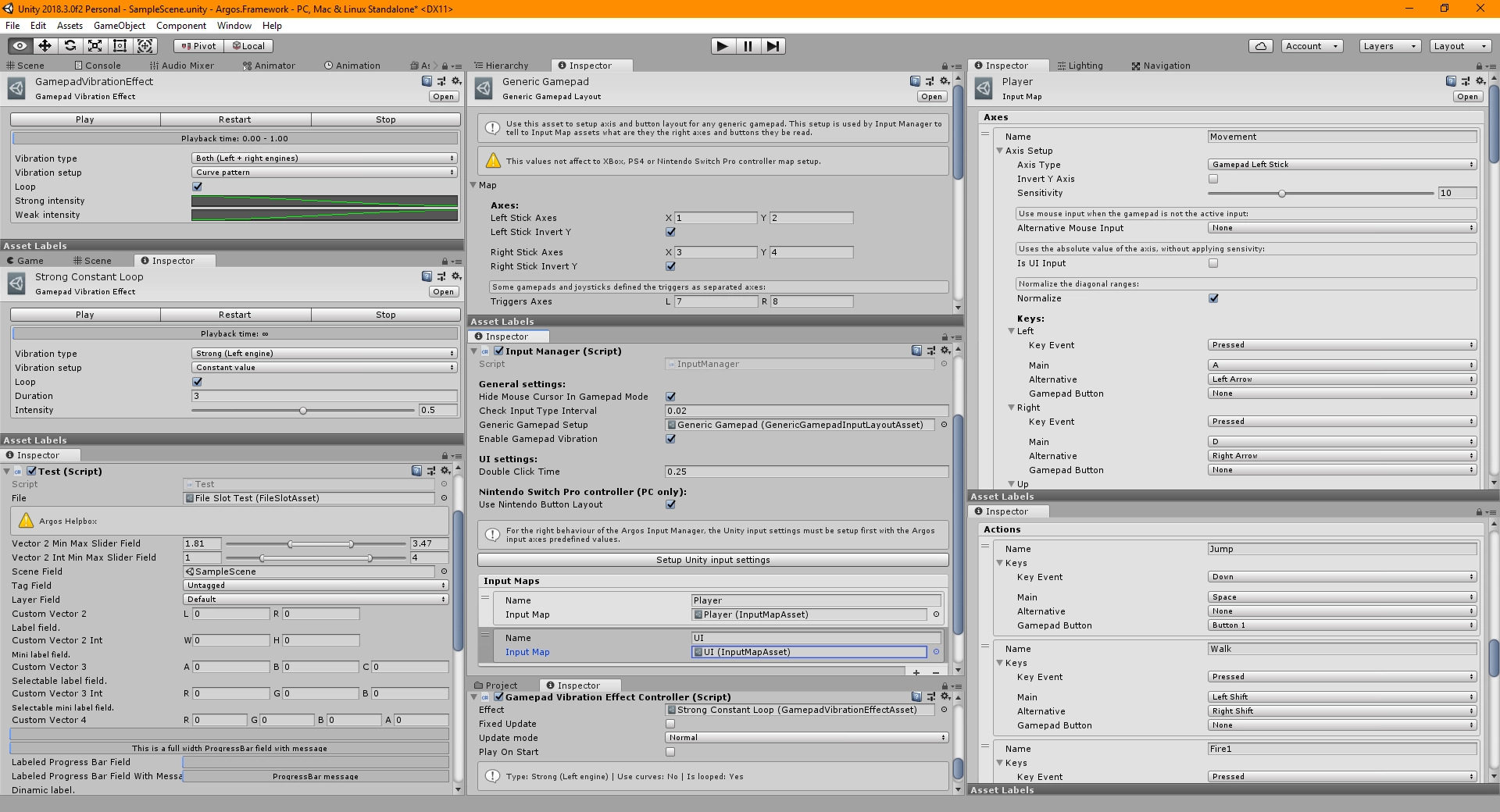
- Extensible multiplatform input system (to support desktop and consoles):
- Designed as Input Map assets, where defined axes properties and actions.
- Support on Windows, Linux and Mac OS:
- Keyboard & Mouse.
- XBox controllers (XBox 360, Xbox One and expected any XInput compatible controller)
- PS4 controllers.
- Nintendo Switch controllers (Pro controller only).
- Generic controllers.
- Generic Gamepad asset map to manually remaped buttons and axes to the common layout (based on XBox 360 layout).
- Advanced gamepad haptics/vibration support:
- Gamepad Vibration Effect asset with vibration pattern designer using Animation Curves and support for linear effects, both to use with left, right or both vibration engines.
- Editor designer works in edit mode, allowing test the effects on controllers without require to enter in play mode.
- Only implemented on Windows using DirectInput8 ForceFeedback feature using SharpDX).
- Gamepad Vibration component to ease implement Gamepad Vibration Effect assets playback (like the Animator component).
- Implements custom Standalone Input Module component to work with this system:
- Ease setup basic UI navigation using existing Input Map assets, previously setup in the Input Manager component, selecting the axis and action to each common UI navigation events:
- Submit.
- Cancel.
- Delete.
- Set To Default.
- Also implements UnityEvent fields to attach editor actions for these events (per Standalone Input Module instance).
- Ease setup basic UI navigation using existing Input Map assets, previously setup in the Input Manager component, selecting the axis and action to each common UI navigation events:
- Partial-unfinished refactor over SDL2.
- Gamepad Vibration Effect asset with vibration pattern designer using Animation Curves and support for linear effects, both to use with left, right or both vibration engines.
- Advanced IMGUI Unity Editor extensions and components, for ease the implementation of advanced inspectors and tools:
- A collection of standard Unity editor controls based on C# attributes:
- Cutomizable HelpBox:
- Supported to be attached to any serializable field.
- Multiline.
- Customizable Vector fields:
- Supported Vector2, Vector3, Vector4, Vector2Int, Vector3Int and Vector4Int types.
- Customizable axis field labels.
- Recreates the exact layout using by internal Unity editor tools.
- MinMaxSlider:
- Supported Vector2 and Vector2Int types.
- Shows the built-in range slider with two number fields on each side, for each axis.
- Tag dropdown:
- Supported to be used on string fields.
- Displays the built-int Unity editor tags dropdown.
- Resets to default "Untaged" if the value is uninitialized or doesn't match any valid tag name.
- Layer dropdown:
- Supported to be used on int fields.
- Displays the built-in Unity editor layers dropdown.
- Resets to default layer if the value is uninitialized or doesn't match any valid layer.
- Supports layer mask values.
- SortingLayer dropdown:
- Supported to be used on int and string fields.
- Displays the built-in Unity editor sorting layers dropdown.
- Resets to default layer if the value is uninitialized or doesn't match any valid layer.
- Supports layer mask values.
- Labels over fields:
- Supported to be attached to any serializable field.
- Supports selectable text.
- Supports normal and mini font sizes.
- Dynamic labels:
- Supported to be used on string fields.
- Shows as independent fields instead of companions of other serializable fields.
- Supports selectable text.
- Supports normal and mini font sizes.
- ProgressBars:
- Supported to be used on float fields.
- Built-in Unity editor progress bar.
- Optional property label.
- Optional content label.
- Memory size formatter label:
- Supported to be used on int fields.
- Displays the int value, a bytes amount value, in the expected memory unit format.
- Password field:
- Supported to be used on string fields.
- Masked string content on UI.
- Buttons:
- Supported to be used on string fields.
- Relies on MonoBehaviour.Invoke method to execute a method named on the string variable.
- Supports normal, mini and large button styles.
- File system fields:
- Supported to be used on string fields.
- Displays a string field followed the "..." button to invoke the File System dialog.
- Supported native dialogs in all desktop systems:
- Open File.
- Save File.
- Included version to save assets in project.
- Open Folder.
- Save Folder.
- Option lists:
- Supported to be used on enum fields.
- Displays the all enumeration values as option buttons.
- Support to displays as single or double column.
- Texture preview panel:
- Supported to be used on Texture, Texture2D, RenderTexture, Cubemap and Sprite fields.
- Recreates the built-in square preview panel with the "Select" mini button to invoke the "Select Texture" dialog.
- A functional demo is available in Attribute field tests scene, on "AttributeTest" gameobject:
- Cutomizable HelpBox:
- Advanced IMGUI Unit editor components:
- Serializable SceneAsset type:
- Allows drag & drop scene assets.
- Supported in editor and runtime code.
- Serialized asset path, scene path and scene index data to be accessed in runtime.
- Toolbar:
- Recreates the built-in Unity editor toolbar control.
- Modal Input Popup Window dialog:
- Recreates the built-in Unity editor modal popup window dialogs.
- Supports string, int and float for the input field.
- Callback to invoke on submit.
- Customizable ReorderableList control:
- Unity's built-in ReorderableList control with a several parameters to customize the behavior and style:
- List items supports any serializable content to display, including the attributes described above.
- Default implementation and customizable callbacks for each control feature:
- Optional header section.
- Optional footer section.
- Element content and style.
- Empty list display style.
- Customize the add button behavior:
- Dropdown list.
- Custom callback.
- Enable or disable the dragable elements feature.
- Input and list events:
- OnChangeElement.
- OnRemoveElement.
- OnSelectElement.
- OnReorderElement.
- ReorderableDictionary: customizable reorderable list version with dictionary behavior.
- Advanced DataTable:
- Based on the Unity Editor built-in TreeView control.
- Binds a serializable array or generic list and compose the columns using the struct/class serializable field/property name and type.
- Supports a high volume of data in realtime.
- Features:
- Optional header and footer sections.
- Optional reorderable rows by drag & drop.
- Optional display row index.
- Optional row multiselection.
- Optional search box to perform quick searchs by specific column.
- Optional resize columns.
- Supports all serializable types and his editor controls (included private built-in controls).
- State persistence. The DataTable remember row and column positions and other related states.
- Bug: On current implementation on latest Unity versions (from Unity 2019 to now) the horizontal scroll don't move the column headers.
- A functional demo is available in Attribute field tests scene, on "DataTable Test" gameobject.
- Unity's built-in ReorderableList control with a several parameters to customize the behavior and style:
- Editor coroutines (based on https://github.com/marijnz/unity-editor-coroutines).
- Mapped Unity editor common GUI styles: Assets/Argos Framework/Base.Editor/Utils/EditorSkinUtility.cs
- Serializable SceneAsset type:
- A collection of standard Unity editor controls based on C# attributes:
- Other features and tools:
- Object Pool component.
- Singleton abstract class:
- With IDisposable version.
- MonoBehaviourSingleton component:
- Abstract class to implement singleton pattern over MonoBehaviour derived classes.
- Timer:
- Supports scaled or unscaled time.
- Can work in editor mode.
- A collection of extension methods for different data types:
- Bool.
- Collection based types.
- Float.
- IEnumerable based types.
- MonoBehaviour based types.
- RenderTexture.
- ScriptableObject based types.
- String.
- Texture2D.
- Transform.
- UIImage (see UI.MaskableGraphic).
- Vector types.
- Small utils for common tasks.
- Extensible User oriented architecture (to support cloud services, like GameJolt, Steam or XBox Live, and consoles):
- Cloud and local file system.
- Files are represented as assets (Scriptable Objects) using the concept of "file slots".
- File assets are designed to work as JSON or binary format.
- The idea was to implement a designer for the Scriptable Object to allow easily setup a simple dictionary behavor (key par value table) or bind a custom serializable struct or class.
- Another idea was the implement optional callbacks to add pre and post serialization steps to be able implemnent features like cryptography.
- Trophies (on supported systems).
- Leaderboards.
- Rich Presence (on supported systems).
- Cloud and local file system.
- The initial goal was to implement a built-in service implementation based on GameJolt API (in this case, for cloud file system, trophies and leaderboards).
- You can see a partial tests with GameJolt API on Gamejolt API test scene.
- Localization system:
- Custom tool for ease manage localization data for texts and other assets.