本アセットは安定版ではありません.AsioドライバによってはInput取得中それ以外のアプリケーションからのアウトプット, インプットすべてを受け付けなくなるAsioドライバもあります.
本アセットは,非常に限定的な用途での利用を想定しているため,これらの検証,調整は行われない可能性があります.
上記の回避策として,Unity上でAsioManagerがドライバを取得した後に,windowsの出力を別の出力に変更後,再度オーディオインターフェースを指定することで,音声が復活する可能性があります.
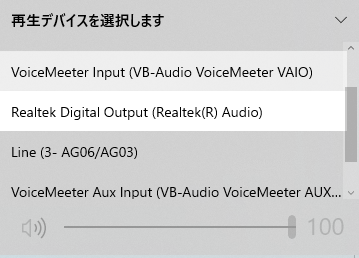
This asset is not stable. Some Asio drivers may stop accepting all outputs and inputs from other applications during input acquisition. Since this asset is intended for very limited use, it may not be verified or adjusted. As a workaround for the above, after AsioManager retrieves the driver on Unity, the audio may be restored by changing the windows output to another output and then specifying the audio interface again.
本アセットは,UnityでASIOによるオーディオ入力をサポートするものです.
ベースにはNAuidoライブラリを利用しています.
Unityの標準機能ではサポートされていない,オーディオインターフェースからの
マルチチャンネルインプットに対応しています.
This asset supports ASIO audio input in Unity.
The NAuido library is used as the base.
It supports multi-channel input from audio interfaces, which is not possible with the standard Unity functionality.
本アセットは,PackageManagerを経由して提供されます. https://docs.unity3d.com/ja/2019.4/Manual/upm-ui-giturl.html
This asset is provided via PackageManager. https://docs.unity3d.com/ja/2019.4/Manual/upm-ui-giturl.html
任意のゲームオブジェクトにAsioManagerをアタッチします.
-
- Asioドライバを指定することで後述のUniAsioReceiverで利用可能になります.
By specifying the Asio driver, it can be used with UniAsioReceiver described below.
- BufferSize/Ch : チャンネルごとのバッファーサイズです.ドライバ選択時に自動設定されますが,手動での書き換えも可能です.
Buffer size for each channel. This is automatically set when the driver is selected, but can also be rewritten manually. - SampleRate : ドライバのサンプルレートです.ドライバ選択時に自動設定されますが,手動での書き換えも可能です.
The sample rate of the driver. It is automatically set when the driver is selected, but can also be rewritten manually. 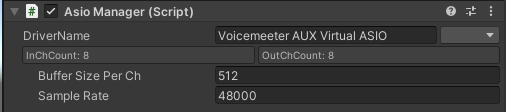
- Asioドライバを指定することで後述のUniAsioReceiverで利用可能になります.
任意のゲームオブジェクトにUniAsioInputReceiverをアタッチします.
-
- Asioドライバから指定したチャンネルのインプットを取得します.取得される値は時間軸的なオーディオデータであり,-1~1の範囲になっています.
Obtains inputs for a specified channel from the Asio driver. The value retrieved is the time-based audio data, ranging from -1 to 1.
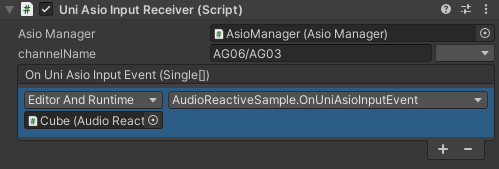
- AsioManager : Step1で作成したAsioManagerを指定します.
Specify the AsioManager created in Step 1. - Channelname : 取得したいInputを選択します.
Select the input you wish to retrieve.
- OnUniAsioInputEvent(float[], int) :
flaotの配列を引数にとるメソッドを指定できます. 配列にはstep1で指定したBufferSize分のオーディオデータが格納されます.
intにはドライバのサンプリング周波数(Hz単位)が格納されます. You can specify a method that takes a flaot array as an argument. The array stores audio data for the BufferSize specified in step1.
- Asioドライバから指定したチャンネルのインプットを取得します.取得される値は時間軸的なオーディオデータであり,-1~1の範囲になっています.