

Smooth scroll for the web.
Drawn between pixels, the same at every refresh rate, and out of the way of everything else.
Svifa is a smooth scroll library for the browser. It makes the mouse wheel and the trackpad scroll smoothly, on the whole page or inside any scrolling element, and leaves everything else to the browser.
The name is Icelandic: svífa means to glide.
Smooth scrolling on the web has a flaw almost everyone has seen without naming it: the last moment of a scroll shimmers. A browser keeps a scrolled page on whole pixels, and the end of a smooth scroll moves by less than a pixel each frame, so the page holds still for a few frames, hops a pixel, and holds again. On a 144 Hz or 240 Hz screen there are more frames to see it in, and sharp text and thin lines show it most. Smooth scroll libraries usually leave it, because the browser's scroll position cannot hold a fraction of a pixel. Moving the whole page with a transform instead avoids it, but breaks sticky elements and everything else that reads the scroll position.
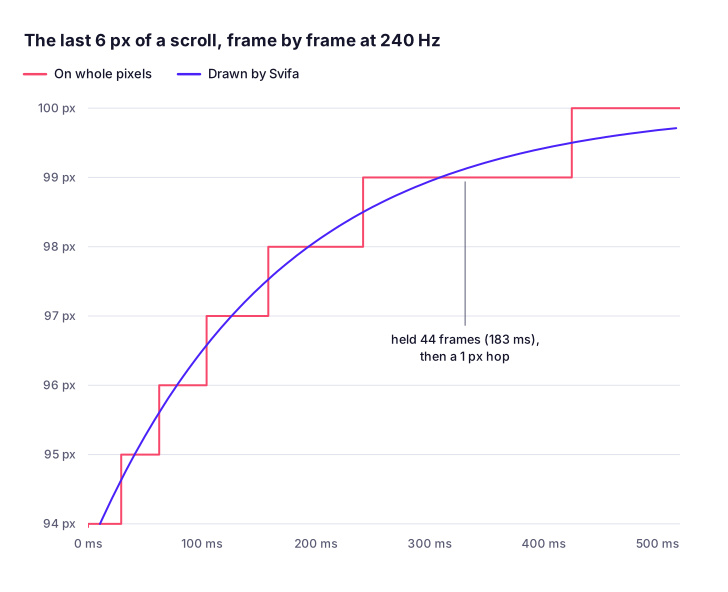
Measured frame by frame with the built library, on the test clock.
Svifa fixes it where it starts. It scrolls to the nearest pixel the browser can show and draws the fraction left over on the GPU, so in Chrome, Edge and Safari's engine (WebKit) the page slows to a stop continuously and comes to rest exactly on the browser's own grid. It needs no CSS: Svifa gives the blocks that scroll with the page a layer of their own, chosen so that what is drawn over what stays as it was, and scrolling boxes inside the page glide and are drawn the same way. Where the page can only be drawn on whole pixels (in Firefox, which at a screen scale of 100% draws whole pixels whatever a page asks, or where a layer would change how the page looks), a glide never moves slower than one pixel a sixtieth of a second instead, so the page never stands still for longer than that before its next pixel, at any refresh rate. Around that, it gets the rest of smooth scrolling right:
- The same at any refresh rate. A scroll takes the same time and follows the same curve on a 60 Hz laptop and a 500 Hz monitor.
- The real scroll position.
position: sticky,IntersectionObserver, scroll-driven animations,scrollevents and anything else that reads the scroll position work as they do without it. - Out of the way. The keyboard, the scroll bar, touch and find in page stay the browser's own, and any of them takes over from a scroll at once, as does any scroll Svifa did not make. A reader who asks for reduced motion gets the browser's own scrolling.
- Small and anywhere. Plain JavaScript with no dependencies, about 15.1 kB minified and gzipped, and safe to import during server
rendering. Components for React, Vue, Svelte, Solid, Angular and Astro, so for Next.js, Nuxt and SvelteKit too. ES module,
CommonJS and a
<script>build, with TypeScript types. - Ready for AI coding tools. Every option is documented in the types, and
llms.txtholds the whole API in one file.
Every claim here is checked by the tests, which run in Chromium, Firefox and WebKit and drive the frame clock at 60 to 1000 Hz, and the motion was measured frame by frame on a 254 Hz screen. If a site already uses a smooth scroll library, switching is usually two lines: the import and the constructor.
Measured on 23 October 2026 with the current release of each library, each set up on the same page as its own documentation shows. The end of a glide was recorded on a 254 Hz screen at a scale of 100%: one wheel notch sent through Windows' own input, every frame the monitor showed captured, and the drawn position of a 1 px line read to a hundredth of a pixel, twice for each library and browser, giving the longer of the two. Chrome 155, Edge 155 and Firefox 158 are the browsers as installed; WebKit 27.2 is Playwright's build of Safari's engine for Windows, not Safari. The other rows come from the same pages driven in Chromium, Firefox and WebKit. Sizes are each page's setup bundled and minified with esbuild, JavaScript and CSS gzipped (so Svifa's figure includes its CSS file and differs a little from its script build's).
| Svifa 1.2.0 | Lenis 1.3.27 | Locomotive Scroll 5.0.1 | GSAP ScrollSmoother 3.15.0 | Smooth Scrollbar 8.8.4 | |
|---|---|---|---|---|---|
| Longest the page stands still near the end of a glide: Chrome, Edge, Firefox, WebKit | 12, 20, 20, 20 ms | 181, 181, 181, 122 ms | 181, 181, 177, 122 ms | 24, 24, 110, 16 ms | 4, 8, 4, 20 ms, and the whole glide lasts 110 to 140 ms (425 ms in WebKit) |
| Drawn between pixels (Chrome, Edge, WebKit) | Yes | No | No | Yes | No (yes with renderByPixels: false) |
| The same glide at 60, 120 and 240 Hz | Yes | Yes | Yes | Yes | No: it rests after 467, 233 and 117 ms |
| The browser's own scroll position | Kept | Kept | Kept | It jumps ahead, and the content follows by a transform | Stays at 0: it scrolls a container of its own |
position: sticky |
Works | Works | Works | Does not stick | Does not stick |
| Find in page shows the match | Yes | Yes | Yes | No | No |
| Scroll-driven animations follow the page (Chromium) | Yes | Yes | Yes | Up to 780 px behind | Do not move |
| The wheel over a scrolling box inside the page | The box glides | The page scrolls; with allowNestedScroll, the box scrolls the browser's way |
The page scrolls | The box scrolls the browser's way | The page scrolls |
| CSS scroll snapping, one wheel notch | Glides to the next snap point | Left to the browser, which pulls it back (snap points of its own in lenis/snap) |
Left to the browser, which pulls it back | Snap points ignored | Snap points ignored |
| Same-page links | Glide, with an offset | Glide, with an offset | Glide, with an offset | Jump | The address changes, the page stays |
| A reader who asks for reduced motion | No glide | No smoothing | Glides | Glides | Glides |
| Space and Page Down | The browser's own | The browser's own | The browser's own | The browser's own | Its own (Space moves 200 px) |
| Markup it needs | None | None | None | Two wrapper elements around the page | A container of fixed height |
| Components | React, Vue, Svelte, Solid, Angular, Astro | React, Vue, Nuxt | None | None | None |
| Size on a page, minified and gzipped | 15.6 kB | 5.7 kB | 9.1 kB | 50.0 kB | 25.1 kB |
| Runtime dependencies | None | None | Lenis 1.3.17 | None | core-js, tslib |
| License | MIT | MIT | MIT | GSAP's own no-charge license | MIT |
| Latest release | This one | 15 October 2026 | 15 January 2026 | 13 April 2026 | 5 June 2023 |
Each example opens on StackBlitz, ready to run and change:
- Vite: plain TypeScript, with a reading progress bar from Svifa's scroll event.
- Next.js:
SmoothScrollin the root layout anduseSvifain a client component. - Vue and Nuxt:
SmoothScrollaround the app anduseSvifain a component. - SvelteKit:
smoothScrollin the root layout anduseSvifain a component. - Solid:
SmoothScrollaround the app anduseSvifain a component. - Angular:
provideSmoothScrollin the app's providers,injectSvifafor the reading progress, and a box with a Svifa of its own fromcreateSvifa, rendered on the server. - Astro:
SmoothScrollin the layout, with view transitions between two pages. - A plain page: one HTML file, with Svifa from a CDN.
With npm:
npm install @arcwrightstudio/svifaWith pnpm:
pnpm add @arcwrightstudio/svifaWith Yarn:
yarn add @arcwrightstudio/svifaWith Bun:
bun add @arcwrightstudio/svifaWith Deno:
deno add npm:@arcwrightstudio/svifaEach installs and imports it as published, Yarn's Plug'n'Play mode included.
Or load the script build, which sets window.Svifa:
<script src="https://cdn.jsdelivr.net/npm/@arcwrightstudio/svifa@1.2.0/dist/svifa.global.min.js" integrity="sha384-ubKC7QrHDs2hQc3uHQh3MttHmejOU5d9mJBKVP2xadSr/Mi0pRe6wFKsRAlAQ2uC" crossorigin="anonymous"></script>Pin the exact version in the address, as here: the integrity hash then makes the browser refuse any file that differs from the
published one.
import Svifa from '@arcwrightstudio/svifa'
import '@arcwrightstudio/svifa/svifa.css'

const svifa = new Svifa()
That is all a page needs. Create Svifa once the page is in the browser, and call svifa.destroy() when whatever created it goes
away. A scroller takes one Svifa: creating a second for the same one throws an error until the first is destroyed.
svifa.css is optional. While Svifa is stopped it hides the scroller's overflow, so the keyboard and the scroll bar are held as
well as the wheel; and while a glide is under way it keeps an embedded frame under the pointer from catching the wheel.
It works the same in any framework, or none. There are components for React and Next.js, Vue and Nuxt, Svelte and SvelteKit, Solid, Angular and Astro, and a plain page needs none.
The React entry has a component and a hook:
// app/layout.tsx in Next.js, or the root of any React app
import { SmoothScroll } from '@arcwrightstudio/svifa/react'
import '@arcwrightstudio/svifa/svifa.css'

export default function RootLayout({ children }: { children: React.ReactNode }) {
  return (
    <html lang="en">
      <body>
        <SmoothScroll lerp={0.08}>{children}</SmoothScroll>
      </body>
    </html>
  )
}
SmoothScroll takes Svifa's options as props (and scroller as a ref too). It is a client component, so a server layout can render
it. Changing a prop that shapes the feel (lerp, duration, easing, wheel, wheelSpeed, nested, native, chain,
anchors, snap) retunes the running Svifa, and one taken off goes back to its default; changing what it scrolls makes it again.
Anything inside reaches the Svifa with useSvifa (in Next.js, from a client component: 'use client' at the top of its file):
import { useState } from 'react'
import { useSvifa } from '@arcwrightstudio/svifa/react'

function BackToTop() {
  const svifa = useSvifa()
  return <button onClick={() => svifa?.scrollTo('top')}>Back to top</button>
}

function ReadingProgress() {
  const [progress, setProgress] = useState(0)
  useSvifa((svifa) => setProgress(svifa.progress))
  return <progress value={progress} />
}
useSvifa() is null on the server and until the Svifa is made. React 18 and 19 are supported, StrictMode included. Next.js
scrolls to the top on a route change; Svifa gives way to that as it does to any scroll it did not make.
Without the entry, the same takes a few lines:
useEffect(() => {
  const svifa = new Svifa()
  return () => svifa.destroy()
}, [])
Yarn Plug'n'Play. A bundler (Vite, webpack, Next.js) loads Svifa and each of its entries through Plug'n'Play as it loads
anything else, and installing Svifa does not make Yarn turn on its experimental ES module loader (.pnp.loader.mjs). Code that
Node runs directly under Plug'n'Play loads Svifa with require; an ES module run that way needs that loader, which a project turns
on itself (pnpEnableEsmLoader: true).
The Vue entry has a component and a composable:
<!-- App.vue -->
<script setup>
import { SmoothScroll } from '@arcwrightstudio/svifa/vue'
import '@arcwrightstudio/svifa/svifa.css'
</script>

<template>
  <SmoothScroll :lerp="0.08">
    <RouterView />
  </SmoothScroll>
</template>
SmoothScroll takes Svifa's options as props (and scroller as a template ref too) and renders only what it holds. Changing a prop
that shapes the feel retunes the running Svifa, and one taken off goes back to its default; changing what it scrolls makes it again.
A flag written alone is on (<SmoothScroll anchors>), and one left out keeps its default. Anything inside reaches the Svifa with
useSvifa, a ref that is null on the server and until the Svifa is made:
<script setup>
import { ref } from 'vue'
import { useSvifa } from '@arcwrightstudio/svifa/vue'

const svifa = useSvifa()
const progress = ref(0)
useSvifa((current) => (progress.value = current.progress))
</script>

<template>
  <button @click="svifa?.scrollTo('top')">Back to top</button>
  <progress :value="progress" max="1" />
</template>
Vue 3.3 and later.
The Vue component, in app/app.vue (in Nuxt 3, app.vue) or a layout. It makes the Svifa in the browser only, so server
rendering is untouched:
<script setup>
import { SmoothScroll } from '@arcwrightstudio/svifa/vue'
</script>

<template>
  <SmoothScroll :anchors="{ offset: -80 }">
    <NuxtPage />
  </SmoothScroll>
</template>
Add the stylesheet in nuxt.config.ts: css: ['@arcwrightstudio/svifa/svifa.css']. Pages and components reach the Svifa with
useSvifa, as above.
In a component, or for a whole SvelteKit site in src/routes/+layout.svelte:
<script>
  import { smoothScroll } from '@arcwrightstudio/svifa/svelte'
  import '@arcwrightstudio/svifa/svifa.css'

  let { children } = $props()
  const svifa = smoothScroll({ lerp: 0.08 })
</script>

{@render children()}
smoothScroll is called while the component starts. It makes the Svifa once the component is in the page, takes it off when the
component leaves, and returns a store of it: $svifa is null on the server and until the Svifa is made. Components inside reach the
same store with useSvifa, which also takes a function to call on every scroll:
<script>
  import { useSvifa } from '@arcwrightstudio/svifa/svelte'

  const svifa = useSvifa()
  let progress = $state(0)
  useSvifa((current) => (progress = current.progress))
</script>

<button onclick={() => $svifa?.scrollTo('top')}>Back to top</button>
<progress value={progress} max="1"></progress>
For a scrolling element, pass a function that returns it: smoothScroll({ scroller: () => box }), with bind:this={box} on the
element. Retune it with $svifa?.configure({ lerp }), in an $effect to follow state. Svelte 4 and 5.
The Solid entry has a component and a primitive:
import { SmoothScroll } from '@arcwrightstudio/svifa/solid'
import '@arcwrightstudio/svifa/svifa.css'

export function App(props) {
  return <SmoothScroll lerp={0.08}>{props.children}</SmoothScroll>
}
SmoothScroll takes Svifa's options as props, with scroller also taking a function that returns an element (one set with
ref). Changing a prop that shapes the feel retunes the running Svifa; changing what it scrolls makes it again. Anything inside
reaches the Svifa with useSvifa, an accessor that is null on the server and until the Svifa is made:
import { createSignal } from 'solid-js'
import { useSvifa } from '@arcwrightstudio/svifa/solid'

function BackToTop() {
  const svifa = useSvifa()
  return <button onClick={() => svifa()?.scrollTo('top')}>Back to top</button>
}

function ReadingProgress() {
  const [progress, setProgress] = createSignal(0)
  useSvifa((current) => setProgress(current.progress))
  return <progress value={progress()} max={1} />
}
Solid 1.6 and later, SolidStart included.
In the app's providers, src/app/app.config.ts:
import { type ApplicationConfig } from '@angular/core'
import { provideSmoothScroll } from '@arcwrightstudio/svifa/angular'

export const appConfig: ApplicationConfig = {
  providers: [provideSmoothScroll({ lerp: 0.08 })],
}
Add node_modules/@arcwrightstudio/svifa/svifa.css to styles in angular.json. The Svifa is made once the app has first
rendered, only in the browser, so server rendering is untouched; and outside Angular's zone, so a glide's frames do not run change
detection. It works with zone.js and without it. Anything in the app reaches it with injectSvifa, a signal that is null until the
Svifa is made, which also takes a function to call on every scroll:
import { Component, signal } from '@angular/core'
import { injectSvifa } from '@arcwrightstudio/svifa/angular'

@Component({
  selector: 'app-reading',
  template: `
    <button (click)="svifa()?.scrollTo('top')">Back to top</button>
    <progress [value]="progress()" max="1"></progress>
  `,
})
export class Reading {
  protected readonly svifa = injectSvifa()
  protected readonly progress = signal(0)

  constructor() {
    injectSvifa((svifa) => this.progress.set(svifa.progress))
  }
}
For a scrolling element in a component, createSvifa makes a Svifa of the component's own, taken off with it. Its options may be a
function, read once the component has rendered, so they can name an element from a view query:
private readonly box = viewChild.required<ElementRef<HTMLElement>>('box')
private readonly boxed = createSvifa(() => ({ scroller: this.box().nativeElement }))
Angular 19 and later.
In a layout:
---
import SmoothScroll from '@arcwrightstudio/svifa/astro'
---

<body>
  <SmoothScroll lerp={0.08} anchors={{ offset: -80 }} />
  <slot />
</body>
The component brings the stylesheet with it. Its props are the options that can be written in markup: all but easing and
native, with scroller as a CSS selector, subpixel as true, false or a CSS selector, and nested as true, false or
'native'. With Astro's view transitions (<ClientRouter />), a Svifa is made for
each page as it comes in. A script reaches the page's Svifa through the hidden element the component renders, svifa-scroll:
<script>
  document.addEventListener('astro:page-load', () => {
    document.querySelector('svifa-scroll')?.svifa?.on('scroll', ({ progress }) => {})
  })
</script><link rel="stylesheet" href="https://cdn.jsdelivr.net/npm/@arcwrightstudio/svifa@1.2.0/svifa.css" integrity="sha384-otF4Jeb3ig0lwx4TPg07EA4DX21Rv2bYdenWzivt0s9iF/itD6ESvFkAKjyNPwyE" crossorigin="anonymous" />
<script src="https://cdn.jsdelivr.net/npm/@arcwrightstudio/svifa@1.2.0/dist/svifa.global.min.js" integrity="sha384-ubKC7QrHDs2hQc3uHQh3MttHmejOU5d9mJBKVP2xadSr/Mi0pRe6wFKsRAlAQ2uC" crossorigin="anonymous"></script>
<script>
const svifa = new Svifa()
</script>Two settings shape how a glide feels. lerp closes in on the target by a share of the way that is left, so a glide starts quick
and settles softly; the lower it is, the longer and softer the glide. duration instead takes a set time along an easing curve.
| Feel | Setting |
|---|---|
| Snappy | lerp: 0.16 |
| The default | lerp: 0.1 |
| Soft | lerp: 0.07 |
| Slow | lerp: 0.05 |
| Very slow | lerp: 0.03 |
| A set time | duration: 1, with easing |
wheelSpeed sets how far each turn of the wheel goes (0.8 is calmer, 1.2 covers more). A glide to one place can have its own
feel: svifa.scrollTo('#faq', { duration: 1.4 }).
All of these can change while the page is open, for a settings panel, or a feel per page:
svifa.configure({ lerp: 0.05 })
svifa.configure({ duration: 1.2, easing: (t) => 1 - (1 - t) ** 3 })
svifa.configure({ duration: undefined }) // back to lerp
Whatever the setting, a glide takes the same time at every refresh rate, from 60 Hz to 1000 Hz. Where the page is drawn on whole
pixels (in Firefox, with subpixel: false, or where Svifa cannot draw between them), a glide never moves slower than one pixel a
sixtieth of a second (60 px a second): its
last pixels come at an even pace rather than ever more slowly, which on whole pixels would show as the page standing still and then
hopping. A timed glide whose easing starts or ends slowly is held to the same pace there, so it arrives a little before its time.
Drawn between pixels, every glide slows to a stop along its own curve.
Each component is tested in an app of its framework, and every example is built with its framework's own tool and driven in a browser on each change: Next.js 16 with React 19, Vue 3.5 with Vite, Nuxt 4, SvelteKit 3 with Svelte 5, Solid 1.9 with Vite, Angular 22 and Astro 7, as well as plain Vite and the plain page. The components are also tested on the oldest version of each framework they support: React 18, Vue 3.3, Svelte 4, Solid 1.6 and Angular 19 (with zone.js and without). GSAP 3 drives Svifa from its own ticker.
new Svifa({ lerp: 0.08, anchors: { offset: -80 } })| Option | Default | What it does |
|---|---|---|
scroller |
window |
What scrolls: the page, or a scrolling element (one with overflow: auto or scroll and more content than fits). |
axis |
'vertical' |
'horizontal' for a scroller that moves sideways, right-to-left content included; it then takes the wheel's up and down as left and right. 'both' for one that moves both ways. See Both ways. |
lerp |
0.1 |
How quickly a glide closes in, the same at any refresh rate: at 0.1, about a tenth of the remaining distance every sixtieth of a second (on whole pixels, never slower than 60 px a second). Lower glides longer and softer; higher follows the wheel more closely, up to 1. |
duration |
none | Glide for a set time instead, in seconds, along easing (on whole pixels never slower than 60 px a second, so an easing that starts or ends slowly arrives a little early there). Used by the wheel and by scrollTo. |
easing |
exponential ease-out | The curve of a timed glide: a function from the share of the time gone (0 to 1) to the share of the distance covered. |
wheel |
true |
Glide the mouse wheel and the trackpad. false leaves them to the browser; scrollTo still glides. |
wheelSpeed |
1 |
Multiplies every wheel and trackpad movement. |
nested |
true |
How the wheel moves a scrolling box inside the scroller (a menu, a code sample, a chat log) while the box can move that way: true glides it as the scroller glides, 'native' leaves it to the browser, false glides the scroller over it, and a function decides for each box. See Scrolling boxes inside. |
native |
none | (element) => boolean. Elements whose wheel turns are always left to the browser. |
chain |
true |
For a scrolling element: once it is at its start or end, the wheel carries on to the page around it, as the browser's own scrolling does. |
subpixel |
true |
Draw the content between whole pixels while it glides, on elements Svifa chooses; or name the elements; false draws on whole pixels. See Drawing between pixels. |
anchors |
false |
Glide to same-page links when they are clicked. true, or scrollTo options for every such glide. See Same-page links. |
snap |
false |
Glide to the snap points the page sets in CSS (scroll-snap-type). See Scroll snapping. |
reducedMotion |
true |
Follow the reader's reduced-motion setting: while it is on, the wheel is the browser's and scrollTo moves at once. |
autoRaf |
true |
Run Svifa's own frame loop, which runs only while something moves. false to call svifa.raf(time) from your own loop. |
An option that should be a number and is not a finite one (NaN or Infinity, for example) is taken as its default.
svifa.scrollTo('#pricing', { offset: -80 })
svifa.scrollTo(0)
const arrived = await svifa.scrollTo(document.querySelector('.faq'), { duration: 0.8 })
svifa.scrollTo({ x: 1200, y: 400 }) // with axis: 'both'
target is a position in pixels from the start, an element, a CSS selector or #id, 'top' or 'start', or 'bottom' or
'end'. An element lands where the browser puts it for a link to it: its start at the start of the scroller, less its own
scroll-margin and the scroller's scroll-padding. An element inside a scrolling box of its own is first brought into view in that
box, as the browser does for a link. On a scroller that moves both ways, a number is the vertical position, { x, y } sets each axis
(an axis left out stays where it is), and an element, a selector or a keyword sets both.
| Option | Default | What it does |
|---|---|---|
offset |
0 |
Added to the position, for example -80 to stop below a sticky header. Both ways: a number for the vertical axis, or { x, y }. |
immediate |
false |
Move at once, without a glide. |
lerp |
Svifa's | This glide's own lerp. |
duration |
Svifa's | This glide's own duration, in seconds. |
easing |
Svifa's | This glide's own easing. |
lock |
false |
Keep the wheel from moving the scroller until this glide arrives. |
force |
false |
Glide even while Svifa is stopped. |
A glide's own lerp or duration replaces Svifa's; with neither, it glides as the wheel does.
Returns a promise that resolves true when the glide arrives, and false when it does not: something else moved the scroller
first, a later scrollTo or the wheel took over, Svifa is stopped, or the target is not on the page (which also logs a warning). It
never rejects. While the reader asks for reduced motion, and on a scroller that snaps (see Scroll snapping), it
moves at once and resolves true.
Changes how Svifa feels while it runs: lerp, duration, easing, wheel, wheelSpeed, nested, native, chain, anchors
and snap. Each one given replaces the one in use, from the next glide or wheel turn; duration: undefined goes back to gliding by
lerp, and a number that is not a finite one leaves that option as it was. scroller, axis, subpixel, reducedMotion and
autoRaf belong to the scroller itself: to change them, destroy Svifa and make it again. See Tuning the feel.
stop() holds the scroller where it is, for a dialog or a menu: the wheel no longer moves it, and with svifa.css neither do the
keyboard or the scroll bar. Where a scroll bar takes room on the page, that room is kept, so nothing shifts sideways. start()
lets it move again. The wheel is held this way whatever the other options say, and so it is while a glide with lock is under way.
const unsubscribe = svifa.on('scroll', ({ scroll, progress, velocity, direction }) => {
  progressBar.style.scale = `${progress} 1`
})
The listener is called with the Svifa instance whenever the scroller's position changes, whatever moved it: once a frame during a
glide, and on every scroll of the browser's own. on returns a function that removes the listener.
Moves a glide on to time, in milliseconds as requestAnimationFrame gives it. Only needed with autoRaf: false; see
Your own frame loop.
Takes Svifa off the page. The scroller stays where it is, and every listener, class and style Svifa added is removed. Calling it again does nothing.
| Property | What it is |
|---|---|
scroll |
Where the content is, in pixels from the start: the glide's exact position while it moves, and the scroller's own position at rest. |
target |
Where the scroller is heading: the end of the glide under way, or at rest the same as scroll. |
limit |
The furthest it can scroll, in pixels, measured as it is now. |
progress |
scroll as a share of limit, from 0 to 1 (1 when it cannot scroll at all). |
velocity |
How fast it is moving, in pixels a second, positive toward the end. |
direction |
1 toward the end, -1 toward the start, 0 before it has moved. |
isGliding |
Whether a glide is under way. |
isStopped |
Whether Svifa is stopped. |
element |
The element that scrolls: <html> for the page. |
axis |
'vertical', 'horizontal' or 'both'. |
options |
The options in use, every default filled in. Read only: change them with configure. |
x, y |
Each axis on its own: { scroll, target, limit, progress, velocity, direction }. x is null unless Svifa moves the scroller sideways, and y unless it moves it up and down. |
On a scroller that moves both ways, scroll, target, limit, progress, velocity and direction are its vertical axis.
The module also exports easeOut, the default easing, and version.
The browser's own scroll events fire as they always do, since Svifa moves the real scroll position. A scrollend event is sent
once for each glide that moved the scroller, when it arrives, in place of the one the browser would send after each of Svifa's
frames; it carries detail.svifa === true. For the page it is sent on document and bubbles to window; for an element, on the
element. Only the scroller's own scrollend events are held back: every other scrolling box on the page keeps its own.
Svifa sets these classes on the scroller's element (<html> for the page), and puts them back if other code rewrites the class
attribute:
| Class | When |
|---|---|
svifa |
Svifa is running. |
svifa-gliding |
A glide is under way. |
svifa-stopped |
Svifa is stopped. |
svifa-subpixel |
Svifa draws between pixels: it has elements to draw (chosen, or named in subpixel), the browser can, and the reader has not asked for reduced motion. |
An element with the data-svifa-native attribute, and everything inside it, keeps the browser's own wheel scrolling. An element
with data-svifa-subpixel="off", and everything inside it, is drawn on whole pixels; on <html> or <body> it turns drawing
between pixels off for the page.
const svifa = new Svifa({ scroller: document.querySelector('.board'), axis: 'both' })
svifa.scrollTo({ x: 2400, y: 900 })
svifa.on('scroll', ({ x, y }) => minimap.show(x.progress, y.progress))
With axis: 'both', a scroller that moves up and down and sideways (a map, a board, a wide table) glides both ways at once: one
movement of the wheel or the trackpad moves each axis by its own part, with the same feel. Each axis stops at its own end, and the
wheel goes on to the page around the scroller only when every way it turned is at its end. A mouse wheel turned with Shift moves it
sideways, as the browser's own scrolling does. Drawing between pixels works on both axes.
A scrolling box inside the scroller (a menu, a code sample, a chat log, a table) glides the wheel itself while it can move the way
the wheel turns, with the same feel and drawn between pixels the same way, and the page stays where it is. At the box's end the
wheel goes on to the page, as the browser's own scrolling does, unless the box's overscroll-behavior keeps it inside. A sideways
movement of the trackpad, or Shift with a mouse wheel, glides a box that scrolls sideways. Svifa finds the boxes on the page once
it is idle, so each is ready before the wheel first turns over it.
While the page glides, what a box holds moves with it exactly. The browser draws a scrolling box that has a layer of its own where it rests and moves its content only by whole pixels, so the content would stand still while the page around it glides, then hop. Svifa gives every box inside a layer of its own, and puts back on the box's content the part of a pixel the browser leaves out, also in a box whose wheel is left to the browser.
new Svifa({ nested: 'native' }) // boxes scroll the browser's own way
new Svifa({ nested: (box) => (box.matches('.chat') ? { lerp: 0.2 } : true) }) // a feel of its own for one kind of box
nested decides for every box: true (the default), 'native', false (the scroller glides over the box), or a function that is
given the box and returns one of those, or options for that box alone, such as lerp or duration. A box marked
data-svifa-native (or picked by the native option) is left to the browser, as are form controls and editable text. A box with a
Svifa of its own keeps it, and that one decides. configure changes how the boxes feel too.
A browser keeps a page's scroll position on whole pixels: Chrome and Edge on device pixels, Firefox and Safari on whole CSS pixels. In the slow end of a glide the page moves less than a pixel a frame, and on a fast screen it does so for many frames in a row, so the page stands still and then hops a pixel. Svifa puts the scroller on the whole pixel just before the place and moves the content the part of a pixel left over, which the GPU draws in between. Zoomed to a part of a pixel (a browser zoom such as 80% or 125%, or a screen scale such as 125%), the browser draws a scroll position on the nearest device pixel, and Svifa counts from there. At rest nothing is moved.
It needs nothing from you. Svifa gives each block that scrolls with the content a layer of its own (will-change: translate, set on
the element for as long as Svifa runs), so the GPU moves it without drawing it again each frame. It chooses the blocks once the page
is idle, and again whenever the page changes:
- The scroller's children, the top-level blocks of the page. A sticky element among them, or inside one, is held still while it is held.
- Split around what a layer would change. A layer makes an element the containing block of the fixed elements inside it, so a
block holding a fixed element is split into its children instead, and the fixed element keeps its place. So is a block holding
something with a
z-indexthat reaches past it, such as a menu, which a layer would keep under the next block. An element that becomes fixed later loses its layer before the browser draws the page again. - Not at all, where a layer would change what is drawn over what. A fixed or sticky element with no
z-index, with content after it in the page, would be drawn under that content once the content had a layer. Svifa then draws the page on whole pixels and says so once in the console: give that element az-indexof 1 or more.
Mark an element data-svifa-subpixel="off" to leave it, and what it holds, on whole pixels (on <html> or <body>, the whole
page). subpixel: false turns drawing between pixels off; a glide then never moves slower than 60 px a second, so its end never
creeps (see Tuning the feel). Firefox, at a screen scale of 100%, draws on whole pixels whatever it is asked,
so there Svifa gives no layers and every glide that even pace; nor on a device with only a touch screen, where nothing glides
under a finger.
To choose the blocks yourself, name them: a CSS selector, a list of elements, or a function that returns them (asked again whenever
the page's elements change). Svifa gives each its layer. Name blocks that together cover everything that scrolls, and every sticky
element inside a named one (Svifa names any it finds missing in the console); never an element with position: fixed or an
ancestor of one.
new Svifa({ subpixel: 'main > section, footer' })What changes.
- Each layer is a stacking context: a
z-indexinside it no longer reaches past it. Svifa splits around the ones it can see; a menu it cannot (one a script makes at the moment it opens, inside a block) shows under the next block. Give the block holding it az-index, mark that blockdata-svifa-subpixel="off", or render the menu at the end of<body>, as most dialog and menu libraries do. - On a system that draws text with subpixel colour antialiasing (ClearType on Windows), Chrome and Edge draw the text inside a layer with greyscale antialiasing instead, at rest as well. macOS has drawn all text in greyscale since macOS 10.14, so there it makes no difference.
- An element's own
translatestyle is replaced while the content glides and put back when it rests. Its ownwill-changeis kept, withtranslateadded, and put back when Svifa is destroyed.
Svifa leaves this off where the browser has no translate property, for a horizontal scroller in right-to-left content, and while
the reader asks for reduced motion (when it never glides).
With anchors, a click on a link to a place on the same page (href="#id", "#" or "#top") glides there in place of the
browser's jump:
new Svifa({ anchors: { offset: -80 } })The link still goes into the address as a new history entry, and hashchange is sent. No popstate is sent, so a client-side
router does not take the click for a navigation. A target inside a scrolling box of its own is brought into view in that box first,
as the browser does. A link pressed from the keyboard, as a skip link is, also moves keyboard focus to the place, so the next Tab
carries on from there. An element that cannot take focus is given tabindex="-1" until it loses focus; if your styles show a focus
outline on such elements, you may want to hide it.
Links to other pages, links opened in a new tab or window, downloads, and links to an id that is not on the page are left to the
browser. A Svifa on a scrolling element takes only links to places inside it, and leaves # and #top to the page. :target
keeps matching what it matched before the click: the browser updates it only for a jump of its own.
Rather than offset, you can give the targets scroll-margin-top. Svifa honours it as the browser does, and so does everything else
that scrolls to an element.
- The reader's reduced-motion setting is followed by default. A change to it while the page is open takes effect at once, and a glide under way finishes at once.
- Svifa moves the scroller only for the wheel, the trackpad and your own calls. The keyboard, the scroll bar, touch, find in page and the browser's own scrolling of a focused field into view stay the browser's, and a key that scrolls ends a glide at once.
- With
anchors, keyboard focus follows a link pressed from the keyboard. See Same-page links.
new Svifa({ snap: true })With snap: true, a scroller with scroll-snap-type glides to the snap points its CSS sets. The wheel moves as far as it would
without snapping, and the glide comes to rest on the nearest snap point:
- With
mandatory, a turn too small to get halfway to the next point still goes on to it, so one notch or one trackpad swipe moves one point, and a longer movement goes as far as the wheel takes it. - With
proximity, it rests where the wheel takes it, unless a snap point is within a third of the visible area; then it rests on the point ahead. scrollToand same-page links rest on the snap point nearest their target.scroll-padding,scroll-margin,scroll-snap-stop: alwaysand areas longer than the visible area are honoured.
Browsers differ over where a scroller may rest, most of all inside an area longer than the visible area, so before each glide Svifa asks the browser and rests exactly where the browser itself would. The browser's snapping is held off while Svifa glides and put back when it rests, so it never moves the scroller afterwards. The keyboard, the scroll bar and touch snap as the browser does.
Without snap, a scroller that snaps is left to the browser: the wheel scrolls it as the browser does, and scrollTo moves at
once. So is a scroller in a vertical writing mode, with or without it.
With autoRaf: false, call raf from your loop every frame:
const svifa = new Svifa({ autoRaf: false })

function frame(time) {
  svifa.raf(time)
  requestAnimationFrame(frame)
}
requestAnimationFrame(frame)
With GSAP, let its ticker drive Svifa:
const svifa = new Svifa({ autoRaf: false })
gsap.ticker.add((time) => svifa.raf(time * 1000))
gsap.ticker.lagSmoothing(0)
ScrollTrigger needs nothing more: it reads the real scroll position, which Svifa moves.
Importing the package is safe anywhere and touches nothing, on Node 14 and later. Creating a Svifa needs a browser; on the server
the constructor throws an error that says so. Create it where only the browser runs your code: an effect, onMounted, onMount,
afterNextRender, a client-only plugin.
Nothing glides. Check that the page itself scrolls. A layout that sets html, body { height: 100%; overflow: auto } makes
<body> the scroller instead; pass scroller: document.body, or whichever element really scrolls. Svifa also leaves the wheel
alone while the scroller has overflow: hidden, which is how many dialogs lock scrolling, and on a scroller that snaps unless
snap is on.
A box inside the page does not glide, or the page glides instead. A box glides on its own only while it has room to move the
way the wheel turns and its overflow is auto or scroll. For anything else (a map, a canvas, a custom scroller), add
data-svifa-native or use the native option, and the wheel there is the browser's own.
The console says Svifa draws the page on whole pixels. It names an element that is fixed or sticky with no z-index, with
content after it: drawn between pixels, that content would cover it. Give the element a z-index of 1 or more.
A fixed element scrolls away with the page. One of its ancestors is named in the subpixel option: name its siblings
instead. When Svifa chooses the elements itself, it never gives a layer to an element holding a fixed one.
A sticky element shivers while it is held. It sits inside an element named in the subpixel option without being named
itself. See
Drawing between pixels; the console names it.
"Svifa: this scroller already has a Svifa". Two parts of the app each create a Svifa for the same scroller. Create it once, near the root, or destroy the first before creating another.
A dropdown is hidden behind the next section. See the stacking note under Drawing between pixels.
The page jumps when a script scrolls it. Svifa gives way to every scroll it did not make, so a script that sets scrollTop
moves the page at once. Use svifa.scrollTo for a glide.
Svifa is tested in current Chromium, Firefox and WebKit, the engine of Safari. It needs a browser that runs ES2019 and supports the
options form of scrollTo. Drawing between pixels also needs the CSS translate property (Chrome and Edge 104, Firefox 72,
Safari 14.1) and is left off without it. Keeping a scroll bar's room while stopped uses scrollbar-gutter (Chrome and Edge 94,
Firefox 97, Safari 18.2); where it is missing, a page with a scroll bar that takes room can shift by its width while stopped.
Taking over from a key, a touch and a script's scroll is tested in all three engines, from find in page in Chromium and Firefox, and from a drag of the scroll bar in Chromium.
Svifa works on a page with a strict Content Security Policy: it writes no inline script or style attribute, evaluates no strings,
fetches nothing, and passes no string to a script sink, so require-trusted-types-for 'script' holds too. It styles elements
only through their style property, which no policy restricts. This is tested in all three engines.
| Import | File |
|---|---|
import Svifa from '@arcwrightstudio/svifa' |
dist/svifa.js (ES module) |
const { Svifa } = require('@arcwrightstudio/svifa') |
dist/svifa.cjs (CommonJS) |
<script src=".../dist/svifa.global.min.js"> |
sets window.Svifa |
@arcwrightstudio/svifa/svifa.css |
the optional stylesheet |
import { SmoothScroll } from '@arcwrightstudio/svifa/react' |
dist/react.js, for React and Next.js (needs react) |
import { SmoothScroll } from '@arcwrightstudio/svifa/vue' |
dist/vue.js, for Vue and Nuxt (needs vue) |
import { smoothScroll } from '@arcwrightstudio/svifa/svelte' |
dist/svelte.js, for Svelte and SvelteKit (needs svelte) |
import { SmoothScroll } from '@arcwrightstudio/svifa/solid' |
dist/solid.js, for Solid (needs solid-js) |
import { provideSmoothScroll } from '@arcwrightstudio/svifa/angular' |
dist/angular.js, for Angular (needs @angular/core) |
import SmoothScroll from '@arcwrightstudio/svifa/astro' |
astro/SmoothScroll.astro, for Astro |
Types are included for every entry and module format, including TypeScript's older node resolution (the Astro component is typed
by Astro itself). React, Vue, Svelte, Solid and Angular are optional peer dependencies: each is needed only by its own entry. The ES
module and the CommonJS file are separate copies of the code, so use one of them throughout an app.
Each version carries its software bill of materials, dist/sbom.cdx.json (CycloneDX), and its signed provenance; SECURITY.md says
how to verify a release.
Svifa follows semantic versioning.
Every option, method and property is documented in the types, so an editor or an assistant shows the explanation where the code is
written. The package also carries llms.txt (node_modules/@arcwrightstudio/svifa/llms.txt): the whole API and the
rules for using it in one plain file, to give an AI coding tool as context.
What Svifa is set to do next:
- Keeping up with browsers: a new scrolling feature is adopted as browsers ship it, and anything it makes unnecessary is removed.
- A ready-made component for each framework that comes into wide use, as there are for React, Vue, Svelte, Solid, Angular and Astro.
What it will not do: effects driven by scrolling (parallax, reveals), which its scroll event and the browser's own scroll-driven animations already make possible; virtual scrolling of long lists; and work in browsers that lack what it needs, which keep their own scrolling.
CONTRIBUTING.md has the commands, how the code works and the rules every change follows, and GOVERNANCE.md who decides and how. Report a security issue as SECURITY.md describes, which also says what Svifa can and cannot promise and how to verify a release, and ask questions in Discussions.
MIT, © Arcwright Studio.