



HybridRedisCache is a simple in-memory and Redis hybrid caching solution for .NET applications.
It provides a way to cache frequently accessed data in memory for fast access and automatically falls back to using
Redis as a persistent cache when memory cache capacity is exceeded.
Basically, there are two types of caching .NET Core supports
- In-Memory Caching
- Distributed Caching
When we use In-Memory Cache then in that case data is stored in the application server memory and whenever we need then we fetch data from that and use it wherever we need it. And in Distributed Caching there are many third-party mechanisms like Redis and many others. But in this section, we work with the Redis Cache in the .NET Core.
Basically, in distributed caching data are stored and shared between multiple servers Also, it’s easy to improve the scalability and performance of the application after managing the load between multiple servers when we use a multi-tenant application Suppose, In the future, if one server crashes and restarts then the application does not have any impact because multiple servers are as per our need if we want Redis is the most popular cache which is used by many companies nowadays to improve the performance and scalability of the application. So, we are going to discuss Redis and its usage one by one.
Redis is an Open Source (BSD Licensed) in-memory Data Structure store used as a database. Basically, it is used to store the frequently used and some static data inside the cache and use and reserve that as per user requirement. There are many data structures present in the Redis that we are able to use like List, Set, Hashing, Stream, and many more to store the data.
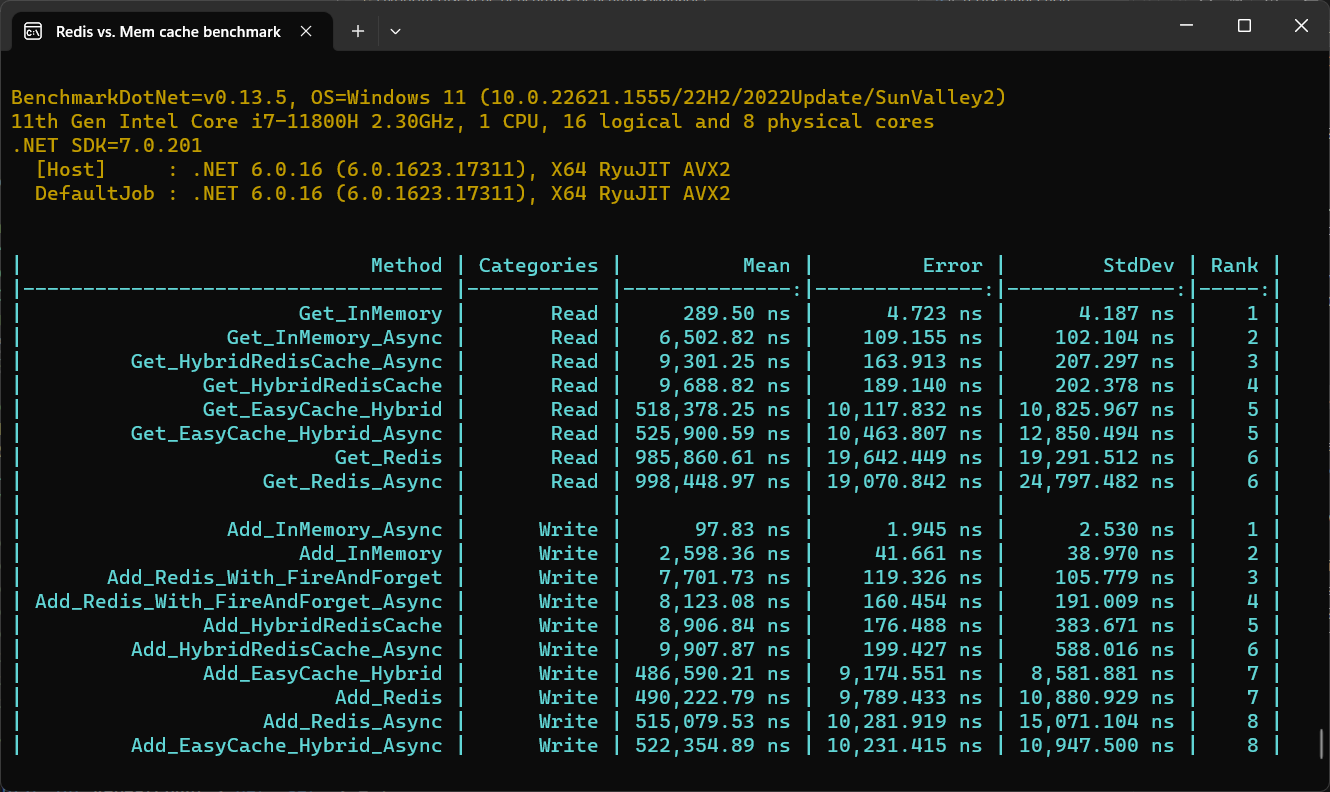
You can install the HybridRedisCache package using NuGet:
PM> Install-Package HybridRedisCache
Installing via the .NET Core command line interface:
dotnet add package HybridRedisCache
To use HybridCache, you can create an instance of the HybridCache class and then call its Set and Get methods to
cache and retrieve data, respectively.
Here's an example:
using HybridRedisCache;

...

// Create a new instance of HybridCache with cache options
var options = new HybridCachingOptions()
{
    DefaultLocalExpirationTime = TimeSpan.FromMinutes(1),
    DefaultDistributedExpirationTime = TimeSpan.FromDays(1),
    InstancesSharedName = "SampleApp",
    ThrowIfDistributedCacheError = true,
    RedisConnectString = "localhost",
    BusRetryCount = 10,
    AbortOnConnectFail = true,
    ReconfigureOnConnectFail = true,
    MaxReconfigureAttempts = 10,
    EnableLogging = true,
    EnableTracing = true,
    FlushLocalCacheOnBusReconnection = true,
    TracingActivitySourceName = nameof(HybridRedisCache),
    EnableRedisClientTracking = true,
    EnableMeterData = true,
    WarningHeavyDataThresholdBytes = 20 * 1024, // 20KB
    DataSizeHistogramMetricName = "my_app_keys_data_size_histogram_metric",
    SerializerType = SerializerType.Bason, // Bson, MessagePack, MemoryPack, Or Custom
    // Serializer = new CustomBinarySerializer(),
};
var cache = new HybridCache(options);

// Cache a string value with the key "mykey" for 1 minute
cache.Set("mykey", "myvalue", TimeSpan.FromMinutes(1));

// Retrieve the cached value with the key "mykey"
var value = cache.Get<string>("mykey");

// Retrieve the cached value with the key "mykey"
// If not exist create one by dataRetriever method
var value = await cache.GetAsync("mykey",
        dataRetriever: async key => await CreateValueTaskAsync(key, ...),
        localExpiry: TimeSpan.FromMinutes(1),
        redisExpiry: TimeSpan.FromHours(6),
fireAndForget: true);var builder = WebApplication.CreateBuilder(args);
builder.Services.AddHybridRedisCaching(options =>
{
options.AbortOnConnectFail = false;
options.InstancesSharedName = "RedisCacheSystem.Demo";
options.DefaultLocalExpirationTime = TimeSpan.FromMinutes(1);
options.DefaultDistributedExpirationTime = TimeSpan.FromDays(10);
options.ThrowIfDistributedCacheError = true;
options.RedisConnectionString = "localhost:6379,redis0:6380,redis1:6380,allowAdmin=true,keepAlive=180";
options.ConnectRetry = 10;
options.EnableLogging = true;
options.EnableTracing = true;
options.TracingActivitySourceName = nameof(HybridRedisCache);
options.FlushLocalCacheOnBusReconnection = true;
});[Route("api/[controller]")]
public class WeatherForecastController : Controller
{
private readonly IHybridCache _cacheService;
public VWeatherForecastController(IHybridCache cacheService)
{
this._cacheService = cacheService;
}
[HttpGet]
public string Handle()
{
//Set
_cacheService.Set("demo", "123", TimeSpan.FromMinutes(1));
//Set Async
await _cacheService.SetAsync("demo", "123", TimeSpan.FromMinutes(1));
}
[HttpGet)]
public async Task<WeatherForecast> Get(int id)
{
var data = await _cacheService.GetAsync<WeatherForecast>(id);
return data;
}
[HttpGet)]
public IEnumerable<WeatherForecast> Get()
{
var data = _cacheService.Get<IEnumerable<WeatherForecast>>("demo");
return data;
}
}HybridCache is a caching library that provides a number of advantages over traditional in-memory caching solutions.
One of its key features is the ability to persist caches between instances and sync data for all instances.
With HybridCache, you can create multiple instances of the cache that share the same Redis cache,
allowing you to scale out your application and distribute caching across multiple instances.
This ensures that all instances of your application have access to the same cached data,
regardless of which instance originally created the cache.
When a value is set in the cache using one instance, the cache invalidation message is sent to all other instances, ensuring that the cached data is synchronized across all instances. This allows you to take advantage of the benefits of caching, such as reduced latency and improved performance, while ensuring that the cached data is consistent across all instances.
Other features of HybridCache include:
- Multiple cache layers: Supports both in-memory and Redis caching layers, allowing for flexible caching strategies.
- Automatic expiration: Cached data can automatically expire based on time-to-live (TTL) or sliding expiration policies.
- Fire-and-forget caching: Enables quickly setting a value in the cache without waiting for a response, improving performance for non-critical cache operations.
- Asynchronous caching operations: Provides asynchronous cache operations to enhance application responsiveness and scalability.
- Distributed key locking: Ensures control over race conditions across multiple services, preventing conflicts with shared resources.
- Client synchronization with Redis messages: Keeps all clients in sync through Redis bus messages. For example, if a key is updated or removed by one client, other clients will automatically clear the key from their local cache, ensuring consistency across instances.
Overall, HybridCache provides a powerful and flexible caching solution that helps enhance the performance and
scalability of your applications while ensuring that cached data remains consistent across all instances.
Every asynchronous API accepts an optional trailing CancellationToken:
using var cts = new CancellationTokenSource(TimeSpan.FromSeconds(2));

await cache.SetAsync("mykey", "myvalue", token: cts.Token);
var value = await cache.GetAsync<string>("mykey", token: cts.Token);
What cancelling actually does.
StackExchange.Redisdoes not accept aCancellationTokenon its command APIs. Cancelling therefore stops your call from waiting and throwsOperationCanceledException; the command has already been handed to the multiplexer and the server may still apply it. Use the token to bound how long a caller waits, not to guarantee a write never lands.
- Redis 6.0+ for general use.
- Redis 8.0+ for
HashSetAsync(key, IDictionary<string, string>, ...)(issuesHSETEX) andHashFieldGetAndDeleteAsync(issuesHGETDEL). notify-keyspace-eventsmust be enabled for cross-instance local cache invalidation.HybridCachetries to enable it at startup withCONFIG SET notify-keyspace-events KA. Managed services such as Azure Cache for Redis and AWS ElastiCache blockCONFIG SET; there the call is logged as an error and startup continues. Enablenotify-keyspace-eventsthrough the provider's own configuration, otherwise local cache entries only expire via their own TTL and may serve stale data until then.
Each time the value of a cached key is modified in the database, Redis pushes an invalidation message to all the clients that are caching the key. This tells the clients to flush the key’s locally cached value, which is invalid. This behavior implies a trade-off between local cache hits and invalidation messages: keys that show a local cache hit rate greater than the invalidation message rate are the best candidates for local tracking and caching.
Install docker on your OS.
Open bash and type below commands:
$ docker pull redis:8.2
$ docker run --name redis -p 6379:6379 -d redis:8.2
Use a Redis 8.x tag.
HashSetAsync(key, IDictionary<string, string>, ...)issuesHSETEXandHashFieldGetAndDeleteAsyncissuesHGETDEL; both are Redis 8.0+. See Server requirements. Avoidredis:latest— it silently moves between major versions.
Test is redis running:
$ docker exec -it redis redis-cli
$ ping- .NET 10 SDK — the library multi-targets
net8.0,net9.0andnet10.0, so building the solution needs the newest of those installed. - Docker — required only for the container-backed test suite, described below.
The tests are split by what they need to run:
| Suite | Base class | Needs Docker? |
|---|---|---|
| In-process | InProcessCacheTest |
No |
| Container-backed | BaseCacheTest |
Yes |
The in-process suite runs Microsoft Garnet, a Redis-compatible server, inside the test process. No daemon, no image pull. Run it anywhere with:
dotnet test src/HybridRedisCache.Test --filter "FullyQualifiedName~InProcess|FullyQualifiedName~SerializerTests|FullyQualifiedName~ArgumentCheckTest|FullyQualifiedName~ObjectHelperTest|FullyQualifiedName~SetAllBehaviorTests|FullyQualifiedName~CancellationTokenTests"The container-backed suite uses Testcontainers to start a real
Redis. It exists because Garnet does not implement everything this library uses — key-space notifications
(CONFIG SET notify-keyspace-events), pub/sub, and the Redis 8 HSETEX / HGETDEL hash commands. Anything
covering those behaviours must live here.
1. A running Docker daemon. Testcontainers talks to /var/run/docker.sock.
2. Non-root access to the daemon. Testcontainers connects to the socket as whoever owns the test
process and has no way to escalate, so running the tests with sudo does not help — an IDE such as
Rider runs as your own user. Your user must be able to reach the socket unaided. On Linux:
sudo usermod -aG docker $USERThen log out and back in — group membership is applied at login, so an existing shell or IDE will keep failing until you start a new session. Symptoms of missing this step:
Docker is either not running or misconfigured. Please ensure that Docker is running
and that the endpoint is properly configured.
  Details: Failed to connect to Docker endpoint at 'unix:///var/run/docker.sock'.
permission denied while trying to connect to the docker API at unix:///var/run/docker.sock
Verify with:
docker info --format '{{.ServerVersion}}' # must succeed without sudoIf Docker was installed as a snap, the
dockergroup may not exist yet. Create it and restart the service first:sudo addgroup --system docker && sudo snap disable docker && sudo snap enable docker.
3. The images. Testcontainers pulls these on first run; pre-pulling avoids a first-run timeout:
docker pull redis:8.2
docker pull testcontainers/ryuk:0.14.0   # Testcontainers' container-cleanup sidecar
The
ryuktag is chosen by theTestcontainerspackage, not by this repo, so it changes when that package is upgraded. If the pull 404s, let Testcontainers pull it itself on the first test run, or read the current tag from the package.
You do not need to start Redis yourself — each test class starts and disposes its own container on a
random port. The image tag is pinned in BaseCacheTest.RedisImage and must stay on Redis 8.x.
Once the above is in place, run everything:
dotnet test src/HybridRedisCache.slnContributions are welcome! If you find a bug or have a feature request, please open an issue or submit a pull request.
If you'd like to contribute to HybridRedisCache, please follow these steps:
- Fork the repository.
- Create a new branch for your changes.
- Make your changes and commit them.
- Push your changes to your fork.
- Submit a pull request.
HybridRedisCache is licensed under the Apache License, Version 2.0. See
the LICENSE file for more information.