A native KDE Connect implementation for the COSMIC Desktop, written in Rust.
Many features are working but you may encounter bugs — please report them via GitHub Issues.
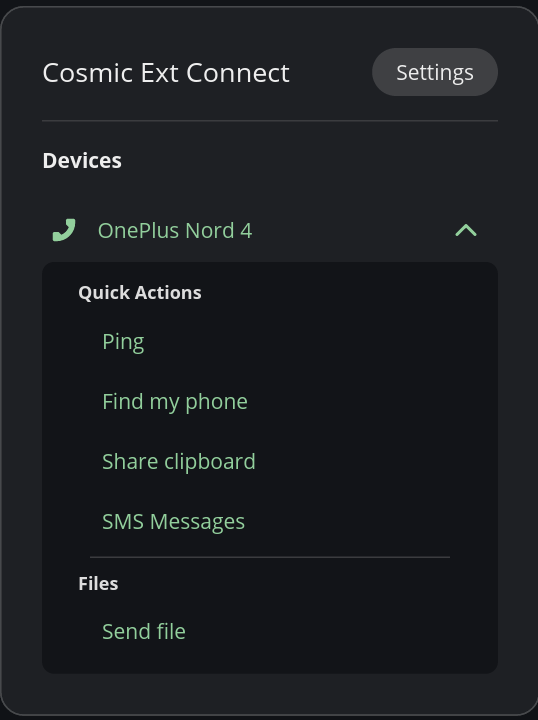
✅ Supported Plugins
- Device Pairing / Unpairing
- Battery Monitor
- Clipboard Sync (Desktop to Mobile) - Working on bidirectional
- Connectivity Report (signal strength / network type)
- Contacts Sync
- Find My Phone
- MPRIS / Media Control (exposed via D-Bus MPRIS2 to COSMIC panel)
- Notifications (receive, action, reply)
- Ping
- Run Commands
- Share Files & URLs (send files, receive files and URLs)
- SMS (conversations, send/receive)
- Plugin Enable / Disable per device
- System Volume (Partial support - May not work on certain devices - Known Mobile App Bug)
- Telephony (Know bug - Media does not resume when Ending/Canceling Call)
- SFTP / Browse Device (Requires sshfs package installed)
🚧 Plugins Not Yet Supported
The following plugins require RTP which is not yet supported on the COSMIC Desktop.
- MousePad / Remote Input
- Presenter Mode
- Virtual Display
Installing from COSMIC Flatpak Repository
flatpak remote-add --if-not-exists --user cosmic https://apt.pop-os.org/cosmic/cosmic.flatpakrepo
flatpak install --user io.github.hepp3n.kdeconnect- rustup.rs
libxkbcommon-dev(required on some distros — if the build fails, install this first)justcommand runner
git clone https://github.com/hepp3n/kdeconnect.git
cd kdeconnect
just build
just install
The service starts automatically on next login via D-Bus activation and XDG autostart.
For journalctl logging and systemctl control instead of D-Bus activation:
just install-systemd
just enable-service
Note: You may need to log out and back in for the applet to appear in the COSMIC panel. Once logged back in, go to COSMIC Settings → Desktop → Panel → Configure Panel Applets and add KDE Connect.
Full logging for both the service and panel applet:
just install-debug- Service logs →
/tmp/kdeconnect-service.log - Applet logs →
/tmp/kdeconnect-applet.log
Restore to standard install with just install.
just uninstallRequires flatpak-builder:
flatpak-builder --force-clean --user --install-deps-from=flathub --repo=repo --install builddir io.github.hepp3n.kdeconnect.jsonSome distributions enables Firewall by default. Or you are enabled it by yourself. In this case, check what firewall you are using. And allow 1714-1764 port range for TCP and UDP connections.
For UFW firewall:
sudo ufw allow 1714:1764/udp
sudo ufw allow 1714:1764/tcp
sudo ufw reload
For Firewalld:
sudo firewall-cmd --permanent --zone=home --add-service=kdeconnect
sudo firewall-cmd --reload
For IPTables:
sudo iptables -I INPUT -i <yourinterface> -p udp --dport 1714:1764 -m state --state NEW,ESTABLISHED -j ACCEPT
sudo iptables -I INPUT -i <yourinterface> -p tcp --dport 1714:1764 -m state --state NEW,ESTABLISHED -j ACCEPT

sudo iptables -A OUTPUT -o <yourinterface> -p udp --sport 1714:1764 -m state --state NEW,ESTABLISHED -j ACCEPT
sudo iptables -A OUTPUT -o <yourinterface> -p tcp --sport 1714:1764 -m state --state NEW,ESTABLISHED -j ACCEPT
For more, directly from official KDEConnect userbase: KDEConnect Firewall
For contributors: There is a opt-in logger for flatpak that is helpful when troubleshooting sandbox issues.
To Enable:
flatpak override --user --env=RUST_LOG=info --env=KDECONNECT_LOG_FILE=1 io.github.hepp3n.kdeconnectTo Disable:
flatpak override --user --unset-env=RUST_LOG --unset-env=KDECONNECT_LOG_FILE io.github.hepp3n.kdeconnectLogs will be generated in ~/.var/app/io.github.hepp3n.kdeconnect/data/
Note You may need to restart the instantace for the override to take effect. If the applet is placed in the cosmic panel you can simply kill the panel and it will restart all applets in the panel:
killall cosmic-panelUsing the flatpak kill command works as well if you perfer this method. The instance will auto restart after stopping if it's installed in the panel.
flatpak --user kill io.github.hepp3n.kdeconnect