

The missing map for your generative-AI ecosystem, discover what your Markdown is trying to tell you.





From chaotic ecosystem to predictable agents, the missing map for your Markdown-based generative-AI ecosystem (Claude Code, Codex, Gemini, Copilot, and others). Detects collisions, orphans, semantic duplicates, and bloated skills on a single graph, with static and optional semantic (LLM) analysis.
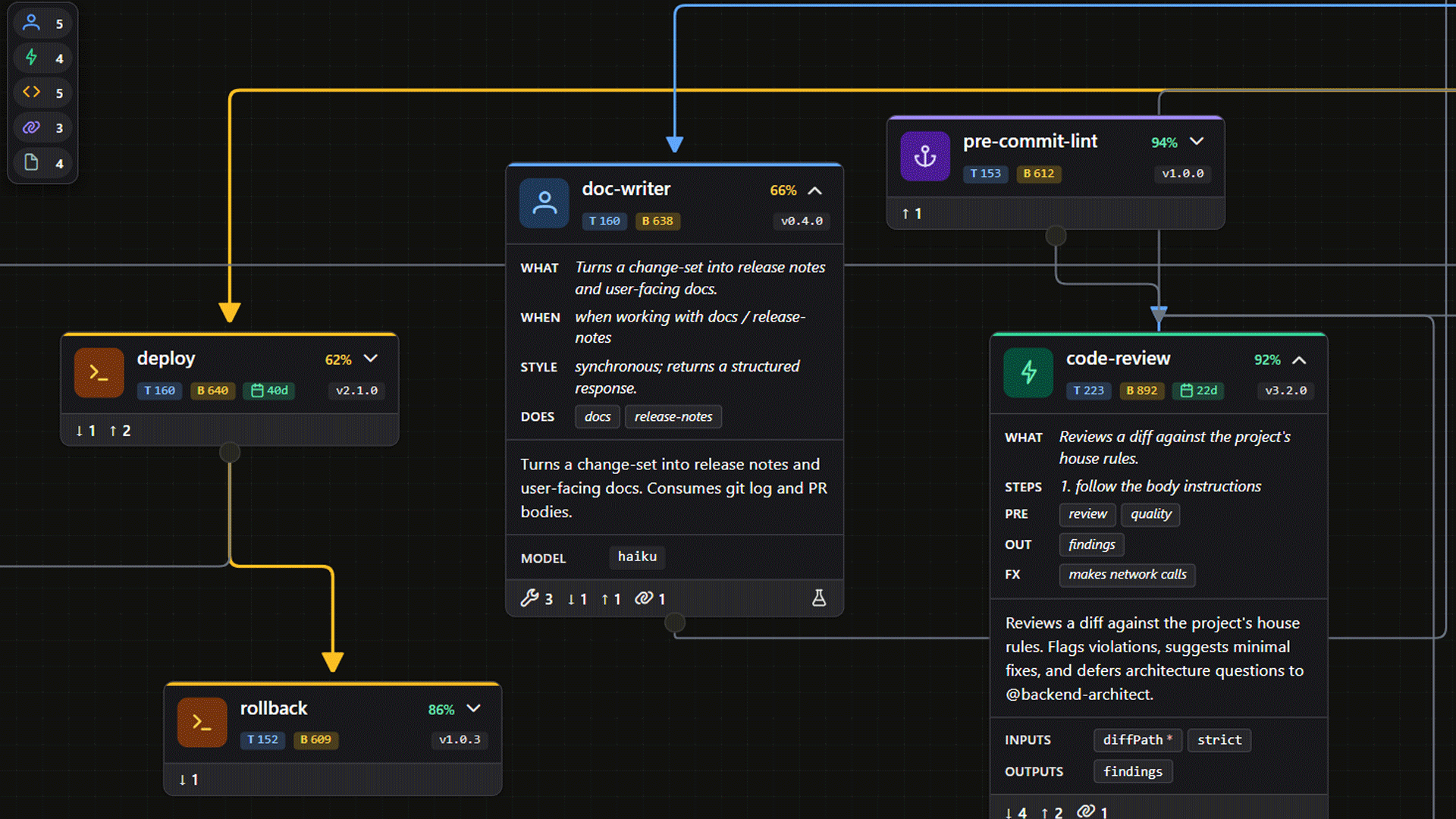
Developers working with AI agents accumulate dozens of skills, agents, commands, and loose documents. Nobody has visibility into:
- How much each Markdown file costs in tokens, invisible until you measure it, expensive at scale.
- What exists and where it lives.
- Who invokes whom (dependencies, cross-references).
- Which triggers overlap or step on each other.
- What is alive vs obsolete.
- What can be deleted without breaking anything.
- When each skill was last optimized or validated.
No official tool (Anthropic, Cursor, GitHub, skills.sh) covers this. skill-map fills that gap.
- Teams and platform architects, multiple projects, multiple agents, divergent copies of the same skill. One scan puts the whole hive in the same graph.
- Authors, skill, agent, or command creators who want to spot duplicates, redundancies, and optimization opportunities before publishing.
- Agent debuggers, when the agent picked the wrong invocation, follow the path from the trigger phrase to the skill that won the match, in real time.
- Tool builders, anyone wiring CLI, JSON output, or plugins on top of the graph.
- Deterministic scanner walks files, parses frontmatter, detects references, and emits structured graph data (nodes, links, issues).
- Optional LLM layer consumes that data and adds semantic intelligence: validates ambiguous references, clusters equivalent triggers, compares nodes, answers questions.
smCLI is the primary surface, every operation reachable from the command line. Baresmopens the Web UI directly.- Web UI, bundled with the CLI, launched in one command. The graph updates live as you edit any
.mdfile. A standalone demo runs in-browser without installing anything. - Plugin system (drop-in, kernel + extensions) lets third parties add Providers, Extractors, Analyzers, Actions, Formatters, or Hooks without touching the kernel.
Every analytical extension declares one of two modes: deterministic (pure code, fast, free, runs inside sm scan / sm check, CI-safe) or probabilistic (calls an LLM through the kernel, runs as a queued job, never during scan). Same plugin model, two cost profiles. Run deterministic in pre-commit; let probabilistic catch up on-demand or nightly.
Full contract: spec/architecture.md §Execution modes.
- CLI-first, everything the UI does is reachable from the command line.
- Deterministic by default, the LLM is optional, never required. The product works offline.
- Public standard, the spec (JSON Schemas + conformance suite + contracts) lives in
spec/. Anyone can build an alternative UI, an implementation in another language, or complementary tooling consuming only the spec. - Platform-agnostic, the first adapter is Claude Code, but the architecture supports any MD ecosystem.
Architecture details (hexagonal kernel, ports & adapters) live in spec/architecture.md.
npm i -g @skill-map/cli
cd your/project
sm init
sm
That last sm opens the Web UI on http://127.0.0.1:4242 with the watcher running. Edit any .md file in the project and the graph updates live in your browser.
Want to try it without installing? Open the live demo.
The first time you run sm bump or sm sidecar annotate, skill-map writes a sibling YAML file next to each .md: demo-agent.md → demo-agent.sm in the same directory. They are intentional, they are part of the design, and they belong in your repo.
They appear only when you opt in. sm scan, sm watch, and the live UI never create .sm files, they only read existing ones. If you just installed skill-map and ran sm init / sm / sm scan, no sidecar exists yet; they show up the first time you call sm bump (or sm sidecar annotate) on a node, and never before.
Why a separate file? Your .md belongs to the vendor (Claude Code, Codex, Cursor, …) and to your own prose. Stuffing skill-map's bookkeeping (version, stability, supersession, tags, audit trail) inside its frontmatter would contaminate vendor input and bloat what the agent reads on every invocation. The .sm sidecar keeps the two layers cleanly separated: the vendor and the human own the .md; skill-map owns the .sm.
Commit them to git. .sm files are source, they carry the metadata that drives sm check, drift detection, and supersession graphs. Treat them like any other tracked file: don't add them to .gitignore, don't strip them on deploy. The opt-in pre-commit hook (sm hooks install pre-commit-bump) keeps them in lockstep with their .md automatically.
Full spec: spec/architecture.md §Annotation system.
If you use Claude Code, the fastest way to evaluate skill-map is the bundled interactive tutorial, about 10 minutes for the demo, with an optional 20–30-min deep dive afterwards.
mkdir try-skill-map && cd try-skill-map
sm tutorial             # writes sm-tutorial.md into the empty dir
claude                  # open Claude Code in the same dir
# Then, in the Claude prompt:
run @sm-tutorial.md
Claude takes over from there: drops a fixture, walks you through sm init, opens the Web UI, edits files in front of your eyes, and shows the watcher reacting live (including how .skillmapignore hides files in real time). You see the full flow before pointing it at your real project, no commitment, fully reversible.
Once you have the basics down, the master tutorial takes you into the plugin system, settings, and view-slots: how the six extension kinds work, how to scaffold and configure your own plugin, and where contributions land in the UI. Around 30–35 minutes, modular (you pick what to explore from a menu).
mkdir try-skill-map-master && cd try-skill-map-master
sm tutorial master      # writes sm-master.md into the empty dir
claude                  # open Claude Code in the same dir
# Then, in the Claude prompt:
run @sm-master.md
Same hands-on style as the basic tutorial, but with a deeper focus on extensibility: you read the model, list the catalogue, inspect single extensions, then build a small plugin end-to-end and watch it appear in the UI.
The spec is the source of truth and lives in spec/, separated from the reference implementation since day zero, so third parties can build alternative implementations using only spec/.
- Canonical URL: skill-map.dev (schemas at
https://skill-map.dev/spec/v0/<path>.schema.json). - npm package:
@skill-map/spec. - Contents: JSON Schemas (draft 2020-12) + prose contracts + conformance suite. Full inventory in
spec/README.md.
skill-map/                     pnpm workspaces root (private)
├── spec/                      specification, published as @skill-map/spec
├── src/                       reference implementation, published as @skill-map/cli (bins: sm, skill-map)
├── ui/                        Angular SPA (graph, list, inspector), bundled into @skill-map/cli
├── web/                       public site (skill-map.dev), hosts the demo bundle
├── scripts/                   build & validation scripts (spec index, CLI reference, demo dataset, …)
├── ...
├── AGENTS.md                  agent operating manual
└── ROADMAP.md                 design narrative (decisions, phases, deferred)
- Website: skill-map.dev
- Full design and roadmap: ROADMAP.md
- Contribution guide: CONTRIBUTING.md
- Spec overview: spec/README.md
- Architecture (ports & adapters): spec/architecture.md
- CLI contract: spec/cli-contract.md
- CLI reference (auto-generated): context/cli-reference.md
- Reference implementation: src/README.md
- Spanish version of this README: README.es.md
- License: MIT
The graph view that gives skill-map its identity is built on Foblex Flow, an excellent Angular flow library that handles nodes, connectors, pan, and zoom. Huge thanks to the Foblex team.
Also standing on the shoulders of Angular, PrimeNG, Hono, and Kysely.