Real CI/CD for LabVIEW — mass compile, VI Analyzer, visual VI diffs, a browsable VI gallery, and a live status dashboard — running entirely on GitHub Actions, in containers, on your own account.
Push a commit and this pipeline spins up headless LabVIEW inside a throwaway Docker container on a GitHub runner, runs the code-quality checks you choose, and publishes the results as a polished GitHub Pages dashboard. There's no build server to babysit, no license server to wire up, and nothing running on anyone else's infrastructure — every container executes in your Actions environment, under your account's minutes.


Documentation · FAQ · Example project
Apply to New Repo is the same green button you'll find on every dashboard — it's the one-click installer for your own repository. The buttons go live once GitHub Pages is enabled (Settings ▸ Pages ▸ deploy from the
gh-pagesbranch) and the dashboard/configurator workflows have run.
5-minute overview — click to watch on YouTube
LabVIEW projects rarely get the automated quality gates that text-based languages take for granted. There's no git diff you can read for a binary .vi, no one-command "compile everything and tell me what broke," and standing up LabVIEW on a build server is a licensing-and-setup ordeal. So changes ship without a safety net, broken VIs and missing dependencies surface late, and reviewing changes to VIs is mostly guesswork.
LabVIEW CI closes that gap. It is portable (drops into any LabVIEW repository), self-contained (LabVIEW runs headless in Docker, so there's no machine to maintain), and transparent (every result is a shareable web page). You get the "green check on every commit" workflow the rest of software engineering relies on — for LabVIEW.
| Capability | What it does |
|---|---|
| Mass Compile | Compiles every VI/CTL and flags broken VIs and missing dependencies — a build check for your whole project, on every commit. |
| VI Analyzer | Runs NI's static-analysis suite for correctness, performance, style, and documentation, as a friendly, navigable report. |
| VIDiff | Visual, side-by-side front-panel + block-diagram diffs of the VIs each commit changed — code review you can actually see. |
| VI Browser | A searchable gallery of every VI's front panel and block diagram, browsable across your commit history. |
| Unit Tests | Runs Caraya / VI Tester / NI Unit Test Framework headlessly and merges the results into one report. |
| Antidoc | Generates project documentation from the VI hierarchy on every commit. |
| Status Dashboard | Aggregates every capability's result for every commit into one live GitHub Pages dashboard. |
Enable only the capabilities you want — each runs on its own and writes its own report. The whole system is driven by a single catalog, so adding a new capability is one entry rather than edits scattered across the UI, installer, and dashboard.
The dashboard for this repo's own example project — a real ~54-VI LabVIEW application with a dozen revisions of genuine history — is published and continuously updated:
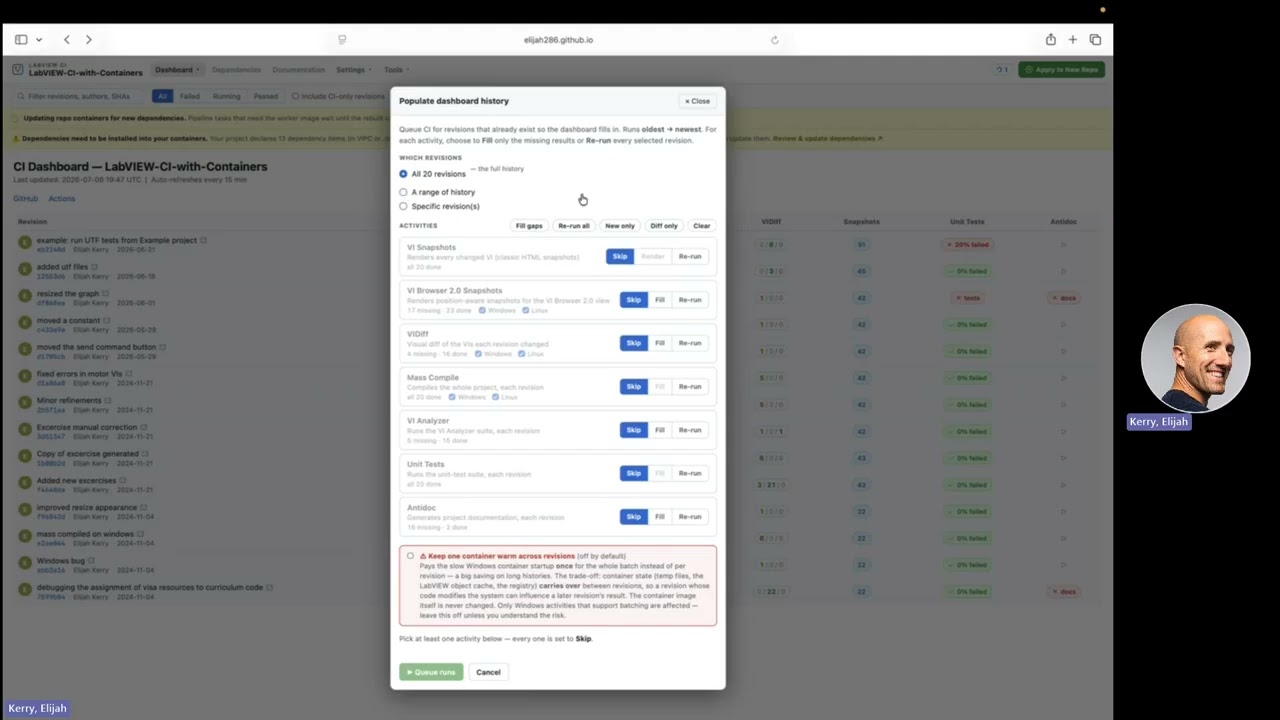
▶ View the live dashboard — click any cell to open the underlying Mass Compile, VI Analyzer, VIDiff, or VI Browser report.
The fastest path is the interactive installer — the same Apply to New Repo button you'll find on every dashboard:
➕ Apply to New Repo — pick your LabVIEW version, platforms, and capabilities; paste a one-time fine-grained token (the page links you straight to GitHub's token screen with the exact permissions pre-filled); and it opens a pull request with everything wired up. Review, merge, done. It can even enable GitHub Pages and add a dashboard badge to your README in the same PR.
Private GitHub repositories are supported — see installing to a private GitHub repository for the token setup.
Prefer the command line, or want a thin reusable-workflow caller? Both are covered in the installer guide. The minimal caller is:
# .github/workflows/labview-ci.yml
jobs:
  labview-ci:
    uses: elijah286/LabVIEW-CI-with-Containers/.github/workflows/labview-ci.reusable.yml@v4
    secrets: inherit
Once installed, the dashboard's Configure and Update now buttons let you change settings or pull the latest tooling without leaving the browser.
push / PR ─▶ reusable workflow ─▶ per-capability container jobs
                                    │ pull worker image (built once, cached)
                                    │ docker run --rm  →  headless LabVIEW
                                    │ build report
                                    ▼
                              gh-pages ─▶ GitHub Pages dashboard
- Containers, not a build server. Worker images bundle LabVIEW (plus your VIPM /
.vipcdependencies, baked in at build time), are published once to your repo's GitHub Container Registry, and are pulled on demand. Each job runs in a fresh, throwaway container. - Your infrastructure, your control. Everything runs on GitHub-hosted (or self-hosted) runners under your account. Nothing touches NI's or the author's servers.
- Catalog-driven and self-updating. A single
catalog.jsonis the source of truth for every capability; the configurator and installer both read it, and installed repositories can adopt new versions with one click.
The Documentation tells the full implementation-level story.
- Full Documentation — an implementation-level reference for expert LabVIEW developers: how the worker images are built, how runners launch headless LabVIEW, how VIPM dependencies are baked in, the catalog model, the report data contracts, the security boundaries, and how to extend or adapt the system.
- FAQ — short, practical answers about setup, configuration, and day-to-day operation.
- Example project — the LabVIEW application this repo runs its own CI on.
Contributions are welcome — issues, fixes, and new capabilities. The architecture is built to make extension cheap: because the system is catalog-driven, adding a capability is usually a single entry in catalog.json plus the action that implements it. Start with the Documentation ("Capabilities in depth" and the architecture overview) to see how the pieces fit, then open an issue or pull request.
Every change to any part of the stack bumps a version and ships as a release, so installed repositories can see exactly what changed and choose when to adopt it. The installer guide describes the versioning and release model in detail.