English · Español
The AI-native E2E test runner that writes, runs, and debugs tests for you.










E2E Runner is a zero-code browser testing framework where tests are plain JSON files — no Playwright scripts, no Cypress boilerplate, no test framework to learn. Define what to click, type, and assert, and the runner executes it in parallel against a shared Chrome pool.
But what makes it truly different is its deep AI integration. With a built-in MCP server, Claude Code can create tests from a conversation, run them, read the results, capture screenshots, and even visually verify that pages look correct — all without leaving the chat. Paste a GitHub issue URL and get a runnable test back. That's the workflow.
[
  {
    "name": "login-flow",
    "actions": [
      { "type": "goto", "value": "/login" },
      { "type": "type", "selector": "#email", "value": "user@test.com" },
      { "type": "type", "selector": "#password", "value": "secret" },
      { "type": "click", "text": "Sign In" },
      { "type": "assert_text", "text": "Welcome back" },
      { "type": "screenshot", "value": "logged-in.png" }
    ]
  }
]
No imports. No describe/it. No compilation step. Just a JSON file that describes what a user does — and the runner makes it happen.
Install E2E testing skills for any coding agent (Claude Code, Cursor, Codex, Copilot, and 40+ more):
npx skills add fastslack/mtw-e2e-runnerThis gives your agent the knowledge to create, run, and debug JSON-driven E2E tests — no documentation reading required.
Browse all available skills at skills.sh
Prerequisites: Node.js >= 20, Docker running, your app on a known port.
npm install --save-dev @matware/e2e-runner
npx e2e-runner init          # creates e2e/tests/ with a sample test
npx e2e-runner pool start    # starts Chrome in Docker
npx e2e-runner run --all     # runs the sample test
Or do it all in one command:
curl -fsSL https://raw.githubusercontent.com/fastslack/mtw-e2e-runner/main/scripts/quickstart.sh | bashAfter setup, edit e2e.config.js to set your app's port:
export default {
  baseUrl: 'http://host.docker.internal:3000', // change 3000 to your port
};
Why
host.docker.internal? Chrome runs inside Docker and can't reachlocalhoston your machine. This hostname bridges the gap. On Linux (Docker Engine, not Desktop), you may need--add-host=host.docker.internal:host-gatewayor use your LAN IP directly.
claude plugin marketplace add fastslack/mtw-e2e-runner
claude plugin install e2e-runner@matware
This gives Claude 13 MCP tools, slash commands, and specialized agents. Just say "Run all E2E tests" or "Create a test for the login flow".
cp node_modules/@matware/e2e-runner/opencode.json ./
mkdir -p .opencode && cp -r node_modules/@matware/e2e-runner/.opencode/* .opencode/
See OPENCODE.md for details.
- Test Format — learn the full action vocabulary
- Claude Code Integration — set up AI-powered testing
- Visual Verification — describe expected pages in plain English
- Issue-to-Test — turn bug reports into executable tests
- Web Dashboard — monitor tests in real time
🧪 Zero-code tests — JSON files that anyone on your team can read and write. No JavaScript, no compilation, no framework lock-in.
🤖 AI-powered testing — Claude Code creates, executes, and debugs tests natively through 13 MCP tools. Ask it to "test the checkout flow" and it builds the JSON, runs it, and reports back.
🐛 Issue-to-Test pipeline — Paste a GitHub or GitLab issue URL. The runner fetches it, generates E2E tests, runs them, and tells you: bug confirmed or not reproducible.
👁️ Visual verification — Describe what the page should look like in plain English. The AI captures a screenshot and judges pass/fail against your description. No pixel-diffing setup needed.
🧠 Learning system — Tracks test stability across runs. Detects flaky tests, unstable selectors, slow APIs, and error patterns — then surfaces actionable insights.
⚡ Parallel execution — Run N tests simultaneously against a shared Chrome pool (browserless/chrome). Serial mode available for tests that share state.
📊 Real-time dashboard — Live execution view, run history with pass-rate charts, screenshot gallery with hash-based search, expandable network request logs.
🔁 Smart retries — Test-level and action-level retries with configurable delays. Flaky tests are detected and flagged automatically.
📦 Reusable modules — Extract common flows (login, navigation, setup) into parameterized modules and reference them with $use.
🏗️ CI-ready — JUnit XML output, exit code 1 on failure, auto-captured error screenshots. Drop-in GitHub Actions example included.
🌐 Multi-project — One dashboard aggregates test results from all your projects. One Chrome pool serves them all.
🐳 Portable — Chrome runs in Docker, tests are JSON files in your repo. Works on any machine with Node.js and Docker.
Each .json file in e2e/tests/ contains an array of tests. Each test has a name and sequential actions:
[
  {
    "name": "homepage-loads",
    "actions": [
      { "type": "goto", "value": "/" },
      { "type": "assert_visible", "selector": "body" },
      { "type": "assert_url", "value": "/" },
      { "type": "screenshot", "value": "homepage.png" }
    ]
  }
]
Suite files can have numeric prefixes for ordering (01-auth.json, 02-dashboard.json). The --suite flag matches with or without the prefix, so --suite auth finds 01-auth.json.
| Action | Fields | Description |
|---|---|---|
goto |
value |
Navigate to URL (relative to baseUrl or absolute) |
click |
selector or text |
Click by CSS selector or visible text content |
type / fill |
selector, value |
Clear field and type text |
wait |
selector, text, or value (ms) |
Wait for element, text, or fixed delay |
screenshot |
value (filename) |
Capture a screenshot |
select |
selector, value |
Select a dropdown option |
clear |
selector |
Clear an input field |
press |
value |
Press a keyboard key (Enter, Tab, etc.) |
scroll |
selector or value (px) |
Scroll to element or by pixel amount |
hover |
selector |
Hover over an element |
evaluate |
value |
Execute JavaScript in the browser context |
navigate |
value |
Browser navigation (back, forward, reload) |
clear_cookies |
— | Clear all cookies for the current page |
| Action | Fields | Description |
|---|---|---|
assert_text |
text |
Assert text exists anywhere on the page (substring) |
assert_element_text |
selector, text, optional value: "exact" |
Assert element's text contains (or exactly matches) the expected text |
assert_url |
value |
Assert current URL path or full URL. Paths (/dashboard) compare against pathname only |
assert_visible |
selector |
Assert element exists and is visible |
assert_not_visible |
selector |
Assert element is hidden or doesn't exist |
assert_attribute |
selector, value |
Check attribute: "type=email" for value, "disabled" for existence |
assert_class |
selector, value |
Assert element has a CSS class |
assert_input_value |
selector, value |
Assert input/select/textarea .value contains text |
assert_matches |
selector, value (regex) |
Assert element text matches a regex pattern |
assert_count |
selector, value |
Assert element count: exact ("5"), or operators (">3", ">=1", "<10") |
assert_no_network_errors |
— | Fail if any network requests failed (e.g. ERR_CONNECTION_REFUSED) |
get_text |
selector |
Extract element text (non-assertion, never fails). Result: { value: "..." } |
When click uses text instead of selector, it searches across common interactive and content elements:
button, a, [role="button"], [role="tab"], [role="menuitem"], [role="option"],
[role="listitem"], div[class*="cursor"], span, li, td, th, label, p, h1-h6
{ "type": "click", "text": "Sign In" }These actions handle common patterns in React/MUI apps that normally require verbose evaluate boilerplate:
| Action | Fields | Description |
|---|---|---|
type_react |
selector, value |
Type into React controlled inputs using the native value setter. Dispatches input + change events so React state updates correctly. |
click_regex |
text (regex), optional selector, optional value: "last" |
Click element whose textContent matches a regex (case-insensitive). Default: first match. Use value: "last" for last match. |
click_option |
text |
Click a [role="option"] element by text — common in autocomplete/select dropdowns. |
focus_autocomplete |
text (label text) |
Focus an autocomplete input by its label text. Supports MUI and generic [role="combobox"]. |
click_chip |
text |
Click a chip/tag element by text. Searches [class*="Chip"], [class*="chip"], [data-chip]. |
// Before: 5 lines of evaluate boilerplate
{ "type": "evaluate", "value": "const input = document.querySelector('#search'); const nativeSet = Object.getOwnPropertyDescriptor(window.HTMLInputElement.prototype, 'value').set; nativeSet.call(input, 'term'); input.dispatchEvent(new Event('input', {bubbles: true})); input.dispatchEvent(new Event('change', {bubbles: true}));" }

// After: 1 action
{ "type": "type_react", "selector": "#search", "value": "term" }Retry an entire test on failure. Set globally via config or per-test:
{ "name": "flaky-test", "retries": 3, "timeout": 15000, "actions": [...] }Tests that pass after retry are flagged as flaky in the report and learning system.
Retry a single action without rerunning the entire test. Useful for timing-sensitive clicks and waits:
{ "type": "click", "selector": "#dynamic-btn", "retries": 3 }
{ "type": "wait", "selector": ".lazy-loaded", "retries": 2 }
Set globally: actionRetries in config, --action-retries <n> CLI, or ACTION_RETRIES env var. Delay between retries: actionRetryDelay (default 500ms).
Tests that share state (e.g., two tests modifying the same record) can race when running in parallel. Mark them as serial:
{ "name": "create-patient", "serial": true, "actions": [...] }
{ "name": "verify-patient-list", "serial": true, "actions": [...] }
Serial tests run one at a time after all parallel tests finish — preventing interference without slowing down independent tests.
The simplest approach — log in via the UI like a real user:
{
  "hooks": {
    "beforeEach": [
      { "type": "goto", "value": "/login" },
      { "type": "type", "selector": "#email", "value": "test@example.com" },
      { "type": "type", "selector": "#password", "value": "test-password" },
      { "type": "click", "text": "Sign In" },
      { "type": "wait", "selector": ".dashboard" }
    ]
  },
  "tests": [...]
}
For SPAs with JWT, skip the login form by injecting the token directly:
{ "type": "set_storage", "value": "accessToken=eyJhbGciOiJIUzI1NiIs..." }Or set it globally in config:
// e2e.config.js
export default {
  authToken: 'eyJhbGciOiJIUzI1NiIs...',
  authStorageKey: 'accessToken',
};
Each test runs in a fresh browser context, so auth state is automatically clean between tests.
More strategies: Cookie-based auth, HTTP header injection, OAuth/SSO bypasses, reusable auth modules, and role-based testing — see docs/authentication.md
Extract common flows into parameterized modules:
// e2e/modules/login.json
{
  "$module": "login",
  "description": "Log in via the UI login form",
  "params": {
    "email": { "required": true, "description": "User email" },
    "password": { "required": true, "description": "User password" }
  },
  "actions": [
    { "type": "goto", "value": "/login" },
    { "type": "type", "selector": "#email", "value": "{{email}}" },
    { "type": "type", "selector": "#password", "value": "{{password}}" },
    { "type": "click", "text": "Sign In" },
    { "type": "wait", "value": "2000" }
  ]
}
Use in tests:
{
  "name": "dashboard-loads",
  "actions": [
    { "$use": "login", "params": { "email": "user@test.com", "password": "secret" } },
    { "type": "assert_text", "text": "Dashboard" }
  ]
}
Modules support parameter validation (required params fail fast), conditional blocks ({{#param}}...{{/param}}), nested composition, and cycle detection.
Skip exploratory or draft tests from --all runs:
// e2e.config.js
export default {
  exclude: ['explore-*', 'debug-*', 'draft-*'],
};
Individual suite runs (--suite) are not affected by exclude patterns.
Describe what the page should look like — AI judges pass/fail from screenshots:
{
  "name": "dashboard-loads",
  "expect": "Patient list with at least 3 rows, no error messages, sidebar with navigation links",
  "actions": [
    { "type": "goto", "value": "/dashboard" },
    { "type": "wait", "selector": ".patient-list" }
  ]
}
After test actions complete, the runner auto-captures a verification screenshot. The MCP response includes the screenshot hash — Claude Code retrieves it and visually verifies against your expect description. No API key required.
Turn GitHub and GitLab issues into executable E2E tests. Paste an issue URL and get runnable tests — automatically.
How it works:
- Fetch — Pulls issue details (title, body, labels) via
ghorglabCLI - Generate — AI creates JSON test actions based on the issue description
- Run — Optionally executes the tests immediately to verify if a bug is reproducible
# Fetch and display
e2e-runner issue https://github.com/owner/repo/issues/42

# Generate a test file via Claude API
e2e-runner issue https://github.com/owner/repo/issues/42 --generate

# Generate + run + report
e2e-runner issue https://github.com/owner/repo/issues/42 --verify
# -> "BUG CONFIRMED" or "NOT REPRODUCIBLE"
In Claude Code, just ask:
"Fetch issue #42 and create E2E tests for it"
Bug verification logic: Generated tests assert the correct behavior. Test failure = bug confirmed. All tests pass = not reproducible.
Auth: GitHub requires gh CLI, GitLab requires glab CLI. Self-hosted GitLab is supported.
The runner learns from every test run — building knowledge about your test suite over time.
Query insights via the e2e_learnings MCP tool:
| Query | Returns |
|---|---|
summary |
Full health overview: pass rate, flaky tests, unstable selectors, API issues |
flaky |
Tests that pass only after retries |
selectors |
CSS selectors with high failure rates |
pages |
Pages with console errors, network failures, load time issues |
apis |
API endpoints with error rates and latency (auto-normalized: UUIDs, hashes, IDs) |
errors |
Most frequent error patterns, categorized |
trends |
Pass rate over time (auto-switches to hourly when all data is from one day) |
test:<name> |
Drill-down history for a specific test |
page:<path> |
Drill-down history for a specific page |
selector:<value> |
Drill-down history for a specific selector |
Storage & export:
- SQLite (
~/.e2e-runner/dashboard.db) — default, zero setup - Neo4j knowledge graph — optional, for relationship-based analysis. Manage via
e2e_neo4jMCP tool ordocker compose - Markdown report (
e2e/learnings.md) — auto-generated after each run
Test narration: Each test run generates a human-readable narrative of what happened step by step, visible in the CLI output and the dashboard.
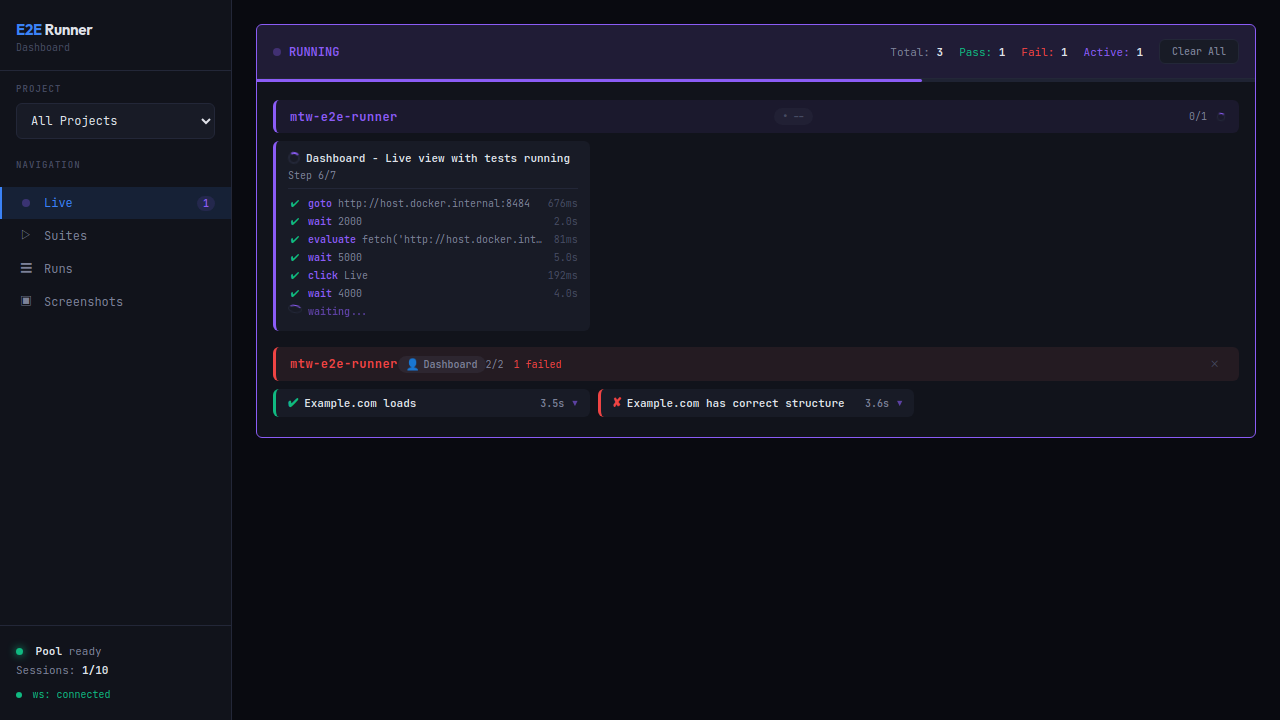
Real-time UI for running tests, viewing results, screenshots, and network logs.
e2e-runner dashboard                  # Start on default port 8484
e2e-runner dashboard --port 9090 # Custom portMonitor tests in real-time with step-by-step progress, durations, and active worker count.
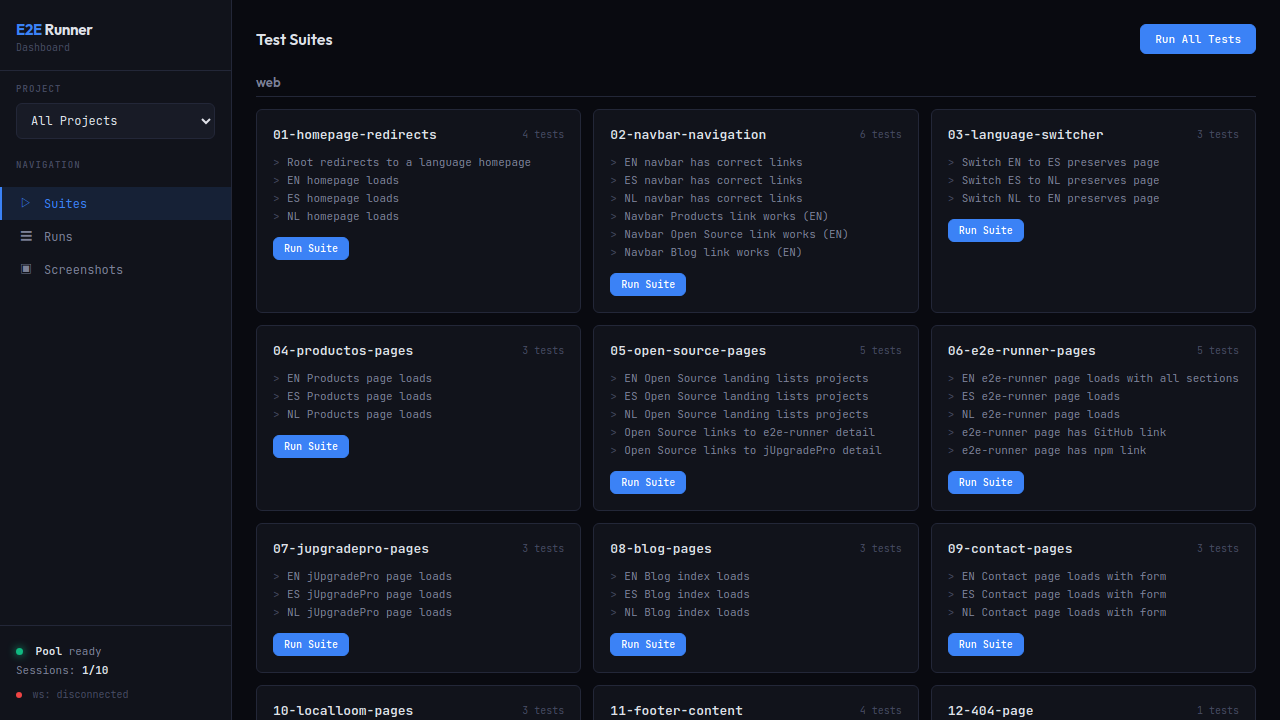
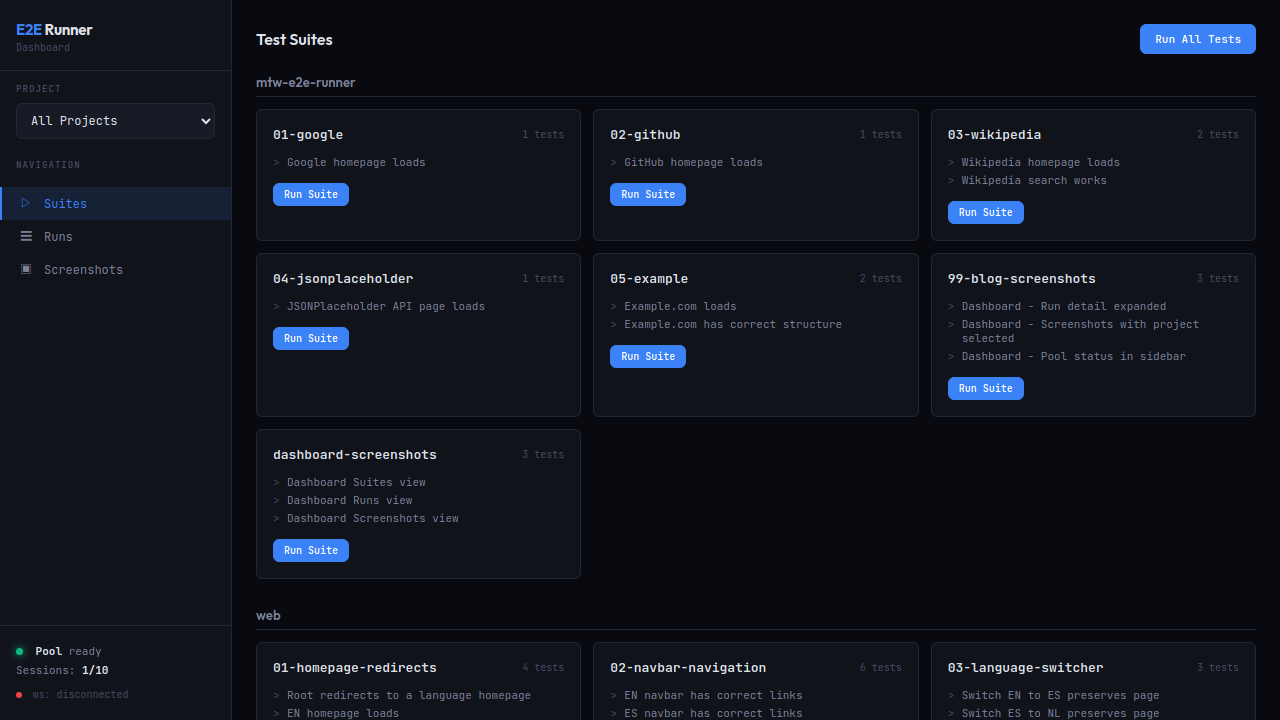
Browse all test suites across multiple projects. Run a single suite or all tests with one click.
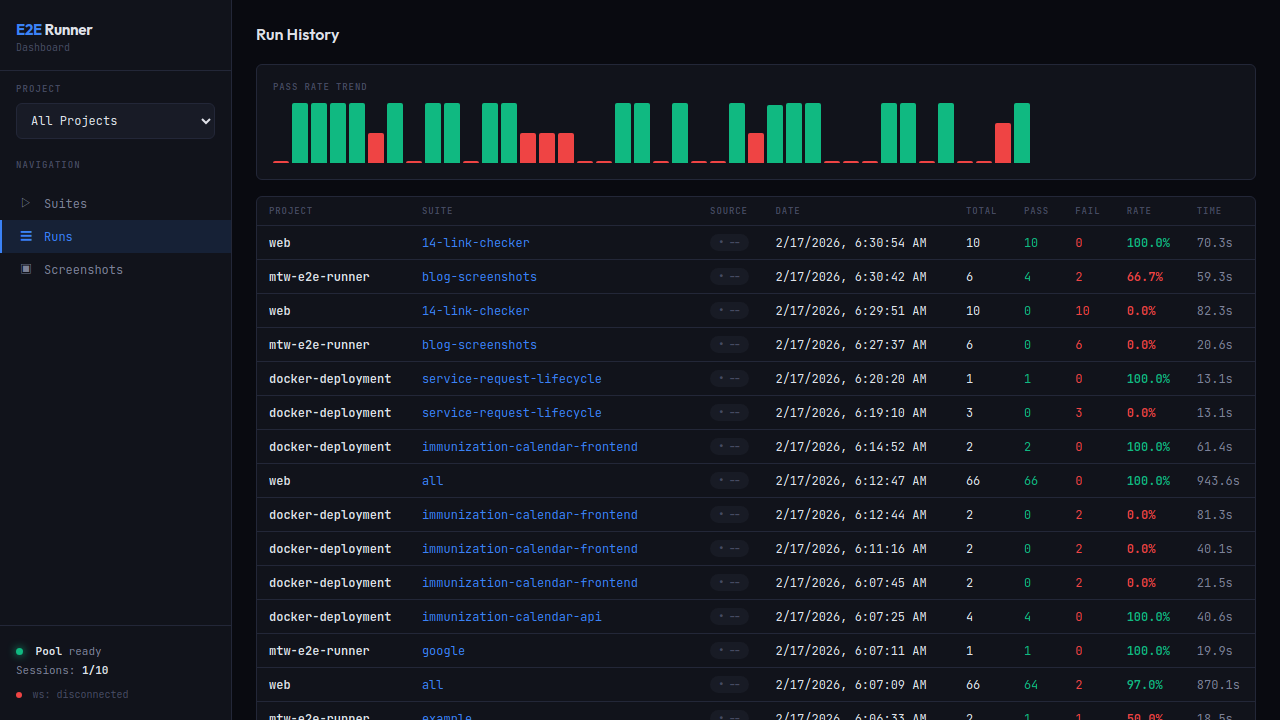
Track pass rate trends with the built-in chart. Click any row to expand full detail with per-test results, screenshot hashes, and errors.
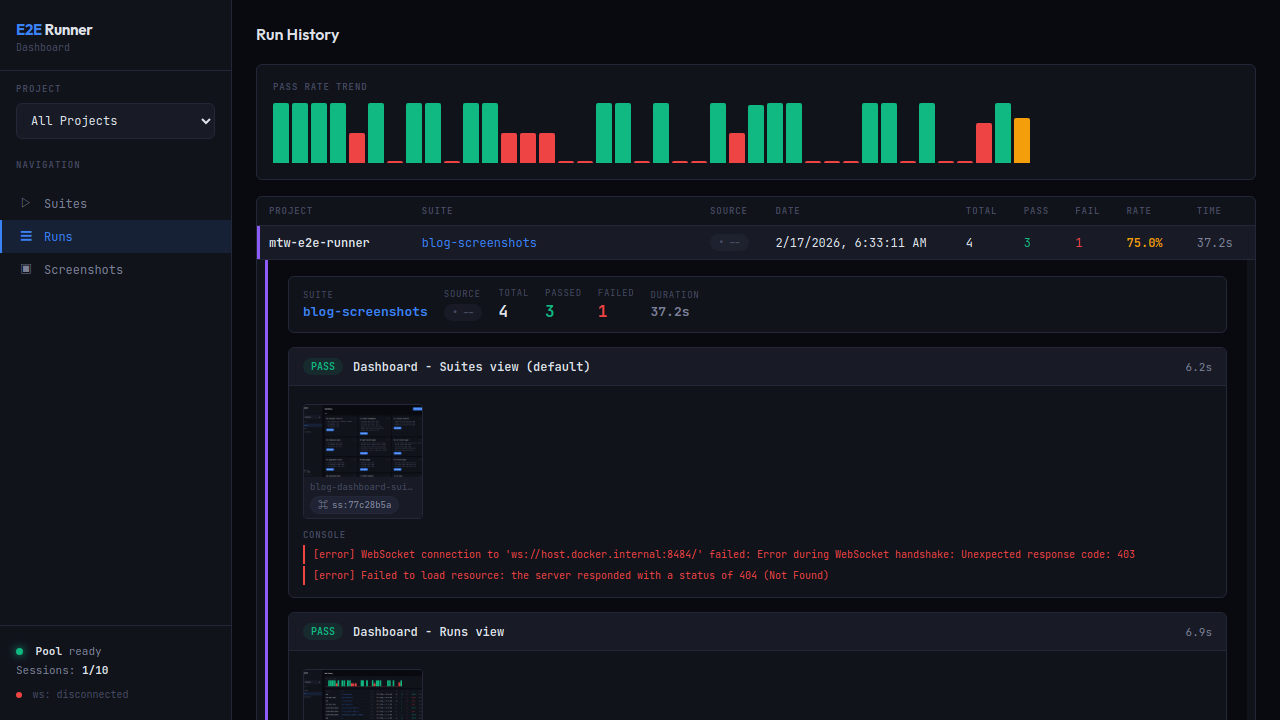
Expanded view with PASS/FAIL badges, screenshot thumbnails with copyable hashes (ss:77c28b5a), formatted console errors, and network request logs.
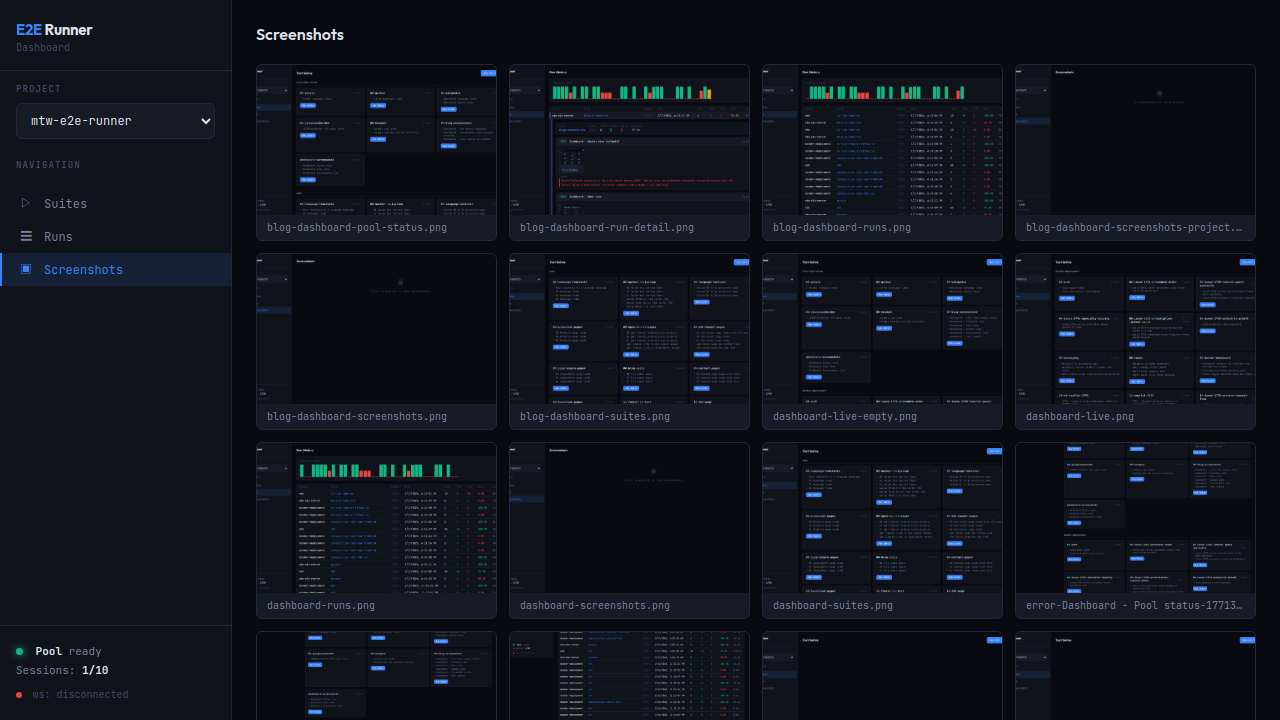
Browse all captured screenshots with hash search. Includes action screenshots, error screenshots, and verification captures.
Monitor Chrome pool health: available slots, running sessions, memory pressure.
Capture screenshots of any URL on demand — no test suite required:
e2e-runner capture https://example.com
e2e-runner capture https://example.com --full-page --selector ".loaded" --delay 2000
Via MCP, the e2e_capture tool supports authToken and authStorageKey for authenticated pages — it injects the token into localStorage before navigating.
Every screenshot gets a deterministic hash (ss:a3f2b1c9). Use e2e_screenshot to retrieve any screenshot by hash — it returns the image with metadata (test name, step, type).
claude plugin marketplace add fastslack/mtw-e2e-runner
claude plugin install e2e-runner@matware
This gives Claude 13 MCP tools, a workflow skill, 3 slash commands (/e2e-runner:run, /e2e-runner:create-test, /e2e-runner:verify-issue), and 3 specialized agents (test-analyzer, test-creator, test-improver).
MCP-only install (tools only, no skill/commands/agents):
claude mcp add --transport stdio --scope user e2e-runner \
-- npx -y -p @matware/e2e-runner e2e-runner-mcpcp node_modules/@matware/e2e-runner/opencode.json ./
mkdir -p .opencode && cp -r node_modules/@matware/e2e-runner/.opencode/* .opencode/See OPENCODE.md for details.
| Tool | Description |
|---|---|
e2e_run |
Run tests (all, by suite, or by file) |
e2e_list |
List available test suites |
e2e_create_test |
Create a new test JSON file |
e2e_create_module |
Create a reusable module |
e2e_pool_status |
Check Chrome pool health |
e2e_screenshot |
Retrieve a screenshot by hash |
e2e_capture |
Capture screenshot of any URL |
e2e_dashboard_start |
Start web dashboard |
e2e_dashboard_stop |
Stop web dashboard |
e2e_issue |
Fetch issue and generate tests |
e2e_network_logs |
Query network logs for a run |
e2e_learnings |
Query stability insights |
e2e_neo4j |
Manage Neo4j knowledge graph |
Pool start/stop are CLI-only — not exposed via MCP.
Place assert_no_network_errors after critical page loads:
{ "type": "goto", "value": "/dashboard" },
{ "type": "wait", "selector": ".loaded" },
{ "type": "assert_no_network_errors" }Set failOnNetworkError: true to automatically fail any test with network errors:
e2e-runner run --all --fail-on-network-errorWhen disabled (default), the runner still collects and reports network errors — the MCP response includes a warning when tests pass but have network errors.
All XHR/fetch requests are captured with: URL, method, status, duration, request/response headers, and response body (truncated at 50KB). Viewable in the dashboard with expandable request detail rows.
MCP drill-down flow:
1. e2e_run          → compact networkSummary + runDbId
2. e2e_network_logs(runDbId)                     → all requests (url, method, status, duration)
3. e2e_network_logs(runDbId, errorsOnly: true)   → only failed requests
4. e2e_network_logs(runDbId, includeHeaders: true) → with headers
5. e2e_network_logs(runDbId, includeBodies: true)  → full request/response bodies
The e2e_run response stays compact (~5KB) regardless of how many requests were captured. Use e2e_network_logs with the returned runDbId to drill into details on demand.
Run actions at lifecycle points. Define globally in config or per-suite:
{
  "hooks": {
    "beforeAll": [{ "type": "goto", "value": "/setup" }],
    "beforeEach": [{ "type": "goto", "value": "/" }],
    "afterEach": [{ "type": "screenshot", "value": "after.png" }],
    "afterAll": []
  },
  "tests": [...]
}
Important:
beforeAllruns on a separate browser page that is closed before tests start. UsebeforeEachfor state that tests need (cookies, localStorage, auth tokens).
# Run tests
e2e-runner run --all                  # All suites
e2e-runner run --suite auth           # Single suite
e2e-runner run --tests path/to.json   # Specific file
e2e-runner run --inline '<json>'      # Inline JSON

# Pool management (CLI only, not MCP)
e2e-runner pool start                 # Start Chrome container
e2e-runner pool stop                  # Stop Chrome container
e2e-runner pool status                # Check pool health

# Issue-to-test
e2e-runner issue <url>                # Fetch issue
e2e-runner issue <url> --generate     # Generate test via AI
e2e-runner issue <url> --verify       # Generate + run + report

# Dashboard
e2e-runner dashboard                  # Start web dashboard

# Other
e2e-runner list                       # List available suites
e2e-runner capture <url>              # On-demand screenshot
e2e-runner init # Scaffold project| Flag | Default | Description |
|---|---|---|
--base-url <url> |
http://host.docker.internal:3000 |
Application base URL |
--pool-url <ws> |
ws://localhost:3333 |
Chrome pool WebSocket URL |
--concurrency <n> |
3 |
Parallel test workers |
--retries <n> |
0 |
Retry failed tests N times |
--action-retries <n> |
0 |
Retry failed actions N times |
--test-timeout <ms> |
60000 |
Per-test timeout |
--timeout <ms> |
10000 |
Default action timeout |
--output <format> |
json |
Report: json, junit, both |
--env <name> |
default |
Environment profile |
--fail-on-network-error |
false |
Fail tests with network errors |
--project-name <name> |
dir name | Project display name |
Create e2e.config.js in your project root:
export default {
  baseUrl: 'http://host.docker.internal:3000',
  concurrency: 4,
  retries: 2,
  actionRetries: 1,
  testTimeout: 30000,
  outputFormat: 'both',
  failOnNetworkError: true,
  exclude: ['explore-*', 'debug-*'],

  hooks: {
    beforeEach: [{ type: 'goto', value: '/' }],
  },

  environments: {
    staging: { baseUrl: 'https://staging.example.com' },
    production: { baseUrl: 'https://example.com', concurrency: 5 },
  },
};- CLI flags
- Environment variables
- Config file (
e2e.config.jsore2e.config.json) - Defaults
When --env <name> is set, the matching profile overrides everything.
e2e-runner run --all --output junitjobs:
e2e:
runs-on: ubuntu-latest
steps:
- uses: actions/checkout@v4
- uses: actions/setup-node@v4
with:
node-version: 20
- run: npm ci
- run: npx e2e-runner pool start
- run: npx e2e-runner run --all --output junit
- uses: mikepenz/action-junit-report@v4
if: always()
with:
report_paths: e2e/screenshots/junit.xmlimport { createRunner } from '@matware/e2e-runner';
const runner = await createRunner({ baseUrl: 'http://localhost:3000' });
const report = await runner.runAll();
const report = await runner.runSuite('auth');
const report = await runner.runFile('e2e/tests/login.json');
const report = await runner.runTests([
{ name: 'quick-check', actions: [{ type: 'goto', value: '/' }] },
]);- Node.js >= 20
- Docker (for the Chrome pool)
Copyright 2025 Matias Aguirre (fastslack)
Licensed under the Apache License, Version 2.0. See LICENSE for details.