
A Swift package that draws server-driven UI (SDUI) screens published by the HotLayout builder: a JSON document, a theme and your data become a native SwiftUI screen, so changing a screen needs no app release.
Quickstart: docs · video · Builder and access: hotlayout.com · try the editor


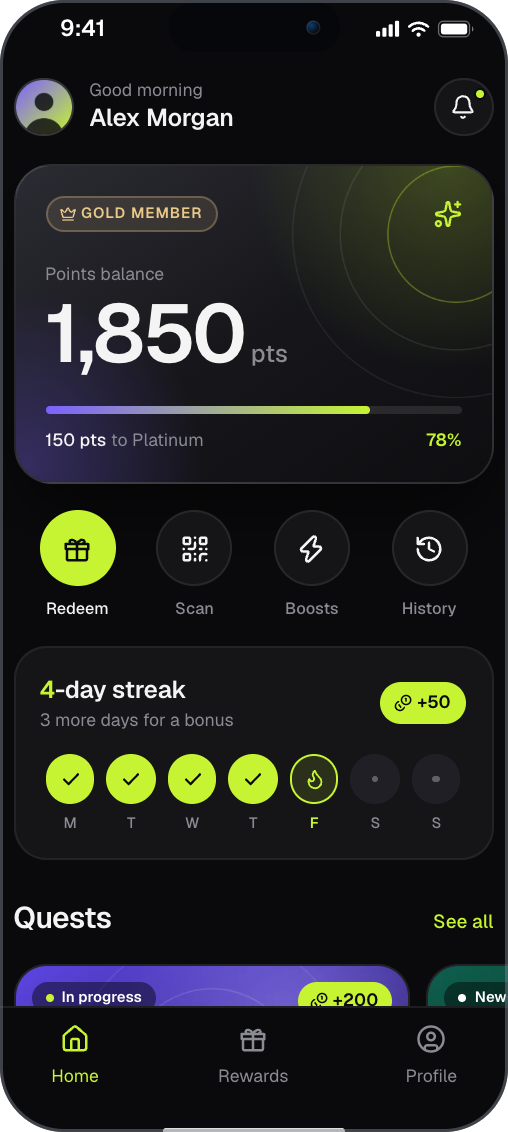
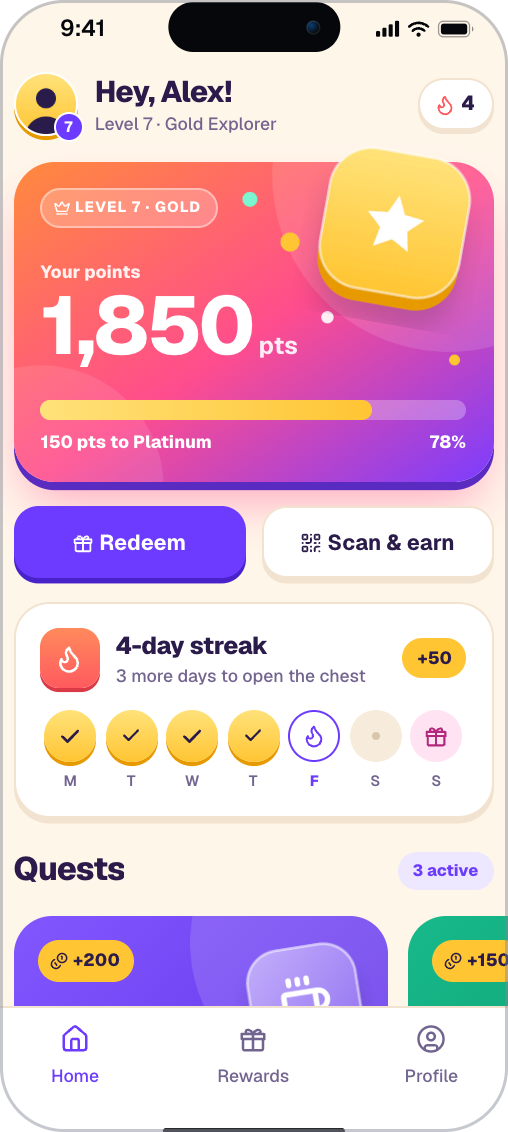
Two screens built in HotLayout. Try the editor in your browser, no sign-up: https://hotlayout.com/try
- One view.
HotlayoutScreendraws a document with its own stack of screens; it opens nothing itself and does not use your navigation. - Three separate inputs. The document (screens), the theme (token values) and your data (a dictionary) are loaded and replaced independently.
- Languages and right-to-left. A document carries its translations; you pass the device locale, the reader picks the language, the formats and the direction.
- The document is untrusted input. A piece of the wrong shape is skipped and reported (
onReport), never a crash. Links and deep links reach your code checked. - A version policy. A newer minor of the document is still drawn; another major is reported as incompatible.
- Placements.
HotlayoutPlacementViewdraws whichever published document the admin put in a named place of your app, with no release. - The same document everywhere. The React, Flutter and Android readers draw the same JSON; all follow the open contract.
- iOS 16 or later
- Swift 5.9 or later, no third-party dependencies
macOS 13 is declared so that the tests run with swift test; it is not a product platform.
HotLayout is installed with Swift Package Manager.
In Package.swift:
dependencies: [
    .package(url: "https://github.com/hotlayout/hotlayout-ios", from: "0.5.1"),
],
targets: [
    .target(name: "MyApp", dependencies: [
        .product(name: "HotLayout", package: "hotlayout-ios"),
    ]),
]
In Xcode: File > Add Package Dependencies..., paste https://github.com/hotlayout/hotlayout-ios, set the rule to Up to Next Major Version from 0.5.1, add the HotLayout library to your app target, then import HotLayout.
Load the document and the theme once, then draw them with HotlayoutScreen inside a view of your own app. The snippet is compiled by a test of this repository (HotLayoutAPITests), so it matches the public API.
import HotLayout
import SwiftUI

struct RewardsScreen: View {
    /// `published.json` of a document and, optionally, `theme/published.json` of its project.
    let documentData: Data
    let themeData: Data?
    @Environment(\.openURL) private var openURL
    // The JSON is read once, in `.task`, not on every evaluation of `body`.
    @State private var document: HotlayoutDocument?
    @State private var theme = HotlayoutThemeSet.builtIn
    @State private var failure: HotlayoutLoadError?

    var body: some View {
        Group {
            if let document {
                HotlayoutScreen(
                    document: document,
                    theme: theme,
                    data: ["user.name": "Maya", "user.points": 1850],
                    locale: Locale.current.identifier,  // the device locale, as is
                    entry: "promo",                     // a named entry point, optional
                    onAction: { action, _ in
                        // The reader opens nothing itself; a standard action arrives checked.
                        if let url = StandardActions.url(for: action) { openURL(url) }
                    },
                    onTrack: { event, _ in print("analytics", event.event, event.params ?? [:]) },
                    onNavigate: { event in event.to != "admin" },  // `false` cancels a change of screen
                    onScreenChange: { shown in print("shown", shown.screenId, shown.cause) },
                    onReport: { reports in reports.forEach { print($0) } }
                )
            } else if let failure {
                Text("This screen is not available: \(failure.description)")
            } else {
                // Not an empty `Group`: an empty view on the first frame never runs `.task`.
                ProgressView()
            }
        }
        .task {
            do {
                document = try HotlayoutDocument.load(documentData)
                if let themeData, let set = try? HotlayoutThemeSet.load(themeData) { theme = set }
            } catch let error as HotlayoutLoadError {
                failure = error
            } catch {
                failure = .malformedJSON(String(describing: error))
            }
        }
    }
}
Standard actions arrive at onAction already checked, and the reader opens nothing itself: you decide what a URL or a deep link does. Locale.current reports the device language only if the app declares its localizations; the reference says how.
| What | Version |
|---|---|
| Package | 0.5.1 |
| Document contract (schema) | 9.34.0 |
| Theme contract | 4.0.1 |
| Built-in icon set | 1.0.0 |
The major version must match; a newer minor is readable, and parts this package does not know degrade instead of failing. What changed in each package version is in CHANGELOG.md.
- Full reference: every callback and parameter, async actions, images, placements and their schedule, what the reader does and does not do
- Quickstart for this platform and all documentation · Video quickstart
- Security model · Platform notes (where Apple's platform differs from the other readers)
- Contributing: building, testing, the demo app and the shared case tables
- Getting the builder: screens are made in the HotLayout builder, hosted at hotlayout.com or self-hosted. To get access, use "Get access" on hotlayout.com or write to contact@hotlayout.com.
Apache License 2.0, see LICENSE. The icon drawings include icons from Lucide (ISC); see THIRD-PARTY-NOTICES.md.