A warm, high-contrast colorscheme with an amber-CRT signature, in dark and light variants.
- Spectral Dark — amber phosphor on OLED black
- Spectral Light — warm cream paper, same amber signature
Every target is generated from one palette definition, so the colors match across your editor, your terminal, and everything else.


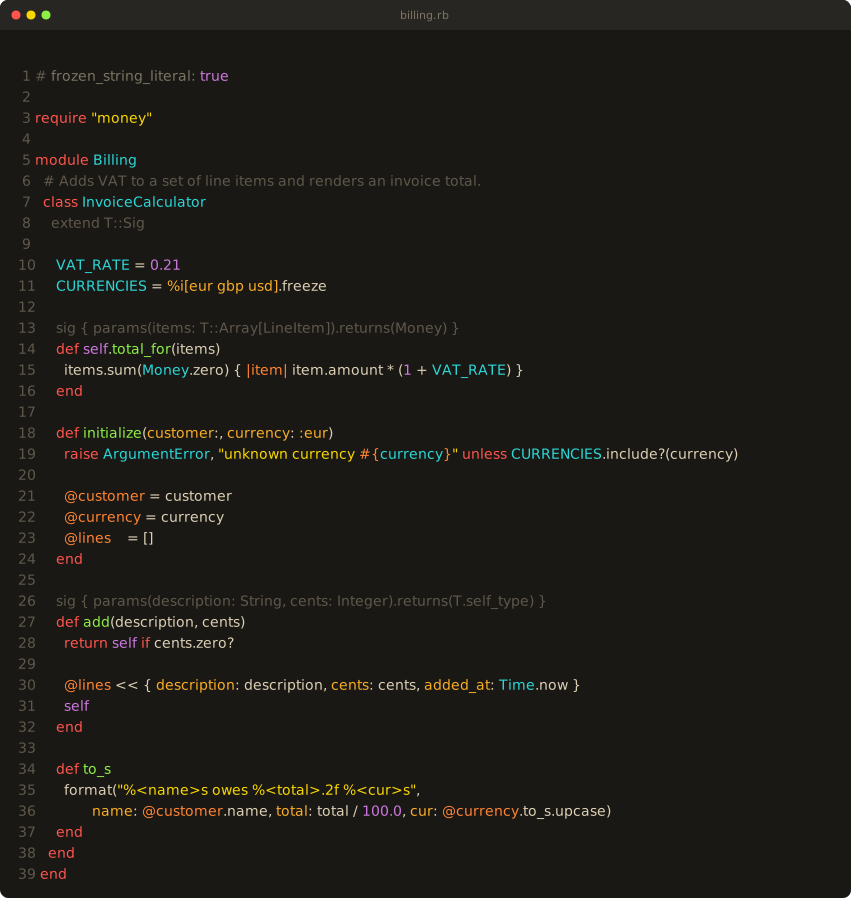
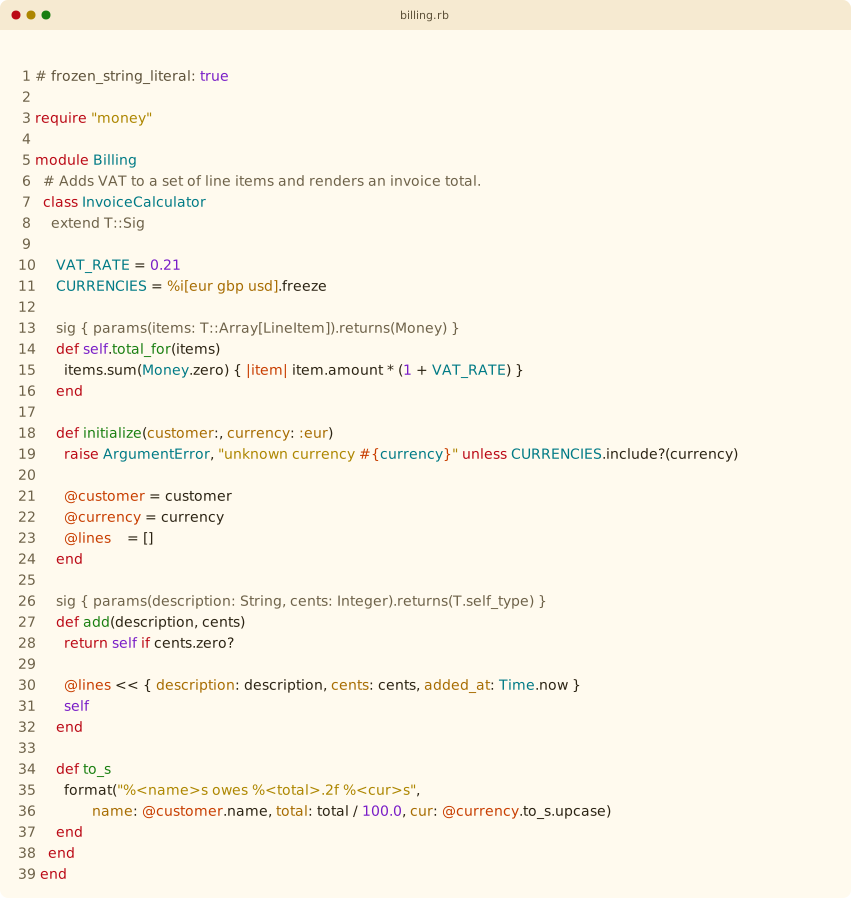
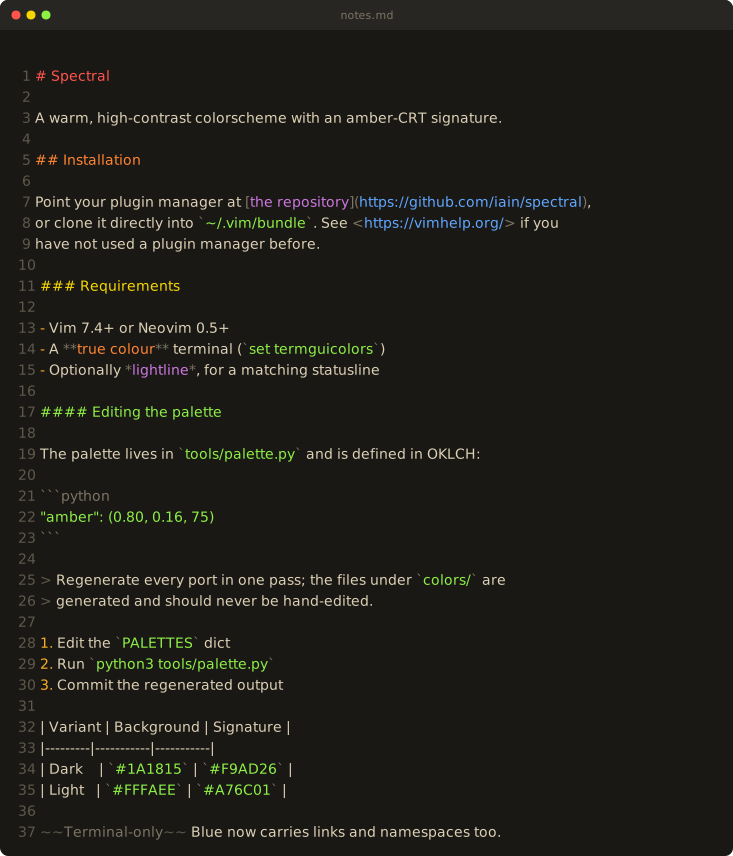
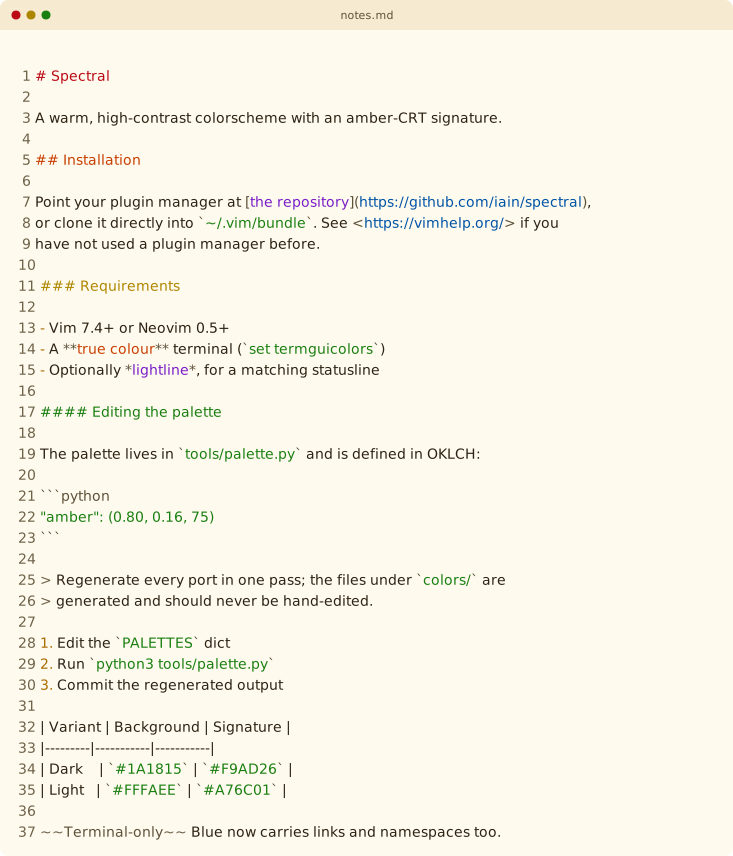
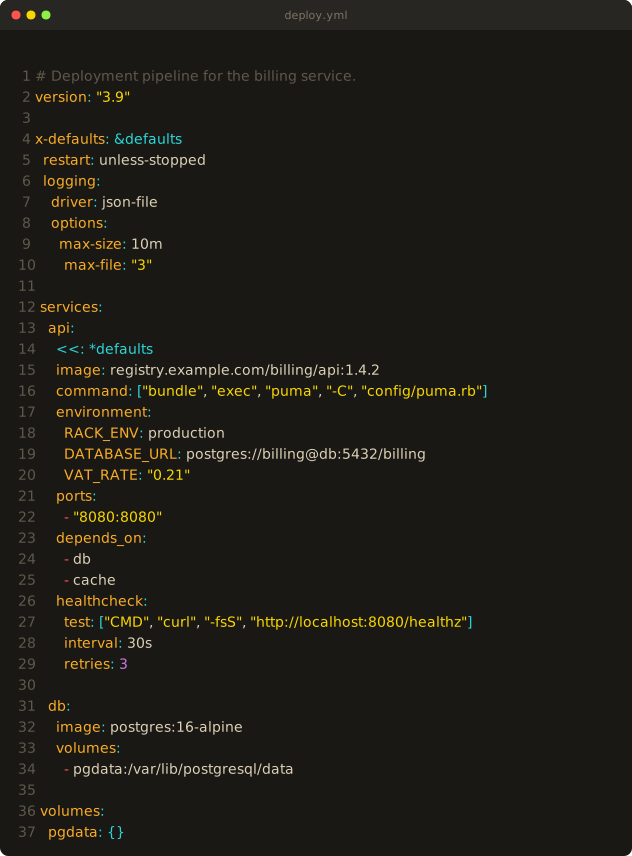
Ruby with Sorbet type signatures, Markdown headings, and YAML keys in amber:
| Dark | Light |
|---|---|
 |
 |
 |
 |
 |
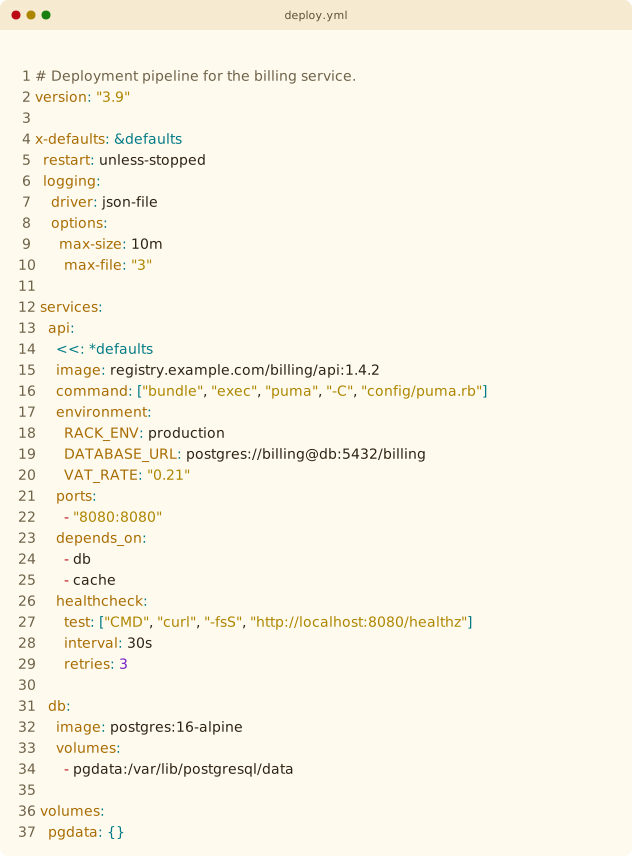 |
Click through for the full-size render. Python samples are in
screenshots/.
| Application | What ships |
|---|---|
| Vim / Neovim | colorscheme, lightline theme, Sorbet syntax plugin |
| VS Code | extension — workbench, TextMate scopes, semantic tokens |
| Zed | extension — one theme family with both variants |
| Ghostty | two themes, plus an install script |
| iTerm2 | two presets, plus a profile sync script |
| Mattermost | two custom themes |
With vim-plug:
Plug 'iain/spectral'With Pathogen, clone into ~/.vim/bundle. Manually, copy colors/ into
~/.vim/colors (Vim) or ~/.config/nvim/colors (Neovim). Then add to your
.vimrc or init.vim:
set termguicolors
colorscheme spectral        " picks the variant matching &background
spectral-dark and spectral-light force a variant. Requires Vim 7.4+ or
Neovim 0.5+, and a true-color terminal.
Languages — Ruby (including Sorbet), Python, JavaScript, TypeScript, Go, HTML, CSS, Markdown, JSON, YAML, TOML, XML, and Vim script.
Plugins — GitGutter, Signify, fugitive, NERDTree, netrw, ALE, CoC, fzf, CtrlP, Telescope, Startify, and vim-which-key.
Neovim — Treesitter (0.8+), covering both the legacy @text.* captures and
the @markup.* names Neovim 0.10 renamed them to; LSP diagnostics, references,
code lens, inlay hints and signature help (0.5+); semantic tokens (0.9+);
floating windows, WinBar and WinSeparator.
A matching lightline.vim theme ships with the colorscheme. Once Spectral is on your runtimepath:
let g:lightline = { 'colorscheme': 'spectral' }It follows &background once lightline reloads.
plugin/sorbet.vim loads automatically for Ruby files and dims sig blocks,
T:: types and extend T::Sig, so signatures recede behind the code they
annotate.
vscode/ is a self-contained extension covering the workbench, the integrated
terminal's ANSI palette, TextMate scopes, and LSP semantic tokens.
To use it without publishing, link it into your extensions directory and reload:
ln -s "$PWD/vscode" ~/.vscode/extensions/spectralTo build a .vsix:
cd vscode && npx @vscode/vsce packageThe mapping departs from the Vim theme in two places, both where the Vim theme is internally inconsistent:
- Punctuation uses
fg_alt, following the Treesitter captures rather than the brighter per-language groups (jsonBraces,cssBraces). - Regular expressions follow the richer
rubyRegexp*treatment — cyan body, orange escapes, purple character classes — rather than the flat orange of@string.regex.
Sorbet signatures are not dimmed here; that relies on the syntax regions in
plugin/sorbet.vim, which have no TextMate scope to hook.
zed/ is an extension carrying zed/themes/spectral.json — one theme family
with both variants, so Zed's system mode switches between them:
{
  "theme": {
    "mode": "system",
    "light": "Spectral Light",
    "dark": "Spectral Dark"
  }
}
To use it without publishing, either drop the theme file in Zed's themes directory:
ln -s "$PWD/zed/themes/spectral.json" ~/.config/zed/themes/spectral.jsonor install the whole directory from the extensions page with Install Dev Extension, which is what publishing to Zed's extension store expects.
Two mappings depart from the Vim theme, both because Zed's captures are coarser than Neovim's:
- Keys keep the amber signature only in JSON, which has a capture of its
own (
property.json_key). YAML, TOML and CSS share the genericpropertycapture with member access on an object, so amber there would paint everyobj.fieldamber too; they follow body text instead. - Markdown headings are one color rather than a ladder of six — Zed
captures every level as
title.
If you would rather have the keys and take the member access with them, Zed's
theme_overrides flips that one capture without touching the theme file:
{
  "theme_overrides": {
    "Spectral Dark":  { "syntax": { "property": { "color": "#F9AD26" } } },
    "Spectral Light": { "syntax": { "property": { "color": "#A76C01" } } }
  }
}
Ruby symbols, Python decorators and Markdown list markers carry the signature as they do everywhere else. Regular expressions follow the VS Code reading: Zed injects a regex grammar, so escapes stay orange inside the cyan body. Sorbet signatures are not dimmed, for the same reason they are not in VS Code.
ghostty/spectral-dark and ghostty/spectral-light. Run ghostty/install.sh
to symlink them into ${XDG_CONFIG_HOME:-~/.config}/ghostty/themes/, then
reference them by name:
theme = dark:spectral-dark,light:spectral-light
Pass --force to replace existing files at the destination.
iterm2/Spectral Dark.itermcolors and iterm2/Spectral Light.itermcolors.
Import via Settings → Profiles → Colors → Color Presets → Import.
To wire both variants into one profile so iTerm2's automatic dark/light switching works:
iterm2/sync.py <path-to-com.googlecode.iterm2.plist> [profile-name]The profile name defaults to Default. The script writes the dark preset to
the unsuffixed and (Dark) color keys, and the light preset to the (Light)
keys.
mattermost/spectral-dark.json and mattermost/spectral-light.json. Open
Settings → Display → Theme → Custom Theme, expand "Copy/Paste Theme Colors",
and paste either file. Amber anchors mentions, buttons and the active-channel
border; the team rail is the darkest neutral.
Each variant is defined in OKLCH — lightness 0–1, chroma, and hue in degrees. The accents sit in a roughly equiluminant band, so they feel equally bright across hues, and the neutrals all share one warm hue at low chroma.
Amber is the signature, and it goes on whatever gives a language its texture: the element you see constantly. Ruby symbols came first; the rest were picked one language at a time.
| Language | Element |
|---|---|
| Ruby | symbols |
| Python | decorators |
| YAML, JSON, TOML | keys |
| CSS | property names |
| JavaScript, TypeScript, Go | object and struct literal keys |
| Markdown | list markers |
HTML, XML and Vim script have no amber yet: nothing in them is both frequent and characteristic enough without swamping the file.
| Color | OKLCH | Hex | Usage |
|---|---|---|---|
| Amber (signature) | 0.80 / 0.16 / 75° |
#F9AD26 |
Symbols, decorators, keys |
| Red | 0.68 / 0.22 / 27° |
#FF544C |
Keywords, control flow |
| Orange | 0.74 / 0.20 / 50° |
#FF8432 |
Parameters, special characters |
| Yellow | 0.88 / 0.20 / 98° |
#F8D700 |
Strings |
| Green | 0.86 / 0.22 / 135° |
#8DEF46 |
Functions, methods |
| Cyan | 0.80 / 0.13 / 195° |
#2AD7D7 |
Types, built-in functions |
| Blue | 0.72 / 0.18 / 255° |
#60A7FF |
Links, namespaces |
| Purple | 0.70 / 0.17 / 320° |
#CC77DF |
Constants, numbers, booleans |
Background 0.21 / 0.006 / 85° → #1A1815 · Foreground 0.86 / 0.038 / 85° → #DCD0B5
| Color | OKLCH | Hex | Usage |
|---|---|---|---|
| Amber (signature) | 0.58 / 0.124 / 72° |
#A76C01 |
Symbols, decorators, keys |
| Red | 0.50 / 0.200 / 27° |
#BB0916 |
Keywords, control flow |
| Orange | 0.56 / 0.183 / 38° |
#C83E01 |
Parameters, special characters |
| Yellow | 0.64 / 0.131 / 88° |
#AD8600 |
Strings |
| Green | 0.52 / 0.166 / 142° |
#1A7F11 |
Functions, methods |
| Cyan | 0.53 / 0.091 / 205° |
#007A85 |
Types, built-in functions |
| Blue | 0.45 / 0.148 / 255° |
#0053A4 |
Links, namespaces |
| Purple | 0.48 / 0.233 / 302° |
#791DC7 |
Constants, numbers, booleans |
Background 0.985 / 0.020 / 85° → #FFFAEE · Foreground 0.26 / 0.030 / 85° → #2B2313
Where a requested chroma falls outside the sRGB gamut, the generator reduces it by bisection, preserving L and H, so each hex is the closest representable color. Some distinctions also depend on the editor: namespaces separate from types only under Treesitter, LSP or semantic tokens, and fall back to cyan in Vim's regex syntax.
Edit the PALETTES dict in tools/palette.py and run it to regenerate every
target in one pass:
python3 tools/palette.pyThat writes colors/spectral-*.vim, ghostty/spectral-*,
iterm2/*.itermcolors, mattermost/spectral-*.json,
vscode/themes/spectral-*.json, vscode/icon.png,
zed/themes/spectral.json, screenshots/palette-*.svg, and
autoload/lightline/colorscheme/spectral.vim. All of those are generated — do
not hand-edit them. After regenerating the iTerm2 presets, run
iterm2/sync.py <plist> to push them into your own plist.
python3 -m unittest discover -s toolsThey check the generated output: valid hex everywhere, no TextMate scope claimed by two entries, and a contrast floor. CI runs them alongside a check that the generated files match the palette.
python3 tools/screenshots.py            # every sample, both variants
python3 tools/screenshots.py billing    # only samples matching a stem
Each file in tools/samples/ is rendered through a real headless Vim and
written to screenshots/. The colors come from Vim's own :TOhtml rather than
from the palette, so a screenshot reports what the colorscheme actually
resolved each syntax group to.
This needs vim on PATH, and is not part of the CI drift check: :TOhtml
markup shifts between Vim versions, so regenerating on a different Vim produces
spurious diffs. Rerun it by hand when the palette changes. The palette-*.svg
cards come from tools/palette.py instead, need no Vim, and are drift-checked
like every other generated file.
MIT