

A Bash language server (LSP) written in Rust. Single binary, no Node, no npm. Provides IDE features: completions, hover, diagnostics, formatting, rename, and go-to-definition. Supports shell scripts in any LSP-compatible editor (Neovim, Helix, Zed, Emacs).

- Hover documentation
- Completions (variables, functions, executables, builtins, snippets)
- Jump to definition
- Find references
- Rename
- Document and workspace symbols
- Diagnostics via shellcheck
- Formatting via shfmt
Note
None of the methods below auto-update. Re-run the install step to pick up new releases, including security fixes.
Diagnostics and formatting require additional tools:
curl -fsSL https://raw.githubusercontent.com/k8s-1/bashls/main/scripts/install.sh | sh
Or download from the releases page, extract, and place bashls somewhere on your $PATH.
cargo install bashls
git clone https://github.com/k8s-1/bashls
cd bashls
cargo build --release
bashls works with any editor that supports LSP.
Install the extension:
curl -fsSL -o bashls.vsix https://github.com/k8s-1/bashls/releases/latest/download/bashls.vsix
code --install-extension bashls.vsix
Works for VS Code, VSCodium, Cursor, Windsurf, and other VS Code forks (use code, codium, cursor, etc. in place of code above).
If bashls isn't on your $PATH, the extension offers to auto-install it, or you can point it at a binary yourself via the bashls.path setting. See editors/vscode for the full settings list.
vim.lsp.config('bashls', {
  cmd = { 'bashls' },
  filetypes = { 'sh' },
  root_markers = { '.git' },
  -- settings = {
  --   bashIde = { shellcheckPath = '/usr/bin/shellcheck' },
  -- },
})
vim.lsp.enable('bashls')Using vim-lsp:
if executable('bashls')
  au User lsp_setup call lsp#register_server({
    \ 'name': 'bashls',
    \ 'cmd': {server_info->['bashls']},
    \ 'allowlist': ['sh'],
    \ })
endif[[language]]
name = "bash"
language-servers = ["bashls"]
[language-server.bashls]
command = "bashls"{
"lsp": {
"bash-language-server": {
"binary": {
"path": "bashls",
}
}
}
}(add-to-list 'eglot-server-programs
'(sh-mode . ("bashls")))Settings can be provided as LSP settings (under bashIde) or as environment variables (e.g. bashIde.shellcheckPath → SHELLCHECK_PATH).
If your editor only supports initialization options, pass the same structure there instead.
Setting (bashIde.*) |
Default | Description |
|---|---|---|
shellcheckPath |
shellcheck |
Path to shellcheck binary. |
shellcheckArguments |
[] |
Additional arguments passed to shellcheck. |
shellcheckExternalSources |
true |
Allow shellcheck to follow sourced files outside the workspace. |
shfmt.path |
shfmt |
Path to shfmt binary. |
shfmt.* |
See shfmt for remaining options. | |
globPattern |
**/*@(.sh|.inc|.bash|.command) |
Files the server treats as bash. |
backgroundAnalysisMaxFiles |
500 |
Max files to analyse in background for workspace-wide features. |
includeAllWorkspaceSymbols |
false |
Return functions and variables from all workspace files in symbol search, not just open files. |
enableSourceErrorDiagnostics |
false |
Show diagnostics when a source/. command cannot be resolved. |
Flag completion relies on bash-completion. Set BASH_LSP_COMPLETE_LONGOPTS=1 to also read flags from a command's --help; this runs the command, so it is off by default.
| Flag | Description |
|---|---|
--log-level |
error (default), warn, info, debug, trace |
--version, -v |
Print version |
--help, -h |
Print usage |
- Integration with explainshell
- Windows support
Measured against bash-language-server 5.6.0 using 50 .sh files from oh-my-bash as a corpus. See examples/lsp_bench.rs for the full methodology.
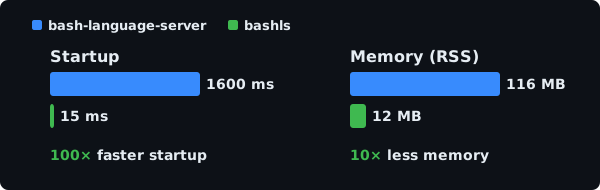
See REFERENCE.md.
Contributions and feedback on improvements are welcome!
Please refer to CONTRIBUTING.md.
This project is released under the MIT License.