- Incrementally expand the Module 2 Project.
- Implement an abstract class with subclasses.
- Implement a
List. - Implement dates being used throughout the application.
For this module project, you will expand upon the Module 2 Project. All the code you need to start with this project will be within that repository.
Fork and clone the Module 2 Project into a new repository. This will keep the two projects separate as you develop incrementally new material that you learn within this module.
In this project, you will implement a ticket feature into the concert application. Consider the following ticket rules:
- Walk-up tickets are purchased the day of the concert and cost $50.
- Student tickets are sold at half the price of walk-up tickets.
- Advance tickets are sold prior to the concert (you cannot buy an advance
ticket the day of, as that would be a walk-up ticket).
- If the advance ticket is purchased 10 or more days before the concert, then the ticket costs $30.
- Else, the ticket costs $40.
In order to integrate this feature, we'll make use of data structures, additional business logic, and implement dates using the new Date and Time API.
Throughout the module, you will be given time to work on this project. Look for the "Project Work Time" lessons, as they will signal when to start the next task outlined here.
It is recommended you complete each task in order, as some tasks depend on other classes to be implemented beforehand.
There are three different types of tickets that you will implement in this
project. But they all have one thing in common: they are all tickets. Create a
Ticket abstract class that the three ticket types will extend off of.
- Create a ticket package in the
src/main/javadirectory called "ticket". - This is where we will implement the ticket feature.
- Create an abstract class called
Ticket. - Add an
intinstance variable calledticketNumbersince every ticket will have a ticket number associated with it. - Create a constructor that takes in a
ticketNumberand initializes the instance variable. - Use IntelliJ to generate a getter method for the instance variable.
- Create an abstract method called
getPrice()that takes no parameters and returns adouble. - Add the following code to override the
toString()method:
    @Override
    public String toString() {
        return String.format("Ticket Number = %d, Price = %.2f", ticketNumber, getPrice());
    }
This task can be completed now.
Currently, the ConcertRepository class has an array of concerts. But now that
we have learned about more data structures, let's replace the array with a
List. Since a List is dynamically sized, as in we can continue to add
elements to it, we won't be restricted by how many concerts we could have!
- Modify the
ConcertRepositoryclass. - Replace the array of
Concertobjects with aListofConcertobjects. - Make the appropriate adjustments.
- Remove the instance variable
currentSize. - Remove the method
getCurrentSize(). - Create a method called
getAllConcerts()that takes no parameters and returns theListofConcertobjects. - Modify the
ConcertServiceappropriately given the changes made to theConcertRepositoryclass. - Modify the following unit tests below and ensure the tests all pass.
Update the ConcertRepositoryTest:
import org.junit.jupiter.api.BeforeEach;
import org.junit.jupiter.api.Test;

import static org.junit.jupiter.api.Assertions.*;

class ConcertRepositoryTest {

    private ConcertRepository repository;

    @BeforeEach
    void setUp() {
        repository = new ConcertRepository();
    }

    @Test
    void constructor() {

        // current size is 0 since no concerts have been added
        assertEquals(0, repository.getAllConcerts().size());
    }

    @Test
    void addGet1() {
        assertEquals(0, repository.getAllConcerts().size());

        // add a concert
        assertTrue(repository.add(new Concert("Artist0", 1000)));
        assertEquals(1, repository.getAllConcerts().size());

        // retrieve the concert using index 0
        Concert c = repository.get(0);
        assertEquals("Artist0", c.getPerformer());
        assertEquals(1000, c.getAvailable());

    }

    @Test
    void addGet5() {
        assertEquals(0, repository.getAllConcerts().size());

        // add 5 concerts
        for (int i = 0; i < 5; i++) {
            // add the concert
            assertTrue(repository.add(new Concert("Artist" + i, i * 1000)));

            // retrieve the concert using index i
            assertNotNull(repository.get(i));

            // confirm the current size
            assertEquals(i + 1, repository.getAllConcerts().size());
        }

        // confirm the size did not increase
        assertEquals(5, repository.getAllConcerts().size());
    }

    @Test
    void getConcertState() {
        // add 3 concerts
        assertTrue(repository.add(new Concert("The Weeknd", 1000)));
        assertTrue(repository.add(new Concert("Taylor Swift", 500)));
        assertTrue(repository.add(new Concert("Harry Styles", 20000)));
        assertEquals(3, repository.getAllConcerts().size());

        // confirm each concert was inserted in the correct array position
        assertEquals("The Weeknd", repository.get(0).getPerformer());
        assertEquals("Taylor Swift", repository.get(1).getPerformer());
        assertEquals("Harry Styles", repository.get(2).getPerformer());
    }

    @Test
    public void getOutOfBounds() {
        assertTrue(repository.add(new Concert("artist1", 1000)));
        assertTrue(repository.add(new Concert("artist2", 1000)));
        assertTrue(repository.add(new Concert("artist3", 1000)));

        // test that out of bounds index returns null
        assertNull(repository.get(-1));
        assertNull(repository.get(3));
    }


    @Test
    void findByPerformer() {
        repository.add(new Concert("Taylor Swift", 1000));
        repository.add(new Concert("The Weeknd", 500));

        Concert c1 = repository.findByPerformer("Taylor Swift");
        assertEquals("Taylor Swift", c1.getPerformer());
        assertEquals(1000, c1.getAvailable());
        assertEquals(0, c1.getWaitlist());

        Concert c2 = repository.findByPerformer("The Weeknd");
        assertEquals("The Weeknd", c2.getPerformer());
        assertEquals(500, c2.getAvailable());
        assertEquals(0, c2.getWaitlist());

        //unknown performer
        Concert c3 = repository.findByPerformer("Unknown Singer");
        assertNull(c3);

    }

    @Test
    void caseInsensitiveFind() {
        repository.add(new Concert("Taylor Swift", 1000));
        repository.add(new Concert("The Weeknd", 500));

        Concert c1 = repository.findByPerformer("TAYLOR swift");
        assertEquals("Taylor Swift", c1.getPerformer());
        assertEquals(1000, c1.getAvailable());
        assertEquals(0, c1.getWaitlist());

    }
}
Update the ConcertServiceTest:
import org.junit.jupiter.api.AfterEach;
import org.junit.jupiter.api.BeforeEach;
import org.junit.jupiter.api.Test;

import java.io.ByteArrayOutputStream;
import java.io.PrintStream;

import static org.junit.jupiter.api.Assertions.*;

class ConcertServiceTest {

    private final PrintStream standardOut = System.out;
    private final ByteArrayOutputStream outputStreamCaptor = new ByteArrayOutputStream();
    private ConcertService concertService;

    @BeforeEach
    public void setUp() {
        System.setOut(new PrintStream(outputStreamCaptor));
        concertService = new ConcertService();
    }

    @AfterEach
    public void tearDown() {
        System.setOut(standardOut);
    }

    @Test
    void duplicateAdd() {
        concertService.addConcert("Taylor Swift" , 100);
        concertService.addConcert("Taylor Swift" , 200);
        assertEquals("Added concert\n" +
                        "Concert with Taylor Swift already exists. Unable to add concert",
                outputStreamCaptor.toString().trim());
    }

    @Test
    void displayEmpty() {
        concertService.displayConcerts();
        assertEquals("", outputStreamCaptor.toString().trim());
    }

    @Test
    void displayNonEmpty() {
        concertService.addConcert("Taylor Swift" , 100);
        concertService.addConcert("The Weeknd", 5000);
        concertService.displayConcerts();
        assertEquals("Added concert\n" +
                     "Added concert\n" +
                     "Concert{performer='Taylor Swift', available=100, waitlist=0}\n" +
                     "Concert{performer='The Weeknd', available=5000, waitlist=0}",
                     outputStreamCaptor.toString().trim());
    }


    @Test
    void purchaseTicket() {
        concertService.addConcert("Taylor Swift" , 3);
        concertService.purchaseTicket("Taylor Swift");
        concertService.purchaseTicket("Taylor Swift");
        concertService.purchaseTicket("Taylor Swift");
        // sold out, ticket unavailable
        concertService.purchaseTicket("Taylor Swift");
        assertEquals("Added concert\n" +
                     "Ticket purchased\n" +
                     "Ticket purchased\n" +
                     "Ticket purchased\n" +
                     "Ticket unavailable",
                outputStreamCaptor.toString().trim());
    }

    @Test
    void purchaseTicketUnknownArtist() {
        concertService.addConcert("Taylor Swift" , 1000);
        concertService.purchaseTicket("Unknown Singer");
        assertEquals("Added concert\n" +
                      "No concert for Unknown Singer",
                outputStreamCaptor.toString().trim());
    }

    @Test
    void addToWaitlist() {
        concertService.addConcert("Taylor Swift" , 100);
        concertService.addConcert("The Weeknd", 5000);
        concertService.addToWaitlist("Taylor Swift");
        concertService.addToWaitlist("Taylor Swift");
        concertService.addToWaitlist("The Weeknd");
        // no concert
        concertService.addToWaitlist("Unknown Singer");

        assertEquals("Added concert\n" +
                     "Added concert\n" +
                     "Added to waitlist\n" +
                     "Added to waitlist\n" +
                     "Added to waitlist\n" +
                     "No concert for Unknown Singer",
                    outputStreamCaptor.toString().trim());
    }
}
This task can be completed after the Collections Framework and Generics section. Note: There will be a lesson called "Project Work Time - Collections" that will signal when to start this part of the project.
In the overview, you saw there will be three subclasses of the Ticket abstract
class. In this task, you will create those three subclasses now. Consider the
following UML diagram:
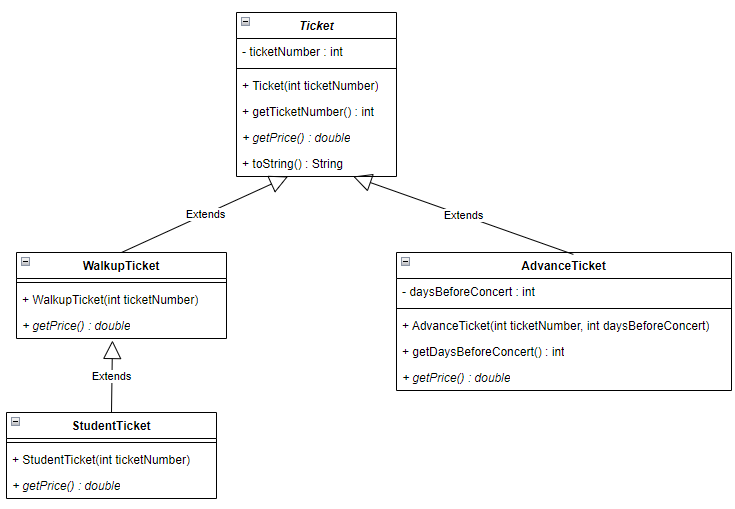
- Create a
WalkupTicketclass that extends theTicketclass. - Return 50.0 for the price since walk-up tickets are purchased the day of the concert and cost $50.
- In the test directory, create a package called
ticketundersrc/test/java. - Within the
ticketpackage in thetestdirectory, add the following test class:
  package ticket;

  import org.junit.jupiter.api.Test;

  import static org.junit.jupiter.api.Assertions.assertEquals;

  public class WalkupTicketTest {

      @Test
      void testWalkupTicket() {
          WalkupTicket ticket = new WalkupTicket(1);
          assertEquals(1, ticket.getTicketNumber());
          assertEquals(50.0, ticket.getPrice());
          assertEquals("ticket.Ticket Number = 1, Price = 50.00", ticket.toString());
      }
}- Run the JUnit and ensure it passes with your implementation.
- Create a
StudentTicketclass that extends theWalkupTicketclass. - Return half the price of a walk-up ticket for the price.
- Within the
ticketpackage in thetestdirectory, add the following test class:
```java
package ticket;

import org.junit.jupiter.api.Test;

import static org.junit.jupiter.api.Assertions.assertEquals;

public class StudentTicketTest {

    @Test
    void testStudentTicket() {
        StudentTicket ticket = new StudentTicket(1);
        assertEquals(1, ticket.getTicketNumber());
        assertEquals(25.0, ticket.getPrice());
        assertEquals("ticket.Ticket Number = 1, Price = 25.00", ticket.toString());
    }
}
```
- Run the JUnit and ensure it passes with your implementation.
- Create an
AdvanceTicketclass that extends theTicketclass. - Add an
intinstance variable calleddaysBeforeConcertsince you can buy this kind of ticket in advance. - In the constructor, also take in a
daysBeforeConcertparameter that initializes the instance variable. - Use IntelliJ to generate a getter method for the instance variable.
- Remember the ticket rules above when pricing out the advance ticket: 1. If the advance ticket is purchased 10 or more days before the concert, then the ticket costs $30.00. 2. Else, the ticket costs $40.00.
- Within the
ticketpackage in thetestdirectory, add the following test class:
```java
package ticket;

import org.junit.jupiter.api.Test;

import static org.junit.jupiter.api.Assertions.assertEquals;

public class AdvanceTicketTest {

    @Test
    void testAdvanceTicket10Days() {
        AdvanceTicket ticket = new AdvanceTicket(1, 10);
        assertEquals(1, ticket.getTicketNumber());
        assertEquals(10, ticket.getDaysBeforeConcert());
        assertEquals(30.0, ticket.getPrice());
        assertEquals("ticket.Ticket Number = 1, Price = 30.00", ticket.toString());
    }

    @Test
    void testAdvanceTicketMoreThan10Days() {
        AdvanceTicket ticket = new AdvanceTicket(2, 12);
        assertEquals(2, ticket.getTicketNumber());
        assertEquals(12, ticket.getDaysBeforeConcert());
        assertEquals(30.0, ticket.getPrice());
    }

    @Test
    void testAdvanceTicketLessThan10Days() {
        AdvanceTicket ticket = new AdvanceTicket(3, 9);
        assertEquals(3, ticket.getTicketNumber());
        assertEquals(9, ticket.getDaysBeforeConcert());
        assertEquals(40.0, ticket.getPrice());
    }
}
```
- Run the JUnits and ensure it passes with your implementation.
This task can be completed after the More on Inheritance section. Note: There will be a lesson called "Project Work Time - Subclasses" that will signal when to start this part of the project.
Now that we have learned about date and time objects, let's put them to use in
our project. Every Concert should have a date associated with it. When we add
this new instance variable, we'll have to make a few changes to our existing
concert application.
-
Modify the
Concertclass. -
Add an instance variable called
concertDateof the appropriate date-time object. 1. Use a date-time object from theDate and Time API. 2. Hint: Look at the unit tests for a hint. -
Update the constructor to take in the
concertDateas a parameter. -
Use IntelliJ to generate a getter method for
concertDate. -
Update the
toString()method to include theconcertDate. -
Modify the
ConcertServiceclass appropriately given the changes made to theConcertclass. -
Consider the following changes to the
Driver:import java.time.LocalDate; import java.time.format.DateTimeFormatter; import java.time.format.DateTimeParseException; import java.time.format.ResolverStyle; import java.util.InputMismatchException; import java.util.Scanner; public class Driver { private static ConcertService service = new ConcertService(); public static void main(String[] args) { Scanner scanner = new Scanner(System.in); String prompt = "Select an action: " + "a=add concert, " + "d=display all concerts, " + "p=purchase ticket, " + "w=add to waitlist," + " q=quit: "; String action; // Prompt the user for an action // Loop until the user enters q to quit do { System.out.println(prompt); action = scanner.nextLine(); switch (action) { case "a": addConcert(); break; case "d": service.displayConcerts(); break; case "p": System.out.println("Enter the performer's name:"); service.purchaseTicket( scanner.nextLine() ); break; case "w": System.out.println("Enter the performer's name:"); service.addToWaitlist( scanner.nextLine() ); break; case "q": break; default: System.out.println("Invalid choice: " + action); } } while (!action.equals("q")); } private static void addConcert() { Scanner scanner = new Scanner(System.in); System.out.println("Enter the performer's name:"); String performer = scanner.nextLine(); try { System.out.println("Enter the number of available tickets:"); int available = scanner.nextInt(); scanner.nextLine(); // Consume the rest of the input DateTimeFormatter formatter = DateTimeFormatter.ofPattern("MM/dd/uuuu") .withResolverStyle(ResolverStyle.STRICT); System.out.println("Enter a date for the concert in the format of MM/dd/uuuu:"); String concertDate = scanner.nextLine(); // Validate the date LocalDate date = LocalDate.parse(concertDate, formatter); service.addConcert(performer, available, date); } catch (InputMismatchException e) { System.out.println("Number of available tickets was not an integer"); } catch (DateTimeParseException e) { System.out.println("Concert date was not a valid date"); } } }
-
Take note of how we are prompting the user for a concert date and how we are validating the date is valid.
-
If we run the driver class now and add a concert, an expected output could be this:
Select an action: a=add concert, d=display all concerts, p=purchase ticket, w=add to waitlist, q=quit:
a
Enter the performer's name:
Taylor Swift
Enter the number of available tickets:
500
Enter a date for the concert in the format of MM/dd/uuuu:
03/17/2023
Added concert
Select an action: a=add concert, d=display all concerts, p=purchase ticket, w=add to waitlist, q=quit:
a
Enter the performer's name:
Harry Styles
Enter the number of available tickets:
750
Enter a date for the concert in the format of MM/dd/uuuu:
02/29/2023
Concert date was not a valid date
Select an action: a=add concert, d=display all concerts, p=purchase ticket, w=add to waitlist, q=quit:
q
- Modify the following unit tests below and ensure the tests all pass.
Update the ConcertTest:
import org.junit.jupiter.api.BeforeEach;
import org.junit.jupiter.api.Test;

import java.time.LocalDate;

import static org.junit.jupiter.api.Assertions.*;

class ConcertTest {

    private Concert c1, c2;

    @BeforeEach
    void setup() {
         c1 = new Concert("The Weeknd", 10, LocalDate.of(2023, 3, 15));
         c2 = new Concert("Harry Styles", 2, LocalDate.of(2023, 3, 17));
    }

    @Test
    void constructor() {
        assertEquals("The Weeknd", c1.getPerformer());
        assertEquals(10, c1.getAvailable());
        assertEquals(0, c1.getWaitlist());

        assertEquals("Harry Styles", c2.getPerformer());
        assertEquals(2, c2.getAvailable());
        assertEquals(0, c2.getWaitlist());
    }

    @Test
    void testToString() {
        assertEquals("Concert{performer='The Weeknd', available=10, waitlist=0, concertDate=2023-03-15}", c1.toString());
        assertEquals("Concert{performer='Harry Styles', available=2, waitlist=0, concertDate=2023-03-17}", c2.toString());
    }

    @Test
    void purchaseTicket() {
        assertEquals(10, c1.getAvailable());
        assertTrue(c1.purchaseTicket());
        assertEquals(9, c1.getAvailable());
        assertTrue(c1.purchaseTicket());
        assertEquals(8, c1.getAvailable());

        assertEquals(2, c2.getAvailable());
        assertTrue(c2.purchaseTicket());
        assertEquals(1, c2.getAvailable());
        assertTrue(c2.purchaseTicket());
        assertEquals(0, c2.getAvailable());
        //no tickets left, remain at 0
        assertFalse(c2.purchaseTicket());
        assertEquals(0, c2.getAvailable());
    }

    @Test
    void addToWaitlist() {
        assertEquals(0, c1.getWaitlist());
        c1.addToWaitlist();
        assertEquals(1, c1.getWaitlist());
        c1.addToWaitlist();
        assertEquals(2, c1.getWaitlist());

        assertEquals(0, c2.getWaitlist());
        c2.addToWaitlist();
        assertEquals(1, c2.getWaitlist());
        c2.addToWaitlist();
        assertEquals(2, c2.getWaitlist());
    }
}
Update the ConcertRepositoryTest:
import org.junit.jupiter.api.BeforeEach;
import org.junit.jupiter.api.Test;

import java.time.LocalDate;

import static org.junit.jupiter.api.Assertions.*;

class ConcertRepositoryTest {

    private ConcertRepository repository;

    @BeforeEach
    void setUp() {
        repository = new ConcertRepository();
    }

    @Test
    void constructor() {

        // current size is 0 since no concerts have been added
        assertEquals(0, repository.getAllConcerts().size());
    }

    @Test
    void addGet1() {
        assertEquals(0, repository.getAllConcerts().size());

        // add a concert
        assertTrue(repository.add(new Concert("Artist0", 1000, LocalDate.of(2023, 3, 15))));
        assertEquals(1, repository.getAllConcerts().size());

        // retrieve the concert using index 0
        Concert c = repository.get(0);
        assertEquals("Artist0", c.getPerformer());
        assertEquals(1000, c.getAvailable());

    }

    @Test
    void addGet5() {
        assertEquals(0, repository.getAllConcerts().size());

        // add 5 concerts
        for (int i = 0; i < 5; i++) {
            // add the concert
            assertTrue(repository.add(new Concert("Artist" + i, i * 1000, LocalDate.of(2023, 3, i+1))));

            // retrieve the concert using index i
            assertNotNull(repository.get(i));

            // confirm the current size
            assertEquals(i + 1, repository.getAllConcerts().size());
        }

        // confirm the size did not increase
        assertEquals(5, repository.getAllConcerts().size());
    }

    @Test
    void getConcertState() {
        // add 3 concerts
        assertTrue(repository.add(new Concert("The Weeknd", 1000, LocalDate.of(2023, 3, 15))));
        assertTrue(repository.add(new Concert("Taylor Swift", 500, LocalDate.of(2023, 3, 16))));
        assertTrue(repository.add(new Concert("Harry Styles", 20000, LocalDate.of(2023, 3, 17))));
        assertEquals(3, repository.getAllConcerts().size());

        // confirm each concert was inserted in the correct array position
        assertEquals("The Weeknd", repository.get(0).getPerformer());
        assertEquals("Taylor Swift", repository.get(1).getPerformer());
        assertEquals("Harry Styles", repository.get(2).getPerformer());
    }

    @Test
    public void getOutOfBounds() {
        assertTrue(repository.add(new Concert("artist1", 1000, LocalDate.of(2023, 3, 15))));
        assertTrue(repository.add(new Concert("artist2", 1000, LocalDate.of(2023, 3, 16))));
        assertTrue(repository.add(new Concert("artist3", 1000, LocalDate.of(2023, 3, 17))));

        // test that out of bounds index returns null
        assertNull(repository.get(-1));
        assertNull(repository.get(3));
    }


    @Test
    void findByPerformer() {
        repository.add(new Concert("Taylor Swift", 1000, LocalDate.of(2023, 3, 15)));
        repository.add(new Concert("The Weeknd", 500, LocalDate.of(2023, 3, 17)));

        Concert c1 = repository.findByPerformer("Taylor Swift");
        assertEquals("Taylor Swift", c1.getPerformer());
        assertEquals(1000, c1.getAvailable());
        assertEquals(0, c1.getWaitlist());

        Concert c2 = repository.findByPerformer("The Weeknd");
        assertEquals("The Weeknd", c2.getPerformer());
        assertEquals(500, c2.getAvailable());
        assertEquals(0, c2.getWaitlist());

        //unknown performer
        Concert c3 = repository.findByPerformer("Unknown Singer");
        assertNull(c3);

    }

    @Test
    void caseInsensitiveFind() {
        repository.add(new Concert("Taylor Swift", 1000, LocalDate.of(2023, 3, 15)));
        repository.add(new Concert("The Weeknd", 500, LocalDate.of(2023, 3, 16)));

        Concert c1 = repository.findByPerformer("TAYLOR swift");
        assertEquals("Taylor Swift", c1.getPerformer());
        assertEquals(1000, c1.getAvailable());
        assertEquals(0, c1.getWaitlist());

    }
}
Update the ConcertServiceTest:
import org.junit.jupiter.api.AfterEach;
import org.junit.jupiter.api.BeforeEach;
import org.junit.jupiter.api.Test;

import java.io.ByteArrayOutputStream;
import java.io.PrintStream;
import java.time.LocalDate;
import java.util.Arrays;

import static org.junit.jupiter.api.Assertions.*;

class ConcertServiceTest {

    private final PrintStream standardOut = System.out;
    private final ByteArrayOutputStream outputStreamCaptor = new ByteArrayOutputStream();
    private ConcertService concertService;

    @BeforeEach
    public void setUp() {
        System.setOut(new PrintStream(outputStreamCaptor));
        concertService = new ConcertService();
    }

    @AfterEach
    public void tearDown() {
        System.setOut(standardOut);
    }

    @Test
    void duplicateAdd() {
        concertService.addConcert("Taylor Swift" , 100, LocalDate.of(2023, 3, 15));
        concertService.addConcert("Taylor Swift" , 200, LocalDate.of(2023, 3, 15));
        assertEquals("Added concert\n" +
                        "Concert with Taylor Swift already exists. Unable to add concert",
                outputStreamCaptor.toString().trim());
    }

    @Test
    void displayEmpty() {
        concertService.displayConcerts();
        assertEquals("", outputStreamCaptor.toString().trim());
    }

    @Test
    void displayNonEmpty() {
        concertService.addConcert("Taylor Swift" , 100, LocalDate.of(2023, 3, 15));
        concertService.addConcert("The Weeknd", 5000, LocalDate.of(2023, 3, 16));
        concertService.displayConcerts();
        assertEquals("Added concert\n" +
                     "Added concert\n" +
                     "Concert{performer='Taylor Swift', available=100, waitlist=0, concertDate=2023-03-15}\n" +
                     "Concert{performer='The Weeknd', available=5000, waitlist=0, concertDate=2023-03-16}",
                     outputStreamCaptor.toString().trim());
    }


    @Test
    void purchaseTicket() {
        concertService.addConcert("Taylor Swift" , 3, LocalDate.of(2023, 3, 15));
        concertService.purchaseTicket("Taylor Swift");
        concertService.purchaseTicket("Taylor Swift");
        concertService.purchaseTicket("Taylor Swift");
        // sold out, ticket unavailable
        concertService.purchaseTicket("Taylor Swift");
        assertEquals("Added concert\n" +
                     "Ticket purchased\n" +
                     "Ticket purchased\n" +
                     "Ticket purchased\n" +
                     "Ticket unavailable",
                outputStreamCaptor.toString().trim());
    }

    @Test
    void purchaseTicketUnknownArtist() {
        concertService.addConcert("Taylor Swift" , 1000, LocalDate.of(2023, 3, 15));
        concertService.purchaseTicket("Unknown Singer");
        assertEquals("Added concert\n" +
                      "No concert for Unknown Singer",
                outputStreamCaptor.toString().trim());
    }

    @Test
    void addToWaitlist() {
        concertService.addConcert("Taylor Swift" , 100, LocalDate.of(2023, 3, 15));
        concertService.addConcert("The Weeknd", 5000, LocalDate.of(2023, 3, 15));
        concertService.addToWaitlist("Taylor Swift");
        concertService.addToWaitlist("Taylor Swift");
        concertService.addToWaitlist("The Weeknd");
        // no concert
        concertService.addToWaitlist("Unknown Singer");

        assertEquals("Added concert\n" +
                     "Added concert\n" +
                     "Added to waitlist\n" +
                     "Added to waitlist\n" +
                     "Added to waitlist\n" +
                     "No concert for Unknown Singer",
                    outputStreamCaptor.toString().trim());
    }
}
This task can be completed after learning about dates in the Common Utility Classes section. Note: There will be a lesson called "Project Work Time - Dates" that will signal when to start this part of the project.
This is the last part of the project and how you will come full circle with integrating the ticket feature into the concert application.
When a user "purchases a ticket", you need to provide the user with the ticket they have purchased (determined by the date the user purchases the ticket and whether the user is a student). You also need to let the user know still if they were able to successfully purchase a ticket. Consider the following instructions and tips on how to integrate the ticket feature:
- Modify the
purchaseTicket()method in theConcertclass. - Rework this method to return an
intvalue instead of abooleanvalue. - Modify the method to match the description: 1. If there are still tickets available, return a positive integer with the ticket number. Get the ticket number based on the availability of tickets (for example, if there are 4 tickets available, the ticket number would be 4). 2. If there are no tickets available, return a negative integer.
- Update the
ConcertTest:
import org.junit.jupiter.api.BeforeEach;
import org.junit.jupiter.api.Test;

import java.time.LocalDate;

import static org.junit.jupiter.api.Assertions.*;

class ConcertTest {

    private Concert c1, c2;

    @BeforeEach
    void setup() {
         c1 = new Concert("The Weeknd", 10, LocalDate.of(2023, 3, 15));
         c2 = new Concert("Harry Styles", 2, LocalDate.of(2023, 3, 17));
    }

    @Test
    void constructor() {
        assertEquals("The Weeknd", c1.getPerformer());
        assertEquals(10, c1.getAvailable());
        assertEquals(0, c1.getWaitlist());

        assertEquals("Harry Styles", c2.getPerformer());
        assertEquals(2, c2.getAvailable());
        assertEquals(0, c2.getWaitlist());
    }

    @Test
    void testToString() {
        assertEquals("concert.Concert{performer='The Weeknd', available=10, waitlist=0, concertDate=2023-03-15}", c1.toString());
        assertEquals("concert.Concert{performer='Harry Styles', available=2, waitlist=0, concertDate=2023-03-17}", c2.toString());
    }

    @Test
    void purchaseTicket() {
        assertEquals(10, c1.getAvailable());
        assertEquals(10, c1.purchaseTicket());
        assertEquals(9, c1.getAvailable());
        assertEquals(9, c1.purchaseTicket());
        assertEquals(8, c1.getAvailable());

        assertEquals(2, c2.getAvailable());
        assertEquals(2, c2.purchaseTicket());
        assertEquals(1, c2.getAvailable());
        assertEquals(1, c2.purchaseTicket());
        assertEquals(0, c2.getAvailable());
        //no tickets left, remain at 0
        assertEquals(-1, c2.purchaseTicket());
        assertEquals(0, c2.getAvailable());
    }

    @Test
    void addToWaitlist() {
        assertEquals(0, c1.getWaitlist());
        c1.addToWaitlist();
        assertEquals(1, c1.getWaitlist());
        c1.addToWaitlist();
        assertEquals(2, c1.getWaitlist());

        assertEquals(0, c2.getWaitlist());
        c2.addToWaitlist();
        assertEquals(1, c2.getWaitlist());
        c2.addToWaitlist();
        assertEquals(2, c2.getWaitlist());
    }
}- Run the
ConcertTestand ensure all the tests still pass. - Modify the
purchaseTicketmethod in theConcertServiceclass. - Have the
purchaseTicketmethod take in two more parameters: 1. Abooleanto determine if the ticket buyer is a student. 2. A date-time object to determine the date the ticket buyer would like to buy the ticket. - Implement the following logic:
1. If the
purchaseDateis after theconcertDate, then the ticket is unavailable since the concert has passed.- Consider the isAfter method to help compare date-time objects.
- Make sure to print that ticket is unavailable.
2. If there are no tickets available, print the ticket is unavailable.
3. If there are tickets still available, check to see if the ticket buyer
is a student. If yes, print the
StudentTicketand that a ticket has been purchased. 4. If there are tickets still available, and the ticket buyer is not a student, but thepurchaseDateandconcertDateare the same, then print theWalkupTicketand that a ticket has been purchased. - Consider the
isEqual method
to help compare date-time objects.
5. If there are still tickets available, and the ticket buyer is not a
student and the
purchaseDateis before theconcertDate, then determine how many days before the concert is the ticket being purchased. - Hint: There are a few ways you can go about this problem. Consider the ChronoUnit.DAYS.between method to help see how many days are between two dates.
- Print the
AdvanceTicketand that a ticket has been purchased.
- Update the
ConcertServiceTest:
import org.junit.jupiter.api.AfterEach;
import org.junit.jupiter.api.BeforeEach;
import org.junit.jupiter.api.Test;

import java.io.ByteArrayOutputStream;
import java.io.PrintStream;
import java.time.LocalDate;

import static org.junit.jupiter.api.Assertions.*;

class ConcertServiceTest {

    private final PrintStream standardOut = System.out;
    private final ByteArrayOutputStream outputStreamCaptor = new ByteArrayOutputStream();
    private ConcertService concertService;

    @BeforeEach
    public void setUp() {
        System.setOut(new PrintStream(outputStreamCaptor));
        concertService = new ConcertService();
    }

    @AfterEach
    public void tearDown() {
        System.setOut(standardOut);
    }

    @Test
    void duplicateAdd() {
        concertService.addConcert("Taylor Swift" , 100, LocalDate.of(2023, 3, 15));
        concertService.addConcert("Taylor Swift" , 200, LocalDate.of(2023, 3, 15));
        assertEquals("Added concert\n" +
                        "concert.Concert with Taylor Swift already exists. Unable to add concert",
                outputStreamCaptor.toString().trim());
    }

    @Test
    void displayEmpty() {
        concertService.displayConcerts();
        assertEquals("", outputStreamCaptor.toString().trim());
    }

    @Test
    void displayNonEmpty() {
        concertService.addConcert("Taylor Swift" , 100, LocalDate.of(2023, 3, 15));
        concertService.addConcert("The Weeknd", 5000, LocalDate.of(2023, 3, 16));
        concertService.displayConcerts();
        assertEquals("Added concert\n" +
                     "Added concert\n" +
                     "concert.Concert{performer='Taylor Swift', available=100, waitlist=0, concertDate=2023-03-15}\n" +
                     "concert.Concert{performer='The Weeknd', available=5000, waitlist=0, concertDate=2023-03-16}",
                     outputStreamCaptor.toString().trim());
    }


    @Test
    void purchaseTicketSoldOutTest() {
        concertService.addConcert("Taylor Swift" , 3, LocalDate.of(2023, 3, 15));
        concertService.purchaseTicket("Taylor Swift", false, LocalDate.of(2023, 3, 15));
        concertService.purchaseTicket("Taylor Swift", false, LocalDate.of(2023, 3, 15));
        concertService.purchaseTicket("Taylor Swift", false, LocalDate.of(2023, 3, 15));
        // sold out, ticket unavailable
        concertService.purchaseTicket("Taylor Swift", false, LocalDate.of(2023, 3, 15));
        assertEquals("Added concert\n" +
                        "ticket.Ticket Number = 3, Price = 50.00\n" +
                        "ticket.Ticket purchased\n" +
                        "ticket.Ticket Number = 2, Price = 50.00\n" +
                        "ticket.Ticket purchased\n" +
                        "ticket.Ticket Number = 1, Price = 50.00\n" +
                        "ticket.Ticket purchased\n" +
                        "ticket.Ticket unavailable",
                outputStreamCaptor.toString().trim());
    }

    @Test
    void purchaseTicketUnknownArtist() {
        concertService.addConcert("Taylor Swift" , 1000, LocalDate.of(2023, 3, 15));
        concertService.purchaseTicket("Unknown Singer", false, LocalDate.of(2023, 3, 15));
        assertEquals("Added concert\n" +
                      "No concert for Unknown Singer",
                outputStreamCaptor.toString().trim());
    }

    @Test
    void testPurchaseTicketStudent() {
        concertService.addConcert("Taylor Swift" , 3, LocalDate.of(2023, 3, 15));
        concertService.purchaseTicket("Taylor Swift", true, LocalDate.of(2023, 3, 15));
        assertEquals("Added concert\n" +
                        "ticket.Ticket Number = 3, Price = 25.00\n" +
                        "ticket.Ticket purchased",
                outputStreamCaptor.toString().trim());
    }

    @Test
    void testPurchaseTicketAdvanceLessThan10() {
        concertService.addConcert("Taylor Swift" , 3, LocalDate.of(2023, 3, 15));
        concertService.purchaseTicket("Taylor Swift", false, LocalDate.of(2023, 3, 14));
        assertEquals("Added concert\n" +
                        "ticket.Ticket Number = 3, Price = 40.00\n" +
                        "ticket.Ticket purchased",
                outputStreamCaptor.toString().trim());
    }

    @Test
    void testPurchaseTicketAdvance10Days() {
        concertService.addConcert("Taylor Swift" , 3, LocalDate.of(2023, 3, 15));
        concertService.purchaseTicket("Taylor Swift", false, LocalDate.of(2023, 3, 5));
        assertEquals("Added concert\n" +
                        "ticket.Ticket Number = 3, Price = 30.00\n" +
                        "ticket.Ticket purchased",
                outputStreamCaptor.toString().trim());
    }

    @Test
    void testPurchaseTicketAdvanceMoreThan10() {
        concertService.addConcert("Taylor Swift" , 3, LocalDate.of(2023, 3, 15));
        concertService.purchaseTicket("Taylor Swift", false, LocalDate.of(2023, 3, 1));
        assertEquals("Added concert\n" +
                        "ticket.Ticket Number = 3, Price = 30.00\n" +
                        "ticket.Ticket purchased",
                outputStreamCaptor.toString().trim());
    }

    @Test
    void addToWaitlist() {
        concertService.addConcert("Taylor Swift" , 100, LocalDate.of(2023, 3, 15));
        concertService.addConcert("The Weeknd", 5000, LocalDate.of(2023, 3, 15));
        concertService.addToWaitlist("Taylor Swift");
        concertService.addToWaitlist("Taylor Swift");
        concertService.addToWaitlist("The Weeknd");
        // no concert
        concertService.addToWaitlist("Unknown Singer");

        assertEquals("Added concert\n" +
                     "Added concert\n" +
                     "Added to waitlist\n" +
                     "Added to waitlist\n" +
                     "Added to waitlist\n" +
                     "No concert for Unknown Singer",
                    outputStreamCaptor.toString().trim());
    }
}- Run the
ConcertServiceTestand ensure all the tests still pass. - Modify the
Driverclass. - Create a new static void method called
purchaseTicket(). 1. Prompt the user for the performer's name. 2. Prompt the user for boolean to determine if the ticket buyer is a student. 3. Prompt the user for the date they wish to purchase the ticket using the form: MM/dd/uuuu.- Example: 03/17/2023
- Use the
ResolverStyle.STRICTto force the user to enter a valid date. 4. Call theConcertServicemethod,purchaseTicket()given the new parameters. 5. Hint: Take a look at how we created theaddConcert()method in the driver class from the previous task.
- In the
switchstatement, changecase "p":to use the new static method you created. - If we run the driver class now, an expected output could be this:
Select an action: a=add concert, d=display all concerts, p=purchase ticket, w=add to waitlist, q=quit:
a
Enter the performer's name:
Taylor Swift
Enter the number of available tickets:
500
Enter a date for the concert in the format of MM/dd/uuuu:
03/17/2023
Added concert
Select an action: a=add concert, d=display all concerts, p=purchase ticket, w=add to waitlist, q=quit:
p
Enter the performer's name:
Taylor Swift
Are you a student? Enter true or false:
false
Enter a date you wish to purchase the ticket MM/dd/uuuu:
03/18/2023
Ticket unavailable
Select an action: a=add concert, d=display all concerts, p=purchase ticket, w=add to waitlist, q=quit:
p
Enter the performer's name:
Taylor Swift
Are you a student? Enter true or false:
true
Enter a date you wish to purchase the ticket MM/dd/uuuu:
03/17/2023
Ticket Number = 500, Price = 25.00
Ticket purchased
Select an action: a=add concert, d=display all concerts, p=purchase ticket, w=add to waitlist, q=quit:
p
Enter the performer's name:
Taylor Swift
Are you a student? Enter true or false:
false
Enter a date you wish to purchase the ticket MM/dd/uuuu:
03/17/2023
Ticket Number = 499, Price = 50.00
Ticket purchased
Select an action: a=add concert, d=display all concerts, p=purchase ticket, w=add to waitlist, q=quit:
p
Enter the performer's name:
Taylor Swift
Are you a student? Enter true or false:
false
Enter a date you wish to purchase the ticket MM/dd/uuuu:
03/16/2023
Ticket Number = 498, Price = 40.00
Ticket purchased
Select an action: a=add concert, d=display all concerts, p=purchase ticket, w=add to waitlist, q=quit:
p
Enter the performer's name:
Taylor Swift
Are you a student? Enter true or false:
false
Enter a date you wish to purchase the ticket MM/dd/uuuu:
03/07/2023
Ticket Number = 497, Price = 30.00
Ticket purchased
Select an action: a=add concert, d=display all concerts, p=purchase ticket, w=add to waitlist, q=quit:
p
Enter the performer's name:
Taylor Swift
Are you a student? Enter true or false:
false
Enter a date you wish to purchase the ticket MM/dd/uuuu:
03/01/2023
Ticket Number = 496, Price = 30.00
Ticket purchased
Select an action: a=add concert, d=display all concerts, p=purchase ticket, w=add to waitlist, q=quit:
p
Enter the performer's name:
Taylor Swift
Are you a student? Enter true or false:
yes
A true or false value was not entered to determine if student
Select an action: a=add concert, d=display all concerts, p=purchase ticket, w=add to waitlist, q=quit:
p
Enter the performer's name:
Taylor Swift
Are you a student? Enter true or false:
true
Enter a date you wish to purchase the ticket MM/dd/uuuu:
02/29/2023
Purchase date was not a valid date
Select an action: a=add concert, d=display all concerts, p=purchase ticket, w=add to waitlist, q=quit:
q
This last task can be completed at the end of the module. There will be no project work time for this last task.