Hyper alias — a personal command layer that learns from how you actually work. Save, search, edit, track, and back up shell shortcuts without repeatedly touching
.zshrc.
📖 English · 한국어 README


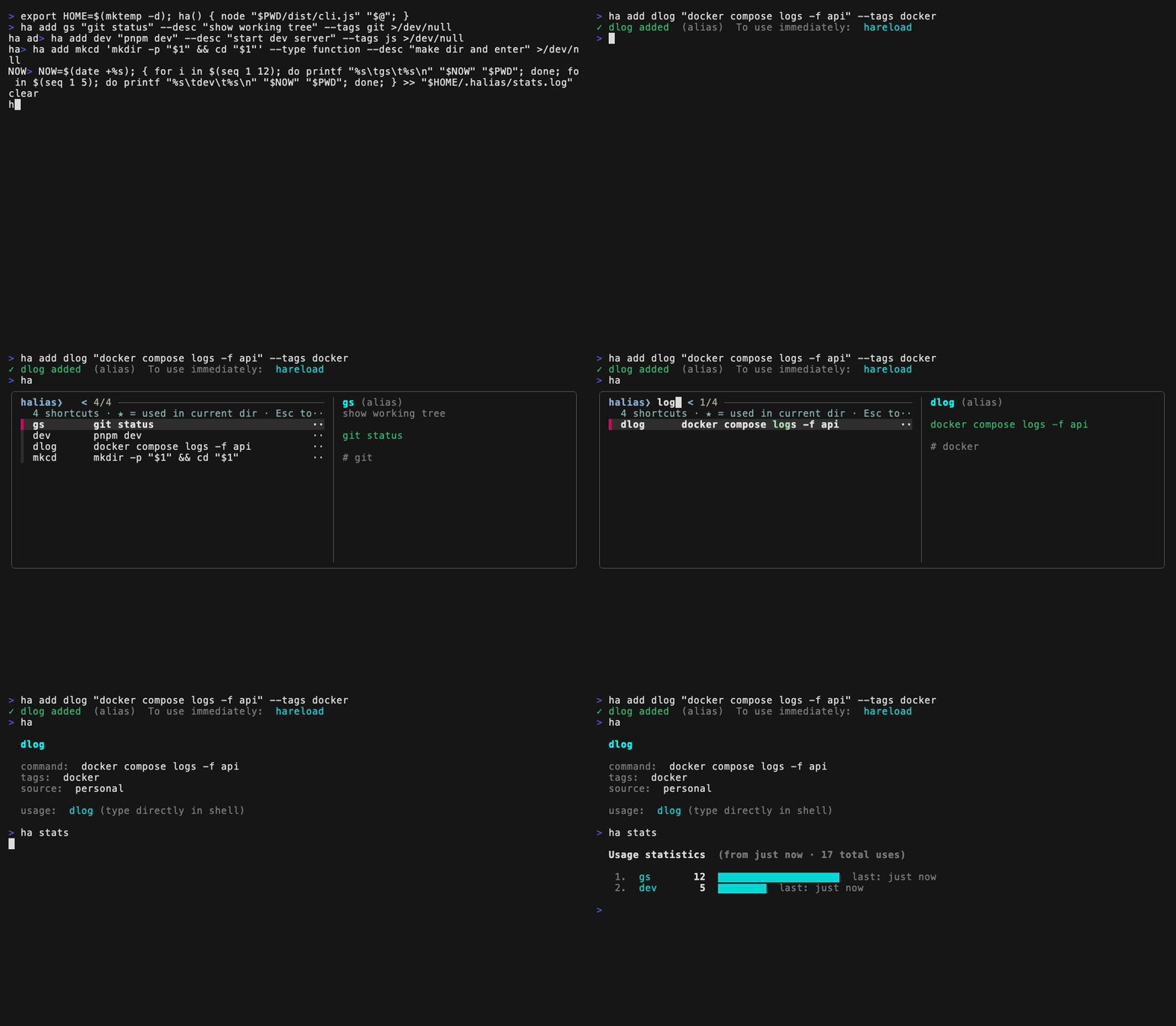
Managing shell aliases used to mean editing .zshrc by hand. halias turns it into a personal command layer:
- 🎯 Context-aware ranking — shortcuts you use in this directory float to the top of search. No manual grouping required.
- ⚡ Save the last command (
ha add --last <name>) — turn the command you just ran into a reusable shortcut. - 💡 Shortcut suggestions (
ha suggest) — find repeated shell commands that are good alias candidates. - ✨ Interactive add (
ha add) — Clack-powered TUI ... - 🔍 Fuzzy search (
ha) — fzf integration searches across name, command, tags, and description - 📊 Auto stats — every shortcut is generated as a wrapper function, so usage is tracked automatically
- 🛡️ Safety nets — system command conflict detection, frequent-use confirmation on delete
- 💾 Backup & restore — single-file JSON export/import with merge or replace strategies
- 🐚 Two entry points —
haliasfor scripts,hafor daily use; same binary
npm install -g halias
# or, via Homebrew (installs Node automatically if needed)
brew install kwonmoto/tap/halias
Both halias and ha will be available globally. The shorter ha is recommended for daily use.
Supported environments: macOS and Linux, with zsh or bash, on Node.js 20+. Windows is not supported natively — use WSL.
To remove halias' shell integration later, run ha uninstall — it strips the managed block from your ~/.zshrc (and completion setup), and optionally deletes your data in ~/.halias.
# 1. Add your first shortcut interactively
ha add
#   ◇ Name?         gs
#   ◇ Type?         alias
#   ◇ Command?      git status
#   ◇ Description?  show working tree status   (optional)
#   ◇ Tags?         git                        (optional)

# Or save the command you just ran
docker compose logs -f api
ha add --last dlog

# 2. Install shell integration (one-time setup)
ha install

# 3. Apply (or just open a new terminal)
source ~/.zshrc

# 4. Use it!
gs                   # → runs `git status`

# 5. Find shortcuts later
ha                   # fuzzy search across all your shortcuts
hareload # apply newly added shortcuts to current shell| Command | Description |
|---|---|
ha (no args) |
Fuzzy search — find shortcuts fast |
ha search (= ha s) |
Same as above, explicit |
ha --run / ha --copy |
Search, then run the selection or copy its command to the clipboard |
ha add |
Add a new shortcut interactively |
ha add <name> <command> |
Add non-interactively (--type, --desc, --tags, --force) — for scripts and dotfiles |
ha add --last [name] |
Save the last shell command as a shortcut |
ha edit [name] |
Edit an existing shortcut (picker if no name) |
ha rename [old] [new] |
Rename a shortcut without the full edit form |
ha list (= ha ls) |
List shortcuts (--sort name|recent|usage, --tag <tag>) |
ha tags [tag] |
Show all tags with counts; select a tag to filter the list |
ha rm [name] |
Delete a shortcut (extra confirm for frequently used) |
ha stats |
Usage stats (top N, unused, per-directory, time-filtered) |
ha unused |
Show never-used and stale shortcuts |
ha unused --clean |
Bulk-delete unused shortcuts interactively |
ha suggest |
Suggest repeated shell commands worth saving |
ha export [path] |
Back up shortcuts to JSON |
ha import <path> |
Restore from backup (--strategy merge|replace) |
ha restore |
Revert to the last auto-backup (saved before destructive operations) |
ha import-rc [file] |
Import aliases and functions from ~/.zshrc (auto-detected if omitted) |
ha config lang [en|ko] |
Get or set the UI language |
ha config editor [cmd] |
Get or set the editor used for function bodies |
ha install |
Add shell integration to ~/.zshrc |
ha uninstall |
Remove shell integration from ~/.zshrc |
ha doctor |
Diagnose your environment |
halias keeps a single source of truth in ~/.halias/shortcuts.json and generates ~/.halias/generated/aliases.sh from it. Your .zshrc only ever has one line added:
# >>> halias shortcuts >>>
[ -f "$HOME/.halias/generated/aliases.sh" ] && source "$HOME/.halias/generated/aliases.sh"
# <<< halias shortcuts <<<
Every shortcut — even simple aliases — is generated as a shell function so usage tracking works consistently:
# from `ha add gs "git status"`:
gs() {
  _halias_track "gs"      # appends to ~/.halias/stats.log
  git status "$@"         # forwards extra args
}
This unification means ha stats works identically for aliases and functions, and you get "$@" arg forwarding for free.
Hit ha with no args to drop into a full-text search across all your shortcuts:
halias❯ git gs git status #git ★ 12회 Show working tree status dev pnpm dev #js ★ 8회 Start dev server gp git pull #git 34회 Pull from origin mkcd mkdir -p && cd #fs Make and enter directory
Search matches across name, command body, tags, and description. Try searching for "polled" — if you described gp as "pull from origin", it'll match.
By default, selecting a shortcut prints its details. Add a flag to skip the retyping:
ha --run     # run the selected shortcut right away (usage is still tracked)
ha --copy # copy its command to the clipboard (pbcopy / wl-copy / xclip / xsel)halias automatically tracks which shortcuts you use in each directory. When you run ha, shortcuts you've used in the current directory float to the top, marked with ★. Global frequency is the tiebreaker.
Example: in ~/work/myapp, dev (used 8 times here) ranks above gs (used 12 times globally but only once here). Move to ~/side/api and the ranking shifts to match what you actually do there.
This means you don't need to organize aliases manually — they organize themselves around your usage patterns.
Best experience comes with fzf installed. The easiest way:
ha doctorIt detects your OS and package manager (Homebrew, apt, dnf, winget, scoop) and offers safe options. Without fzf, search falls back to a simple selector.
ha stats              # top 10 with bar chart
ha stats --top 5
ha stats --since 7d   # last 7 days only (also: 24h, 30m)
ha stats --by-dir     # usage per directory — see what the context ranking has learned
ha stats --unused     # never-used + 30+ days idle (shows command + registration date)
ha unused             # shorthand for the above
ha unused --clean     # interactive checklist to bulk-delete unused shortcuts
Usage stats (since 1 month ago · 14 calls total)
1. gs 5 ▇▇▇▇▇▇▇▇▇▇▇▇▇▇▇▇▇▇▇▇ last: 1 min ago
2. gp 3 ▇▇▇▇▇▇▇▇▇▇▇▇ last: 6 min ago
3. mkcd 2 ▇▇▇▇▇▇▇▇ last: 30 min ago
ha suggest           # repeated command candidates from recent shell history
ha suggest --top 5
ha suggest --min 4   # only commands repeated 4+ times
ha suggest --save    # pick a suggestion and save it immediately
Shortcut candidates
Commands repeated 3+ times in recent shell history.
1. 12x docker compose logs -f api
2. 7x git pull --rebase
To save one: ha suggest --save
Suggestions skip commands that are already saved as shortcuts, short one-off commands, session setup noise, and common navigation commands like cd, ls, and pwd.
Give any shortcut its own tab completion. Via ha edit <name>, set an argument completion command — any shell command that prints candidates to stdout, one per line:
ha edit vault-dec
#   ◇ Argument completion command?
#     security dump-keychain | awk -F'"' '/svce/ {print $4}'
After hareload, vault-dec <Tab> completes from that command's live output. Works in both zsh and bash. If the candidate command fails, completion silently degrades — the shortcut itself is unaffected.
ha export                              # ./halias-backup-2026-04-29.json
ha export ~/Dropbox/halias-backup.json
ha import ~/Dropbox/halias-backup.json # merge (existing wins)
ha import backup.json --strategy replace
ha restore                             # undo the last destructive operation
merge keeps existing entries on name conflict (safe). replace clears everything first (explicit confirmation required).
Before any destructive operation — import --strategy replace or unused --clean — halias automatically saves a snapshot to ~/.halias/shortcuts.json.bak. Run ha restore to roll back to it. Imports also warn you when an incoming shortcut would shadow a system command (e.g. ls, cd).
ha doctor checks your environment end-to-end:
halias environment check

  ✓ fzf installed
  ✓ Shell integration installed (.zshrc)
  ✓ Shell history available (1000 recent commands)
  ✓ shortcuts.json integrity OK (12 entries)
  ! 1 shortcut overrides system command
      • ls
    → Run `ha rm <name>` if unintended.
  ✓ aliases.sh generated
~/.halias/
├── shortcuts.json          # source of truth (human-readable JSON)
├── shortcuts.json.bak      # auto-backup taken before destructive operations
├── stats.log               # raw usage log (timestamp + name + directory)
├── config.json             # halias preferences (e.g. preferred editor)
└── generated/
    └── aliases.sh          # auto-generated, sourced by your shell
Everything is plain text, version-controllable, and easy to back up.
Your data and shell setup are treated as a public API:
shortcuts.json(schema v1), thestats.logformat, and the rc marker block (# >>> halias shortcuts >>>) are frozen. New fields are only added optionally — existing files keep working without any action.- If a breaking format change is ever needed, it ships in a major version with an automatic migration and a backup of your previous data (
shortcuts.json.bak-v1). - Command names and their documented flags follow semver: they don't break within a major version.
Search results now learn from where you actually use shortcuts. Shortcuts used in the current directory float to the top without manual project scopes.
ha unused/ha unused --clean— find and bulk-delete stale shortcutsha rename— rename without the full edit formha list --tag— filter list by tagha editopens$EDITORfor function bodies; auto-detects installed editors
- English / Korean UI (
ha config lang) ha completion zsh|bash— tab-complete commands and shortcut namesha tags— browse tags and filter shortcuts by tagha import-rc— pull existing aliases and functions from~/.zshrc
- Automatic backup before destructive operations +
ha restoreto roll back ha uninstall— clean removal of shell integration- Conflict warnings when imports would shadow system commands
ha doctorverifiesaliases.shis in sync withshortcuts.json- Hardened shell-code generation so one bad shortcut can't break the rest
- Per-shortcut argument tab completion (
argCompleteviaha edit) - Non-interactive
ha add <name> <command>for scripts and dotfiles ha --run/ha --copy— act on a search result without retypingha config editorand a first-run getting-started guide
- Test suite (unit + real bash/zsh integration) running in CI
- Lock-file serialization of all store writes — no lost updates across shells
- Documented support matrix
- Fuzzy-search preview pane, demo GIF, and the stability promise above
- MCP server — expose your shortcuts and per-directory usage stats to AI coding agents as personal context. AI generates a long command once;
ha add --lastkeeps it; your agent learns what you actually use where.
Beyond that: driven by real usage and friction discovered in daily work, not by feature checklists.
Suggestions and bug reports welcome via issues.
npm run dev -- add        # run with tsx (no build needed)
npm run typecheck         # type check
npm run build # produce dist/MIT — see LICENSE.