The same weather app built in 12 different frontend frameworks
For automated cross-framework web performance benchmarking
📊 View Results •
🎯 Choose a Framework

I've built the same weather app in 12 different frontend web frameworks.
Along with automated scripts to benchmark each of their performance, quality and capabilities.
To finally answer the age-old question: "Which is the best* frontend framework?"
So, without further ado, let's see how every framework weathers the storm! ⛈️
- To objectively compare frontend frameworks in an automated way
- Because I have no life, and like building the same thing 10 times
- Smallest bundle size and best compression
- Fastest load time (FCP, LCP, TTI, TTFB, etc)
- Lowest resource consumption (CPU & memory usage, etc)
- Most maintainable (least verbose, complex and repetitive code)
- Quickest build time (prod compile, dev server HMR latency, etc)
- Frameworks Covered
- Usage Guide
- Project Outline
- Results
- Real-world Applications
- Status
- Requirement Spec
- Attributions and License
Tip
Choosing a framework for your next project? I've also built Stack Match, a comparison tool to help you pick the right framework based on your requirements. Check it out at stack-match.as93.net :)













Click a framework to view info, test/lint/build/etc statuses, and to preview the demo app
You'll need to ensure you've got Git, Node (v22+) and Python (3.10+) installed
git clone git@github.com:lissy93/framework-benchmarks.git
cd framework-benchmarks
npm install
pip install -r scripts/requirements.txt
npm run setupRun npm run dev:[app-name]
Or, you can: cd ./apps/[app-name] then npm i and npm run dev
All apps are tested with the same shared test suite, to ensure they all conform to the same requirements, and are fully functional.
Tests are dome with Playwright and can be found in the tests/ directory.
Either execute tests for all implementations with npm test, or just for a specific app with npm run test:[app] (e.g. npm run test:react).
You should also verify the lint checks pass, with npm run lint or npm run lint:[app].
Build the app for production, with npm run build:[app-name]
Then upload the app's build output (dist/, build/ or the app root, depending on the framework) to any web server, CDN or static hosting provider
- Create app directory:
apps/[app-name]/withpackage.json, a build config (e.g.vite.config.js), and asrc/dir - Register the framework in
frameworks.json - Add a test config at
tests/config/playwright-[app-name].config.js - Run
npm run setupto generate scripts, sync shared assets and mocks, and install deps. Verify withnpm run check - Code your app!
5.1. Preview locally withnpm run dev:[app-name]
5.2. then test withnpm run test:[app-name]to ensure it meets the requirements spec - Validate everything passes with the test, lint and build scripts
framework-benchmarks
├── scripts					# Scripts for managing the app (syncing assets, generating mocks, etc)
├── assets					# These are shared across all apps for consistency
│   ├── icons				# SVG icons, used by all apps
│   ├── styles			# CSS classes and variables, used by all apps
│   └── mocks				# Mocked data, used by apps when running benchmarks
├── website					# Source templates for the results website
├── tests						# Test suit
└── apps						# Directory for each app as a standalone project
    ├── react/
    ├── svelte/
    ├── angular/
    └── ...
The scripts/ directory contains
everything for managing the project (setup, testing, benchmarking, reporting, etc).
You can view a list of scripts by running npm run help.
To keep things uniform, all apps will share certain assets
tests/- Same test suit used for all apps. To ensure each app conforms to the spec and is fully functionalassets/- Same static assets (icons, fonts, styles, meta, etc)assets/styles/- Same styles for all apps, and theming is done with CSS variables
- Dependencies: Beyond their framework code, none of the apps use any additional dependencies, libraries or third-party "stuff"
- Data: Apps support using real weather data, from open-meteo api. However, to keep tests fair, we use mocked data when running benchmarks.
npm run setup- Creates mock data, syncs assets, updates scripts and installs dependenciesnpm run test- Runs the test suite for all apps, or a specific appnpm run lint- Runs the linter for all apps, or a specific appnpm run check- Verifies the project is correctly setup and ready to gonpm run build- Builds all apps, or a specific app for productionnpm run start- Starts the demo server, which serves up all built appsnpm run help- Displays a list of all available commands
See the package.json for all commands, and npm run help for details.
Note that the project commands get generated automatically by the generate_scripts.py script, based on the contents of frameworks.json and config.json. That's what npm run setup is for.
A summary of results can be viewed in summary.tsv.
Full, detailed results can be found in the results branch,
or attached as an artifact in the GitHub Actions benchmarking workflow runs.
For slightly more interactive reports, you can view the website at framework-benchmarks.as93.net,
and also view a stats on a per-framework basis.
The following charts show live data from the latest benchmark run. See the web version for interactive charts.
| Framework | Stars | Downloads | Size | Contributors | Age | Last updated | License |
|---|---|---|---|---|---|---|---|
| React |
246.2k | 575.3M | 983.5 MB | 2k | 13.1y | 1 hour ago | MIT |
| Angular |
100.4k | 23.1M | 629.7 MB | 2.6k | 11.8y | 10 hours ago | MIT |
| Svelte |
87.4k | 20.2M | 118.5 MB | 931 | 9.6y | 49 minutes ago | MIT |
| Preact |
38.7k | 90.8M | 18.9 MB | 372 | 10.8y | 21 hours ago | MIT |
| Solid.js |
35.7k | 10.8M | 16.9 MB | 194 | 8.2y | 8 hours ago | MIT |
| Qwik |
22k | 132.4k | 83.2 MB | 637 | 5.4y | 5 days ago | MIT |
| Vue 3 |
53.9k | 53.2M | 42.3 MB | 627 | 7.8y | 6 days ago | MIT |
| jQuery |
59.8k | 73.3M | 35.1 MB | 347 | 20.3y | 16 hours ago | MIT |
| Alpine.js |
31.7k | 2.2M | 8.8 MB | 317 | 6.6y | 1 day ago | MIT |
| Lit |
21.7k | 24.6M | 61.1 MB | 210 | 9.0y | 1 week ago | BSD-3-Clause |
| VanJS |
4.4k | 8k | 3.8 MB | 24 | 3.1y | 4 months ago | MIT |
| Lume.js |
38 | 160 | 1.3 MB | 1 | 0.7y | 1 month ago | MIT |
Different frameworks shine in different ways, and therefore have very different usecases.
So to properly demonstrate each frameworks ideal usecase, I've also built a real-world app in each framework.
| Project | Framework | GitHub | Website |
|---|---|---|---|
 |
 |
🌐 web-check.xyz | |
 |
 |
🌐 dashy.to | |
 |
 |
🌐 digital-defense.io | |
 |
 |
🌐 networkingtoolbox.net | |
 |
 |
🌐 awesome-privacy.xyz | |
 |
 |
🌐 domain-locker.com | |
 |
 |
🌐 email-comparison | |
 |
 |
🌐 who-dat.as93.net | |
 |
 |
🌐 N/A | |
 |
 |
🌐 raid-calculator | |
 |
 |
🌐 permissionator |
Each app gets built and tested to ensure that it is functional, compliant with the spec, and (reasonably) well coded. Below is the current status of each, but for complete details you can see the Workflow Logs via GitHub Actions.
| Workflow | Status |
|---|---|
| Build: Compiles each app for deployment |  |
| Test: Runs all unit and integration tests |  |
| Lint: Ensures lint/consistency checks pass |  |
| Benchmark: Executes all app benchmarks |  |
| Transform: Formats and publishes results |  |
| CI: Runs checks on PRs to ensure all good |  |
| Docker: Builds and publishes the image |  |
| Tag: Bumps version and tags on merge |  |
| Release: Drafts a release with assets |  |
| Docs: Updates dynamic info in markdown |  |
| Mirror: Syncs repo to Codeberg mirror |  |
| App | Build | Test | Lint |
|---|---|---|---|
| React |
 |
 |
 |
| Angular |
 |
 |
 |
| Svelte |
 |
 |
 |
| Preact |
 |
 |
 |
| Solid.js |
 |
 |
 |
| Qwik |
 |
 |
 |
| Vue 3 |
 |
 |
 |
| jQuery |
 |
 |
 |
| Alpine.js |
 |
 |
 |
| Lit |
 |
 |
 |
| VanJS |
 |
 |
 |
| Lume.js |
 |
 |
 |
| Vanilla JavaScript |
 |
 |
 |
Every app is built with identical requirements (as validated by the shared test suite), and uses the same assets, styles, and data. The only difference is the framework used to build each.
Why a weather app? Because it enables us to use all the critical features of any frontend framework, including:
- Binding user input and validation
- Fetching external data asynchronously
- Basic state management of components
- Handling fallback views (loading, errors)
- Using browser features (location, storage, etc)
- Logic blocks, for iterative content and conditionals
- Lifecycle methods (mounting, updating, unmounting)
For our app to be somewhat complete and useful, it must do the following:
- On initial load, the user should see weather for their current GPS location
- The user should be able to search for a city, and view it's weather
- And the user's city should be stored in localstorage for next time
- The app should show a detailed view of the current weather
- And a summary 7-day forecast, where days can be expanded for more details
There's certain standards every app should follow, and we want to use best practices, so:
- Theming: The app should support both light and dark mode, based on the user's preferences
- Internationalization: The copy should be extracted out of the code, so that it is translatable
- Accessibility: The app should meet AA standard of WCAG in line with the EAA
- Mobile: The app should be fully responsive and optimized for mobile
- Performance: The app should be efficiently coded as best as the framework allows
- Testing: Core functionality, logic and complexity should be tested, aiming for 90% coverage
- Error Handling: App should be robust, with errors handled gracefully and correctly surfaced
- Quality: The code should be clean, typechecked, linted and formatted consistently
- Security: Code should follow secure best practices, inline with OWASP reccomentations
- SEO: Correct semantic elements, meta and og tags and SSR compatible where applicable
- CI: Automated tests, lints and validation should ensure all changes are compliant
To compare the frameworks, we need to measure:
- Bundle size & output
- Load metrics: FCP, LCP, CLS, TTI, interaction latency
- Hydration/SSR cost, CPU & memory
- Cold vs. warm cache behaviour
- Memory usage: idle, post-flow, leak delta
- Build time & dev server HMR latency
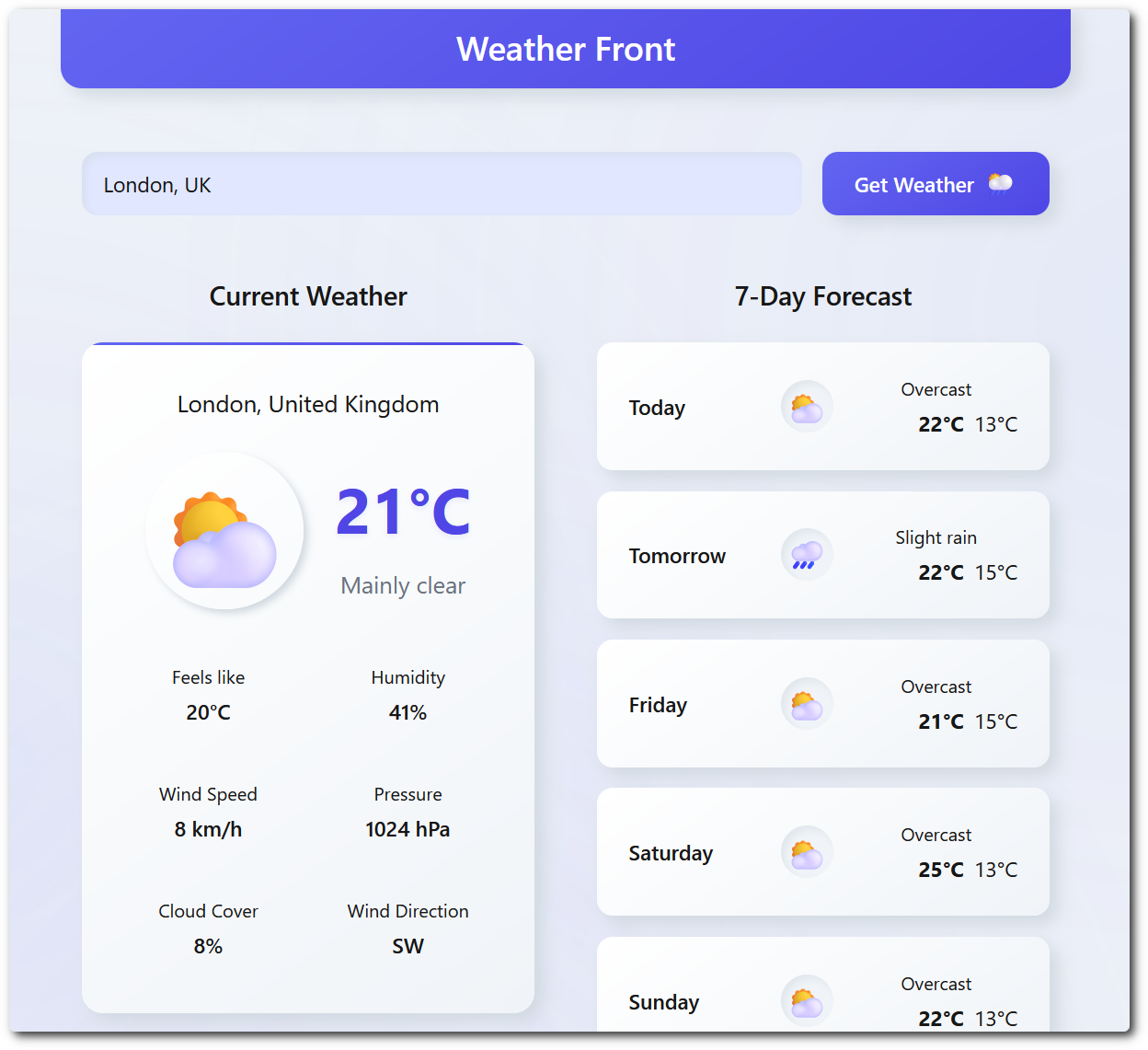
The interface is nothing special. It's a simple form which must be identical arcorss all apps, as validated by the snapshots in the tests.
The screenshots will all look like this:
This is a fair, like-for-like comparison - but it's not the final word. The app uses all the everyday stuff (state, fetching, input, lists, lifecycle), but it won't push any framework to its limits. So worth bearing in mind:
- Scale: We're not rendering tens of thousands of nodes, or stress-testing giant lists and rapid re-renders - which is where some frameworks pull ahead
- Scope: It's one app archetype. Things like complex routing, deep global state, streaming SSR and heavy animation aren't covered
- Real-world variance: Benchmarks run in CI on a single environment, so treat the numbers as a guide, not gospel
lissy93/framework-benchmarks is licensed under MIT © Alicia Sykes 2025.
For information, see TLDR Legal > MIT
Expand License
The MIT License (MIT)
Copyright (c) Alicia Sykes <alicia@omg.lol>

Permission is hereby granted, free of charge, to any person obtaining a copy
of this software and associated documentation files (the "Software"), to deal
in the Software without restriction, including without limitation the rights
to use, copy, modify, merge, publish, distribute, sub-license, and/or sell
copies of the Software, and to permit persons to whom the Software is furnished
to do so, subject to the following conditions:

The above copyright notice and this permission notice shall be included install
copies or substantial portions of the Software.

THE SOFTWARE IS PROVIDED "AS IS", WITHOUT WARRANTY OF ANY KIND, EXPRESS OR IMPLIED,
INCLUDING BUT NOT LIMITED TO THE WARRANTIES OF MERCHANT ABILITY, FITNESS FOR A
PARTICULAR PURPOSE AND NON INFRINGEMENT. IN NO EVENT SHALL THE AUTHORS OR COPYRIGHT
HOLDERS BE LIABLE FOR ANY CLAIM, DAMAGES OR OTHER LIABILITY, WHETHER IN AN ACTION
OF CONTRACT, TORT OR OTHERWISE, ARISING FROM, OUT OF OR IN CONNECTION WITH THE
SOFTWARE OR THE USE OR OTHER DEALINGS IN THE SOFTWARE.
© Alicia Sykes 2025 - present
Licensed under MIT
Thanks for visiting :)
