API consumption
📑 Chapter summary
In this section your group must design, implement and test a client application that uses the RESTful API implemented by you. If you utilize HTML and JavaScript, it is mandatory that the HTML is contained in static files. It means that your server cannot generate HTML dynamically (using PHP or JSP). All modifications made to the webpage must be done in the client side using javascript. Of course, you can use anchors () to load a new URL. Please, consider the Same Origin Policy" because it might cause problems to your client implementation. It is recommend to host the files in a local HTTP server and not directly in your file system. We will give you more instructions in Exercise 4.In addition, you must include an auxiliary service that interacts with your API (and possibly the client).
- Learn how to use APIs
- Implement a client that uses the project API
- Implement an auxiliary service that interacts with your API
✔️ Chapter evaluation (max 30 points)
You can get a maximum of 30 points after completing this section. You can check more detailed assessment criteria in the Lovelace return box for Deadline 5.📑 Content that must be included in the section
You must provide a description of the application. You must clarify which are the goals of the application and why a user would like to use this application. You must also state what is the functionality provided by the RESTful API used by this application.✏️ DogDict is a wiki for information regarding dogs. With DogDict, one can easily find every-day information about dogs of all breeds. DogDict allows users to write, edit, delete and fetch information like the coat length of a certain breed or provide fun facts about dachshunds. DogDict is a system that contains our RESTful API, database and the client. The client allows the users to access every method found in the API, which in practice means that through the CLI, users can GET, POST, PUT and DELETE data in the database.
📑 Content that must be included in the section
Provide a use case diagram of your application. For each case, specify which is the API resource/s that cover the given functionality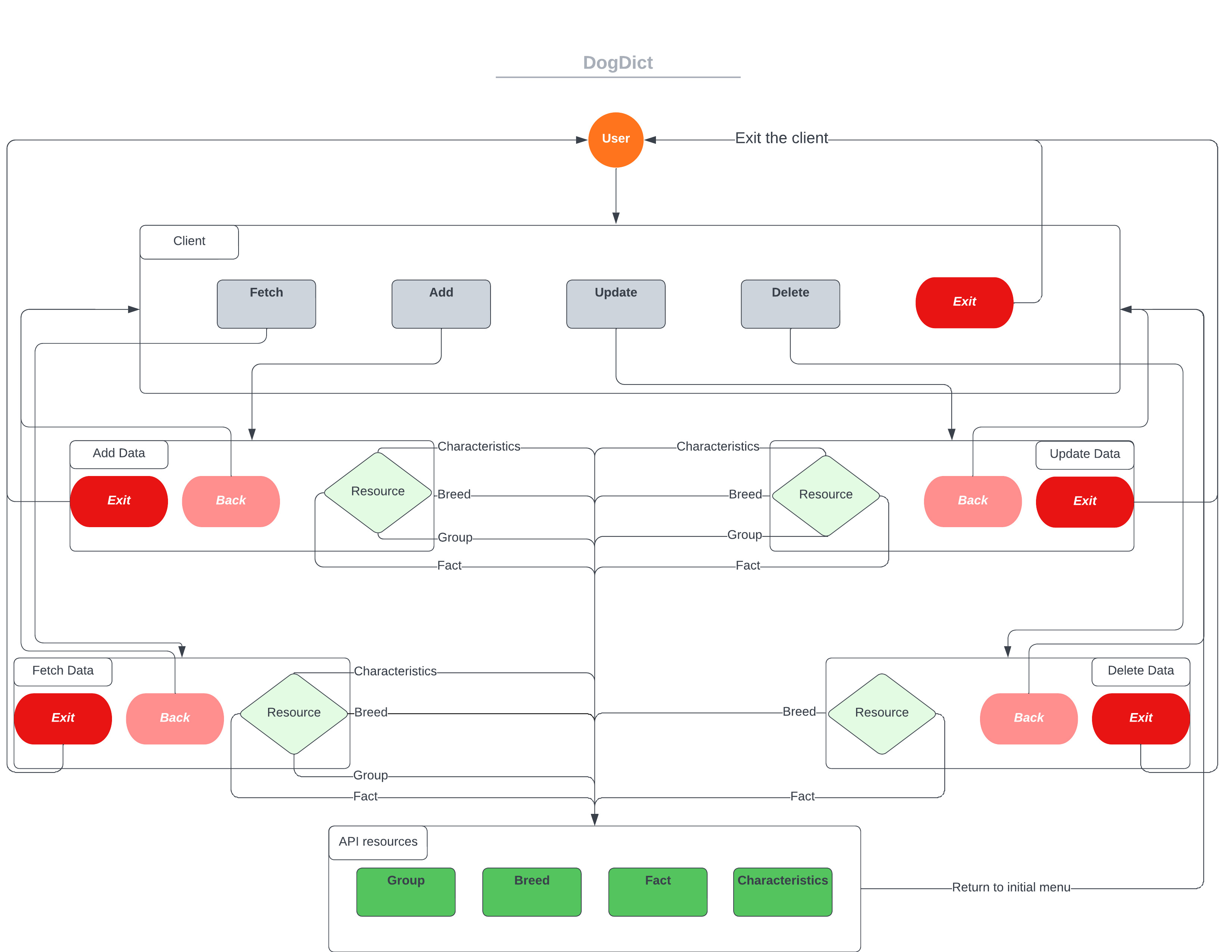
✏️ The above diagram represents some use cases for DogDict. Diagram is created with Lucidchart. Example use cases:
Fetching data:
- User wants to get the names of all the groups in DogDict
- User chooses "Fetch"
- Another prompt where user is asked what information they are looking for
- User chooses to Group and names of all groups are provided to the user
- User is returned to the initial menu
Deleting data:
- User wants to delete a certain breed from DogDict
- User chooses "Delete"
- Another prompt where user is asked the breed's name and group
- Given valid inputs, the data is deleted
- User is returned to the initial menu
📑 Content that must be included in the section
Draw a diagram of the client layout. Students can use any software they want to do the sketching. For more professional-like design, students can use any wireframing tool available in Internet. Some of them can be found from http://webdesignledger.com/tools/13-super-useful-ui-wireframe-tools. Pencil is free, open source and easy to use. Other options are Visio and Balsamiq (you need a license). You can also create the UI using a paper and a pencil and scan the resulting drawing.✏️ Diagram provided in the use case diagram section also provides sufficient visualization for the client layout. When user starts the client, they enter the "Client" section of the diagram. User is prompted with 5 options: fetch, add, update, delete data or exit the program. After selecting "add", for example, the user is then prompted to select what kind of information they want to add. Given the kind of resource they want to add, some additional information might be required and it will be prompted to the user. After inserting all necessary information, the chosen action will be completed and the user will be returned to the initial menu "Client".
📑 Content that must be included in the section
Draw the screen workflow of your client (which are the possible screens that you can access from one specific screen?)✏️ Again, the above diagram in the use case diagram section provides sufficient information about the workflow. Look at the next chapter to see what the CLI looks like visually.
💻 TODO: SOFTWARE TO DELIVER IN THIS SECTION
The code repository must contain:- The source code for the client application.
- External libraries. You can also report them in the README.md if the libraries are very big or need to be installed.
- The code for testing the application (if it exists).
- We recommend to include a set of scripts to run your application and tests (if they exist).
- A README.md file containing:
- Dependencies (external libraries)
- How to setup/install the client
- How to configure and run the client
- How to run the different tests of your client (if you have implemented unit testing)
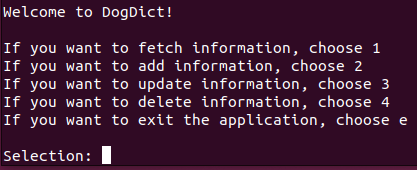
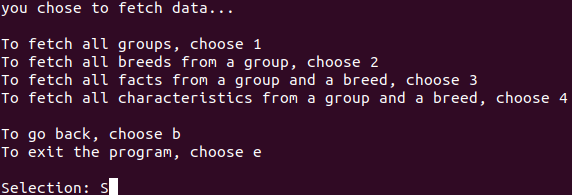
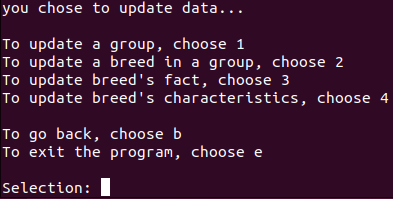
✏️ Very basic CLI implementation that supports all the functionalities of the RESTful API:
Initial menu:
After user has chosen to fetch information:
After user has chosen to update existing information:
📑 Content that must be included in the section
You must provide a description of the service. You must clarify which are the goals of the service and how it interacts with your API (and possibly the client). The service can be autonomous entity that does some automated work on the API (data cleaning, calculating composites etc.), or it can be commanded from the client interface to perform heavier tasks that would clog the API server itself (statistics generation, recommendation algorithms etc.).✏️ Write your description here
📑 Content that must be included in the section
Provide a diagram that shows how the service communicates with other parts in the ecosystem.✏️ Put your diagram here
💻 TODO: SOFTWARE TO DELIVER IN THIS SECTION
The code repository must contain:- The source code for the auxiliary service.
- External libraries. You can also report them in the README.md if the libraries are very big or need to be installed.
- The code for testing the service (if it exists).
- We recommend to include a set of scripts to run your service and tests (if they exist).
- A README.md file containing:
- Dependencies (external libraries)
- How to setup/install the service
- How to configure and run the service
- How to run the different tests of your service (if you have implemented unit testing)
✏️ Do not need to write anything here. Implement your service
| Task | Student | Estimated time |
|---|---|---|
| CLI implementation and debugging, wiki updates | Kalle Veijalainen | 34h |
| Fixing previous deadline | Lauri Suutari | 5h |
| Miscallaneous | Martti Mourujärvi | 5h |