SSHBackup uses simple SSH pipelining to retrieve the data and stores it locally.
SSHBackup connects to your server via ssh and executes a command or script of your choosing. The command needs to pipe the backup data to stdout, in order for SSHBackup to pick it up and store it in a place of your choosing.
An example would be the following command, which stores all data in the root-directory in a tar-archive, and writes that to stdout.
tar cfvz - / -C /
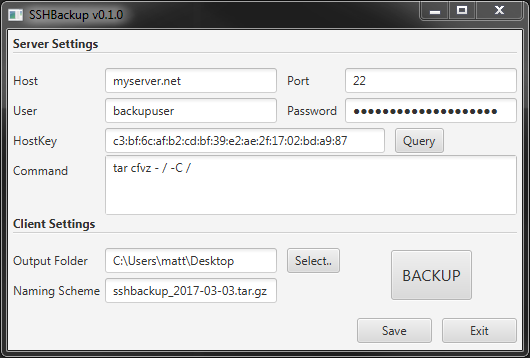
-
Host
- the hostname/ip of the server to backup
-
Port
- the SSH server-port (default: 22)
-
User
- the user to log into the server with
-
Password
- the user's password
-
HostKey (fingerprint)
- the fingerprint of the SSH server's host key, for verification
-
Command
- the command run on the server, which writes the backup to stdout
-
OutputFolder
- the folder to store the backup in
-
NamingScheme
- (currently) the file to store the backup in. (planned) a naming pattern
Either git clone and build it yourself with maven or download a windows build here (signed with key id: F864BE90)
SSHBackup makes use of the following libraries:
- SSHJ (Apache License 2.0)
- Spring 4 (Apache License 2.0)
- Gson (Apache License 2.0)
- Commons Lang (Apache License 2.0)