AI text refiner. Voice to text. Macro recorder. Screen & GIF recorder. All from your system tray.
Select text anywhere → press a hotkey → AI rewrites it and pastes it back in under a second.
Works in Gmail, Notion, Slack, Word, VS Code, Discord — every app on your computer.

-555555?style=for-the-badge&logo=windows)
-555555?style=for-the-badge&logo=windows)




Most AI writing tools make you open a browser tab, paste your text, wait, copy the result, switch back, and paste again. That's 7 steps — every single time.
Hotkeys does it in 1 step — without ever leaving whatever you're writing in.
It sits quietly in your system tray and gives you a full toolkit:
| ✍️ AI Text Refiner | Select any text, press a hotkey — it's rewritten and pasted back in under a second |
| ⌨️ Custom Prompt Hotkeys | Write any instruction, assign it F1–F12, fire it from any app instantly |
| 🎙️ Voice to Text | Hold a hotkey, speak, your words appear wherever your cursor is — fully offline |
| 📝 Quick Notes | Floating scratchpad window — capture thoughts, paste clips, drag to resize from any edge |
| 🔴 Macro Recorder | Record any sequence of keystrokes and mouse clicks, replay it with one key |
| 🎬 Screen Recorder | Capture any window or region of your screen as an MP4 |
| 🎞️ GIF Recorder | Record any window or region as an animated GIF — perfect for sharing clips |
| 📸 AI Screenshot | Capture your screen and instantly ask the AI what's in it |
No API key needed. Works out of the box on Windows and Mac — just download and run.
All your prompts in one place. Click any card to activate it, drag to reorder, right-click for options:
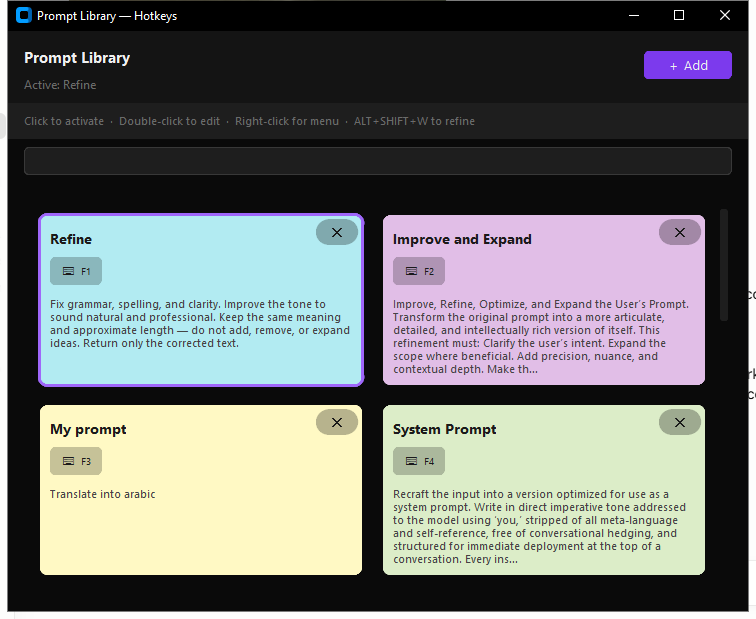
The library ships with 16 ready-to-use prompts. Each one is a single instruction that gets applied to whatever text you've selected.
| Hotkey | Prompt | What it does |
|---|---|---|
F1 |
Refine | Fixes grammar, spelling, and clarity — same meaning, natural tone |
F2 |
Improve & Expand | Makes your text more articulate, detailed, and expressive |
F3 |
Translate | Translates in place (default: Arabic — change it to anything) |
F4 |
System Prompt | Reformats text into a clean, deployable AI system prompt |
F5 |
Simplify | Strips jargon and complexity — immediately understandable |
F6 |
Technical Depth | Adds precision and implementation detail for expert readers |
F7 |
Expand | Develops underdeveloped ideas without going off-topic |
F8 |
Professional | Rewrites in polished, formal language at the same length |
F9 |
Ask Claude | Turns vague thoughts into a sharp, specific AI prompt |
F10 |
Pirate | Rewrites with nautical flair — same meaning, more swagger |
F11 |
ELI5 | Explains anything as if the reader is five years old |
F12 |
Tweet | Compresses the sharpest idea into one punchy tweet |
| — | Brutally Honest | Says exactly what's meant, no softening, no padding |
| — | Story Hook | Turns any idea into a gripping opening line |
| — | Devil's Advocate | Argues the exact opposite with equal conviction |
| — | Haiku | Distils the core idea into a 5-7-5 haiku |
These are just the starting point. Hit + Add to write your own.
The only limit is your imagination. Want a prompt that rewrites emails in your exact voice? Converts meeting notes into action items? Translates to your language? Summarises legal contracts in plain English? Turns rough ideas into job postings?
Add it in 10 seconds and it works everywhere, instantly.
Tip: Press any hotkey to see a floating sticky note preview. Edit the prompt on the fly before it fires, then press the key again to apply.
- Download Hotkeys-v3.1-win64.zip
- Extract the zip — you'll get a
Hotkeysfolder - Open the folder and double-click
Hotkeys.exe - The ⚡ icon appears in your taskbar tray — you're done
No Python. No pip. No API key. No installing anything. It just works.
- Download Hotkeys-mac.dmg
- Open the DMG — drag Hotkeys.app to your Applications folder
- Double-click Open Hotkeys.command inside the DMG (bypasses macOS security prompt)
- Grant Accessibility permission when prompted (one-time, 30 seconds)
- The ⚡ icon appears in your menu bar — you're done
No Python. No pip. No API key. No installing anything. It just works.
Prefer to install from source? Download install_mac.command — right-click → Open, terminal does everything automatically (~10 min)
- Select text in any app
- Press
Alt + Shift + W - Wait ~0.5 seconds — the text is rewritten and pasted back
- Select text in any app
- Press the prompt's hotkey (e.g.
F5for Simplify) - A sticky note appears — read the prompt, edit it if you want
- Press the same key again to fire it
- Press
Alt + Shift + Eto open the Prompt Library - Click + Add
- Give it a name and write your instruction
- (Optional) Assign a hotkey via right-click → Assign hotkey
- Click Save — available everywhere immediately
- Press
Shift + F7— a resizable notes window opens instantly - Type your note or paste anything from the clipboard
- Press
Shift + F7again (orEsc) to close — notes are saved automatically - Drag any edge or corner to resize; drag the title bar to move
- Place your cursor where you want the text
- Press
Ctrl + Enterto start recording - Speak naturally
- Press
Ctrl + Enteragain to stop — your words appear instantly
Runs fully offline — nothing is sent anywhere.
- Press
Shift + F1to start recording — a red pill appears in the corner - Do anything: type, click, switch windows, scroll — everything is captured
- Press
Shift + F1again to stop — the pill shows how many events were captured - Press
Shift + F1once more to replay the exact sequence - Press
Escat any point to cancel recording or stop playback - (Optional) Save frequently used macros and assign them their own hotkey
- Press
Shift + F2— a setup dialog appears - Choose Full screen, pick a window, or drag to select a region
- (Optional) Enable microphone audio
- Click Start Recording — dialog disappears, recording begins silently
- Press
Shift + F2again to stop — a save dialog appears - Choose a filename and location — saved as MP4
- Press
Shift + F3— a setup dialog appears - Choose a window or drag to select a region
- Set FPS and max duration, then click Start Recording
- Press
Shift + F3again (or wait for the time limit) to stop - Preview the GIF — save it or discard it
- Press
PrtSc— the screen is captured instantly - A dialog appears with the screenshot and an AI chat box
- Ask anything: "What does this error mean?", "Summarise this page", "What's in this chart?"
- The AI answers immediately
Everything is configurable. Open the library (Alt+Shift+E) and click the gear icon, or right-click the tray icon.
- AI Provider — switch between Cerebras and Groq, or enter your own API key
- Hotkeys — change any global shortcut to whatever you prefer
- Voice model — choose small (fast) or large (more accurate), pick your microphone
- Transcription — language, beam size, custom vocabulary
- Push-to-talk — hold to record, release to transcribe
- Autostart — launch automatically when your computer starts
| Action | Shortcut |
|---|---|
| Refine selected text with AI | Alt + Shift + W |
| Open Prompt Library | Alt + Shift + E |
| Undo last refine | Alt + Shift + Z |
| Fire prompt 1–12 | F1 – F12 |
| Start / stop voice recording | Ctrl + Enter |
| Cancel / stop anything | Escape |
| Record / stop / replay macro | Shift + F1 |
| Start / stop screen recorder | Shift + F2 |
| Start / stop GIF recorder | Shift + F3 |
| Explain selected text (AI ask) | Shift + F4 |
| Open / close Quick Notes | Shift + F7 |
| AI screenshot | PrtSc |
All hotkeys are customisable in Settings. Per-prompt hotkeys are assigned per prompt via right-click → Assign hotkey.
Hotkeys works out of the box with no setup required — API access is built in.
If you want to use your own key (for higher limits or your own account), both providers are free:
| Provider | Speed | Free tier | Sign up |
|---|---|---|---|
| Cerebras | ~0.3 s | ✅ Yes | cerebras.ai |
| Groq | ~0.5 s | ✅ Yes | console.groq.com |
Sign up → copy your API key → paste it into Settings → done.
Voice-to-text (Whisper) runs fully offline — no API key, no internet required.
- 🔒 Voice is transcribed locally — the Whisper model runs on your computer, nothing is sent anywhere
- 🌐 Text refinement goes to Cerebras or Groq — same as any AI assistant you already use
- 🚫 No analytics, no telemetry, no account required
| Feature | Notes | |
|---|---|---|
| ✍️ | AI text refiner | Works in any app, any text field |
| 📚 | Prompt library | 16 built-in prompts, unlimited custom ones |
| ⌨️ | Per-prompt hotkeys | Assign F1–F12 to any prompt; fires from any app |
| 🗒️ | Sticky note popup | Preview and edit a prompt before it fires |
| 🔤 | Live spell check | Misspellings underlined in red as you type in the library |
| 🔍 | Prompt search | Find prompts instantly as you type |
| 🔄 | Drag to reorder | Organise prompts by drag and drop |
| ↩️ | Undo last refine | Instantly revert an AI rewrite with Alt+Shift+Z |
| 🎙️ | Voice to text | Fully offline, Whisper model runs on-device |
| 🔇 | Noise reduction | Works cleanly in noisy environments |
| 🚀 | Push-to-talk | Hold to record, release to transcribe |
| 📋 | Transcription history | Browse and copy past recordings |
| ⚡ | Instant paste | Output types directly where your cursor is |
| 🖥️ | System tray / menu bar | Zero UI clutter — always available, never in the way |
| 🔴 | Macro recorder | Record & replay any sequence of keystrokes and mouse clicks (Shift+F1) |
| 💾 | Saved macros | Name, save, and assign hotkeys to your most-used macros |
| 🎬 | Screen recorder | Capture any window or region as MP4, optional mic audio (Shift+F2) |
| 🎞️ | GIF recorder | Record any window or region as an animated GIF (Shift+F3) |
| 📸 | AI screenshot | Capture screen and ask AI anything about it (PrtSc) |
| 📝 | Quick Notes | Floating scratchpad window, resizable from all edges, auto-saves (Shift+F7) |
| 🔁 | Hotkey watchdog | Auto-recovers if hotkeys ever stop responding |
| 🍎 | macOS support | Full feature parity on Mac — same plug-and-play experience |
git clone https://github.com/sprawf/hotkeys.git
cd hotkeys

# Windows
python -m venv venv
venv\Scripts\pip install -r requirements.txt
venv\Scripts\python main.py

# Mac
python3 -m venv venv
venv/bin/pip install -r requirements_mac.txt
venv/bin/python3 main.py| Component | Library |
|---|---|
| UI | CustomTkinter + tkinter |
| Speech-to-text | faster-whisper (runs offline) |
| Voice activity detection | Silero VAD |
| AI text refinement | Cerebras / Groq API |
| Spell check | pyspellchecker |
| Global hotkeys | keyboard |
| Macro recorder | pynput |
| Screen capture | mss (cross-platform) |
| Screen / GIF recorder | PyAV (FFmpeg) |
| System tray | pystray |
| Packaging | PyInstaller |
MIT — free to use, fork, and build on.
If this saved you time, consider leaving a ⭐ — it helps others find it.