
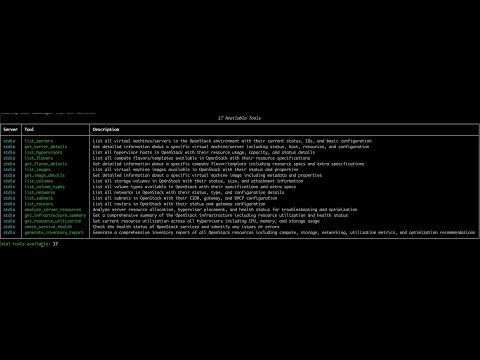
MCP server for OpenStack infrastructure management. Connects to OpenStack APIs and exposes 17 tools for managing compute, storage, and networking resources.
- List and manage servers, hypervisors, flavors
- View images and storage volumes
- Network and subnet management
- Resource utilization monitoring
- Service health checks
- Infrastructure inventory reports
Set OpenStack environment variables:
export OS_AUTH_URL=https://your-openstack-endpoint:5000/v3
export OS_USERNAME=admin
export OS_PASSWORD=your-password
export OS_PROJECT_NAME=admin
export OS_USER_DOMAIN_NAME=Default
export OS_REGION_NAME=RegionOne
Or add them in config/openstack_config.json:
{
    "AUTH_URL": "https://your-openstack-endpoint:5000/v3",
    "USERNAME": "admin",
    "PASSWORD": "your-password",
    "PROJECT": "admin",
    "DOMAIN": "Default",
    "REGION": "RegionOne"
}For MCP CLI, update server_config.json (or create if not present):
{
  "mcpServers": {
    "openstack": {
      "command": "/path/to/your/python3",
      "args": ["/path/to/openstack-mcp-server/openstack_mcp_server.py"],
      "env": {
        "OPENSTACK_CONFIG_PATH": "/path/to/your/config/openstack_config.json"
      }
    }
  }
}
For Claude Desktop, add to MCP config:
{
  "mcpServers": {
    "openstack": {
      "command": "/path/to/your/python3",
      "args": ["/path/to/openstack-mcp-server/openstack_mcp_server.py"],
      "env": {
        "OPENSTACK_CONFIG_PATH": "/path/to/your/config/openstack_config.json"
      }
    }
  }
}| Tool Name | Description |
|---|---|
list_servers |
List all virtual machines with status and configuration |
get_server_details |
Get detailed information about a specific server |
list_hypervisors |
Show hypervisor hosts with resource usage |
list_flavors |
List compute flavors with resource specifications |
get_flavor_details |
Get detailed flavor information |
list_images |
Show available VM images |
get_image_details |
Get detailed image information |
list_volumes |
List storage volumes with status and size |
list_volume_types |
Show available volume types |
list_networks |
List networks with configuration details |
list_subnets |
Show subnets with CIDR and gateway info |
list_routers |
List routers with gateway configuration |
analyze_server_resources |
Analyze server resource allocation and health |
get_infrastructure_summary |
Complete infrastructure overview |
get_resource_utilization |
Current resource usage across hypervisors |
check_service_health |
Health status of OpenStack services |
generate_inventory_report |
Detailed inventory with optimization recommendations |


- Python 3.8+
- OpenStack environment
Sreenath (zreenathmenon@gmail.com)