
#ProcessingLogs
Info
Structure of the application
Ubuntu instructions
Updating toolchain in Ubuntu 16.04 LTS
Updating toolchain in Ubuntu 14.04 LTS
Installing Boost library
From Ubuntu's repository
Upstream versions
Getting the sources of application
Compilation
Compiling only the sources
Building distribution .deb package
Compiling the whole application src + test
Cleaning
Build from sources
Build as distribution package
Run
Running only sources
Running only sources installed via distribution package
Usage
Running tests
#Info Lightweight adaptation of apache log viewer. While reading a log it creates and holds positions as indexes, in the RAM, to the appropriate chunk of the file that can be later displayed. Logs are stored in the format:
"%h %l %u %t \"%r\" %>s %O \"%{Referer}i\" \"%{User-Agent}i\""
More info about log format at: http://httpd.apache.org/docs/2.2/mod/mod_log_config.html
##Structure of the application The application was designed to be modular. It can be extended for example to add an another chain for manipulating with the input argument (dir handlingFile) or add another strategy for displaying contents (dir rowsFilteringStrategies). Also the class RequestMethod was designed in such manner that one can be more specific for selecting names of the request method by adjusting the enum Request and define its explicit version in
std::map<Request, std::vector<std::string>> type_;
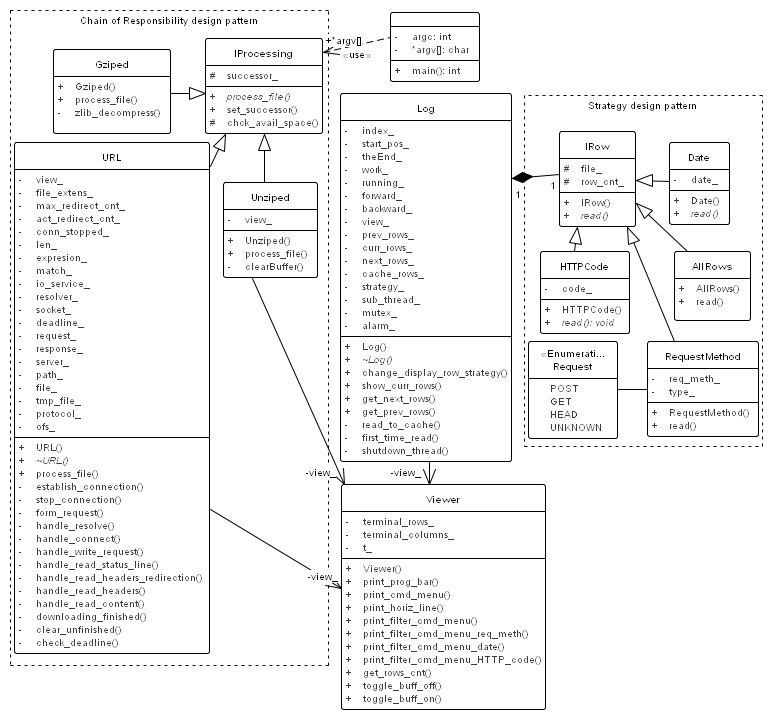
#Ubuntu instructions I decided to use the latest C++14 standard. Therefore the compiler needs to be newer than Ubuntu's 14.04 LTS default g++-4.8, which can handle the standard and contains appropriate STL library without linkage issues. In Ubuntu 16.04 LTS is this problem solved because its default compiler is in version 5.4.
##Updating toolchain in Ubuntu 16.04 LTS Just install new build tool by running command:
sudo add-apt-install cmake
##Updating toolchain in Ubuntu 14.04 LTS Add external repository with:
sudo add-apt-repository ppa:ubuntu-toolchain-r/test
and after that update and upgrade your current development packages:
sudo apt-get update
sudo apt-get upgrade
finally install toolchain packages (I decided to use latest version of compiler from the external repository that for the time of writting is g++-6):
sudo apt-get install g++-6 gcc-6 cmake
For effectively use of the new compiler we need to add symlinks (you can use TAB to autocomplete):
sudo update-alternatives --install /usr/bin/cc cc /usr/bin/gcc-6 100
sudo update-alternatives --install /usr/bin/c++ c++ /usr/bin/g++-6 100
sudo update-alternatives --install /usr/bin/g++ g++ /usr/bin/g++-6 100
##Installing Boost library Second step is to prepare libraries on which our application depends on. For beginners easier way is to install them from distribution repository.
###From Ubuntu's repository For the time of writting there are diverse version.
| Ubuntu 14.04 | Ubuntu 16.04 |
|---|---|
| Latest version 1.55.0 | Latest version 1.58.0 |
sudo apt-get install \libboost-filesystem1.55-dev \libboost-iostreams1.55-dev \libboost-regex1.55-dev \libboost-system1.55-dev |
sudo apt-get install \libboost-filesystem1.58-dev \libboost-iostreams1.58-dev \libboost-regex1.58-dev \libboost-system1.58-dev |
After this step you are ready to getting the sources of application.
###Upstream versions If you are interested in latest version download the sources of zlib library from http://www.zlib.net (for the time of writting it is 1.2.8) because Boost iostreams depends on it and unpack it:
tar -xf /path/to/zlib-1.2.8.tar.gz
Please remember the above /path/to/uncompressed-zlib because it will be later used while compiling the Boost library. After that download latest version of the Boost library from http://www.boost.org/ (for the time of writting it is 1.61) and unpack it:
tar -xf /path/to/boost_1_61_0.tar.gz
Before we can continue we need to install another required package due to compile requirements.
sudo apt-get install libbz2-dev
After that install the library via:
cd /path/to/boost_1_61_0
./bootstrap.sh --with-libraries=filesystem,system,iostreams,regex

# This step is optional, but usefull for you.
# It stops building on first occured error
# and you could find and install missing parts
# NOTICE: in the -s flag we use the path
#         to locate uncompressed zlib library
# http://www.boost.org/doc/libs/1_61_0/libs/iostreams/doc/installation.html
sudo ./b2 -q -sZLIB_SOURCE="/path/to/zlib-1.2.8"

# Last step is to copy sources and headers of the Boost library to
# /usr/local/include/
# /usr/local/lib
sudo ./b2 install -sZLIB_SOURCE="/path/to/zlib-1.2.8"
#Getting the sources of application If you want to start using the application without (unit) tests, get the sources executing command:
git clone git@github.com:efDidymos/ProcessingLogs.git
and continue to compiling only the sources section. At its end it will point you to run section for start using the application.
If you are interested to get deeply insights of the whole application, you can download the sources also with the (google) unit test framework. It is available at https://github.com/google/googletest (for the time of writting, the latest stable version is 1.7.0). So run the command which downloads sources also from google repository:
git clone --recursive git@github.com:efDidymos/ProcessingLogs.git
and continue to complete compilation.
#Compilation For interested person in deeply insights, recommended process is jump over the compile of source to compile src + tests.
##Compiling only the sources
cd /path/to/ProcessingLogs/src
mkdir build
cd build && cmake ..
make
And now, if you want you can execute the application. Or if you are interested in building the distribution package read bellow instructions.
###Building distribution .deb package Edit the CMakeLists.txt file with your favourite text editor:
vim /path/to/ProcessingLogs/src/CMakeLists.txt
locate and change the line from
set(GENERATE_DEB false) # Switch to build .deb package
to:
set(GENERATE_DEB true) # Switch to build .deb package
After that jump to build dir from previous section and regenerate builds with cmake. Finally build the distribution (.deb) package inside the current dir (/path/to/ProcessingLogs/src/build) by executing the command make package:
cd /path/to/ProcessingLogs/src/build
cmake ..
make package
At the end you can install the package via sudo dpkg -i ProcessingLogs-1.0.0-Linux.deb
##Compiling the whole application src + test
cd /path/to/ProcessingLogs/
mkdir build
cd build && cmake ..
make
#Cleaning ##Build from sources Just remove the build directory:
cd /path/to/ProcessingLogs/
rm -rf build
##Build as distribution package
If you built and installed the .deb package then you need to remove it from your package system.
Therefore for Ubuntu run: sudo apt-get remove processinglogs
#Run ##Running only sources
./path/to/ProcessingLogs/build/src/ProcessingLogs <file>
or
./path/to/ProcessingLogs/build/src/ProcessingLogs <url_address>
###Running only sources installed via distribution package If you followed instructions on Building distribution .deb package then you can simply execeute:
ProcessingLogs <url_address>
###Usage
[q]-quit  [f]-filter options  [j]-move down  [k]-move up
           |
           +-- FILTER BY: (0) None  (1) HTTP Code  (2) Request method  (3) Date
                                    |               |                   |
                                    |               |                   +-- Please enter day [01-31] and press ENTER:
                                    |               |
                                    |               +-- FILTER Request method BY: (0) POST  (1) GET  (2) HEAD  (3) Unknown
                                    |
                                    +-- Please enter code [1xx - 5xx] and press ENTER:
##Running tests For this step is required that the application was compiled with the unit tests. If not jump to compile src + tests section.
./path/to/ProcessingLogs/build/test/<file>