




- Time-saving: Email templates eliminate the need to create emails from scratch, saving valuable time and effort.
- Customisability: Quick editing capabilities enable employees to personalise the content of the templates while maintaining a professional appearance.
- Consistent branding: Templates ensure that all emails adhere to the brand's guidelines, reinforcing brand recognition and professionalism.
- Professional appearance: Well-designed templates provide a polished and consistent look, enhancing the business's credibility and reputation.
- Streamlined communication: Prompt and efficient communication.
- Flexibility: Templates can be adapted for various purposes, such as promotional emails, customer support responses, newsletters, and more.
- Easy updates: Templates can be easily modified to reflect changes in offers, policies, or design elements, ensuring that communication remains current and aligned with business objectives.
- Standardisation: Templates enforce a standardized structure and format for emails, reducing errors and improving clarity in communication.
- Scalability: Email templates facilitate consistent messaging even as the business grows, ensuring a cohesive customer experience across all interactions.
- Improved productivity: With quick access to templates, employees can focus more on core tasks, increasing overall productivity within the business.
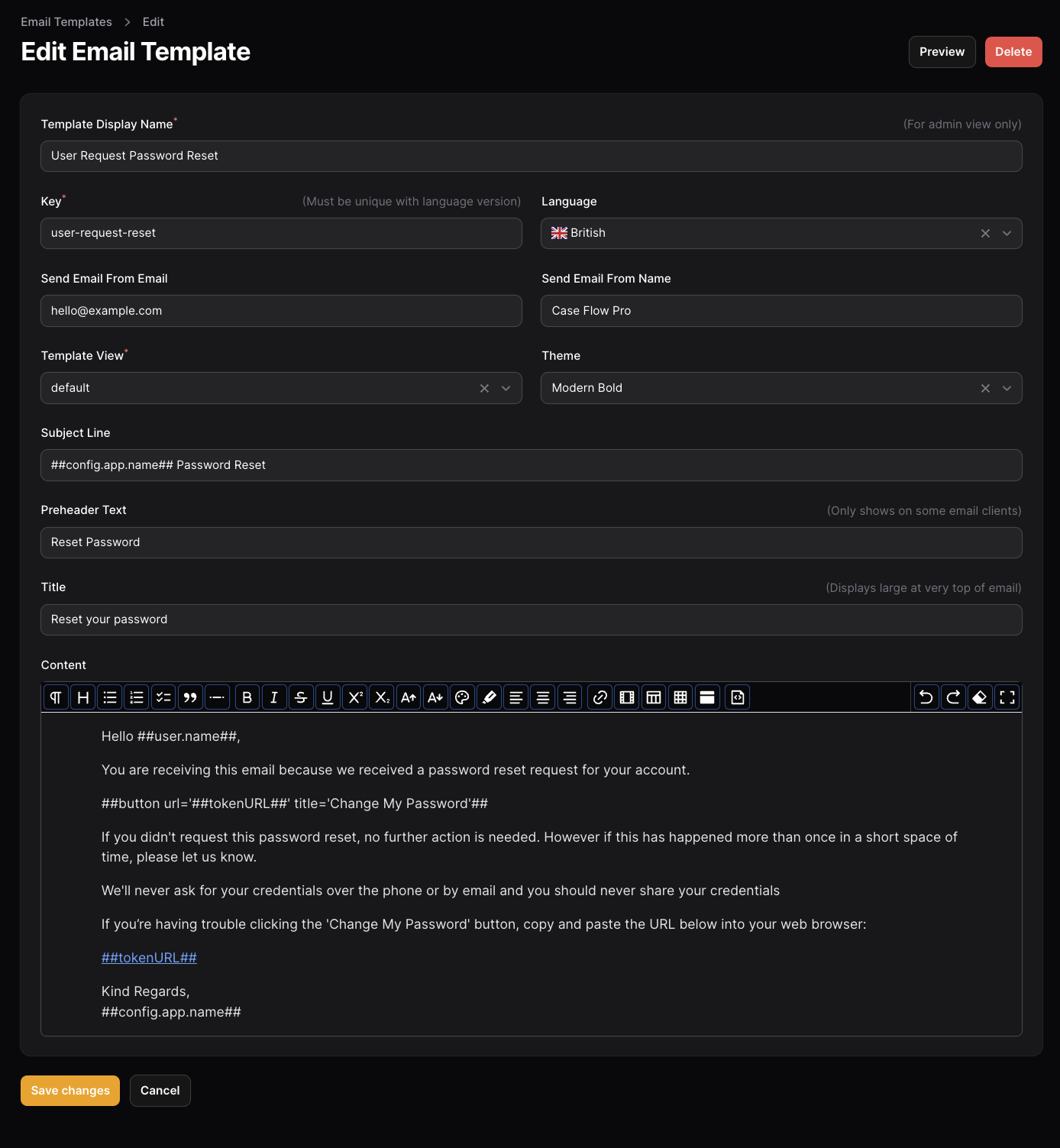
- Content management for email templates allowing authorised users to edit email template content in the admin.
- Templates can include model attribute tokens or config values which will be replaced, eg ##user.name## or ##config.app.name##
- Templates can be saved with different locales for multi-lingual capability.
- A generic method for quickly creating mail classes to speed up adding new templates and faster automation possiblities.
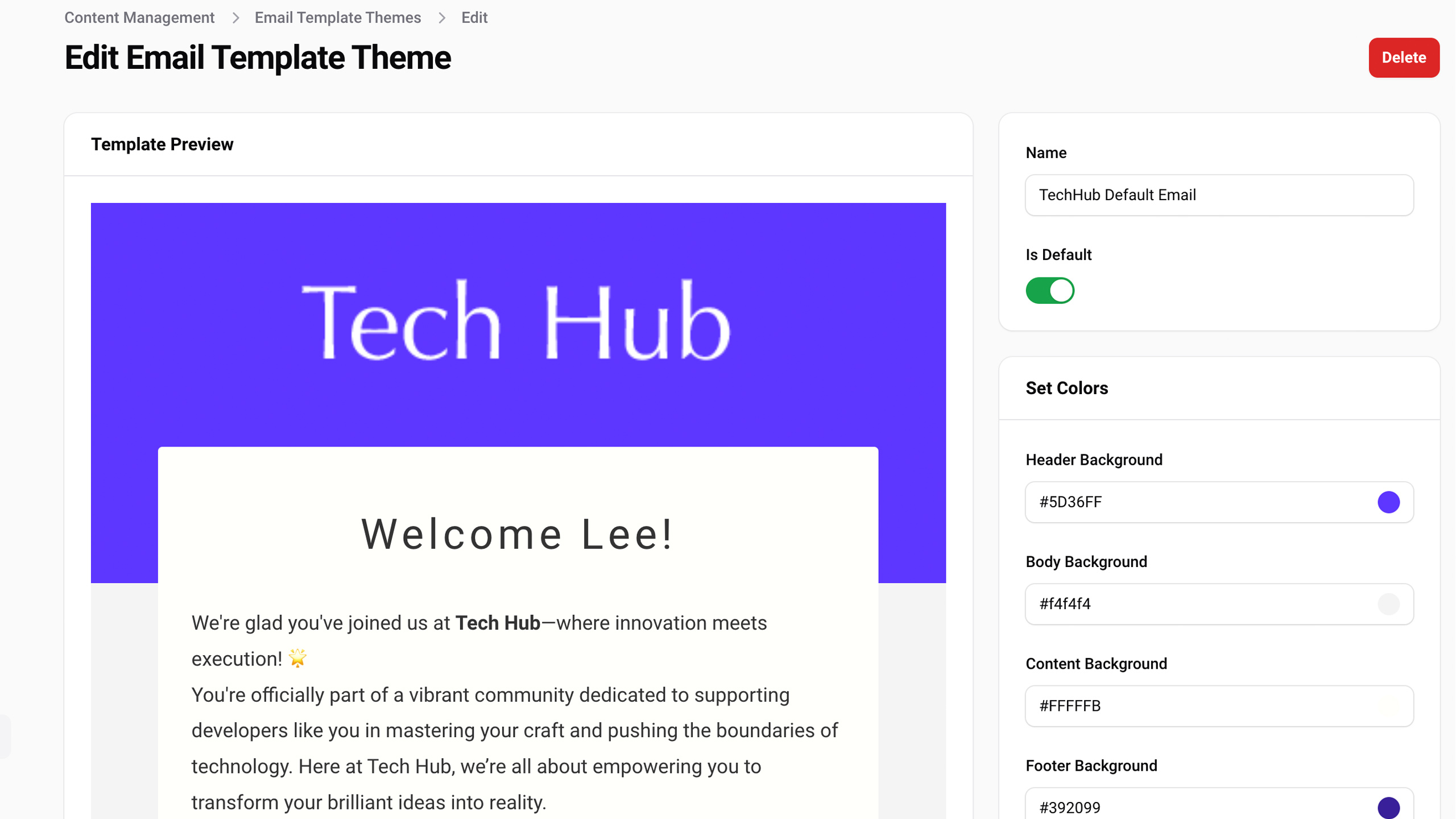
- Theme editor - Set your own colours and apply to specific templates.
We use the standard Laravel mail sending capability, the package simply allows content editing and faster adding of new template Classes
Edit email content in the admin and use tokens to inject model or config content.
| Package Version | Filament | Laravel | PHP |
|---|---|---|---|
| 5.x | 5.x | 11.x, 12.x | 8.2+ |
| 4.x | 4.x | 11.x | 8.2+ |
| 3.x | 3.x | 10.x, 11.x | 8.1+ |
This package supports Filament's built-in multi-tenancy. When enabled, tenants can customise their own email templates while falling back to global system templates.
In config/filament-email-templates.php:
'multitenancy' => [
    'enabled' => true,
    'tenant_model' => App\Models\Team::class,
    // Optional - derived automatically from tenant model if not set:
    // 'tenant_foreign_key' => 'team_id',
    // 'ownership_relationship' => 'team',
],use Visualbuilder\EmailTemplates\EmailTemplatesPlugin;
public function panel(Panel $panel): Panel
{
return $panel
->plugins([
EmailTemplatesPlugin::make()
->multitenancy()
->tenantModel(Team::class),
]);
}After enabling multitenancy, publish and run the migration to add the tenant column:
php artisan migrateThe migration adds a nullable tenant foreign key to both the vb_email_templates and vb_email_templates_themes tables.
Template Fallback Chain
When retrieving a template (e.g. for sending an email), the package checks:
- Tenant-specific template — a template with the matching key AND the current tenant's ID
- Global template — a template with the matching key and a NULL tenant ID
This means tenants only need to create templates they want to customise. All other emails automatically use the global system templates.
In Filament Panels
Tenant users see both their own templates and global system templates in the resource list. When a tenant creates a new template, it is automatically assigned to their tenant.
Sending Emails
Pass the tenant ID explicitly when outside a Filament context (e.g. in queue workers or artisan commands):
$template = EmailTemplate::findEmailByKey('user-welcome', 'en_GB', $tenantId);Within a Filament panel, the tenant is resolved automatically from Filament::getTenant().
Cache keys include the tenant context to prevent cross-tenant cache pollution. When a template is updated or deleted, both the tenant-specific and global cache entries are cleared to ensure the fallback chain stays consistent.
After enabling multitenancy on an existing installation, run php artisan cache:clear to reset stale cache keys.
Get the package via composer:
# For Filament 5.x
composer require visualbuilder/email-templates:^5.0

# For Filament 4.x
composer require visualbuilder/email-templates:^4.0
Running the install command will copy the template views, migrations, seeders and config file to your app.
The --seed option will populate 7 default templates which you can then edit in the admin panel.
php artisan filament-email-templates:install --seedNote: The seeder can also be edited directly if you wish to prepopulate with your own content.
database\Seeders\EmailTemplateSeeder.php
Add this plugin to panel using plugins() method in app/Providers/Filament/AdminPanelProvider.php:
use Visualbuilder\EmailTemplates\EmailTemplatesPlugin;

public function panel(Panel $panel): Panel
{
    return $panel
        // ...
        ->plugins([
            EmailTemplatesPlugin::make(),
            // ...
        ]);
}
Menu Group and sort order can be set in the config
In the config file config/filament-email-templates.php navigation can be disabled/enabled
use Filament\Pages\Enums\SubNavigationPosition;

    /**
     * Admin panel navigation options
     */
    'navigation' => [
        'enabled' => true,
        'templates' => [
            'sort' => 10,
            'label' => 'Email Templates',
            'icon' => 'heroicon-o-envelope',
            'group' => 'Content',
            'cluster' => false,
            'position' => SubNavigationPosition::Top
        ],
        'themes' => [
            'sort' => 20,
            'label' => 'Email Template Themes',
            'icon' => 'heroicon-o-paint-brush',
            'group' => 'Content',
            'cluster' => false,
            'position' => SubNavigationPosition::Top
        ],
    ],
Or you can use a closure to enable navigation only for specific users:
// AdminPanelProvider.php
    ->plugins([
// ...
        EmailTemplatesPlugin::make()
                ->enableNavigation(
                    fn () => auth()->user()->can('view_email_templates') || auth()->user()->can('view_any_email_templates'),
               ),
])The package supports optional screenshot capture for email template themes. When configured, a "Capture" button appears on the theme list page that generates a preview image of how emails look with that theme's colours. Screenshots are stored via Spatie MediaLibrary on the EmailTemplateTheme model.
Provide a screenshotCapture closure on the plugin. The closure receives the rendered email HTML string and should return ['image' => binary, 'contentType' => 'image/png'] or null.
// AdminPanelProvider.php
->plugins([
    EmailTemplatesPlugin::make()
        ->screenshotCapture(function (string $html): ?array {
            // Example using a screenshot service (Browsershot, Puppeteer Lambda, etc.)
            return app(ScreenshotService::class)->htmlToBase64($html, [
                'viewport' => 'mobile',
                'fullPage' => true,
            ]);
        }),
])
When configured, the theme list page will show:
- A preview thumbnail column showing the captured screenshot
- A Capture button on each row to capture/recapture a single theme
- A Capture Screenshots bulk action to capture multiple themes at once
- A manual upload field in the theme edit form
When screenshotCapture is not configured, these features are hidden and the package works exactly as before.
Screenshots are stored as a screenshot media collection (single file) on the EmailTemplateTheme model. A thumb conversion (400x600, contain) is generated automatically for the list view.
The model implements Spatie\MediaLibrary\HasMedia, so you can access screenshots programmatically:
$theme->getFirstMediaUrl('screenshot');           // Original
$theme->getFirstMediaUrl('screenshot', 'thumb'); // ThumbnailToken format is ##model.attribute##. When calling the email pass any referenced models to replace the tokens automatically.
You can also include config values in the format ##config.file.key## eg ##config.app.name##.
In the email templates config file you must specify keys that are allowed to be replaced.
    /**
     * Allowed config keys which can be inserted into email templates
     * eg use ##config.app.name## in the email template for automatic replacement.
     */
    'config_keys' => [
        'app.name',
        'app.url',
'email-templates.customer-services'Emails may be sent directly, via a notification or an event listener.
The following email templates are included to get you started and show different methods of sending.
- User Registered - Welcome them to the platform
- User Verify Email - Check they are human
- User Verified Email - Yes they are
- User Request Password Reset - Let them change the password
- User Password Reset Success - Yay, you changed your password
- User Locked Out - Oops - What to do now?
- User Login - Success
Not all systems will require a login notification, but it's good practice for security so included here.
A new Registered event is triggered when creating a new user.
We want to welcome new users with a friendly email so we've included a listener for the Illuminate\Auth\Events\Registered Event which will send the email if enabled in the config:-
  'send_emails'             => [
        'new_user_registered'    => true,
        'verification'           => true,
        'user_verified'          => true,
        'login'                  => true,
        'password_reset_success' => true,
],This notification is built in to Laravel so we have overidden the default toMail function to use our custom email template.
For reference this is done in the EmailTemplatesAuthServiceProvider.
Important Register this provider so the override takes effect. Add
Visualbuilder\EmailTemplates\EmailTemplatesAuthServiceProvider::classto theprovidersarray inconfig/app.php(or within your ownAppServiceProvider). Without this, Laravel will send its default verification email instead of your customised template.
This can be disabled in the config.
To Enable email verification ensure the User model implements the Laravel MustVerifyEmail contract:-
class User extends Authenticatable implements MustVerifyEmailand include the verified middleware in your routes.
If you have a custom registration page and need to manually generate the verification URL, you can send the notification like this:
use Illuminate\Support\Facades\URL;

$notification = new \Filament\Notifications\Auth\VerifyEmail();
$notification->url = URL::temporarySignedRoute(
    'filament.actor.auth.email-verification.verify',
    now()->addMinutes(config('auth.verification.expire', 60)),
    [
        'id' => $user->getKey(),
        'hash' => sha1($user->getEmailForVerification()),
    ]
);

$user->notify($notification);

Auth::login($user);
Note The
notify()call must occur before logging in the user.
Replacing the Filament default email requires extending the Filament RequestPasswordReset class to override the default request method like this:-
namespace App\Filament\Resources\Auth;

use Visualbuilder\EmailTemplates\Notifications\UserResetPasswordRequestNotification;


class RequestPasswordReset extends \Filament\Pages\Auth\PasswordReset\RequestPasswordReset
{
    public function request(): void
    {
        try {
            $this->rateLimit(2);
        } catch (TooManyRequestsException $exception) {
            $this->getRateLimitedNotification($exception)?->send();
            return;
        }

        $data = $this->form->getState();

        $status = Password::broker(Filament::getAuthPasswordBroker())->sendResetLink(
            $data,
            function (CanResetPassword $user, string $token): void {
                if (! method_exists($user, 'notify')) {
                    $userClass = $user::class;
                    throw new Exception("Model [{$userClass}] does not have a [notify()] method.");
                }
                $tokenUrl = Filament::getResetPasswordUrl($token, $user);

                /**
                * Use our custom notification is the only difference.
                */
                $user->notify( new UserResetPasswordRequestNotification($tokenUrl));
            },
        );

        if ($status !== Password::RESET_LINK_SENT) {
            Notification::make()
                ->title(__($status))
                ->danger()
                ->send();

            return;
        }

        Notification::make()
            ->title(__($status))
            ->success()
            ->send();

        $this->form->fill();
    }
}
And then add this class into the admin panel provider:-
use App\Filament\Resources\Auth\RequestPasswordReset;

class AdminPanelProvider extends PanelProvider
{
    public function panel(Panel $panel): Panel
    {
        return $panel
            ->default()
            ->id('admin')
            ->path('admin')
            ->plugins([
                EmailTemplatesPlugin::make(),
            ])
->passwordReset(RequestPasswordReset::class)use Visualbuilder\EmailTemplates\Notifications\UserResetPasswordRequestNotification;
/**
* @param $token
*
* @return void
*/
public function sendPasswordResetNotification($token)
{
$url = \Illuminate\Support\Facades\URL::secure(route('password.reset', ['token' => $token, 'email' =>$this->email]));
$this->notify(new UserResetPasswordRequestNotification($url));
}Some theme colour options have been provided. Email templates will use the default theme unless you specify otherwise on the email template.
In the config file config/filament-email-templates.php logo, contacts, links and admin preferences can be set
    //Default Logo
    'logo'                    => 'media/email-templates/logo.png',

    //Logo size in pixels -> 200 pixels high is plenty big enough.
    'logo_width'              => '476',
    'logo_height'             => '117',

    //Content Width in Pixels
    'content_width'           => '600',

    //Contact details included in default email templates
    'customer-services'  => ['email' => 'support@yourcompany.com',
                             'phone' => '+441273 455702'],

    //Footer Links
    'links'                   => [
        ['name' => 'Website', 'url' => 'https://yourwebsite.com', 'title' => 'Goto website'],
        ['name' => 'Privacy Policy', 'url' => 'https://yourwebsite.com/privacy-policy', 'title' => 'View Privacy Policy'],
    ],
If you wish to directly edit the template blade files, see the primary template here:
- Path:
resources/views/vendor/vb-email-templates/email/default.php
New templates in this directory will be automatically visible in the email template editor dropdown for selection.
Not all email clients (e.g., Outlook) render CSS from a stylesheet effectively. To ensure maximum compatibility, it's best to put styles inline. For checking how your email looks across different clients, Litmus Email Previews is highly recommended.
Each email template is identified by a key and a language:
- Key:
user-password-reset - Language:
en_gb
This allows the relevant template to be selected based on the users locale - You will need to save the users preferred language to implement this.
Please note laravel default locale is just "en" we prefer to separate British and American English so typically use en_GB and en_US instead but you can set this value as you wish.
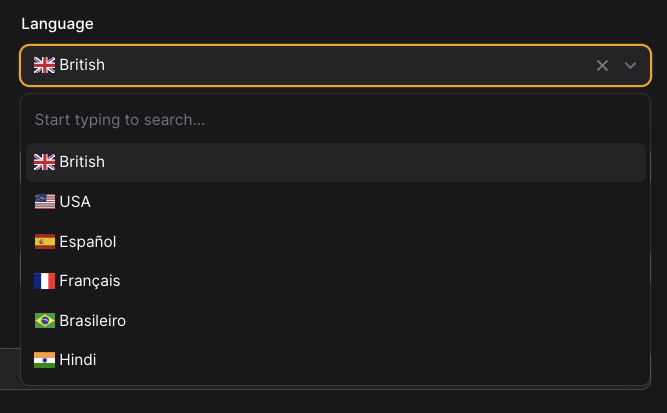
Languages that should be shown on the language picker can be set in the config
    'default_locale'   => 'en_GB',

    //These will be included in the language picker when editing an email template
    'languages'        => [
        'en_GB' => ['display' => 'British', 'flag-icon' => 'gb'],
        'en_US' => ['display' => 'USA', 'flag-icon' => 'us'],
        'es'    => ['display' => 'Español', 'flag-icon' => 'es'],
        'fr'    => ['display' => 'Français', 'flag-icon' => 'fr'],
        'in'    => ['display' => 'Hindi', 'flag-icon' => 'in'],
        'pt'    => ['display' => 'Brasileiro', 'flag-icon' => 'br'],
    ]
Flag icons are loaded from CDN: https://cdn.jsdelivr.net/gh/lipis/flag-icons@6.6.6/css/flag-icons.min.css see https://www.npmjs.com/package/flag-icons
We've currently opted to keep using a separate Mailable Class for each email type. This means when you create a new template in the admin, it will require a new php Class. The package provides an action to build the class if the file does not exist in app\Mail\VisualBuilder\EmailTemplates.
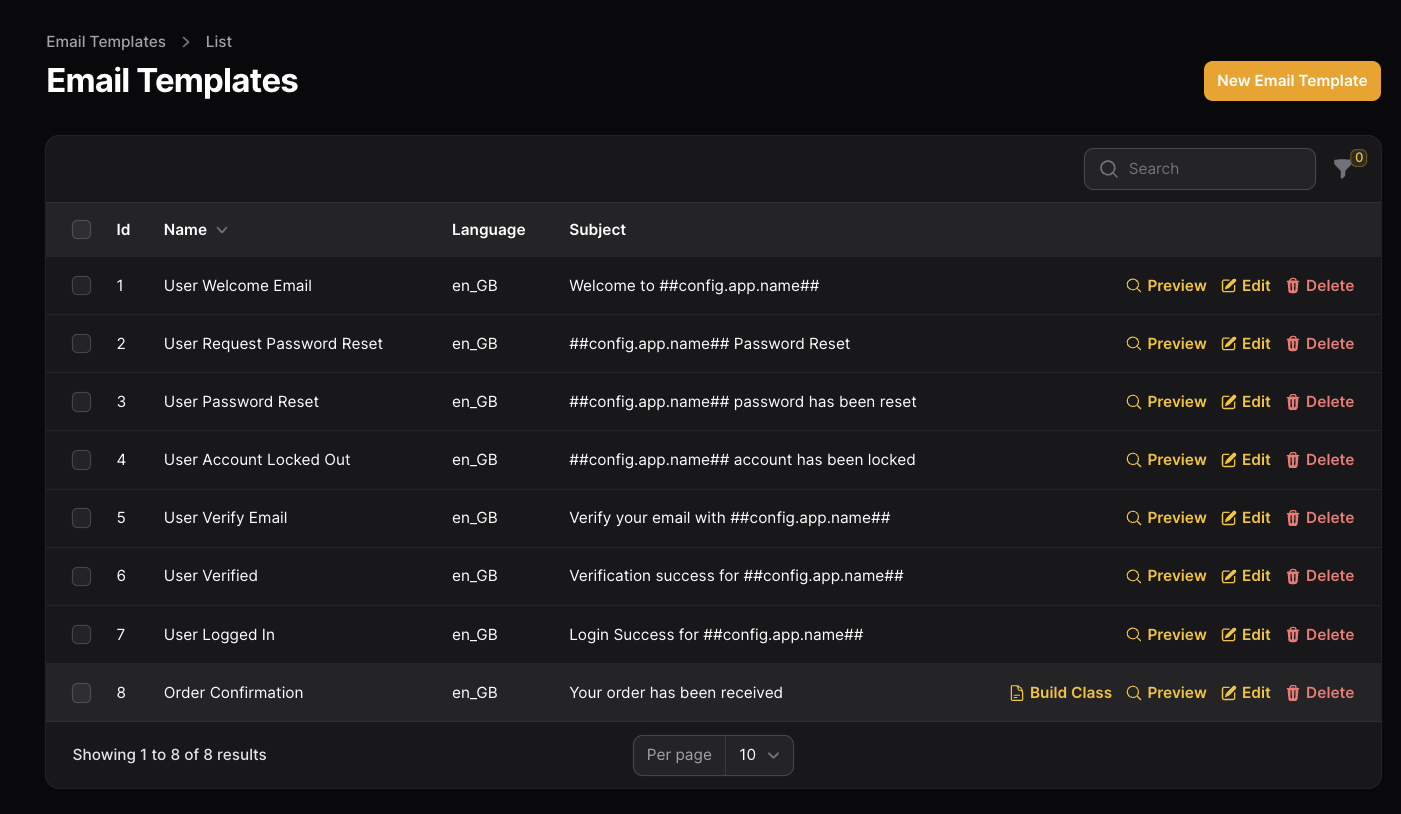 Currently generated Mailable Classes will use the BuildGenericEmail Trait
<?php

namespace App\Mail;

use Illuminate\Bus\Queueable;
use Illuminate\Mail\Mailable;
use Illuminate\Queue\SerializesModels;
use Visualbuilder\EmailTemplates\Traits\BuildGenericEmail;

class MyFunkyNewEmail extends Mailable
{
    use Queueable, SerializesModels, BuildGenericEmail;

    public string $template = 'email-template-key';  //Change this to the key of the email template content to load
    public string $sendTo;

    /**
     * Create a new message instance.
     *
     * @return void
     */
    public function __construct($user) {
        $this->sendTo = $user;
    }
}Just pass through the models you need and assign them in the constructor.
class MyFunkyNewEmail extends Mailable
{
    use Queueable, SerializesModels, BuildGenericEmail;

    public string $template = 'email-template-key';  //Change this to the key of the email template content to load
    public string $sendTo;
    public Model $booking;

    public function __construct($user, Booking $booking) {
            $this->user       = $user;
            $this->booking    = $booking;
            $this->sendTo     = $user->email;
        }
In this example you can then use ##booking.date## or whatever attributes are available in the booking model.
If you need to derive some attribute you can add Accessors to your model.
Both of these function will allow you to use:-
##user.full_name## in the email template:-
public function getFullNameAttribute()
{
  return $this->firstname.' '.$this->lastname;
}
OR
protected function fullName(): Attribute
{
    return Attribute::make(
        get: fn () => $this->firstname.' '.$this->lastname,
    );
}In here you can see how to pass an attachment:-
The attachment should be passed to the Mail Class and set as a public property.
In this case we've passed an Order model and an Invoice model which has a PDF.
class SalesOrderEmail extends Mailable
{
    use Queueable, SerializesModels, BuildGenericEmail;

    public string $template = 'email-template-key';
    public string $sendTo;
    public $attachment;
    public User $user;
    public Order $order;
    public Invoice $invoice;

    /**
     * Constructor for SalesOrderEmail.
     *
     * @param User $user User object
     * @param Order $order Order object
     * @param Invoice $invoice Invoice object
     */
    public function __construct($user, $order, $invoice) {
        $this->user = $user;
        $this->order = $order;
        $this->invoice = $invoice;
        $this->attachment = $invoice->getPdf(); // Missing semicolon added
        $this->sendTo = $user->email;
    }
}
*** Update *** From php8.0 the above code can be shortend to:_
class SalesOrderEmail extends Mailable
{
    use Queueable, SerializesModels, BuildGenericEmail;

    public string $template = 'email-template-key';
    public string $sendTo;
    public $attachment;

    /**
     * Constructor for SalesOrderEmail using PHP 8 constructor property promotion.
     *
     * @param User $user User object
     * @param Order $order Order object
     * @param Invoice $invoice Invoice object
     */
    public function __construct(public User $user, public Order $order, public Invoice $invoice) {
        $this->attachment = $invoice->getPdf();
        $this->sendTo = $user->email;
    }
}
The attachment is handled in the build function of the BuildGenericEmail trait. Customise the filename with attachment->filename You should also include the filetype.
 public function build() {
        $template = EmailTemplate::findEmailByKey($this->template, App::currentLocale());

        if($this->attachment ?? false) {
            $this->attach(
                $this->attachment->filepath, [
                'as'   => $this->attachment->filename,
                'mime' => $this->attachment->filetype
            ]
            );
        }

        $data = [
            'content'       => TokenHelper::replace($template->content, $this),
            'preHeaderText' => TokenHelper::replace($template->preheader ?? '', $this),
            'title'         => TokenHelper::replace($template->title ?? '', $this)
        ];

        return $this->from($template->from['email'],$template->from['name'])
            ->view($template->view_path)
            ->subject(TokenHelper::replace($template->subject, $this))
            ->to($this->sendTo)
            ->with(['data'=>$data]);
    }
Compatible with Laravel 11.x and 12.x mailable methods.
./vendor/bin/pest Please see CHANGELOG for more information what has changed recently.
Please see CONTRIBUTING for details.
If you discover any security related issues, please email support@ekouk.com instead of using the issue tracker.
The GNU GPLv3. Please see License File for more information.