Skip to content

[CP Staging] Search error state, distinguish stale search results from a real request failure - #101554

Merged
mountiny merged 5 commits into
Expensify:mainfrom
callstack-internal:fix-deployblocker-101520
Sep 18, 2026
Merged

mountiny merged 5 commits into
Expensify:mainfrom
callstack-internal:fix-deployblocker-101520

Conversation

@LukasMod

@LukasMod LukasMod commented Sep 18, 2026

Copy link
Copy Markdown
Contributor

Explanation of Change

The error view treated any non-invalid-query code as stale, so a server rejection (e.g. EXP_ERROR) offered refresh copy instead of a retry. The no-response case is now an explicit NO_RESPONSE sentinel in JSON_CODE, so only a request that never reached the server shows the refresh copy. Any real code keeps the error copy and gets a Try again button.

# Scenario Trigger Before (production) PR #100176 This fix
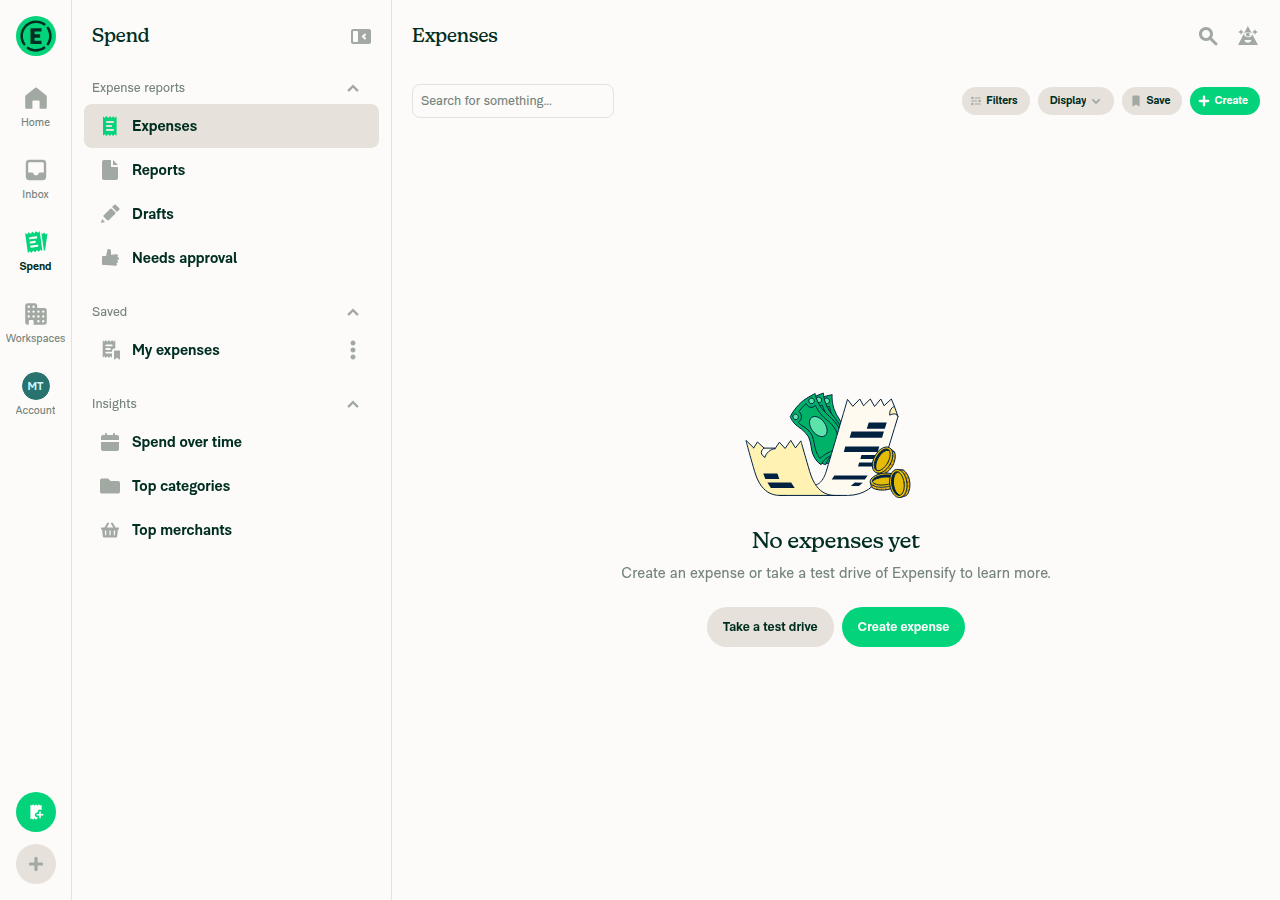
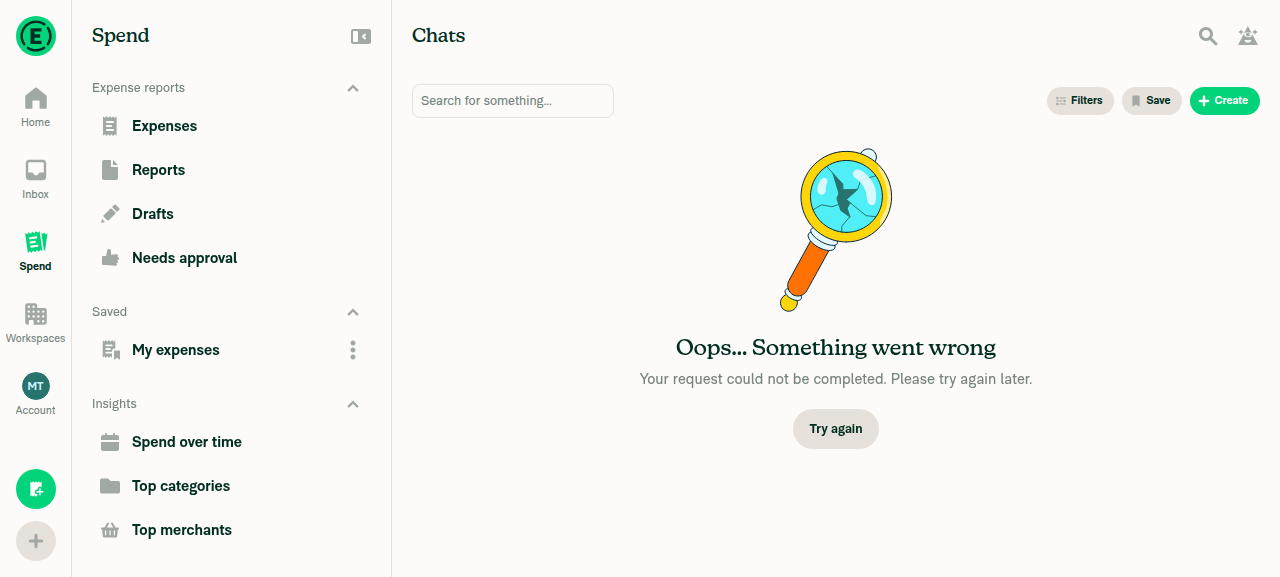
1 Server rejects the query with a non-401 code (the deploy blocker) - 402 code Search type:chat category:abcd Oops... Something went wrong / Your request could not be completed. Please try again later. / Try again Refresh needed / This page is out of date, refresh to see the latest / Refresh (wrong) Oops... Something went wrong / Your request could not be completed. Please try again later. / Try again
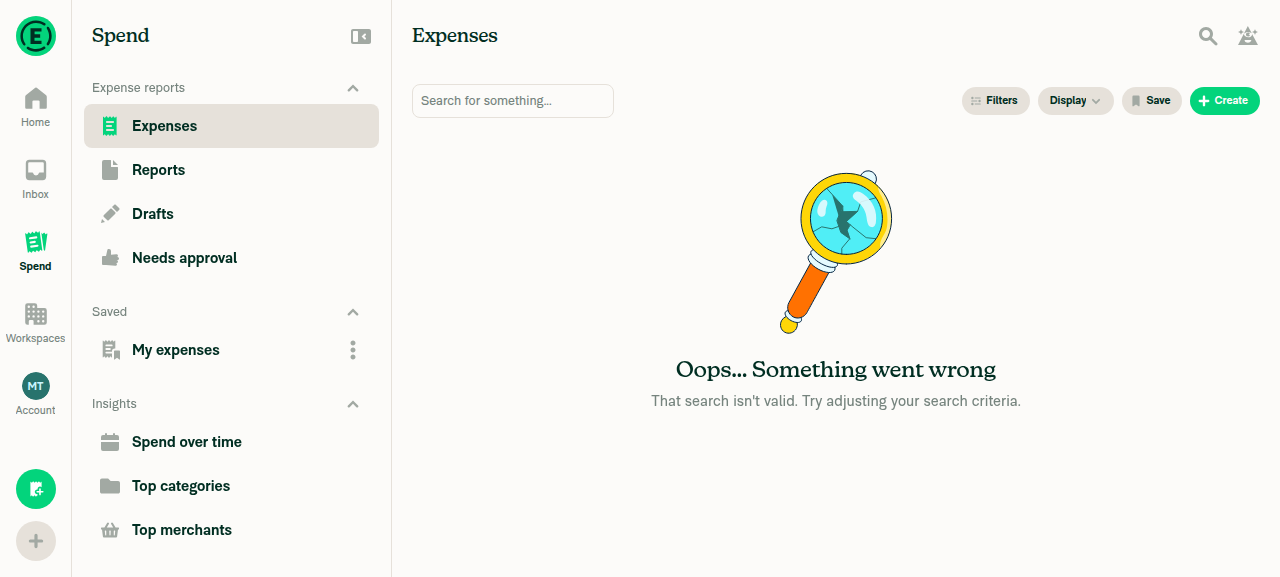
2 Server rejects the query as invalid - 401 code Search type:expensee Oops... Something went wrong / That search isn't valid. Try adjusting your search criteria. / no button same same
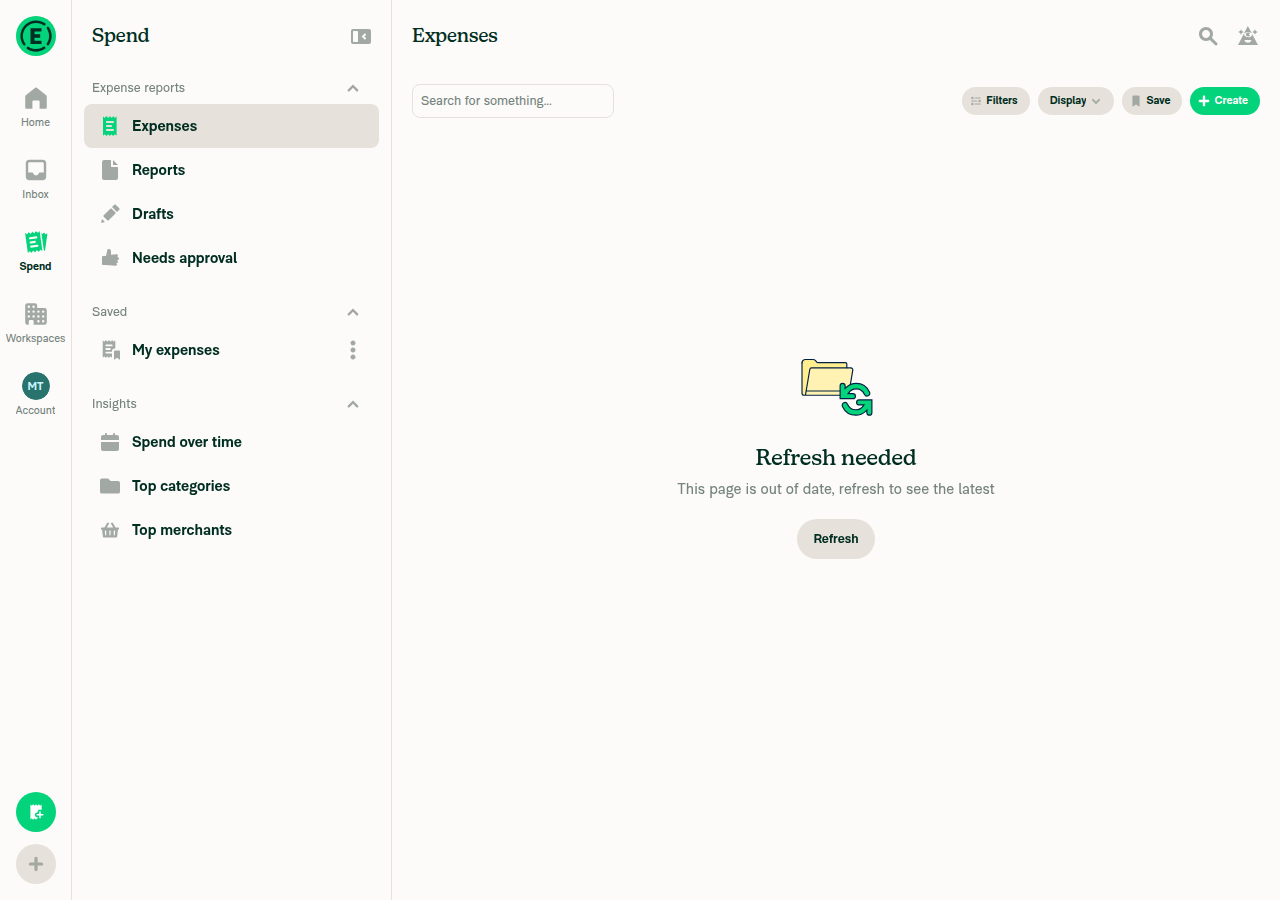
3 Request failed before the server answered (the state #99352 asked for) - no response (0 code) Settings > Troubleshoot > "Simulate failing network requests" on, then search type:expense Oops... Something went wrong / Your request could not be completed. Please try again later. / Try again (the #99352 complaint) Refresh needed / This page is out of date, refresh to see the latest / Refresh Refresh needed / This page is out of date, refresh to see the latest / Refresh

Fixed Issues

$ #101520
PROPOSAL:

Tests

  • Verify that no errors appear in the JS console

Test 1: Server rejects the query, code other than 401 - jsonCode 402 (the deploy blocker scenario)

  1. Open Spend, tap the search icon.
  2. Enter type:chat category:abcd, submit.
  3. Verify "Oops... Something went wrong" with "Your request could not be completed" and a Try again button.
  4. Reload the page. Verify the same error page is still shown.

Test 2: Server rejects the query as invalid - jsonCode 401 INVALID_SEARCH_QUERY

  1. Open Spend, tap the search icon.
  2. Enter type:expensee, submit.
  3. Verify "Oops... Something went wrong" with "That search isn't valid" and no button.
  4. Reload. Verify the same page, still no button.

Test 3: Request failed before the server could answer - responseJsonCode NO_RESPONSE (0)

  1. Settings, Troubleshoot, turn on "Simulate failing network requests".
  2. Open Spend, tap the search icon, enter type:expense, submit.
  3. Verify the folder-and-arrows illustration, "Refresh needed", "This page is out of date, refresh to see the latest", and a Refresh button.
  4. Turn the toggle off, press Refresh. Verify results load.

Offline tests

QA Steps

  • Verify that no errors appear in the JS console

PR Author Checklist

  • I linked the correct issue in the ### Fixed Issues section above
  • I wrote clear testing steps that cover the changes made in this PR
    • I added steps for local testing in the Tests section
    • I added steps for the expected offline behavior in the Offline steps section
    • I added steps for Staging and/or Production testing in the QA steps section
    • I added steps to cover failure scenarios (i.e. verify an input displays the correct error message if the entered data is not correct)
    • I turned off my network connection and tested it while offline to ensure it matches the expected behavior (i.e. verify the default avatar icon is displayed if app is offline)
    • I tested this PR with a High Traffic account against the staging or production API to ensure there are no regressions (e.g. long loading states that impact usability).
  • I included screenshots or videos for tests on all platforms
  • I ran the tests on all platforms & verified they passed on:
    • Android: Native
    • Android: mWeb Chrome
    • iOS: Native
    • iOS: mWeb Safari
    • MacOS: Chrome / Safari
  • I verified there are no console errors (if there's a console error not related to the PR, report it or open an issue for it to be fixed)
  • I verified there are no new alerts related to the canBeMissing param for useOnyx
  • I followed proper code patterns (see Reviewing the code)
    • I verified that any callback methods that were added or modified are named for what the method does and never what callback they handle (i.e. toggleReport and not onIconClick)
    • I verified that comments were added to code that is not self explanatory
    • I verified that any new or modified comments were clear, correct English, and explained "why" the code was doing something instead of only explaining "what" the code was doing.
    • I verified any copy / text shown in the product is localized by adding it to src/languages/* files and using the translation method
      • If any non-english text was added/modified, I used JaimeGPT to get English > Spanish translation. I then posted it in #expensify-open-source and it was approved by an internal Expensify engineer. Link to Slack message:
    • I verified all numbers, amounts, dates and phone numbers shown in the product are using the localization methods
    • I verified any copy / text that was added to the app is grammatically correct in English. It adheres to proper capitalization guidelines (note: only the first word of header/labels should be capitalized), and is either coming verbatim from figma or has been approved by marketing (in order to get marketing approval, ask the Bug Zero team member to add the Waiting for copy label to the issue)
    • I verified proper file naming conventions were followed for any new files or renamed files. All non-platform specific files are named after what they export and are not named "index.js". All platform-specific files are named for the platform the code supports as outlined in the README.
    • I verified the JSDocs style guidelines (in STYLE.md) were followed
  • If a new code pattern is added I verified it was agreed to be used by multiple Expensify engineers
  • I followed the guidelines as stated in the Review Guidelines
  • I tested other components that can be impacted by my changes (i.e. if the PR modifies a shared library or component like Avatar, I verified the components using Avatar are working as expected)
  • I verified all code is DRY (the PR doesn't include any logic written more than once, with the exception of tests)
  • I verified any variables that can be defined as constants (ie. in CONST.ts or at the top of the file that uses the constant) are defined as such
  • I verified that if a function's arguments changed that all usages have also been updated correctly
  • If any new file was added I verified that:
    • The file has a description of what it does and/or why is needed at the top of the file if the code is not self explanatory
  • If a new CSS style is added I verified that:
    • A similar style doesn't already exist
    • The style can't be created with an existing StyleUtils function (i.e. StyleUtils.getBackgroundAndBorderStyle(theme.componentBG))
  • If new assets were added or existing ones were modified, I verified that:
    • The assets are optimized and compressed (for SVG files, run npm run compress-svg)
    • The assets load correctly across all supported platforms.
  • If the PR modifies code that runs when editing or sending messages, I tested and verified there is no unexpected behavior for all supported markdown - URLs, single line code, code blocks, quotes, headings, bold, strikethrough, and italic.
  • If the PR modifies a generic component, I tested and verified that those changes do not break usages of that component in the rest of the App (i.e. if a shared library or component like Avatar is modified, I verified that Avatar is working as expected in all cases)
  • If the PR modifies a component related to any of the existing Storybook stories, I tested and verified all stories for that component are still working as expected.
  • If the PR modifies a component or page that can be accessed by a direct deeplink, I verified that the code functions as expected when the deeplink is used - from a logged in and logged out account.
  • If the PR modifies the UI (e.g. new buttons, new UI components, changing the padding/spacing/sizing, moving components, etc) or modifies the form input styles:
    • I verified that all the inputs inside a form are aligned with each other.
    • I added Design label and/or tagged @Expensify/design so the design team can review the changes.
  • If a new page is added, I verified it's using the ScrollView component to make it scrollable when more elements are added to the page.
  • I added unit tests for any new feature or bug fix in this PR to help automatically prevent regressions in this user flow.
  • If the main branch was merged into this PR after a review, I tested again and verified the outcome was still expected according to the Test steps.

Screenshots/Videos

Android: Native
Android: mWeb Chrome
iOS: Native
Screen.Recording.2026-09-18.at.11.53.19.mov
iOS: mWeb Safari
MacOS: Chrome / Safari
Screen.Recording.2026-09-18.at.11.27.12.mov

The error view treated any non-invalid-query code as stale, so a server
rejection (e.g. EXP_ERROR) offered refresh copy instead of a retry. The
no-response case is now an explicit NO_RESPONSE sentinel in JSON_CODE, so
only a request that never reached the server shows the refresh copy. Any
real code keeps the error copy and gets a Try again button.

Co-authored-by: Apex <noreply@callstack.com>
@LukasMod

Copy link
Copy Markdown
Contributor Author

@codex review

@LukasMod

Copy link
Copy Markdown
Contributor Author

@MelvinBot review

@MelvinBot

Copy link
Copy Markdown
Contributor

🤖 Review: the fix is correct. No blocking issues. npx tsc --noEmit is clean and all 14 tests/ui/SearchPageTest.tsx tests pass locally on 94fabff. I verified the three documented scenarios on web (4/6 steps — the two page-reload steps I can't drive safely).

The two things the fix depends on both hold:

  • errors never lands without a code. The only top-level errors write on a snapshot_ key is src/libs/actions/Search.ts:860, and its isSearchRequest guard is true for the only caller that uses failureData (Search.ts:1233). The other two callers take only optimisticData/finallyData. So responseStatusCode is never null in the hasErrors branch, and the new else (generic error + Try again) is only reached with a real server code.
  • The real code always wins over NO_RESPONSE. SaveResponseInOnyx returns OnyxUpdates.apply(...), and SEARCH is a READ command with no previousUpdateID, so doesClientNeedToBeUpdated returns false and failureData is applied inline — before the .then() at Search.ts:1284 overwrites it. The sentinel can't clobber the server code afterwards.

Suggestions (none blocking)

  1. Possible one-frame flash of "Refresh needed" on a genuine server rejection. failureData writes NO_RESPONSE and notifies subscribers, then the real code arrives in a second merge — so the error view can render the stale copy once before flipping to Oops.../Try again. Before this PR both paths rendered identical copy, so the gap was invisible; now it is user-visible. I did not observe it and it's likely sub-frame, but it's worth a quick look since this is a CP.
  2. Add one test for the ordering, not just the view. Both new tests set responseJsonCode directly on the snapshot, so they cover the render but not the failureData.then() overwrite that is the actual fix. A test that drives search() against a mocked non-success jsonCode and asserts the persisted responseJsonCode ends up as the server's code (not 0) would lock in the mechanism the whole fix rests on.
  3. NO_RESPONSE: 0 in JSON_CODE. The comment covers it, but JSON_CODE otherwise mirrors server codes, and ValueOf<typeof CONST.JSON_CODE> is already used as a jsonCode type (tests/unit/APITest.ts:62), so 0 is now a valid "server" code there. A search-scoped constant would keep the enum honest. Harmless today — your call.
  4. Three overlapping conditions in the render. isStale drives the title, subtitleKey is an if/else chain, and the props come from two separate spreads keyed on isStale and !isInvalidQuery (src/components/Search/index.tsx:1111-1160). The three states are mutually exclusive, so one lookup keyed on the state would read more cleanly than three checks the reader has to keep in sync.
  5. Please double-check step 4 of Tests 1 and 2 yourself. Whether the error page survives a reload is route-dependent: the effect at index.tsx:816 resets hasErrors to the canned query when the route is / or /search, which is what the existing drops a persisted retryable failure on a fresh mount test relies on. Those are exactly the two steps I couldn't run.
  6. The Screenshots/Videos sections are empty and Offline tests is blank, though the all-platforms screenshot box is ticked.

Test steps verification (web)

Non-401 rejection shows the generic error with Try again, 401 shows the invalid-query subtitle with no button, and the simulated network failure shows the FolderSync illustration with a working Refresh — exactly as the fix describes.

Search results loaded after disabling simulate-failing toggle and pressing Refresh

Step Status
Test 1: type:chat category:abcd → generic error page, Try again button, no folder illustrationShowed "Oops... Something went wrong" / "Your request could not be completed. Please try again later." with the broken-magnifying-glass illustration and a Try again button.
Non-401 search error with Try again button
Test 1: reload keeps the same error stateNot attempted — reloading the pinned web session can drop client auth and hit a magic-code wall I can't clear. Needs a human pass.
⚠️
Test 2: type:expensee → generic title, invalid-query subtitle, no buttonShowed "Oops... Something went wrong" / "That search isn't valid. Try adjusting your search criteria." with no button in the error view.
401 invalid-query search error with no button
Test 2: reload keeps the same no-button stateNot attempted — same session-reload restriction. Needs a human pass.
⚠️
Test 3: "Simulate failing network requests" on → Refresh needed stateFolder-and-arrows illustration, "Refresh needed", "This page is out of date, refresh to see the latest", and a Refresh button.
Refresh needed state after simulating failing network requests
Test 3: toggle off, press Refresh → results loadView updated to the normal empty-results state with no error or refresh UI remaining.
Search results loaded after disabling simulate-failing toggle and pressing Refresh
No new JS console errors on the Search error pageCould not capture browser console output on this platform. The network trace showed only one incidental 403 on AuthenticatePusher during onboarding, unrelated to Search.
⚠️

@codecov

codecov Bot commented Sep 18, 2026

Copy link
Copy Markdown

Codecov Report

✅ Changes either increased or maintained existing code coverage, great job!

Files with missing lines Coverage Δ
src/CONST/index.ts 91.52% <ø> (ø)
src/libs/actions/Search.ts 60.09% <100.00%> (ø)
src/components/Search/index.tsx 58.47% <80.00%> (+0.30%) ⬆️
... and 109 files with indirect coverage changes

@LukasMod

Copy link
Copy Markdown
Contributor Author
  1. Confirmed as a real ordering gap, but it is pre-existing in kind, based on origin PR there will be follow up for it: fix: show a "Refresh needed" empty state for stale search results #100176 (comment)
  2. Added in tests/unit/Search/searchSnapshotStateTest.ts
  3. Kept there because JSON_CODE already carries a client-side sentinel, UNABLE_TO_RETRY: 'unableToRetry', and the only ValueOf<typeof CONST.JSON_CODE> usage is a test-local type in APITest.ts, so the enum was not purely server codes before this change
  4. Done: the branch now derives one failureKind of stale | invalidQuery | failed and spreads a single errorViewByKind[failureKind] row into FullPageErrorView, replacing the two spreads and the subtitle if/else chain.

@LukasMod
LukasMod marked this pull request as ready for review September 18, 2026 10:23
@LukasMod
LukasMod requested review from a team as code owners September 18, 2026 10:23
@melvin-bot
melvin-bot Bot requested review from flaviadefaria and getusha and removed request for a team September 18, 2026 10:23
@melvin-bot

melvin-bot Bot commented Sep 18, 2026

Copy link
Copy Markdown

@getusha Please copy/paste the Reviewer Checklist from here into a new comment on this PR and complete it. If you have the K2 extension, you can simply click: [this button]

@melvin-bot
melvin-bot Bot removed the request for review from a team September 18, 2026 10:23
@LukasMod

Copy link
Copy Markdown
Contributor Author

@getusha It's ready, I did small clean up after Melvin suggestion as it was getting messy after initial fix

Comment thread src/CONST/index.ts Outdated
Comment thread tests/unit/Search/searchSnapshotStateTest.ts Outdated
@LukasMod

Copy link
Copy Markdown
Contributor Author

Fixed docs issue

@getusha

getusha commented Sep 18, 2026

Copy link
Copy Markdown
Contributor

Reviewer Checklist

  • I have verified the author checklist is complete (all boxes are checked off).
  • I verified the correct issue is linked in the ### Fixed Issues section above
  • I verified testing steps are clear and they cover the changes made in this PR
    • I verified the steps for local testing are in the Tests section
    • I verified the steps for Staging and/or Production testing are in the QA steps section
    • I verified the steps cover any possible failure scenarios (i.e. verify an input displays the correct error message if the entered data is not correct)
    • I turned off my network connection and tested it while offline to ensure it matches the expected behavior (i.e. verify the default avatar icon is displayed if app is offline)
  • I checked that screenshots or videos are included for tests on all platforms
  • I included screenshots or videos for tests on all platforms
  • I verified that the composer does not automatically focus or open the keyboard on mobile unless explicitly intended. This includes checking that returning the app from the background does not unexpectedly open the keyboard.
  • I verified tests pass on all platforms & I tested again on:
    • Android: HybridApp
    • Android: mWeb Chrome
    • iOS: HybridApp
    • iOS: mWeb Safari
    • MacOS: Chrome / Safari
  • If there are any errors in the console that are unrelated to this PR, I either fixed them (preferred) or linked to where I reported them in Slack
  • I verified proper code patterns were followed (see Reviewing the code)
    • I verified that comments were added to code that is not self explanatory
    • I verified that any new or modified comments were clear, correct English, and explained "why" the code was doing something instead of only explaining "what" the code was doing.
    • I verified any copy / text that was added to the app is grammatically correct in English. It adheres to proper capitalization guidelines (note: only the first word of header/labels should be capitalized), and is either coming verbatim from figma or has been approved by marketing (in order to get marketing approval, ask the Bug Zero team member to add the Waiting for copy label to the issue)
  • If a new code pattern is added I verified it was agreed to be used by multiple Expensify engineers
  • I verified that this PR follows the guidelines as stated in the Review Guidelines
  • I verified other components that can be impacted by these changes have been tested, and I retested again (i.e. if the PR modifies a shared library or component like Avatar, I verified the components using Avatar have been tested & I retested again)
  • If a new component is created I verified that:
    • A similar component doesn't exist in the codebase
    • All props are defined accurately
    • The component has a clear name that is non-ambiguous and the purpose of the component can be inferred from the name alone
    • The only data being stored in the state is data necessary for rendering and nothing else
    • The component has the minimum amount of code necessary for its purpose, and it is broken down into smaller components in order to separate concerns and functions
  • If a new CSS style is added I verified that:
    • A similar style doesn't already exist
    • The style can't be created with an existing StyleUtils function (i.e. StyleUtils.getBackgroundAndBorderStyle(theme.componentBG)
  • If the PR modifies code that runs when editing or sending messages, I tested and verified there is no unexpected behavior for all supported markdown - URLs, single line code, code blocks, quotes, headings, bold, strikethrough, and italic.
  • If the PR modifies a generic component, I tested and verified that those changes do not break usages of that component in the rest of the App (i.e. if a shared library or component like Avatar is modified, I verified that Avatar is working as expected in all cases)
  • If the PR modifies a component related to any of the existing Storybook stories, I tested and verified all stories for that component are still working as expected.
  • If the PR modifies a component or page that can be accessed by a direct deeplink, I verified that the code functions as expected when the deeplink is used - from a logged in and logged out account.
  • If the PR modifies the UI (e.g. new buttons, new UI components, changing the padding/spacing/sizing, moving components, etc) or modifies the form input styles:
    • I verified that all the inputs inside a form are aligned with each other.
    • I added Design label and/or tagged @Expensify/design so the design team can review the changes.
  • For any bug fix or new feature in this PR, I verified that sufficient unit tests are included to prevent regressions in this flow.
  • If the main branch was merged into this PR after a review, I tested again and verified the outcome was still expected according to the Test steps.
  • I have checked off every checkbox in the PR reviewer checklist, including those that don't apply to this PR.

Screenshots/Videos

Android: HybridApp Screenshot_1789733654
Android: mWeb Chrome Screenshot_1789729732
iOS: HybridApp Screenshot iPhone 17 Pro 18-09-2026 at 2 45 45 PM
iOS: mWeb Safari Screenshot iPhone 17 Pro 18-09-2026 at 2 53 25 PM
MacOS: Chrome / Safari Screenshot 2026-09-18 at 2 07 13 PM

Comment thread src/components/Search/index.tsx Outdated

@getusha getusha left a comment

Copy link
Copy Markdown
Contributor

Choose a reason for hiding this comment

The reason will be displayed to describe this comment to others. Learn more.

looks good, thanks

@melvin-bot
melvin-bot Bot requested a review from mountiny September 18, 2026 12:19

@mountiny mountiny left a comment

Copy link
Copy Markdown
Contributor

Choose a reason for hiding this comment

The reason will be displayed to describe this comment to others. Learn more.

Thanks for the fix

@mountiny
mountiny merged commit 9df550a into Expensify:main Sep 18, 2026
35 of 37 checks passed
@github-actions

Copy link
Copy Markdown
Contributor

🚧 mountiny has triggered a test Expensify/App build. You can view the workflow run here.

OSBotify pushed a commit that referenced this pull request Sep 18, 2026
…101520

(cherry picked from commit 9df550a)

(cherry-picked to staging by mountiny)
@OSBotify OSBotify added the CP Staging marks PRs that have been CP'd to staging label Sep 18, 2026
@OSBotify

Copy link
Copy Markdown
Contributor

✋ This PR was not deployed to staging yet because QA is ongoing. It will be automatically deployed to staging after the next production release.

@os-botify

os-botify Bot commented Sep 18, 2026

Copy link
Copy Markdown

🔁 Filed a Staging retest request for deploy blockers #101520 after this PR was cherry-picked to staging.

@OSBotify

Copy link
Copy Markdown
Contributor

🚀 Cherry-picked to staging by https://github.com/mountiny in version: 9.4.84-2 🚀

platform result
🕸 web 🕸 success ✅
🤖 android 🤖 success ✅
🍎 iOS 🍎 success ✅

@MelvinBot

Copy link
Copy Markdown
Contributor

🤖 No help site changes are required for this PR, so I did not create a draft PR.

This change only reroutes which transient error message the Search page shows when a request fails. It adds no feature, setting, label, or workflow, and it doesn't make any existing article inaccurate. Nothing under docs/articles documents the Search error states — grepping the whole docs/ tree for Refresh needed, This page is out of date, and Something went wrong returns no article matches, only the help site's own search widget template.

What I checked

I reviewed the four Search articles and verified their claims against the live UI on 19debe9:

Doc claim Live UI Verdict
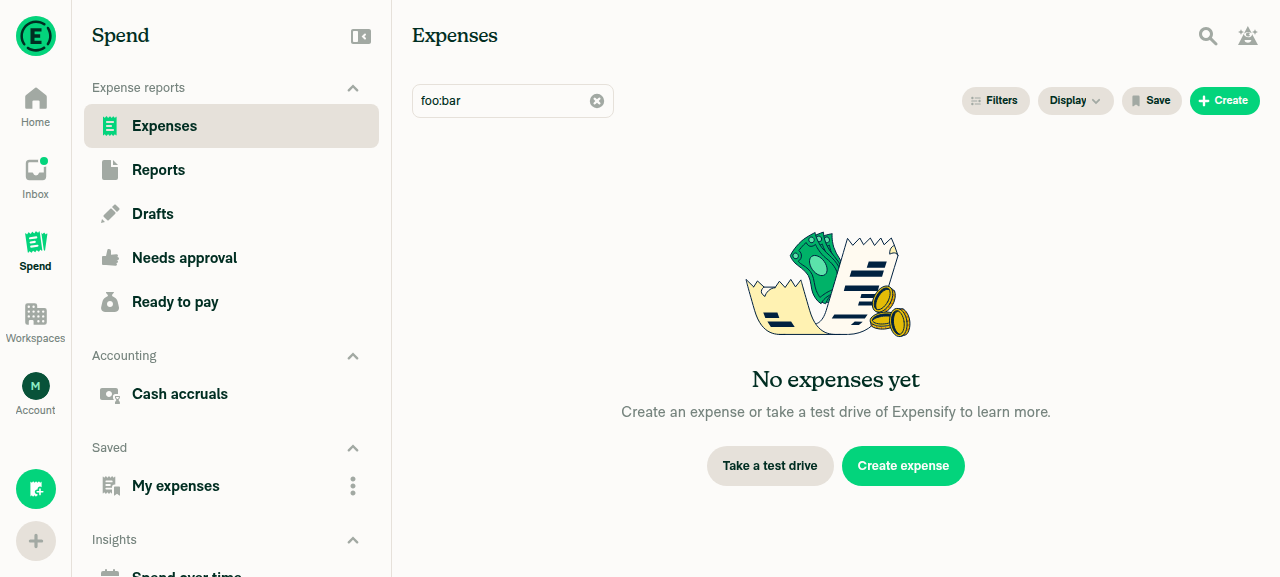
Use-Search-Operators-to-Filter-and-Analyze.md:246 — an unrecognized operator "will be ignored and return results based on any valid parts of the query" type:expense foo:bar returned the normal Expenses results view with foo:bar retained as free text. No error page. ✅ Accurate
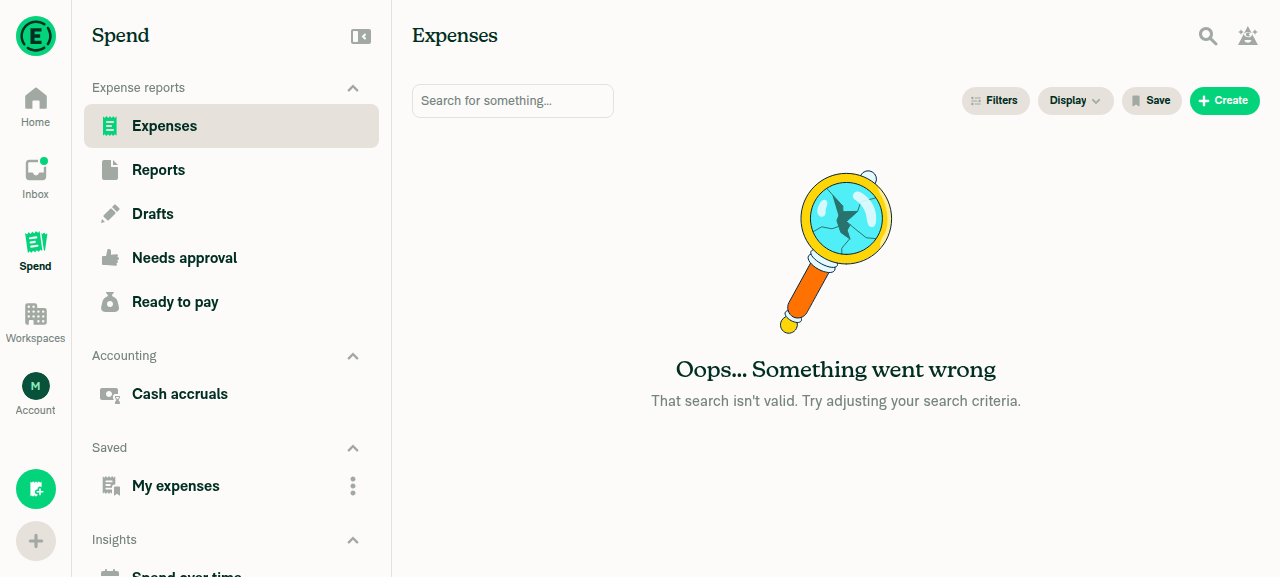
Invalid value for a real operator type:expensee shows "Oops... Something went wrong" / "That search isn't valid. Try adjusting your search criteria." with no button — unchanged by this PR, which only altered the non-401 path ✅ Not documented, no change needed
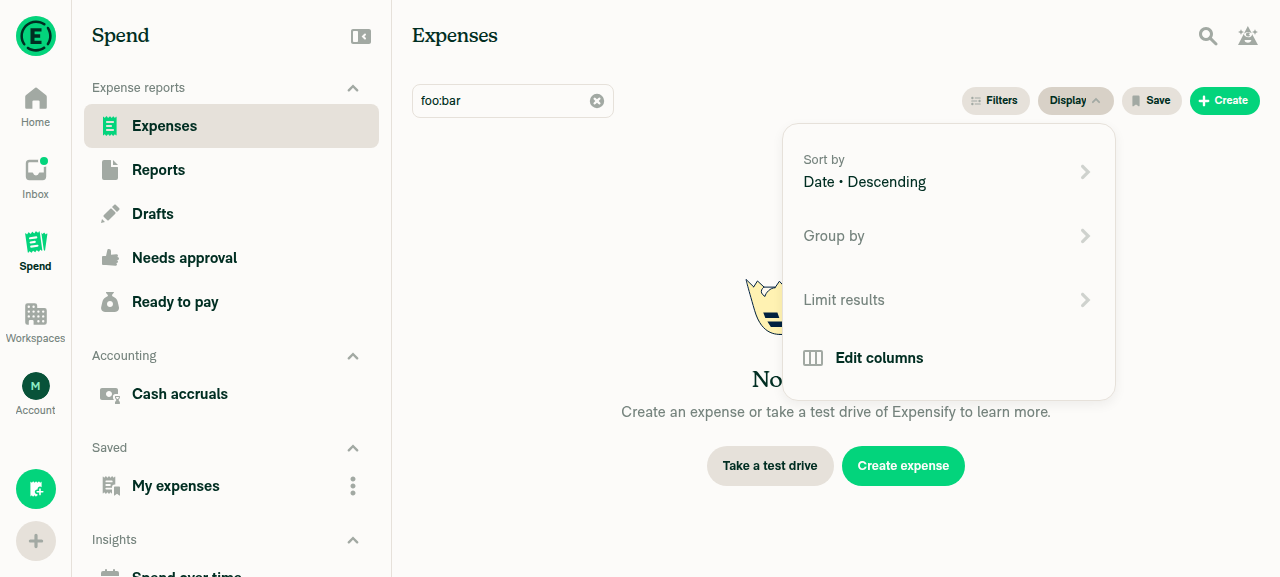
Search-and-Download-Expenses.md:142Display > Edit columns The toolbar button is exactly Display, and its menu contains exactly Edit columns. The nav tab is exactly Spend. ✅ Accurate
UI verification screenshots Query type:expense foo:bar returns the normal Expenses view, not an error Invalid search error page for type:expensee with no button Spend tab active with the Display menu open showing Edit columns

One optional addition, your call

The help site has no FAQ covering a failed search, and this PR gives that case a distinct message and a retry path. If you want it documented, a short FAQ entry in Search-and-Download-Expenses.md would fit — something covering that Try again retries a failed search while Refresh reloads results that are out of date. That's net-new content rather than a correction, so I left it out. Reply with @MelvinBot add that FAQ and I'll open the draft PR.

LukasMod — there's no linked help site PR to review, since none was needed. I skipped the closing review line you asked for rather than point you at a PR that doesn't exist.

@OSBotify

Copy link
Copy Markdown
Contributor

🚀 Cherry-picked to staging by https://github.com/mountiny in version: 9.4.86-0 🚀

platform result
🕸 web 🕸 success ✅
🤖 android 🤖 success ✅
🍎 iOS 🍎 success ✅

@MelvinBot

Copy link
Copy Markdown
Contributor

🤖 Yes, one help-site article needed updating. Draft PR: Docs updates for E/A#101554 Search error states and invalid operator FAQ

The FAQ What happens if I enter an invalid operator? in docs/articles/new-expensify/reports-and-expenses/Use-Search-Operators-to-Filter-and-Analyze.md:246 said the system "will ignore it and return results based on any valid parts of the query." It doesn't — the query is rejected and the results are replaced by an error page. That answer was already wrong before this PR; your change makes the surrounding behavior worth documenting properly, so the docs PR corrects the FAQ and adds a ## How to troubleshoot search operator errors in Expensify section covering all three states.

I read every message, button, and toggle label off the running app on your branch rather than from en.ts, per HELPSITE_NAMING_CONVENTIONS.md:

State Title Subtitle Button
Unrecognized operator or value Oops... Something went wrong That search isn't valid. Try adjusting your search criteria. none
Server rejected the query Oops... Something went wrong Your request could not be completed. Please try again later. Try again
Server unreachable Refresh needed This page is out of date, refresh to see the latest Refresh

No other article under docs/articles documents Search error or empty states, so nothing else needs changing.

Compliance and checks
  • One # title plus # FAQ, all new content under ##, new heading starts with "How to" — HELP_AUTHORING_GUIDELINES.md sections 2, 4 and 9.
  • UI strings quoted verbatim with exact capitalization; buttons bolded, not quoted — HELPSITE_NAMING_CONVENTIONS.md.
  • One screenshot placeholder in the required <!-- SCREENSHOT: --> form, for the state members most often mistake for an empty result set.
  • npm run spell-changed passes; 26 additions, 3 deletions, one file.
  • Fixed Issues is left blank because no issue was filed for the docs update — it is attributed to this PR in the body instead.

One thing to note: the docs PR branch lives on upstream, not on callstack-internal/Expensify-App, so you may not be able to push to it directly. Reply on that PR tagging me if you want wording changes and I'll push them.

@LukasMod, please review the linked help site PR and confirm it reflects the current behavior. Then mark the linked help site PR Ready for review

@lanitochka17

Copy link
Copy Markdown

Deploy Blocker #101554 was identified to be related to this PR.

@OSBotify

Copy link
Copy Markdown
Contributor

🚀 Cherry-picked to staging by https://github.com/mountiny in version: 9.4.89-0 🚀

platform result
🕸 web 🕸 success ✅
🤖 android 🤖 success ✅
🍎 iOS 🍎 success ✅

@OSBotify

Copy link
Copy Markdown
Contributor

🚀 Deployed to production by https://github.com/luacmartins in version: 9.4.89-0 🚀

platform result
🕸 web 🕸 success ✅
🤖 android 🤖 success ✅
🍎 iOS 🍎 failure ❌

Bundle Size Analysis (Sentry):

@OSBotify

Copy link
Copy Markdown
Contributor

🚀 Cherry-picked to staging by https://github.com/mountiny in version: 9.4.90-0 🚀

platform result
🕸 web 🕸 success ✅
🤖 android 🤖 success ✅
🍎 iOS 🍎 success ✅

Sign up for free to join this conversation on GitHub. Already have an account? Sign in to comment

Labels

CP Staging marks PRs that have been CP'd to staging

Projects

None yet

Development

Successfully merging this pull request may close these issues.

6 participants