
Find, install, update and remove software from the Arch repositories, the AUR, Flatpak and Snap in one terminal app that shows exactly what will change before anything does.


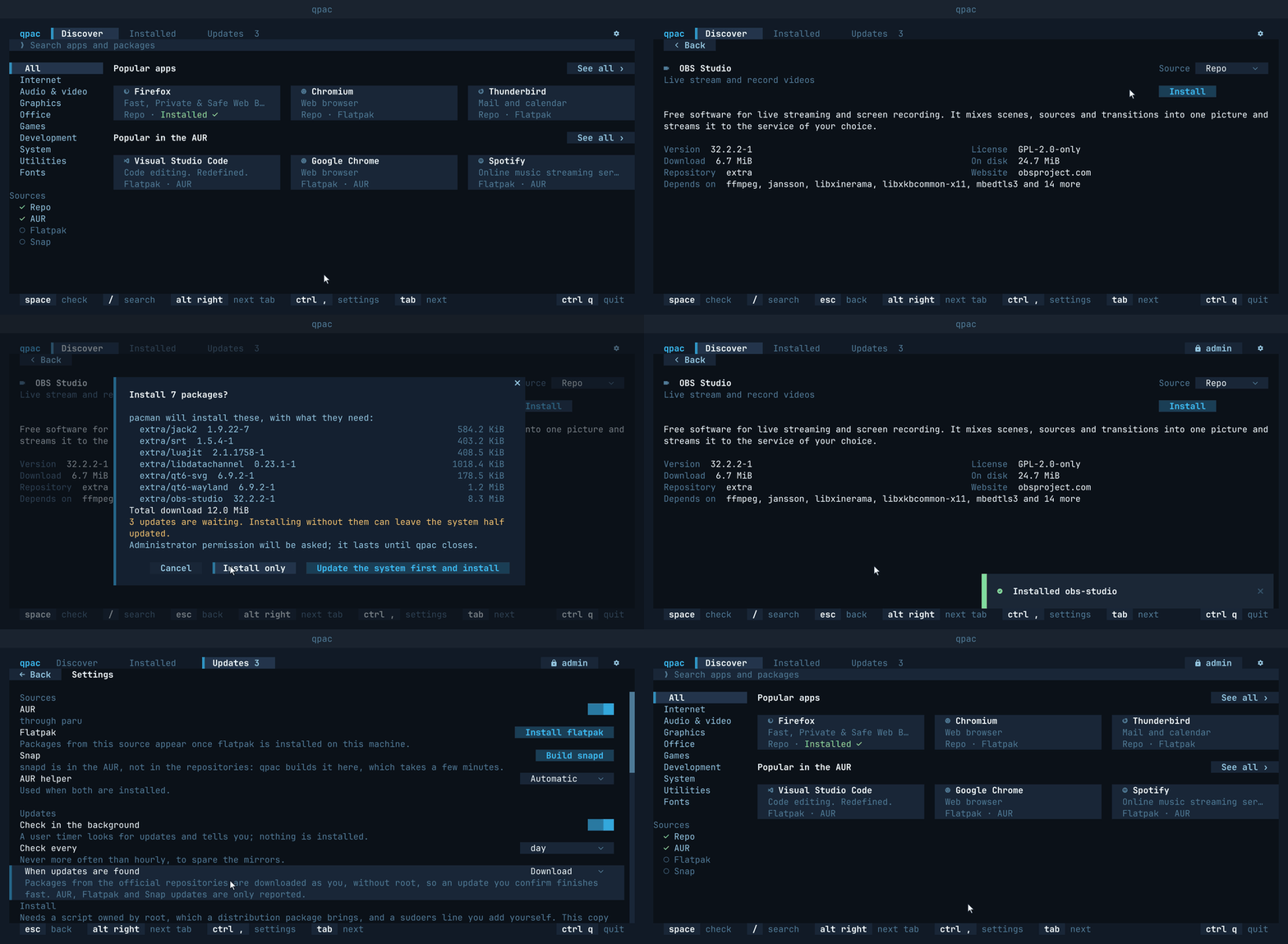
quvyta-packages, or qpac for short, is a package manager for Arch Linux that runs in the terminal. It is meant to bring pacman, the AUR, Flatpak and Snap together in one simple interface that feels like an app store, and shows exactly what will change before anything does. It is part of the Quvyta ecosystem of terminal applications, is built on quvyta-framework and is open source under the MIT licence.
Beta. qpac is new. It finds software in the repositories, the AUR, Flatpak and Snap, installs and removes from all four, and builds AUR packages with
paruoryayafter you have read their recipes. The interface may still change between releases. Please report anything that looks wrong at https://github.com/quvyta/packages/issues.
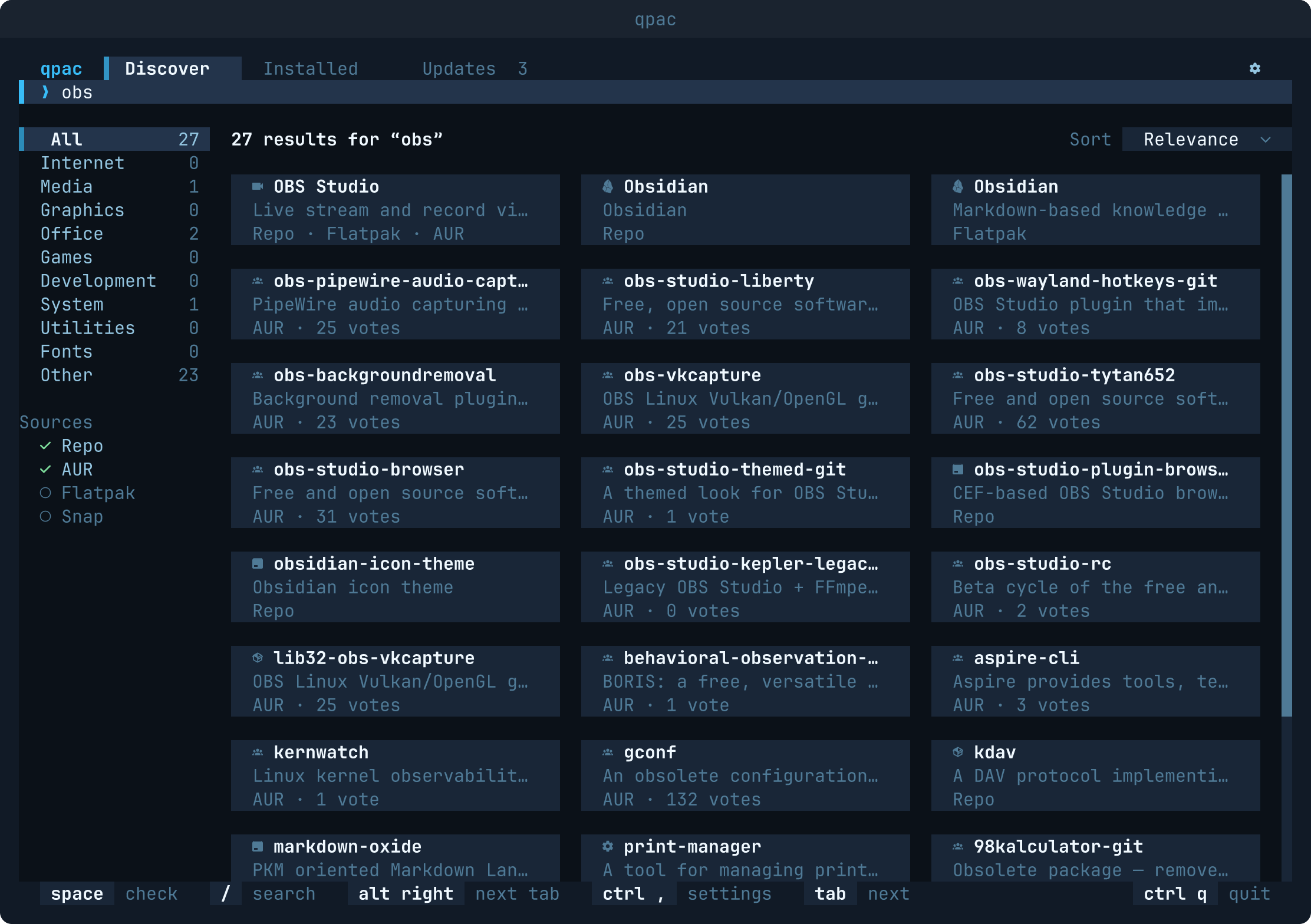
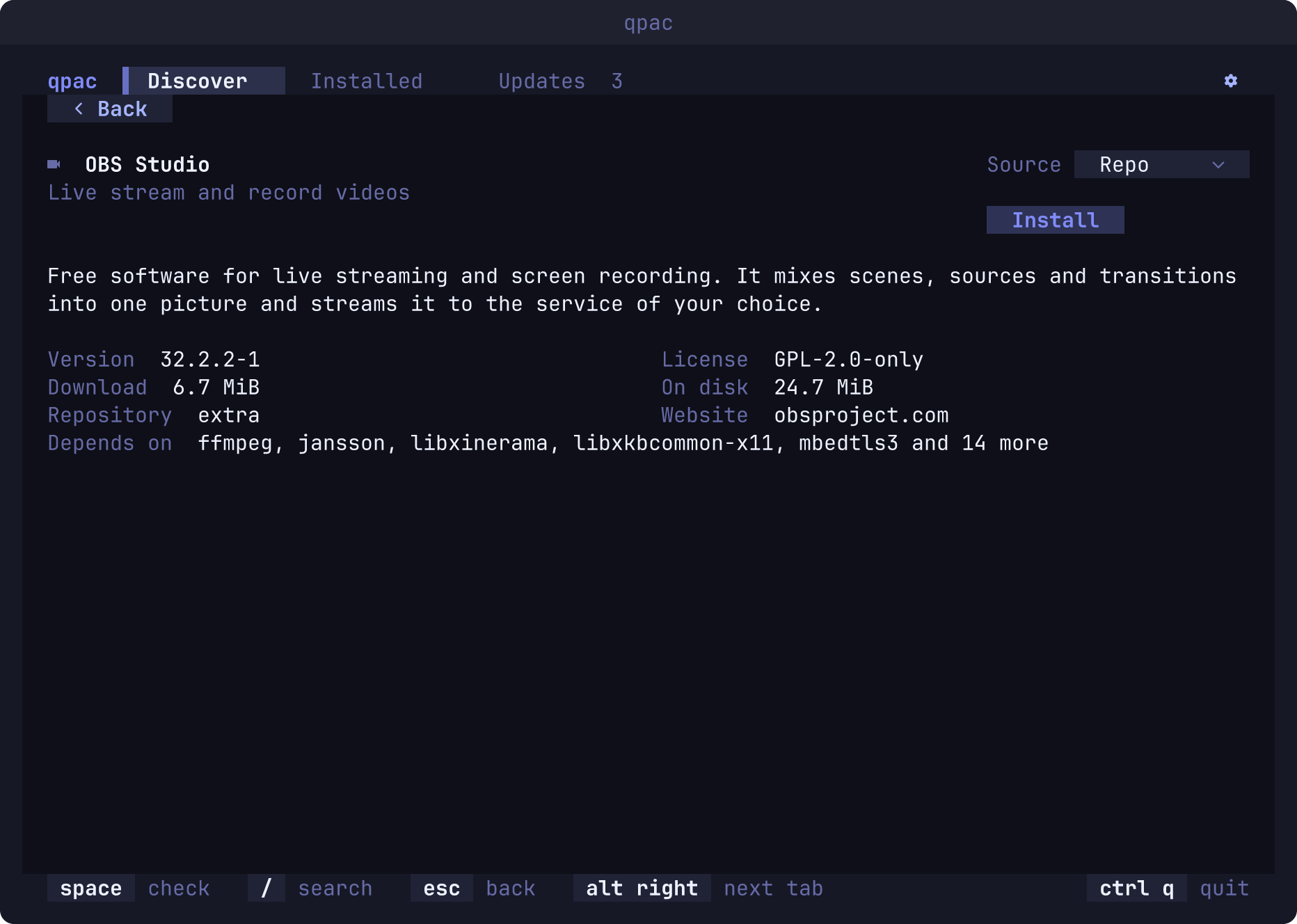
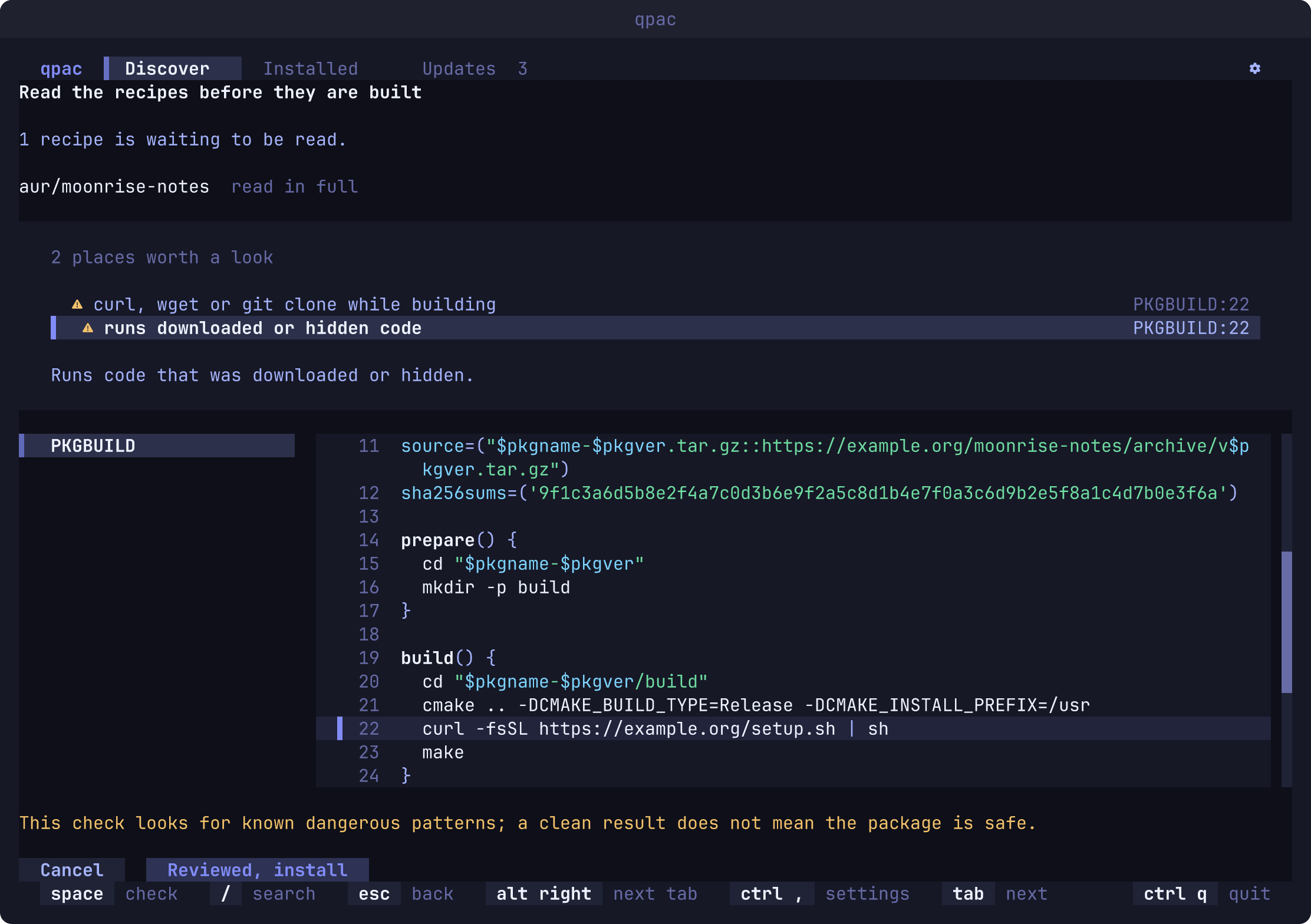
- Discover. A store page: popular apps and what is popular in the AUR as cards, the kinds of
software on the left (Internet, Audio & video, Graphics, Office, Games, Development and more).
Typing searches the repositories, the AUR and Flatpak at once; results arrive as each source
answers, without the cards jumping around, and one application found in several sources is one
card. Opening a card shows the application's page with its description, sizes, licence,
website and dependencies, and an Install or Remove button. Categories and descriptions come
from AppStream, the data GNOME Software and KDE Discover use; without it (the
archlinux-appstream-datapackage) qpac offers to install it and works with a built-in list meanwhile. Popularity comes from pkgstats, Flathub and the AUR's votes, and is kept for a day so the page opens with it; with Flatpak on, a row shows what Flathub updated recently, and installed Flatpaks are marked. - Installed. Your applications, or every package, in a table you can search and sort, with
the source of each (
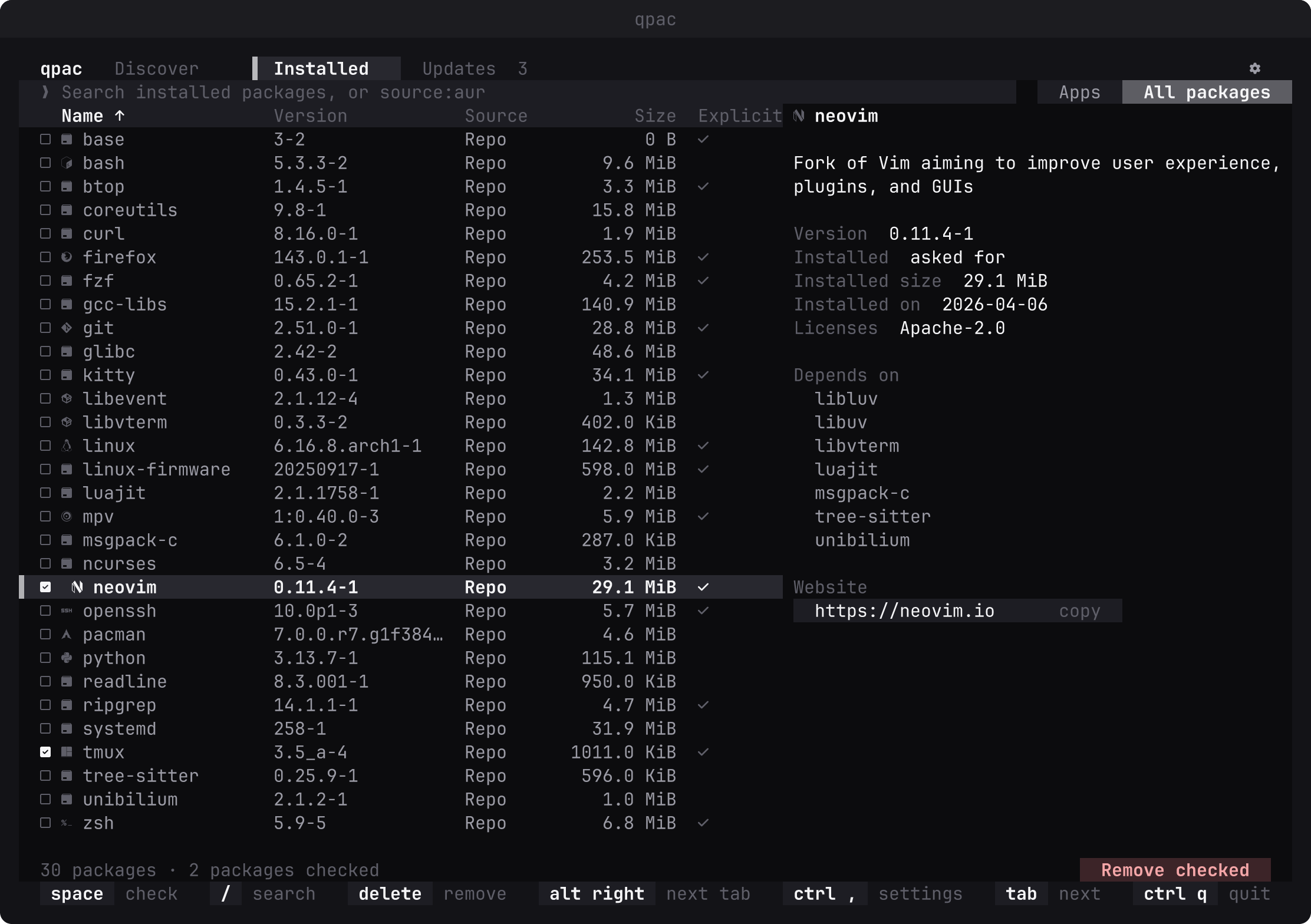
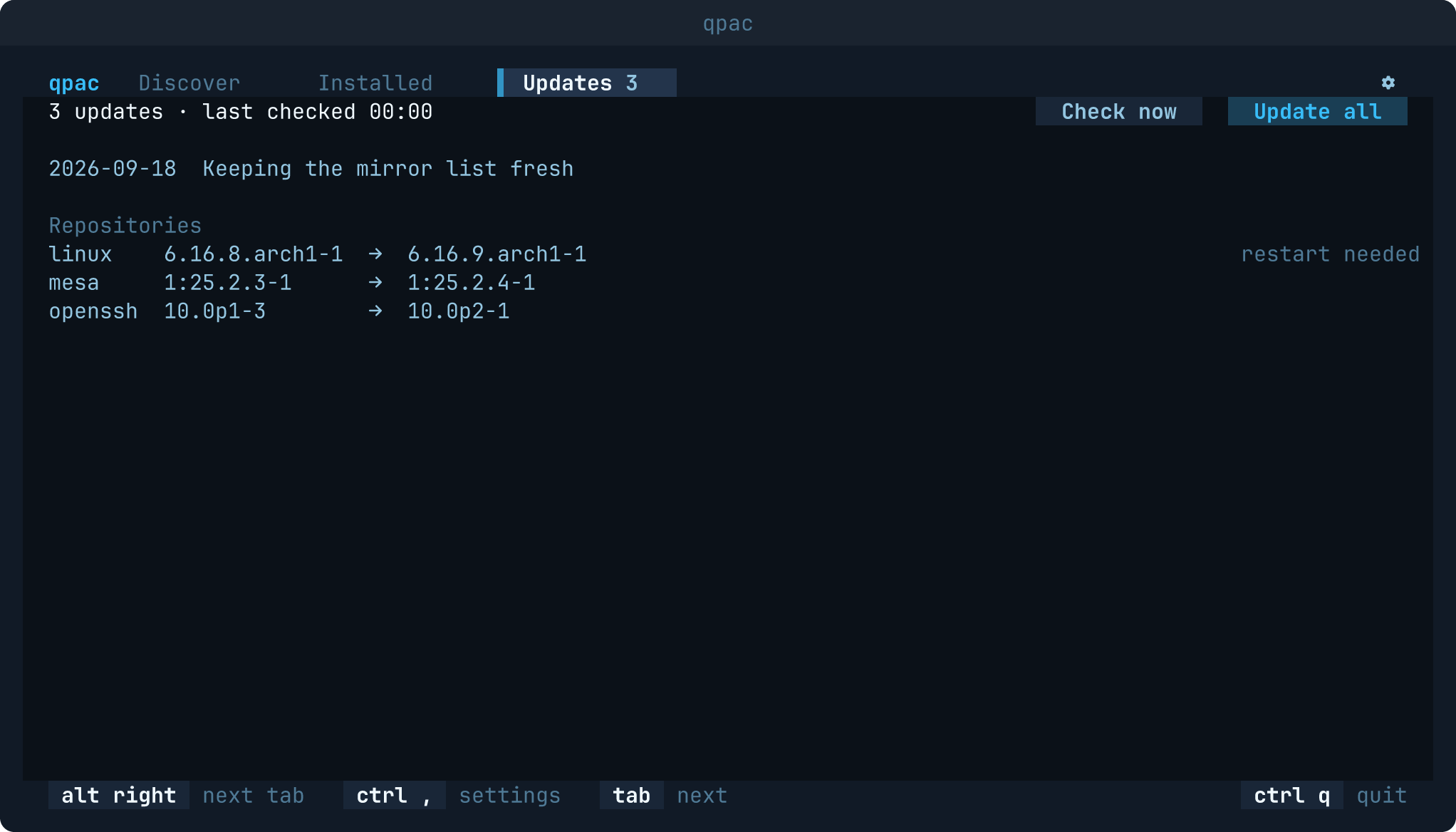
source:aurin the search keeps only the AUR's), and a detail panel: version, installed size, whether you asked for it or it came as a dependency, install date, licences, dependencies and website. The list is read straight from pacman's local database, so it opens at once and needs no privileges. - Updates. The waiting updates, grouped by source, with a note on those that need a restart,
and the last two weeks of Arch news above them, those that need your hand marked. The check
refreshes a private copy of pacman's database and never runs
pacman -Syon the real one, so it can never leave the system half upgraded. Update all shows the full list, takes a snapper or timeshift snapshot before (and with snapper after) when one is installed, and lists the new.pacnewfiles when it is done. Installing while updates wait offers to update first, so the system is never partly upgraded. - Orphans. Packages nothing needs any more are marked among all packages and can be cleaned up in one step; after a removal or an update qpac asks, cleans up by itself, or leaves them, as you choose.
- Mirrors. With reflector installed, the settings choose pacman's mirrors by country, count, age and speed, keep the old list beside the new one, and can turn on reflector's weekly timer.
- Flatpak, installed, removed and updated. An application installed for you needs no password; a system-wide one goes through the helper, and a mix of the two is confirmed once and then run step by step. Without Flathub, the settings say so and offer to add it. Waiting Flatpak updates, for you and for the whole system, join the Updates tab as their own group, and Update all brings each of them up to date as the one ref it waits in: your own as you, the system's through the helper, each in a step with its own confirmation.
- AUR packages, built and read first.
paruoryaydoes the building as you, never as root; the root steps it asks for are relayed to qpac's helper through a private pair of pipes, so a build never gets a shell with privileges, and the packages the build wants to install are worked out beforehand and checked against what the helper is asked for. Before any of it, the recipes are fetched, compared with the ones you approved last time and read through rules that point at the risky lines; the whole build is one screen, and only Reviewed, install starts it. - Snap. snapd is read on its own socket, as you, so the snaps and a running job's real
progress need no privileges; the helper carries out the install, the removal and the update. A
snap that needs classic confinement is a request of its own, so
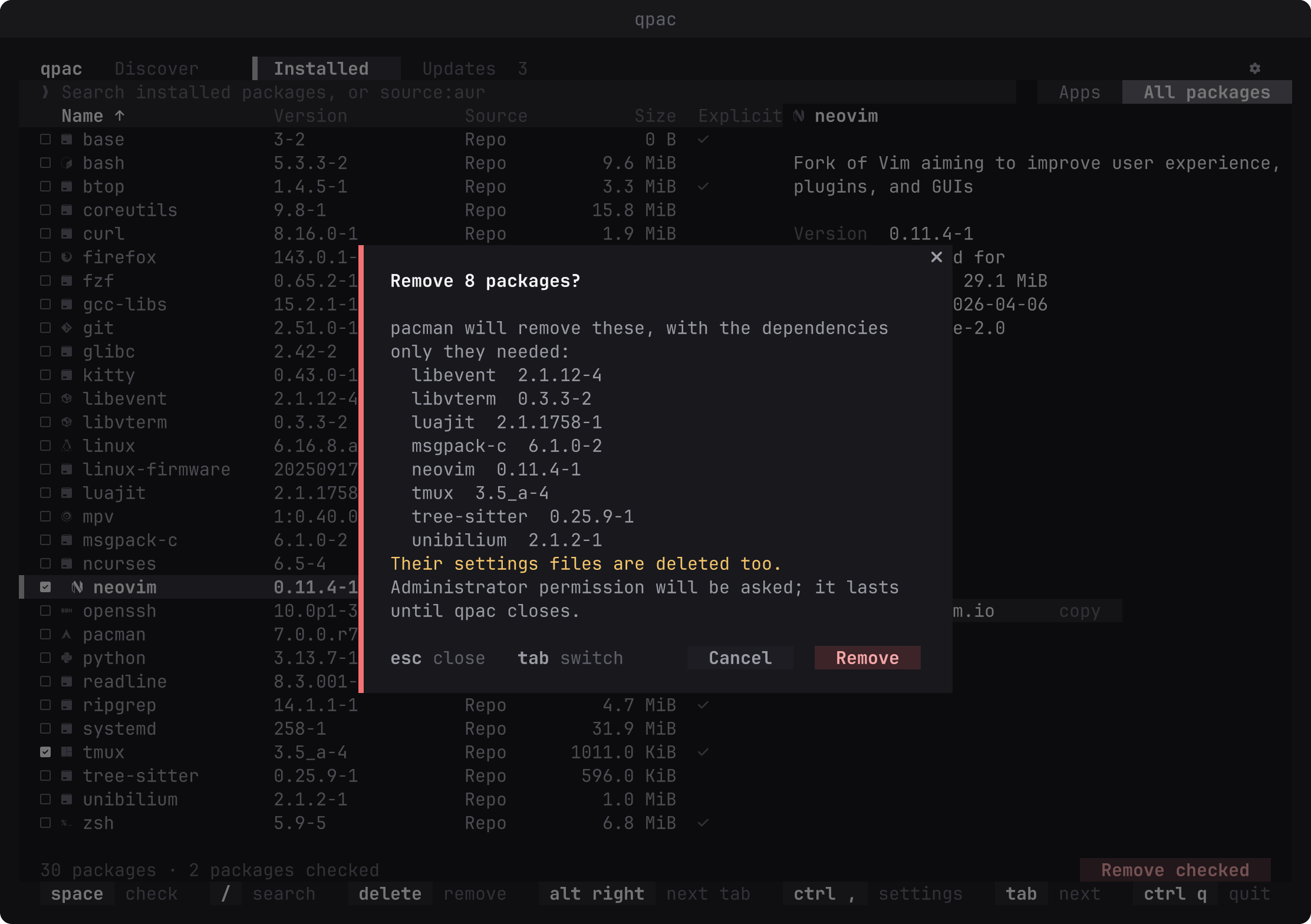
--classiccan never land on a snap whose confirmation did not say what it means. Waiting snap updates join the Updates tab as their own group. Without snapd the source is shown faint with what it would take to install it, and nothing is asked of a snapd that is not there. - Changes you can see. Install from the store, or check packages and remove them. Before anything runs, pacman is asked what the change would do, and the full list, dependencies included, is shown for you to confirm. Cancel has the focus, so the safe answer is the default.
- Your password stays with polkit or sudo. The first change you confirm asks for it once:
polkit (
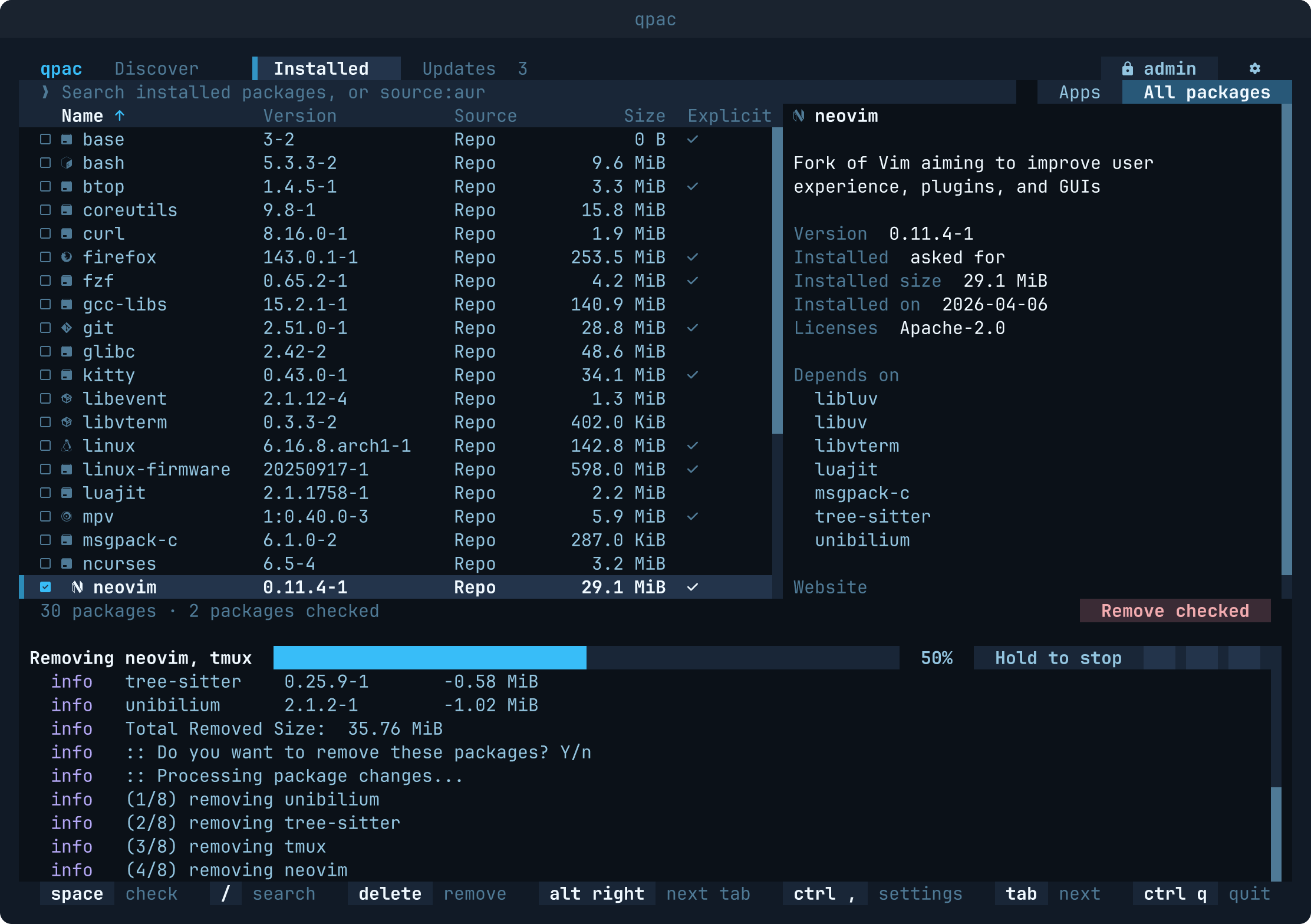
pkexec) where it is installed, in your desktop's own window or on the terminal, and sudo on the terminal otherwise. qpac never sees it. A small helper then carries out every change as root until qpac closes, and does nothing else; theadminbadge in the header shows it is up, and clicking it lets the permission go. pacman runs with its output and progress in a pane below the list, which stays where it is. A long transaction can be stopped. - A locked database is explained, never forced. If another transaction holds pacman's lock, qpac says so, and by which process when it can tell. It never removes the lock.
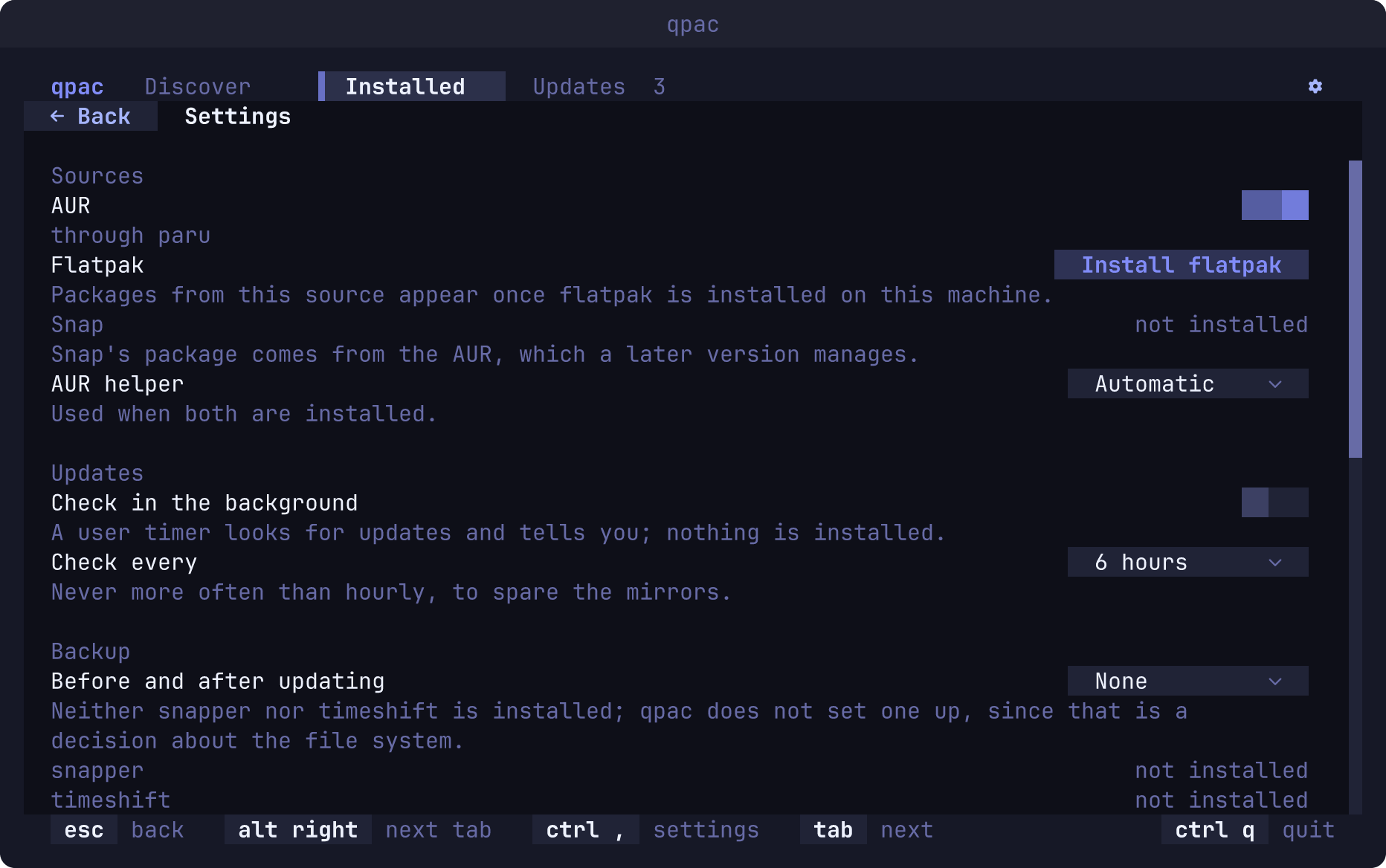
- Settings. The gear at the top right (or
ctrl+,) opens them: which sources are on, the AUR helper, who asks for permission, and the appearance rows every Quvyta application shares: language, theme, icons, reduced motion and the pillar, each shared one with a box under it that says whether the change applies in every Quvyta application or here only; a change another Quvyta application makes reaches qpac while it is open. A missing source is shown with the reason, and where its program is in the official repositories (parufor the AUR,flatpakfor Flatpak) it can be installed from there, through the same confirmation. The AUR is refused when qpac runs as root, because packages are never built as root. - A check in the background, if you want one. Turned on in the settings, a systemd user
timer runs
qpac --checkevery few hours (6 by default, never more often than hourly): it looks for updates without opening the screen and without privileges, and writes what it found to~/.local/state/quvyta/packages/state.json. Nothing runs as root and nothing is installed. It can also download the pending updates from the official repositories ahead, still as you and without root, into~/.cache/quvyta/packages/downloads; the next update you confirm copies them into pacman's cache, where pacman checks them as its own, and finishes without waiting for the mirrors. With Flatpak on and installed, it also pulls your own Flatpak updates into Flatpak's repository withflatpak --user update --noninteractive --no-deploy: they are fetched as you, without root, and none of them is deployed, so the nextflatpak updateyou run finishes without downloading again. Flatpak's system-wide installation is never touched, since that needs root. A third step, install, needs a root-owned script that a distribution package brings and a sudoers line you add yourself; acargo installhas no such script, so there the settings show the step with that reason and it cannot be chosen. That script (/usr/lib/quvyta-packages/upgrade) and the recipe that installs it are in thepackagingfolder of the repository.
The interface follows your system language. Nine are included: English, Turkish, German, Spanish, French, Brazilian Portuguese, Russian, Simplified Chinese and Japanese. Every one of them is held to the same screens at the same narrow widths, so a translated button is never cut short or pushed out of its panel. The themes, icons, keys and mouse behaviour are the same across the Quvyta ecosystem.
- Snaps have no kind in Discover: snapd's search answer carries no category per snap, so snap cards fall under "Other" and are found by searching rather than by browsing.
- The Installed tab lists the packages pacman knows. Flatpaks and snaps are not in it; they are marked as installed on their cards in Discover instead.
- Arch Linux, or a distribution built on it, with
pacman. - polkit (
pkexec) orsudo, for anything that changes the system. - Rust 1.95 or later to build it.
curl -fsSL https://raw.githubusercontent.com/quvyta/quvyta/main/install.sh | sh -s -- packagesOr with cargo:
cargo install quvyta-packages
qpac
If the command is not found, add ~/.cargo/bin to your PATH (fish: fish_add_path ~/.cargo/bin).
The program is installed as qpac and also under its full name, quvyta-packages. Release
0.1.0 called the short command qpackages; from 0.1.1 on it is qpac, and cargo install
removes the old name when it upgrades.
Run qpac without sudo: it asks for privileges only when a change is confirmed.
The first start opens a short setup: how qpac looks (language, theme, icons), which sources it uses, and whether it checks for updates in the background. A source this computer lacks can be checked there; it is installed once the setup is over, through the same confirmation as any other install. Nothing is written until you finish, and the setup never comes again once packages.conf exists.
| Key | What it does |
|---|---|
ctrl+1, ctrl+2, ctrl+3 |
Discover, Installed, Updates; alt+left and alt+right step through them |
/ |
Search on the page you are on |
space |
Check or uncheck the selected package or card |
ctrl+enter |
Install the checked cards, after a confirmation |
delete |
Remove the checked packages, after a confirmation |
ctrl+, |
Settings |
esc |
Back |
tab |
Move to the next part of the screen |
ctrl+q |
Quit |
Clicking a column title sorts by it, and the boundary between the table and the details can be dragged.
The settings page saves every change at once. The settings are in ~/.config/quvyta/packages.conf (or under $XDG_CONFIG_HOME), next to
the other Quvyta applications' settings. Releases up to 0.1.1 kept them in
~/.config/quvyta-packages/settings.toml; the first start of 0.1.2 moves that folder over, and
a file already in the new place is never overwritten.
[sources]
flatpak = false   # turn a source off; every source is on by default

[aur]
helper = "auto"   # "auto", "paru" or "yay"; auto takes paru when both are installed

[privilege]
tool = "auto" # "auto", "pkexec" or "sudo"; auto takes pkexec when polkit is installedqpac collects no statistics and has no account, cookie or identifier of its own. What it sends over the network is what the requests below need, to the servers named, and nothing else. Two different things are called updates below, and they are kept apart on screen as well: updates for your packages, which the Updates tab and the background check look for, and a newer qpac, which is about the program itself.
When qpac starts, at most once a day, it asks crates.io whether a newer version of qpac itself is out, reading the same file cargo install reads: one HTTPS GET of https://index.crates.io/qu/vy/quvyta-packages. The request carries no cookie and no identifier; its headers are Host: index.crates.io, User-Agent: quvyta-packages/<the version you run> and Accept: */*, and nothing else. crates.io sees, as with any connection, the address it comes from. When a newer qpac is out, a notice says qpac 0.2.0 is out, that it is about qpac and not your packages, and how to update it: from the Quvyta launcher, or with cargo install quvyta-packages. When there is no network, or crates.io does not answer within ten seconds, nothing is said and the next day asks again; qpac never waits for the answer before it opens. Nothing is asked while the first-run setup is open, and the background check (qpac --check) never asks it. The time of the last question is kept in ~/.local/state/quvyta/packages/update-check.
To turn it off, switch off Say when a newer qpac is out under qpac itself at the bottom of the settings. The switch is shared across the whole Quvyta ecosystem: it is update-notice = false in ~/.config/quvyta/quvyta.conf, and turning it off stops the same question in every Quvyta application. While it is off, qpac asks nothing at all. It is a different switch from Check in the background under Updates, which is about your packages.
Everything else goes through programs Arch already has, run as you, and reaches the same servers they would reach without qpac. qpac's own requests are made with curl over HTTPS only, and carry curl's own User-Agent: curl/<its version>.
- Checking your packages for updates, when qpac opens, when you press Check now, after an update, and from the background timer if you turned it on (which skips the mirrors when the last check is less than an hour old):
pacman -Syrefreshes a private copy of the repository databases from your own mirrors; when the step you chose is to download ahead, the timer also runspacman -Suwinto a folder of your own and, with Flatpak on,flatpak --user update --no-deploy, which fetches your installation's updates from Flathub and deploys none of them; the AUR is asked about the packages no repository offers, throughhttps://aur.archlinux.org/rpc/v5/info(the timer) or yourparuoryay(the screen), which sends their names; with Flatpak on,flatpak remote-ls --updatesasks your Flatpak remotes (Flathub, when you added it) for your installation and the system's; and with Snap on,snap refresh --listasks snapd, which asks the Snap Store. - Arch news, with each check on the Updates tab:
https://archlinux.org/feeds/news/. - Discover's home page: the packages most machines report to
https://pkgstats.archlinux.de/api/packagesand Flathub's popular and recently updated apps fromhttps://flathub.org/api/v2/collection/, both kept for a day, and the AUR's votes and popularity for the AUR row from its RPC. - Searching in Discover: a search with the AUR on sends your search words to
https://aur.archlinux.org/rpc/v5/search; with Snap on, snapd searches the Snap Store for them. The repositories and Flatpak are searched in the catalogs already on your disk. - Reading an AUR recipe before a build:
git cloneofhttps://aur.archlinux.org/<package>.git. - Installing, removing and updating, only after you confirm, apart from the updates the download-ahead step fetches for you: pacman,
paruoryay, flatpak and snapd download from your mirrors, the AUR and the sources a recipe names, Flathub and the Snap Store. Add Flathub addshttps://dl.flathub.org/repo/flathub.flatpakrepoas a remote. - Mirrors, with reflector installed: opening the settings runs
reflector --list-countries, which reads the mirror status from archlinux.org, and choosing the mirrors, only when you press it, has reflector read it again and test the mirrors it picks.
qpac installs and removes real packages, so the safest way to try it is on a system you can
throw away. From a clone, run.sh builds it and opens it in a fresh Arch Linux container with
podman; everything it installs stays in the container and is gone when you
quit.
git clone https://github.com/quvyta/packages
cd packages
./run.sh            # open qpac in the container
./run.sh --shell    # a shell in the same container instead
Downloads are cached in two podman volumes, so the second run is quick. ./run.sh --help says
how to remove them.
The repository holds two crates: crates/qpackages, the application, and
crates/qpackages-core, published as quvyta-packages-core, which reads pacman's files and
plans its transactions without drawing anything or asking for privileges. The toolchain is
pinned by rust-toolchain.toml.
cargo run --bin qpacThe tests never run a real package manager: pacman's output is played back from recordings. Before your first commit, enable the checks (formatting, clippy, tests and docs):
git config core.hooksPath .githooksMIT. See LICENSE.