The settings Arch Linux users set up by hand after an install, in one list: each one previewed, backed up and undoable.


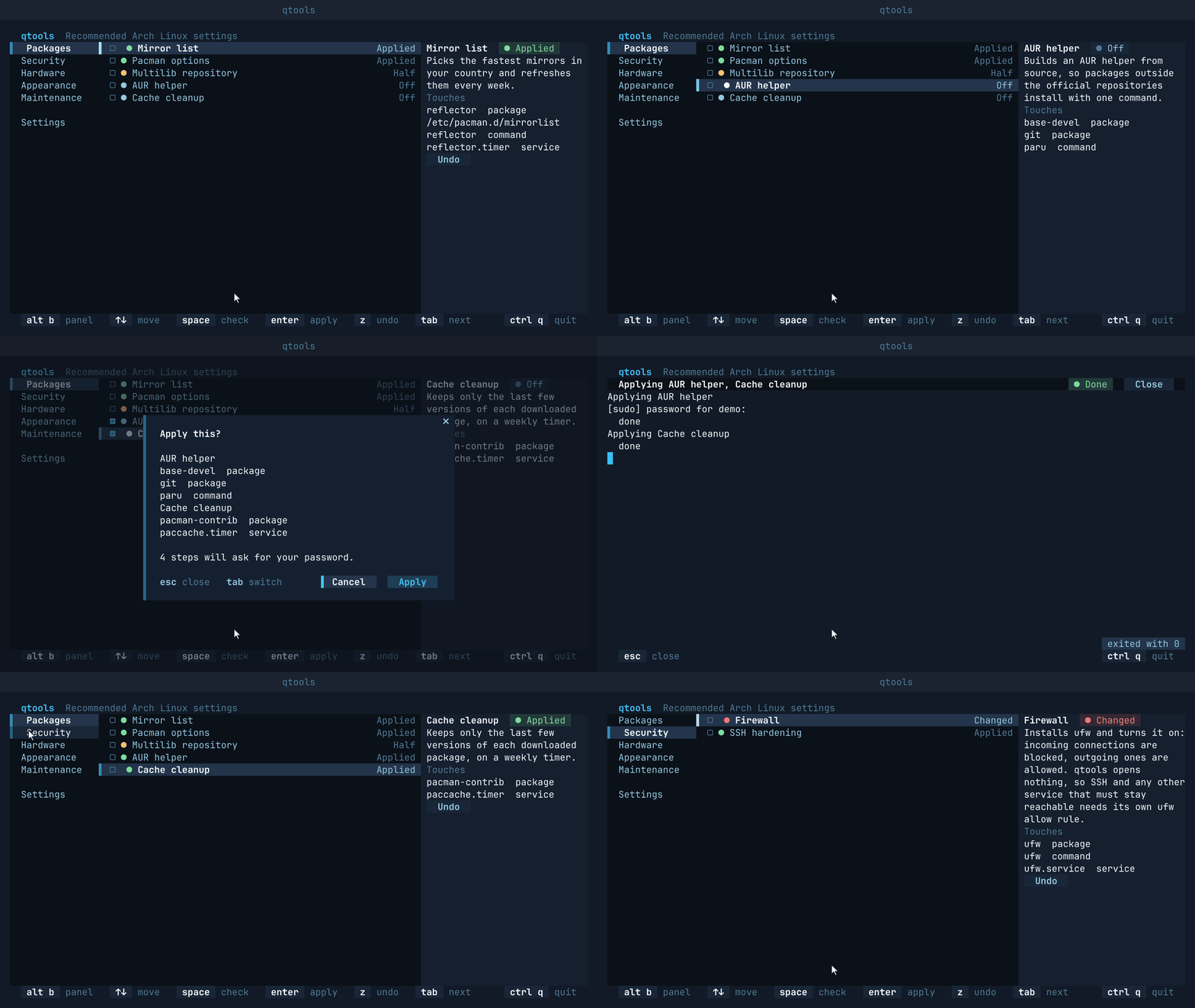
quvyta-tools applies the settings Arch Linux users usually set up by hand, from one list: a fast mirror list, parallel downloads in pacman, the multilib repository, an AUR helper, a package cache that cleans itself, a firewall, SSH hardening, SSD trim, a journal size limit and time sync. It is part of the Quvyta ecosystem of terminal applications, is built on quvyta-framework and is open source under the MIT licence.
Every item tells you where it stands on this machine, shows exactly what it will touch before it does anything, asks, keeps a backup, and can be undone. Running an item a second time changes nothing; it says it is already applied. qtools is not a package manager and never runs as root.
Beta. qtools is new, and it changes your system: it installs packages, edits files under
/etcand enables services. Read the confirmation before you accept it, and try it first on a machine you can afford to repair. The interface and the command line may still change between releases. Please report anything that looks wrong at https://github.com/quvyta/tools/issues.
- Arch Linux, or a distribution built on it that uses
pacmanandsystemd. On any other distribution qtools says it does not support it yet and exits without changing anything. sudo, set up for your user: the steps that need privileges ask for your password through it.- Rust 1.95 or later to install it with cargo.
curl -fsSL https://raw.githubusercontent.com/quvyta/quvyta/main/install.sh | sh -s -- toolsOr with cargo directly:
cargo install quvyta-tools
qtools
If the command is not found, add ~/.cargo/bin to your PATH (fish: fish_add_path ~/.cargo/bin).
The package installs two commands that do the same thing: qtools and quvyta-tools.
  qtools  Recommended Arch Linux settings
▌  Packages     ▌ ☐  ● Mirror list                                Off  Mirror list   ● Off
  Security        ☐ ● Pacman options                              Off  Picks the fastest mirrors in
  Hardware        ☐ ● Multilib repository                         Off  your country and refreshes
  Appearance      ☐ ● AUR helper                                  Off  them every week.
  Maintenance     ☐ ● Cache cleanup                               Off  Touches
                                                                       reflector  package
  Settings                                                             /etc/pacman.d/mirrorlist
                                                                       reflector  command
                                                                       reflector.timer  service


   alt b  panel    ↑↓  move    space  check    enter  apply    z  undo                ctrl q  quit
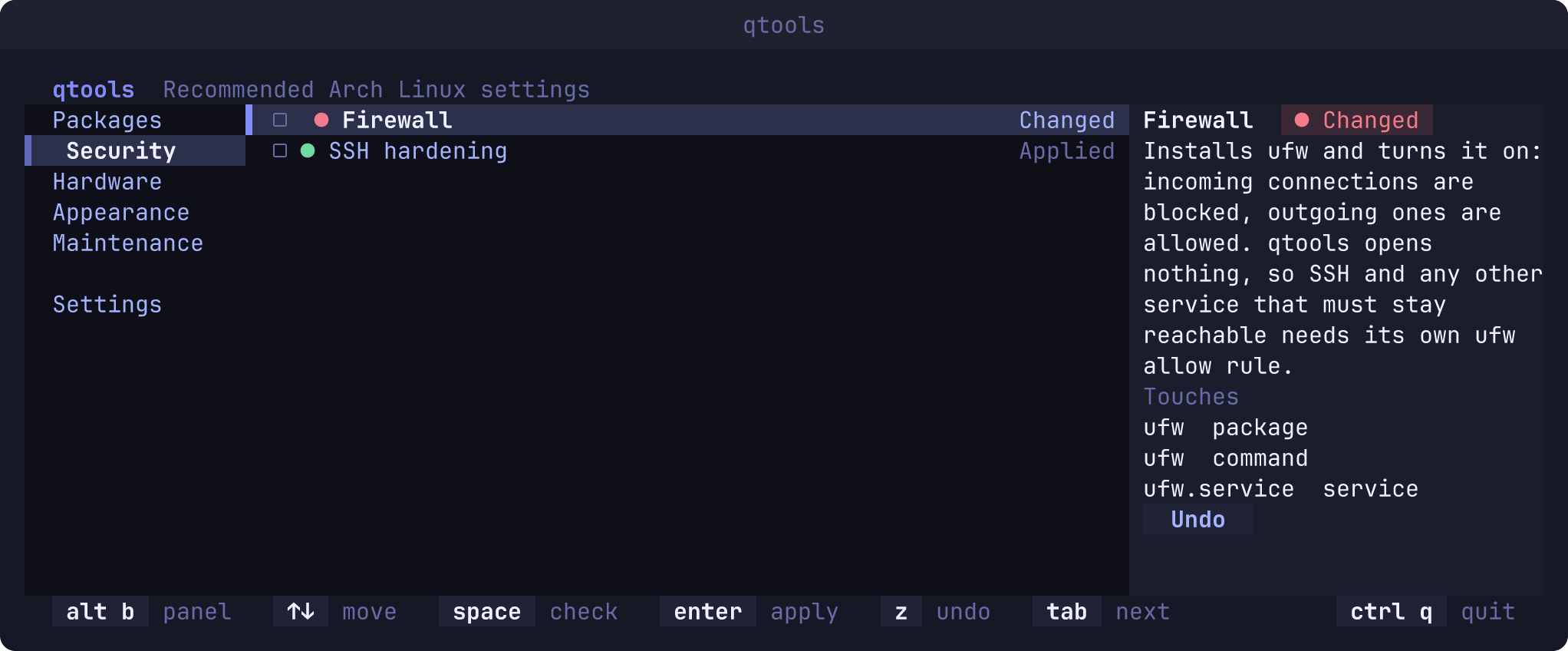
Groups on the left, the group's items in the middle, and on the right everything the chosen item
will touch: the packages it installs, the files it writes, the services it enables. Each item
carries its state as a mark and a word: ● Applied, ○ Off, ◐ Half, and ▲ Changed when
something outside qtools edited the same file. An item that makes no sense on this machine is
shown faint, with the reason, and cannot be applied.
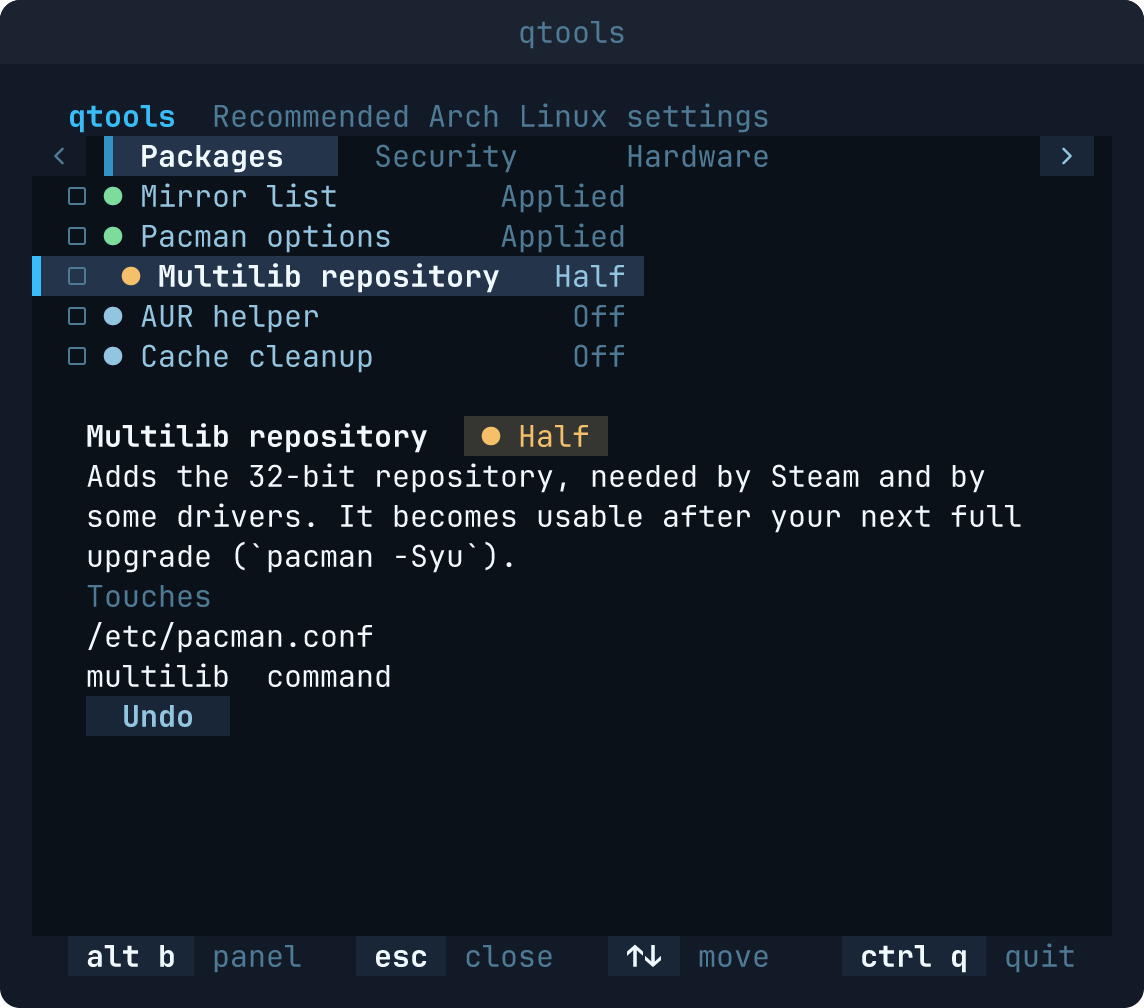
↑↓move,enterapplies the chosen item.spacechecks several items;enterthen applies them one after the other.zundoes an applied item.alt bcloses or reopens the detail panel.- Below 72 columns the screen folds on its own: the groups become a strip above the list, the
list takes the full width, and
alt bopens the detail below the list;esccloses it. - Settings, the last entry of the sidebar, changes the language, the theme and the icons; see below.
- Everything works with the mouse as well: a click on a group shows it, a click on an item asks to apply it, a click on its check mark checks it.
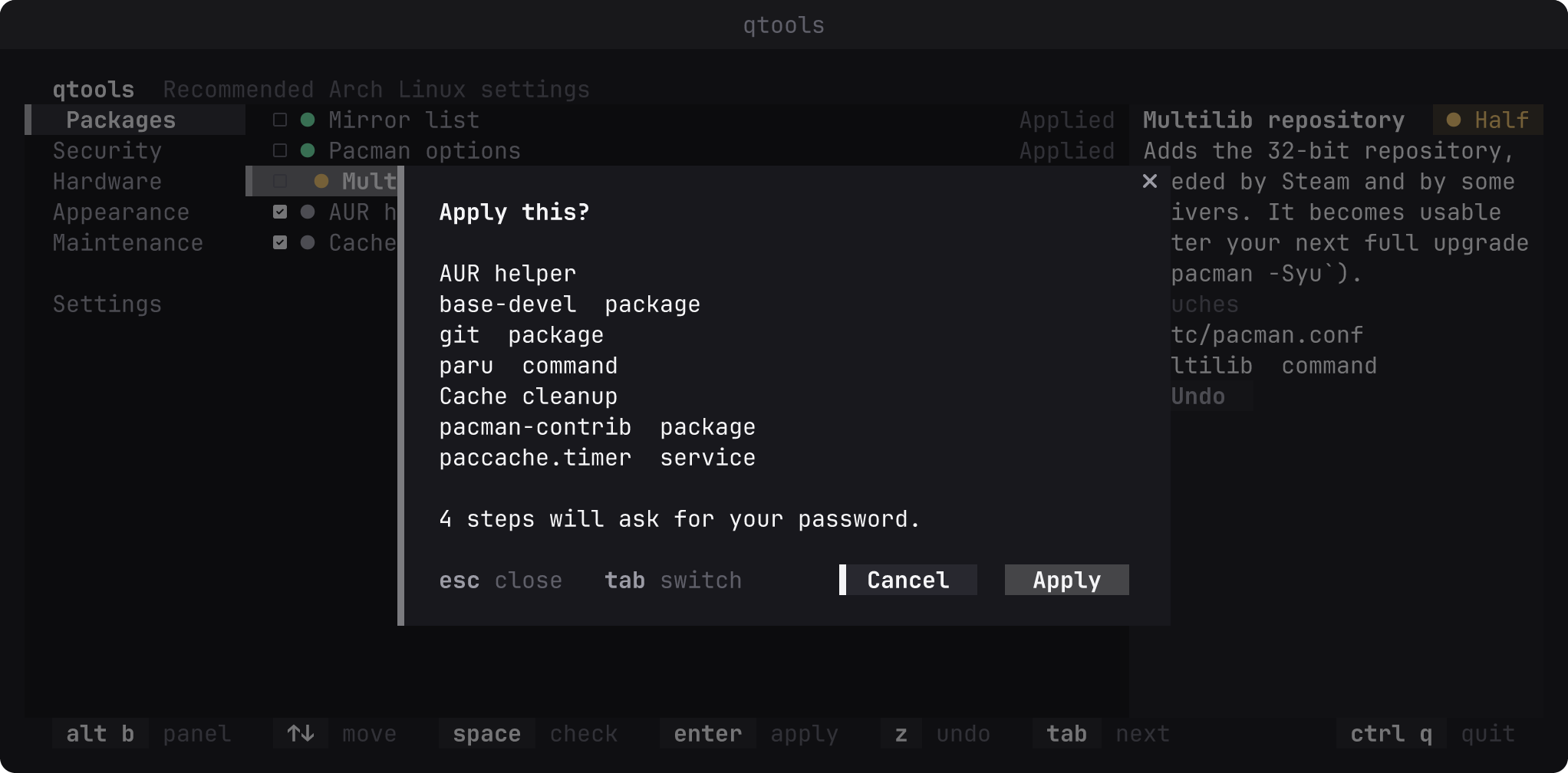
Before anything runs, one confirmation lists the commands, the files, where the backup goes and how many steps will ask for your password.
The interface comes in English, Turkish, German, Spanish, French, Brazilian Portuguese, Russian, Simplified Chinese and Japanese. Until you choose one, qtools follows your system language (LC_ALL, LC_MESSAGES or LANG), so pt_BR.UTF-8 gives Brazilian Portuguese and zh_CN.UTF-8 Simplified Chinese; any other language falls back to English.
The first time qtools opens, a short wizard asks for the language, the colour theme and the icons, each with an "In every Quvyta application" box that shares the choice with every other Quvyta application; when another Quvyta application has already chosen all three, that page is left out. Its second page says what qtools promises before it changes anything, and has one box, Say when an update is out (see below). Nothing is written until you finish; closing it half-way leaves everything as it was, and the wizard comes again next time. Finishing writes ~/.config/quvyta/tools.conf, which holds those three choices, and the shared ~/.config/quvyta/quvyta.conf if it is not there yet. Unchecking the box writes update-notice = false into that file, for every Quvyta application. Everything the wizard asks can be changed later on the Settings page.
Settings is the last entry of the sidebar, below the groups, and the last tab on a narrow screen. It shows the same rows as every Quvyta application: language, theme, icons and reduced motion, each with its In every Quvyta application box, then the pillar and Say when an update is out. There is no Save button: a change takes effect at once and is written straight away. With the box checked it goes to the shared ~/.config/quvyta/quvyta.conf, and every Quvyta application that follows it changes too; unchecked, it stays in qtools' own ~/.config/quvyta/tools.conf. The pillar is qtools' own and is kept in tools.conf. A language, theme, icons or reduced motion changed in another Quvyta application reaches an open qtools at once, and an open Settings page shows it. If a file cannot be written, the change still applies until qtools quits and its row says why it was not saved. The update switch is written in the background; if it cannot be, it goes back to what it was and a notice says which folder and why.
| Item | Id | What it does |
|---|---|---|
| Mirror list | mirrors |
Installs reflector, writes the fastest mirrors of your country to /etc/pacman.d/mirrorlist and refreshes them weekly with reflector.timer. |
| Pacman options | pacman-options |
Turns on ParallelDownloads, Color and VerbosePkgLists in /etc/pacman.conf. |
| Multilib repository | multilib |
Enables the [multilib] section of /etc/pacman.conf, needed by Steam and some drivers. |
| AUR helper | aur-helper |
Builds paru from the AUR so packages outside the official repositories install with one command. |
| Cache cleanup | cache-cleanup |
Installs pacman-contrib and enables paccache.timer, keeping only the last few versions of each downloaded package. |
| Item | Id | What it does |
|---|---|---|
| Firewall | firewall |
Installs ufw, turns it on and enables ufw.service: incoming connections are blocked, outgoing ones allowed. qtools opens nothing, so SSH and any other service that must stay reachable needs its own ufw allow rule. |
| SSH hardening | ssh-hardening |
Only when openssh is installed: a drop-in under /etc/ssh/sshd_config.d/ turns off password logins and root logins. It takes effect at the next sshd restart; make sure your key is already in place on a machine you reach remotely. |
| Item | Id | What it does |
|---|---|---|
| Compressed swap in RAM | zram-swap |
Installs zram-generator and writes /etc/systemd/zram-generator.conf: a compressed swap device half the size of your memory, on top of any swap you already have. It becomes active at the next boot or the next start of the zram service. |
| Bluetooth | bluetooth |
Only on a machine with a Bluetooth controller: installs bluez and bluez-utils and enables bluetooth.service. |
| Laptop power management | laptop-power |
Only on a machine with a battery, and only when power-profiles-daemon is not already managing power: installs tlp and enables tlp.service, at tlp's own defaults. |
| NVIDIA and Wayland | nvidia-wayland |
Only with an NVIDIA card whose driver is already installed: writes options nvidia_drm modeset=1 to /etc/modprobe.d/50-quvyta-nvidia.conf and enables the suspend, resume and hibernate services. It takes effect at the next boot; if the nvidia module is built into your initramfs, run mkinitcpio -P as well. qtools does not install the driver: which one is right depends on the card and the kernel, and a wrong one can leave the machine without a display. |
| Item | Id | What it does |
|---|---|---|
| Qt matches GTK | qt-gtk-match |
Only on a machine with a graphical session: writes QT_QPA_PLATFORMTHEME=gtk3 to /etc/environment.d/90-quvyta-qt.conf, so Qt applications follow GTK's colours and fonts instead of looking like strangers next to them. qt6-base already ships the plugin, so nothing extra is installed; it takes effect the next time you log in. |
| Fonts | fonts |
Installs noto-fonts, noto-fonts-emoji and noto-fonts-cjk, then writes /etc/fonts/local.conf so sans-serif, serif and monospace resolve to Noto Sans, Noto Serif and Noto Sans Mono, with Noto Color Emoji behind each of them as a fallback. Arch's own fontconfig defaults, such as hinting and subpixel order, stay untouched. |
| Item | Id | What it does |
|---|---|---|
| SSD trim | ssd-trim |
Enables fstrim.timer on machines with a non-rotational disk. |
| Journal size limit | journal-limit |
Caps the system log at 500 MB through a drop-in under /etc/systemd/journald.conf.d/; takes effect at the next boot or journald restart. |
| Time sync | time-sync |
Enables systemd-timesyncd.service, unless another time service (chrony, ntp, openntpd) is installed. |
The same items can be applied or undone without the screen, in the order given:
qtools --run mirrors pacman-options
qtools --revert multilib
The exit code is 0 when every item went through, 1 when one failed (the rest are not run), 2 when an argument made no sense and 3 when the distribution is not supported (nothing is run).
qtools keeps its state under ~/.local/state/quvyta-tools/ (or $XDG_STATE_HOME/quvyta-tools/
when that variable is set):
backups/holds every file as it was before qtools wrote it;applied.tomlis the journal: which item and which step were applied, when, where the backup is, and a digest of what was written.
The digest is how qtools notices that a file changed behind its back. Such a file is shown as
▲ Changed and is never silently overwritten. Undoing removes only the packages qtools itself
installed; a package you already had stays.
qtools never reads, stores or passes on your password. Steps that need privileges run through
sudo in a terminal embedded in the screen, so the password prompt you see is sudo's own, and
you type into it directly. The confirmation says beforehand how many steps will ask.
- qtools changes system files and services. Each change is recorded and can be undone: an undo puts back the file qtools saved, and leaves a file alone when something else has changed it since.
- The firewall blocks every incoming connection. On a machine you reach over the network, add a
ufw allowrule for SSH first, or apply the firewall from the machine itself. - SSH hardening turns off password logins. Make sure your key works before you restart
sshd. - A file that shows
▲ Changedwas edited by something other than qtools. qtools will not write over it; look at the file and decide yourself.
qtools collects no statistics and sends nothing about you, your machine or your work anywhere.
It asks one question of its own accord: whether a newer qtools is out. When qtools opens, at most once a day, it reads the list of published versions of quvyta-tools from crates.io, the same file cargo install reads: one HTTPS GET of https://index.crates.io/qu/vy/quvyta-tools. The request carries no cookie and no identifier; its headers are Host: index.crates.io, User-Agent: quvyta-tools/<the version you run> and Accept: */*, and nothing else. crates.io sees, as with any connection, the address it comes from. The question never holds up the screen. When a newer version is out, a notice says which one and how to update; if an item is running at that moment, the notice waits until you close its terminal. When there is no network, or crates.io does not answer within ten seconds, nothing is said and the next day asks again. Nothing is asked while the first-start wizard is open, nor by qtools --run and qtools --revert, nor on a distribution qtools does not support.
The time of the last question is kept in ~/.local/state/quvyta/tools/update-check (or under $XDG_STATE_HOME/quvyta/tools/), the Quvyta folder for qtools. That is a different folder from ~/.local/state/quvyta-tools/, where qtools keeps its backups and journal; the question never reads or writes there.
To turn it off, uncheck Say when an update is out on the wizard's second page or, later, on qtools' Settings page. The switch is Quvyta-wide: it is update-notice = false in ~/.config/quvyta/quvyta.conf, and turning it off stops the question in every Quvyta application. The same switch is on the settings of quvyta and of every other Quvyta application that asks, and that line can be edited by hand. While it is off, qtools asks nothing at all.
Apart from that question, qtools reaches the network only through the items you apply, and only after you confirm them: installing a package runs pacman, which downloads from your mirrors; the mirror list runs reflector, which asks Arch's mirror status service; and the AUR helper is cloned from aur.archlinux.org and built with makepkg, which downloads its sources.
The toolchain is pinned by rust-toolchain.toml.
git clone https://github.com/quvyta/tools
cd tools
cargo run --bin qtools
The tests never touch the machine: every command, file and service goes through one layer that the tests replace. Before your first commit, enable the checks (formatting, clippy, tests and docs):
git config core.hooksPath .githooksBug reports, ideas and pull requests are welcome; CONTRIBUTING.md explains how. What changed in each release is in CHANGELOG.md.
MIT. See LICENSE.